
ds-bench
v0.1.0
Published
Static audit for design-system agent readiness.

Maintainers
 jwrighty
Readme
DS Bench
Static audit for design-system agent readiness.
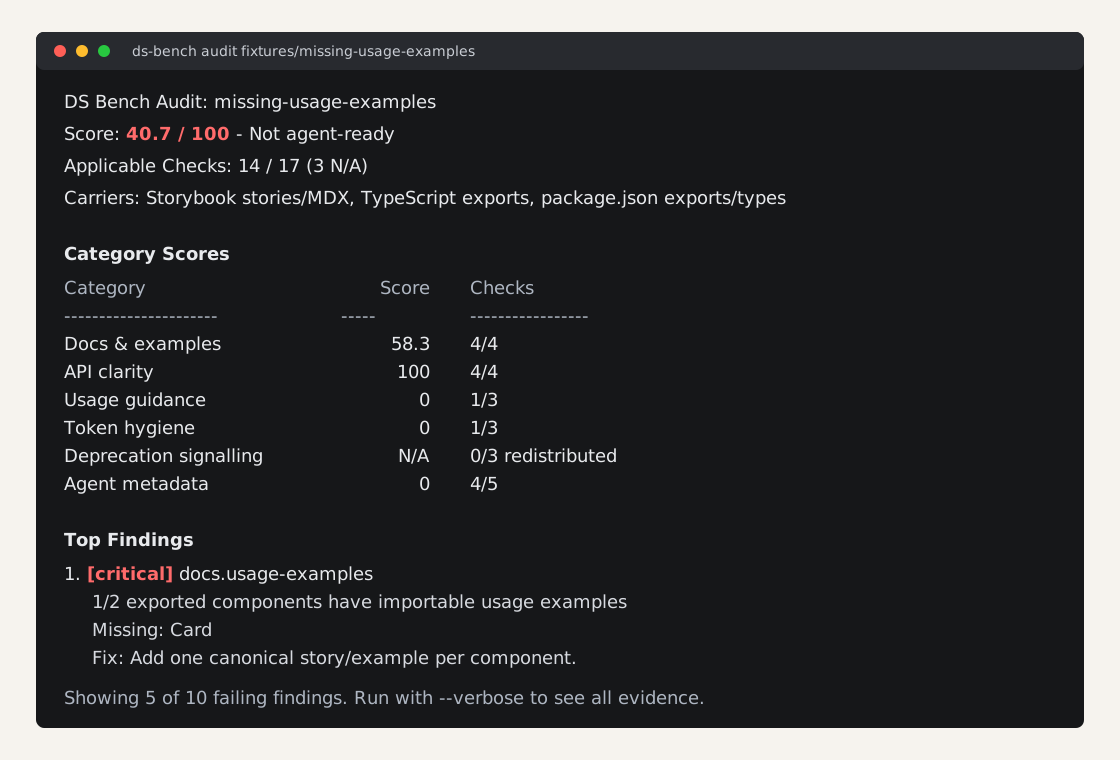
DS Bench is a diagnostic tool for the loop: score -> findings -> fixes -> re-run delta. It scans a local design-system checkout and reports where the system is hard for coding agents to understand: missing examples, unclear APIs, weak usage guidance, token drift, deprecation traps, and stale agent metadata.
Quickstart
Requires Node.js 22 or newer.
npx ds-bench audit <path>Examples:
npx ds-bench audit .
npx ds-bench audit ./packages/react --verbose
npx ds-bench audit . --json > audit-report.json
The audit is deterministic and local. It does not call AI APIs, crawl docs sites, or fetch remote URLs.
Output Modes
Default output is a human report with the composite score, category scores, top findings, and concrete fixes.
npx ds-bench audit .Use --compact for a short CI-oriented summary:
npx ds-bench audit . --compactUse --verbose for all findings, evidence, and receipts:
npx ds-bench audit . --verboseUse --json for the machine-readable AuditReport:
npx ds-bench audit . --json > audit-report.jsonConfiguration
Pass a JSON config with --config:
{
  "exclude": ["storybook-static/**"],
  "weights": {
    "docs": 25,
    "api": 20,
    "guidance": 15,
    "tokens": 15,
    "deprecation": 15,
    "agent": 10
  }
}
exclude entries are glob patterns applied during shared file discovery. weights may override any category for private analysis.
Published field-survey numbers always use the versioned default weights:
| Category | Default weight | | --- | ---: | | Docs & examples | 25 | | API clarity | 20 | | Usage guidance | 15 | | Token hygiene | 15 | | Deprecation signalling | 15 | | Agent metadata | 10 |
Principles
- Diagnostic first: the report should explain what lowered the score and how to improve it.
- Static first:
ds-bench auditis fast, local, deterministic, and does not need credentials. - Signals over tools: checks measure the information agents need, not allegiance to one documentation stack.
Intrinsic understandability dominates the score. Clear docs, examples, APIs, usage guidance, token discipline, and deprecation signalling matter more than adding an agent-facing file after the fact.
JSON Contract
The AuditReport schema is published at schemas/audit-report.schema.json.
The JSON report is the v0 comparison artifact. To measure a remediation delta, save two reports and diff them externally:
npx ds-bench audit . --json > before.json
# make changes
npx ds-bench audit . --json > after.json
Composite scores are comparable only when both rubricVersion and registryFingerprint match. The report shape will not break naive JSON diffing without a rubricVersion bump.
Design & Process
The design record is published alongside the code:
- PRD — problem statement, users, and scope for the v0 static tier.
- CONTEXT.md — the project's ubiquitous language: runs, tiers, brownfield axes, battery terms.
- ADRs — why this is a tool first (0001), static-first with a behavioral tier to follow (0002), and why intrinsic understandability dominates the score (0003).
- Check reference and pilot notes — every check's rationale, plus audit runs against MUI, Chakra, Polaris, and Cedar used to calibrate the rubric.
Package Contents
The npm package publishes only the files needed for the CLI, schema, and README image:
docs/assets/readme-report.svgdist/srcschemas
Fixtures, pilot reports, scratch issues, and development docs stay out of the tarball.