
dsh-3d-viewer
v0.3.0
Published
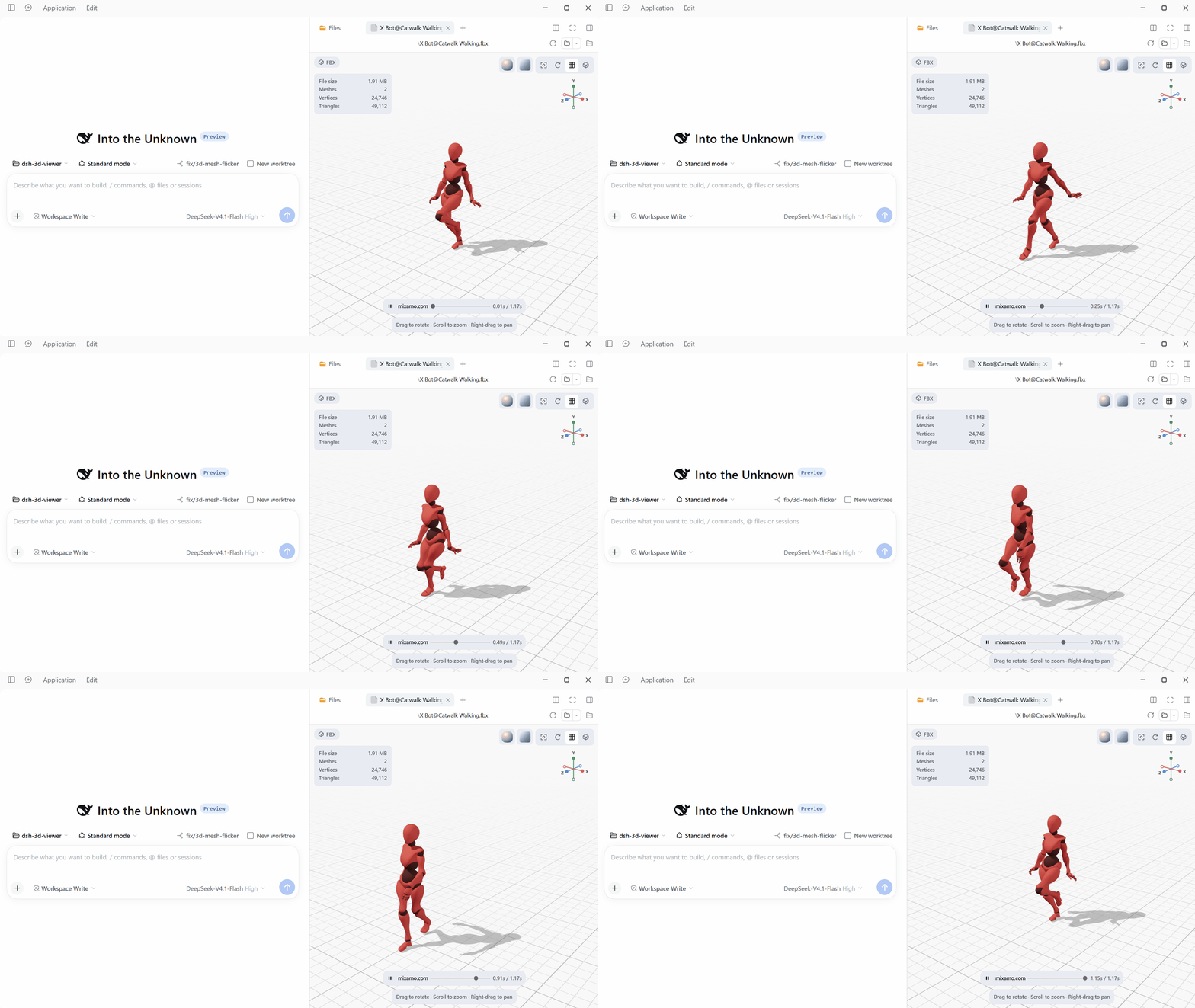
Preview 3D models and textures from the session workspace in DSH's right sidebar. Supported formats include FBX, OBJ, glTF, GLB, DAE, and STL models, plus PNG, JPEG, TGA, EXR, and HDR textures.

Maintainers
 niaobu
Readme
English | 中文


在 DSH 右侧边栏预览会话工作区中的 3D 模型和纹理。支持 FBX、OBJ、glTF、GLB、DAE、STL 模型,以及 PNG、JPEG、TGA、EXR、HDR 纹理。可旋转,缩放,切换视角、材质与环境,并播放内嵌动画。
安装
插件通过 npm 包 dsh-3d-viewer 分发。Three.js 运行时与格式解码器只在打开预览时加载。
从 npm 安装(推荐)
- 打开 DSH Desktop,点击侧边栏的 Plugins(插件)。
- 点击 Add plugin(添加插件) → Install a third-party plugin(安装第三方插件)。
- 输入
dsh-3d-viewer,需要固定版本时写[email protected]。 - Registry 选择 npm 官方源(国内也可用 npmmirror)。
- 点击 Install,在 Installed plugins(已安装插件) 中确认 3D Viewer 为 On。
从本地目录安装(可选)
- 把插件目录解压到任意位置。
- 打开 DSH Desktop,点击侧边栏的 Plugins(插件)。
- 点击 Add plugin(添加插件) → Install a third-party plugin(安装第三方插件)。
- 填入插件目录的绝对路径(例如
F:\plugins\dsh-3d-viewer),点击 Install。 - 在 Installed plugins(已安装插件) 中确认 3D Viewer 为 On。
插件代码在 DSH 进程中运行,请只安装可信来源。
运行要求
- DSH Desktop 0.2.2-rc.3 或更高版本。
- 支持 WebGL 2。
- 模型或纹理位于会话工作区。
使用
打开右侧边栏,进入 Files(Mod+P),点击支持的文件。
模型预览:拖拽旋转,滚轮缩放,右键拖拽平移。工具栏可复位视角、自动旋转,以及切换网格和线框;点击或拖动坐标轴切换视角;材质和环境选择器位于右上角。模型包含动画片段时,底部提示上方会显示动画栏:可播放/暂停、按名称选择片段、拖动进度条跳转,并选择 0.5× 到 2× 的播放速度。切换片段会回到该片段第一帧,同时保持当前播放/暂停状态。
纹理预览:滚轮缩放,放大后拖拽平移;使用 适应窗口 或双击复位;垂直翻转 用于处理上下颠倒的源图。元信息显示尺寸、位深和缩放比例。
大文件和首次切换环境可能需要几秒。没有预览时先刷新页面,再重启 DSH。
支持格式
模型预览
| 格式 | 支持内容 |
| --- | --- |
| FBX | 网格、层级、材质、内嵌贴图、动画、节点数据 |
| OBJ | 多边形、分组、法线、UV、顶点色、线/点、MTL、常用贴图 |
| glTF / GLB | 动画、蒙皮、内嵌资源、外部 .bin 与贴图 |
| DAE | COLLADA 网格、材质、外部贴图与动画 |
| STL | ASCII/二进制、中性 PBR 材质、二进制顶点色 |
说明:
- 忽略模型自带的灯光、相机和音频。
- 外部贴图从工作区读取。
- FBX 外部贴图缺失时只告警。
- OBJ 缺少 MTL 时使用默认材质,贴图缺失时使用白色占位。
- glTF/GLB 的外部
.bin和贴图必须存在于工作区,缺失会导致资源加载失败。 - glTF 的 Draco、Meshopt、KTX2 扩展不支持。
- DDS、KTX2、PVR 等无内置解码器的格式不支持。
- MTL 的
map_Ks/map_Ns尚未完整映射到 PBR。 - STL 没有材质和动画。
纹理预览
| 格式 | 解码数据 | 预览 | | --- | --- | --- | | PNG | 8-bit RGBA | 直接显示,保留 alpha | | JPG / JPEG | 8-bit RGBA | 直接显示,保留 alpha | | TGA | 8-bit RGBA | 直接显示,保留 alpha | | EXR | 16-bit half 或 32-bit float,1–4 通道 | 色调映射到 SDR | | HDR | Radiance RGBE,默认 16-bit half | 色调映射到 SDR |
- EXR、HDR 使用曝光 1 和 Reinhard 色调映射后输出 sRGB。
- HDR 预览在支持 WebGL2 时使用 GPU 色调映射,否则回退到 half-float CPU 路径。
- 预览按资源地址、版本和格式缓存(普通 160 MiB,低内存 64 MiB)。
代码结构
| 区域 | 主要文件 |
| --- | --- |
| 宿主与打包 | index.js、cordis.patch.yml、package.json |
| 核心 | src/core/:字节工具、格式注册、模型统计 |
| 客户端注册 | src/client.js、src/core/formats.js、src/core/texture-formats.js |
| 懒加载运行时 | src/runtime.js、src/ui/viewer-runtime.js、src/loaders/address.js |
| 懒加载 UI chunk | client.ui.styles.js、client.ui.texture.js、client.locales.*.js |
| UI | src/ui/:框架、控件、偏好;ui/model/ 与 ui/texture/ 分别为两个查看器 |
| 场景 | src/scene/:渲染器、相机、材质、环境、网格、后处理 |
| 加载器 | src/loaders/:格式分派、工作区读取、纹理 Worker,formats/ 为格式加载器 |
| 第三方代码 | src/vendor/:修改过的 FBX Loader |
| 构建与测试 | build.mjs、tests/run.mjs、tests/**/*.mjs |
src/client.js 只负责注册预览;src/runtime.js 持有 Three.js、场景初始化和格式懒加载分派。UI 入口不直接导入 Three.js;场景代码和纹理 WebGL 预览随懒加载运行时加载。样式、非中英文语言字典和纹理查看器同样是包内 UI chunk;中英文字典保留在入口中,作为 DSH 的回退语言。
开发
npm ci
npm test
npm run build
CI 使用 Node.js 24。npm test 会让每个 tests/**/*.mjs 在独立进程中运行。
npm run build 会写出 UI 入口、懒加载运行时、格式/纹理 chunk、UI 样式/语言/纹理 chunk 和 EXR/HDR Worker 到 dist/。修改源码后需提交重建的 dist/ 文件。
许可证
MIT,见 LICENSE。第三方声明见 THIRD_PARTY_NOTICES.md,包括 Three.js(MIT)与 Poly Haven HDRI(CC0)。React 由 DSH 提供。