
dsh-agent-memory
v0.8.4
Published
Cross-session long-term memory for DeepSeek Harness: a schema-validated memory domain over ctx.storage plus model-facing remember/recall/index/forget tools and a memory protocol prompt section.

Maintainers
 mon140522
Readme
dsh-agent-memory
DeepSeek Harness(DSH)的跨会话长期记忆插件。
功能
跨会话记住事实、偏好、决策和教训,新会话开局就能用上之前会话积累的信息。数据存在 $DSH_HOME/storages/memory.json(纯 JSON,可直接查看、可进 git)。不需要 MCP 服务器、不需要向量库、不需要 embedding API、无额外运行时依赖。
特性
- 跨会话持久:A 会话写入,B 会话开局即可检索到,新会话接着旧项目的状态走。
- 相关性阈值注入:每轮模型执行前,插件根据当前消息检索记忆,按最低相关性分数过滤(
injectMinScore),只注入达到阈值的记忆,最多injectCount条。不相关的直接丢弃——只为真正有用的记忆付费。 - 多维度相关性:评分综合语义相似度、任务关联度、模式匹配、因果关联、时效性(不只是关键词重复)。满足≥2条维度才采用,减少巧合关键词带来的噪音。
- 防衰退机制:协议段包含自我强化规则:任务开头检索重读核心规则、同类错误重复自动固化教训、语言漂移触发自我纠正。
- 自我纠错闭环:同一错误(相同 code/消息)重复出现
lessonizeAfter次(默认 2)时,插件提示 agent 把它固化为 importance=3 的教训;教训入库后会在相关话题上自动注入,防止再犯。用户纠正则由记忆协议覆盖(当场固化)。 - 中文友好检索:中文按 bigram(双字)索引 + 单字兜底 + BM25 词频信号,英文按词,另加整串匹配。不需要分词库或任何 ML 依赖。
- 可解释召回:每条检索结果附命中原因(reasons)——子串/标签/双字重合/BM25/重要度/新鲜度/使用频率,你可以和 agent 一起审计"为什么这条记忆被翻出来"。
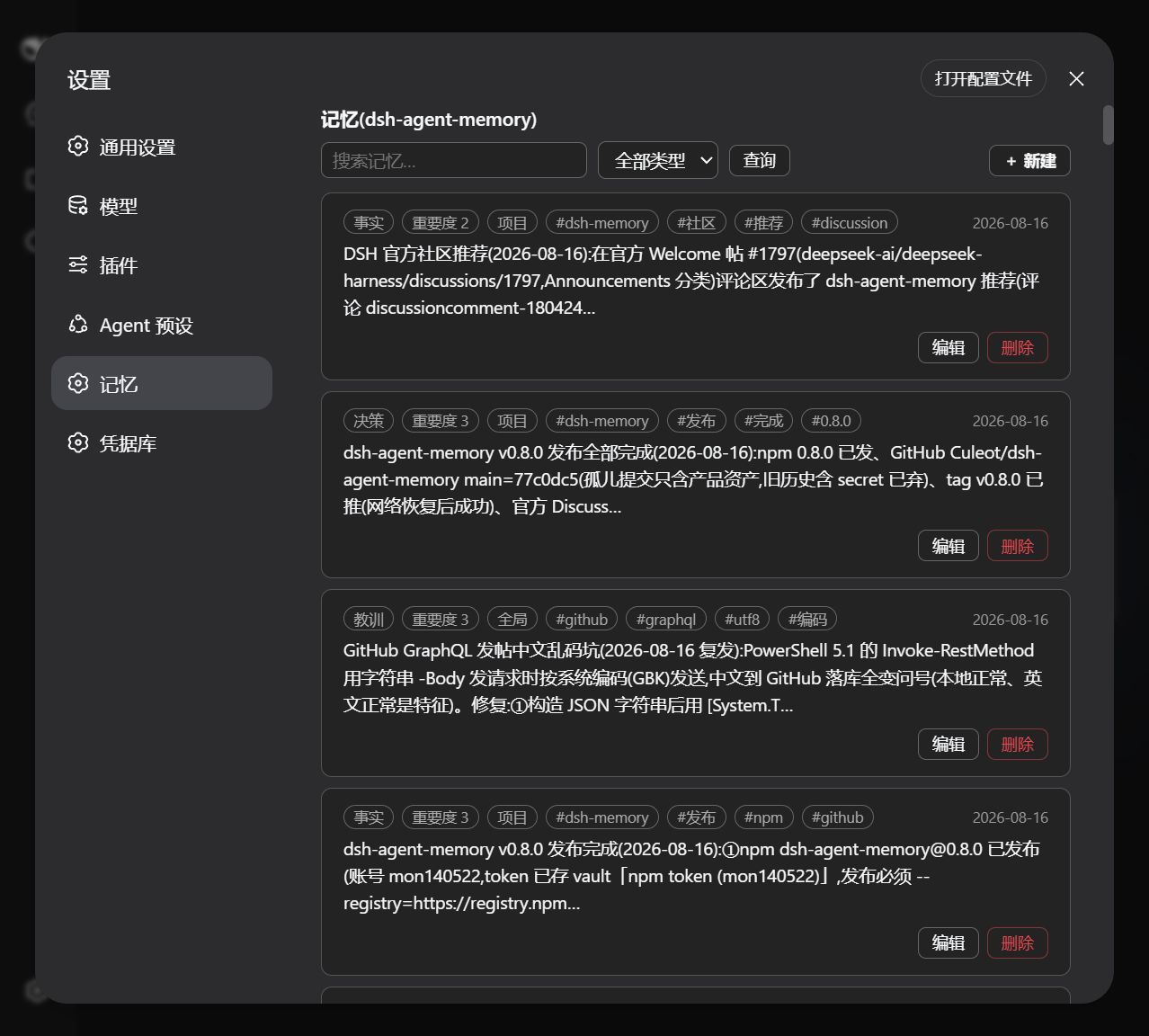
- 记忆面板(Web UI):设置里的一级导航「记忆」——统计、搜索、类型过滤,还能直接新建/编辑/删除记忆,改完立即生效,深色模式自适应。
- memory_sediment:会话收尾或用户纠正后,把值得长期保留的事实/决策/教训批量沉淀(≤3 条/次、带冷却防噪),agent 总结已有上下文、零额外模型成本。
- 原生接入:复用 DSH 的存储 domain(
ctx.storageDomain)、工具注册和 agent 生命周期 hook,跟随官方版本保持兼容。
工具
| 工具 | 用途 |
|---|---|
| memory_remember | 写入一条持久记忆(content、kind、tags、scope、importance、可选 TTL)。 |
| memory_recall | 按关键词检索;按相关性、重要性、新鲜度、历史使用频率排序。 |
| memory_index | 浏览记忆清单,支持 kind/tag/scope 过滤、分页、标题级展示。 |
| memory_forget | 按 id 或 tags 删除;importance=3 记录需 confirm: true。 |
| memory_import | 从 JSONL/JSON 文件导入记忆,走写链(不直接改存储文件)——安全的批量导入方式。 |
| memory_reload | 外部修改存储文件后,从磁盘重开并合并,无需重启。 |
| memory_sediment | 批量沉淀多条记忆(会话收尾用),带条数上限与冷却防噪。 |
分类:fact | preference | decision | lesson | todo | note。范围:user(所有项目生效)或 project(仅当前项目)。
外部修改防护
存储文件在启动时加载一次,由运行中的进程整体写入(单写者模型)。为防止进程内写入静默抹掉外部改动:
- 每次写入先校验文件指纹,不一致(其他进程/脚本改过)拒绝写入并报清晰错误,而不是覆盖;
- 批量导入请用
memory_import(走写链,文件与内存保持同步); - 如果仍然手动改了
memory.json或拷入文件,调用memory_reload合并(或重启)。
重复抑制
按需注入在"检索结果与上一轮完全一致"时跳过,连续聊同一话题不会反复注入同一块——「相关记忆」提示在话题变化时出现,而不是每句话都出现。
安装与启用
# 1. 给 profile 加依赖
cd ~/.dsh/profiles/<名字>
npm install dsh-agent-memory
# 2. 在 agent preset 里加一行(~/.dsh/.agent-presets/<preset>/agent.cordis.yml)
- id: memory
name: 'dsh-agent-memory'# 3. 重启 DSH,新会话里出现记忆工具不用 preset?也可以挂到 profile 的 host 平面(~/.dsh/profiles/<名字>/cordis.patch.yml):
- insert:
    - id: memory
      name: 'dsh-agent-memory'
前置条件:profile 里已挂存储三件套(dsh-storage、dsh-storage-json、dsh-storage-domain——web profile 自带)。
配置
全部可选:
| 配置项 | 默认 | 说明 |
|---|---|---|
| maxRecords | 400 | 容量上限,超出自动淘汰低价值记录 |
| maxContentChars | 2000 | 单条记忆正文长度上限 |
| injectEnabled | true | 每轮按当前消息注入相关记忆(agent/pre-step) |
| injectCount | 3 | 每轮最多注入条数(0 关闭) |
| injectMinScore | 1.0 | 最低相关性分数阈值(0=不按分数过滤,只按排名) |
| injectMaxChars | 120 | 每条注入摘要长度上限 |
| lessonizeEnabled | true | 同类错误重复时自动提示固化教训 |
| lessonizeAfter | 2 | 同指纹错误出现几次后提示 |
| recencyHalfLifeDays | 90 | 新鲜度半衰期(天) |
| mergeSimilarity | 0.7 | 近重复合并阈值 |
| protocolSection | true | 注入记忆协议 prompt 段 |
卸载与排查
- 卸载:profile 里
pnpm remove dsh-agent-memory,删掉 preset/patch 里的行。数据留在memory.json,重装自动恢复。 - 工具没出现:检查行是否存在、依赖是否安装、是否重启过 DSH。
- 存储报错:memory 插件依赖存储三件套,profile 缺的话在 patch 里补上。
- memory.json 损坏:纯 JSON,手动修复或直接删除(删除=清空记忆)。
开发
npm install && npm run build && npm test   # 构建 + 31 个单元测试
npm run smoke                              # 真机 headless 往返验证
许可证
MIT