
dsh-agent-team-roles
v0.2.1
Published
在 Web GUI 里可视化管理 agent team 的角色:每个角色是一份独立 preset,开关它自己的能力行(工具 / 技能 / MCP / 分组 / loop / AGENTS.md),只引用现有行、不新增行、不改任何现有文件。

Maintainers
 starspacepx
Readme
description: "给 dsh 的 agent team 每个成员定义一枚角色 preset,并在会话页签栏提供角色配置页与团队群聊。" kind: "package-reference"
dsh-agent-team-roles
English · 中文
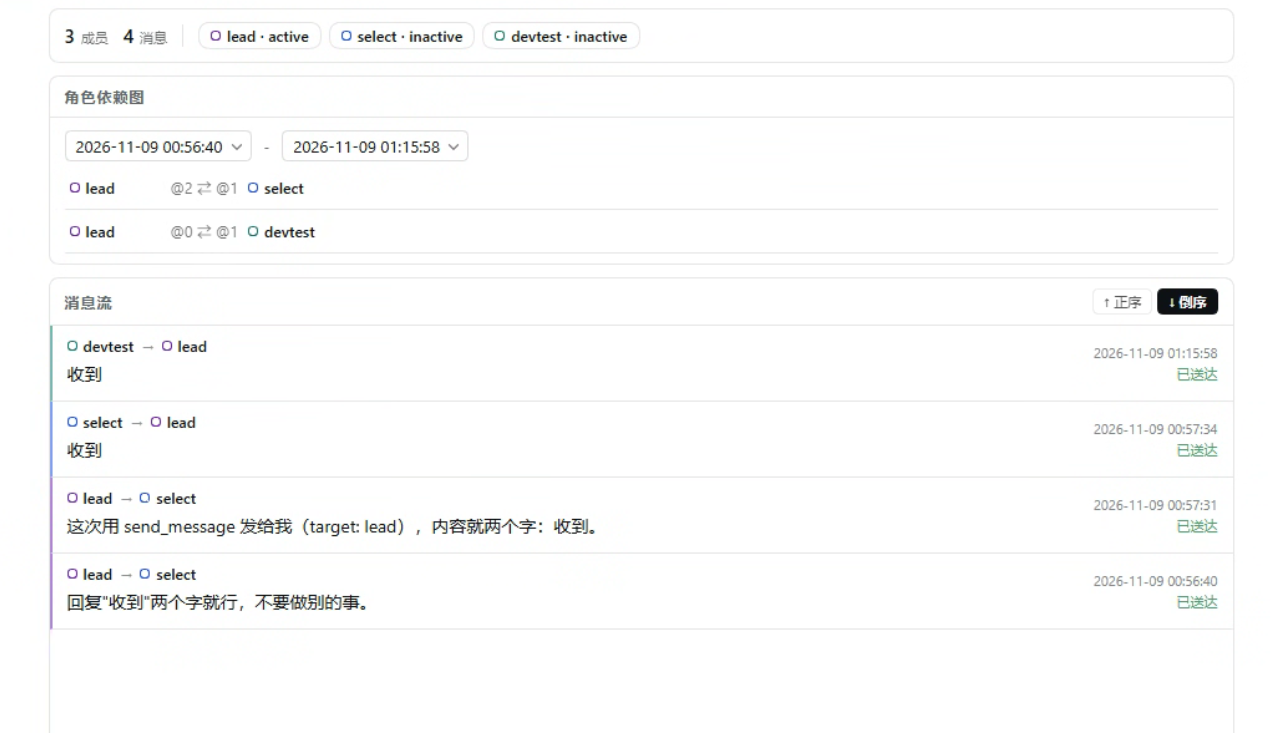
给 dsh 的 agent team 的每个成员定义一个角色:每个角色是一枚独立可选的 agent preset, 再加两个会话页签:「角色」配置页与「群聊」。只延伸官方接口,不改 dsh 一个字节。
它能做什么
| 能力 | 一句话 |
| --- | --- |
| 角色即 preset | 每个角色注册成一枚独立 preset,与内置的 standard / cordis / ptc / minimal 并列 |
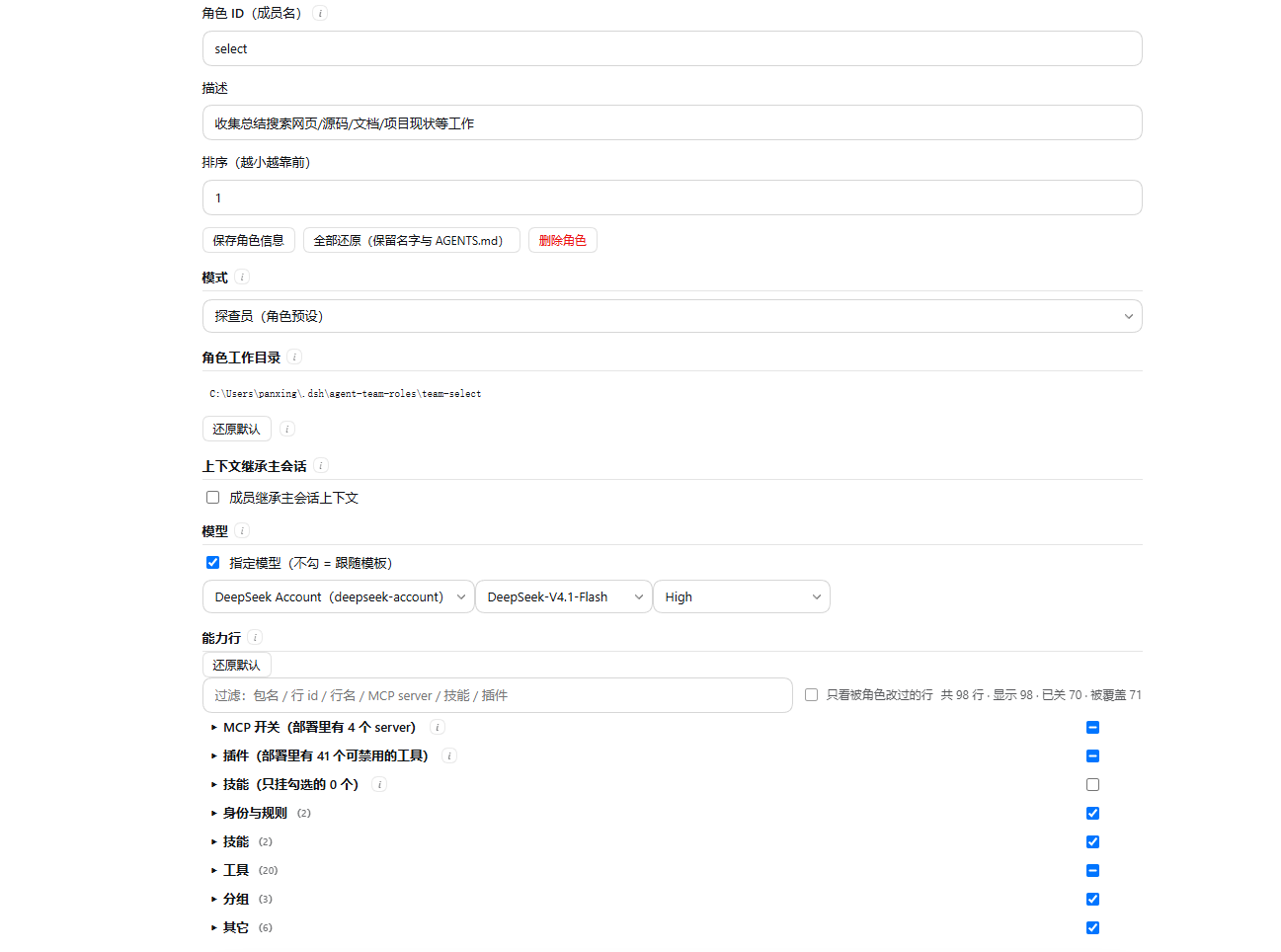
| 开关式配置面板 | 过滤、只看被改过的行、整类三态开关、分类折叠;一次手势合并成一条批量请求 |
| 只引用,不新增 | 角色的能力行来自部署当前的预设,角色只改已有行,不凭空造行 |
| 技能按角色选用 | 技能行的开关与顺序按角色存,宿主侧一次装配 |
| 模型按角色选用 | 每个角色可单独指定 provider / 模型 / 推理强度;留空跟随模板 |
| MCP 开关 | 关掉 = 该角色的 agent 看不到那台 MCP 服务器的工具(可见性过滤,不是再起连接) |
| 启用团队与成员绑定 | set-team 打开团队运行时,bindMembers 把新建成员绑到同名角色 |
| 会话页签「群聊」 | 不切会话聚合全员消息流,只读投影,不依赖任何外部数据库 |
| @成员 派发 | Lead 看到全部成员,@名字 直接投递;任务板变化会唤醒 Lead |
安装
dsh plugin --profile web add github:StarSpacePX/dsh-agent-team-roles然后重启 dsh。宿主侧的新代码只在新进程里存在,热加载只覆盖客户端侧。
这条命令会把插件装进 profile 并自动补进 dsh.profile.bundles(不需要手工编辑 profile 的
package.json)。⚠️ 用 git 地址安装时,pnpm 默认阻止安装期构建脚本,报错里会打印要写进
<DSH_HOME>/profiles/web/pnpm-workspace.yaml 的 allowBuilds 条目,照抄后重跑即可。
本地开发时可以直接装目录:
dsh plugin --profile web add link:D:/path/to/dsh-agent-team-roles装完确认:GET /state 里有没有 team 段 —— 有就说明宿主侧是新代码。
快速开始
- 会话页签栏打开「角色」页。
- 最上面打开「启用智能体团队」——它会同时选上团队组合包并打开成员绑定。 两步都会如实回报「已生效」或「已保存,重启 dsh 后生效」。
- 「新建角色」:它默认以部署当前的预设为底,在能力行表里开关工具 / 技能 / MCP。角色 id 默认带
team-前缀。 - 把这个 preset 选给一个成员;之后在「群聊」页签看全员消息流。
配置
写在 profile 的 cordis.patch.yml 的 config: 段里:
| 键 | 默认 | 说明 |
| --- | --- | --- |
| dir | null | 角色数据目录;留空 = <DSH_HOME>/agent-team-roles |
| prefix | "team-" | 新建角色时 preset id 的前缀,避免与内置 preset 撞名 |
| bindMembers | false | 强制打开成员绑定;改了要重启 dsh |
| home | null | dsh 数据根目录;一般留空,走 DSH_HOME 或 ~/.dsh |
# <DSH_HOME>/profiles/web/cordis.patch.yml
config:
  prefix: team-
bindMembers: false细读:配置项。
数据与卸载
- 数据全部在
<DSH_HOME>/agent-team-roles/:roles.json索引 + 每个角色一个<id>/role.json与<id>/AGENTS.md。 - 插件不改 dsh 包、不改 shipped preset、不改
~/.dsh/settings.yaml。 - 卸载插件不会删数据。 彻底清干净:卸插件 → 重启 dsh → 手动删掉
agent-team-roles/目录。 - 备份就是拷这个目录;恢复就是把目录放回去再重启。
文档
全部说明在 docs/,索引见那篇。最常看的三篇:
配置项 · 启用与成员绑定 · 日志。
边界与已知限制
- 成员创建失败会永久占用这个名字:这是 dsh 本体的限制,插件修不了。控制并发,失败后别改名重试。
- 群聊页签是只读的,没有输入框;要发消息走
@成员或工具。 - 写配置类的改动要重启 dsh,界面只刷新页面即可。
- 面板只做开关,没有逐行 config 编辑器;行名悬停能看到该行的 config。
开发
下面的命令只在克隆仓库开发时可用(npm 包里不含 tests/)。
npm test              # 全量测试
npm run test:drift    # 只跑产物一致性检查
npm run build:client  # 改了 src/client/** 后重建 lib/client.js
npm run accept:live   # 真机验收探针
许可
MIT。