
dsh-agy
v0.4.1
Published
Google Antigravity (agy) OAuth auth + model access plugin for DeepSeek Harness: multi-account pool, 429 rotation, device fingerprinting, CLI and web login.


Readme
dsh-agy


Google Antigravity (agy) access for DeepSeek Harness: OAuth authentication, a multi-account pool with automatic 429 rotation, device fingerprinting, and both CLI and web management.
中文文档:docs/README_zh.md
Features
- OAuth login: one-click sign-in via browser OAuth callback, with headless paste-URL mode and a remote paste-credential blob channel.
- Two management surfaces: web and CLI, either one works, core features are the same.
- Multi-account pool: encrypted account store, usage-aware account selection (family-scoped quotas, OMP-aligned ranking), automatic rotation on rate limits, per-account cooldown to the real reset time, per-account device fingerprints.
- Inline Settings UI: an Antigravity section inside DSH Settings with four tabs — accounts (login, activation, grouped 5-hour/weekly quota windows, test calls, fingerprint and proxy management), models (per-model visibility), usage (cumulative token and request statistics), and credentials (import/export). No separate page: the surface only exists where DSH Settings does.
- Model visibility toggles: hide individual models from the DSH model selector. Blacklist semantics — only models you switch off are hidden, so models the server adds later stay visible.
- Usage statistics: input / output / cache-read / cache-write tokens, request counts, failures, rate limits, rotations, latency and time-to-first-token, aggregated by account and by model. Includes calls that never pass through DSH (CLI, verification, test calls), which no session-based statistic can see.
- CLI:
dsh-agy login|status|import|verify|logoutworks standalone, with or without a harness.
Screenshots
The Antigravity section inside DSH Settings. Account emails and project names are redacted.
| Accounts | Models |
|:---:|:---:|
| 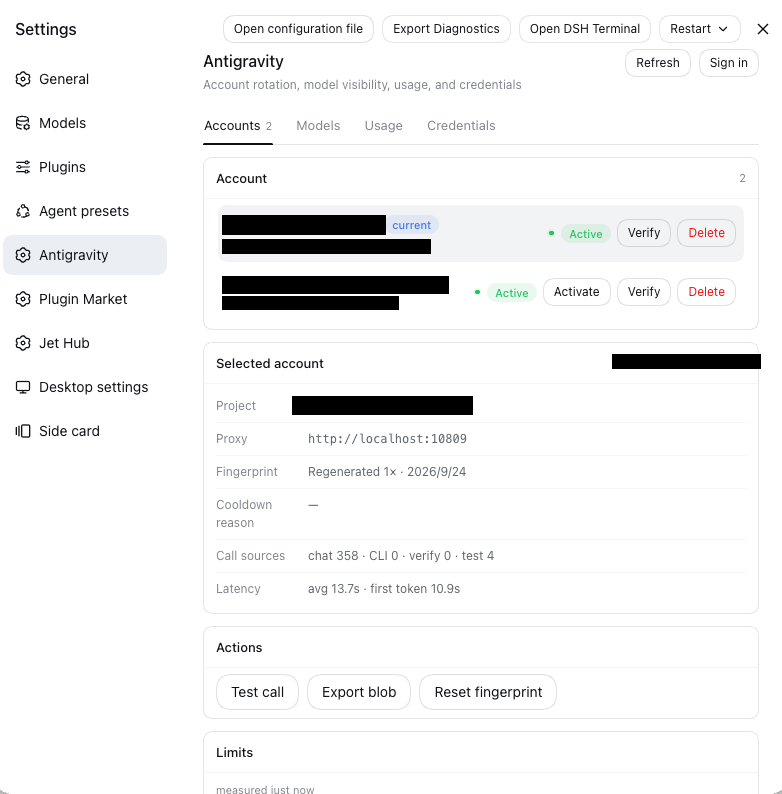 |
| 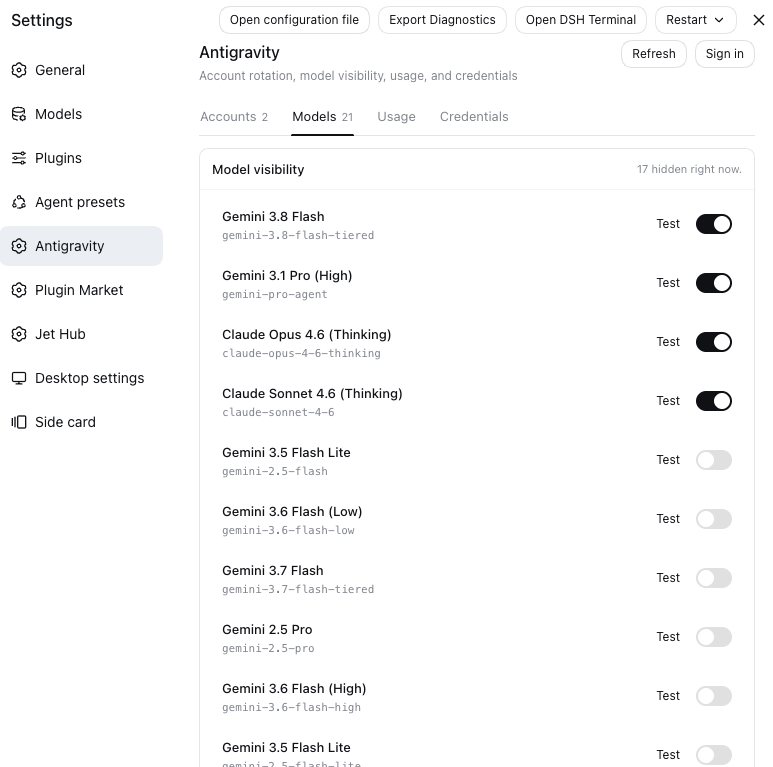 |
| Limits — 5-hour and weekly windows | Usage — cumulative, per-model and per-account |
|
|
| Limits — 5-hour and weekly windows | Usage — cumulative, per-model and per-account |
| 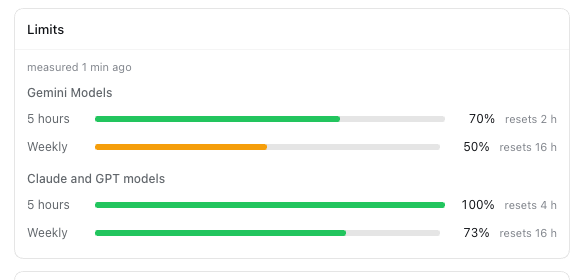 |
| 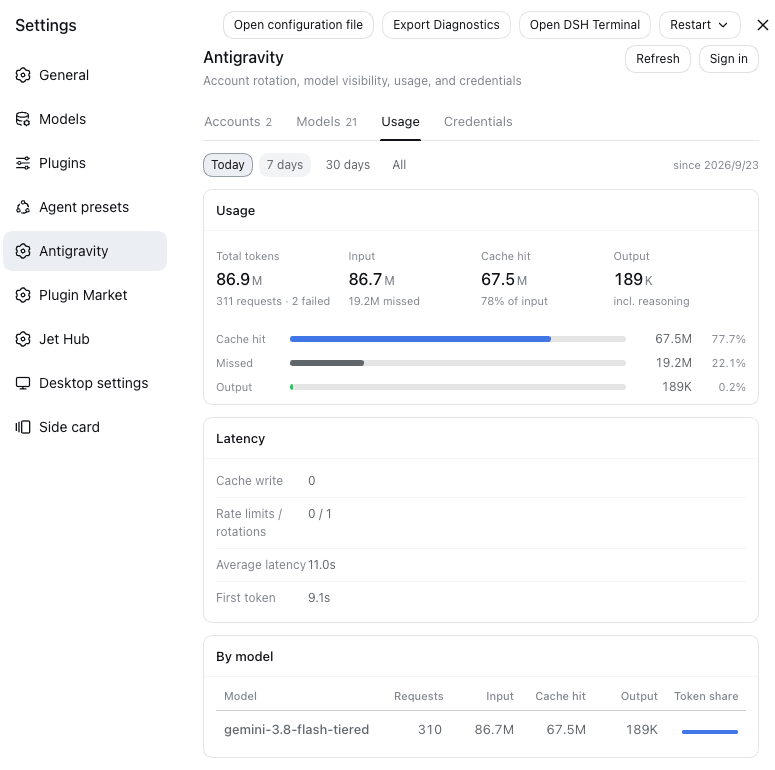 |
|
Quickstart
Path A: DSH Web GUI Users (Recommended — 100% Web UI, zero CLI commands)
For users using DeepSeek Harness browser workspace / Web GUI:
# 1. Install plugin into DSH web profile (via dsh CLI, or pnpx/npx if dsh is not in PATH)
dsh plugin --profile web add dsh-agy
# or: npx @deepseek-ai/dsh plugin --profile web add dsh-agy

# 2. Launch DSH Web
dsh web

# 3. Open Settings → Antigravity, then click "登录" (Login) in that section
# Complete OAuth authorization, and start using the agy provider
The section lives in Settings → Antigravity (top-level, alongside General
and Models). There is no separate dashboard page: the old /agy URL is gone.
Path B: Headless / Terminal Only (Standalone CLI)
For Linux VPS, SSH remote servers, or headless CI environments:
# Run directly without global install (npx / pnpx)
npx dsh-agy login
npx dsh-agy status

# Or install globally
npm install -g dsh-agy
dsh-agy login          # interactive OAuth (browser, --headless paste, or --blob)
dsh-agy status         # list accounts + quota summary
dsh-agy verify         # refresh + health check
dsh-agy health         # batch health check (optionally on an interval)
dsh-agy import <file>  # import agy auth.json or credential blob (--blob)
dsh-agy logout         # remove account
CLI reference
| Command | Options | Description |
|---|---|---|
| dsh-agy login | --headless — print the auth URL and wait for a pasted redirect URL--blob — print a paste-credential blob instead of storing the account--port <n> — loopback callback port (default 51121)--project <id> — bind the login to a specific project--timeout <ms> — callback timeout (default 300000) | Interactive Google OAuth |
| dsh-agy status | — | List accounts + per-model quota summary |
| dsh-agy import <files...> | --blob — the pasted value is a credential blob--email <email> — set the account email (skips userinfo verification)--overwrite — replace an existing account with the same email | Import agy auth.json files or credential blobs (multiple files / multi-line paste = batch import) |
| dsh-agy export | --index <n> — export one account by index (default: all)--out <dir> — write one dsh-agy-<index>.blob per account (default: print to stdout, one blob per line) | Export account credentials as paste blobs |
| dsh-agy verify | --index <n> — verify one account by index (default: all) | Refresh + health check |
| dsh-agy health | --index <n...> — check only these accounts (default: all enabled)--interval <ms> — repeat on an interval instead of once | Batch health check (refresh + userinfo), re-enables accounts whose credentials are live again |
| dsh-agy logout | --index <n> — account index (default: active)--email <email> — account email | Remove an account |
Per-account proxy
Each account can have its own proxy; credentials are encrypted at rest and displayed masked as protocol//host:port.
dsh-agy login --proxy socks5://user:pass@host:1080
dsh-agy import --proxy <url> file.json
dsh-agy proxy set --index 0 --proxy <url>   # set / update
dsh-agy proxy clear --index 0               # clear (fall back to env)
dsh-agy proxy test --index 0                # TCP 2s fast-fail probe
dsh-agy proxy list                          # masked list
dsh-agy status                              # shows proxy column (masked host:port)
Fallback: with no per-account proxy, requests use EnvHttpProxyAgent (HTTP_PROXY/HTTPS_PROXY with NO_PROXY honored). Per-account proxies ignore NO_PROXY, are fail-closed (unreachable proxy skips the account without cooldown and clears affinity), and loopback targets (localhost/127.0.0.1/::1) are always forced direct.
Settings → Antigravity → account detail shows a Proxy row [input] [Save][Clear][Test] with the masked host:port; writes and probes go over the management RPC (account.proxy / account.proxyTest). Save requires a non-empty value — clearing an existing proxy is the explicit Clear action, never an accidental empty Save. Test probes whatever is in the box, so an UNSAVED proxy can be checked before it is written; it reports reachable/unreachable in the notice line, and is disabled (with the reason on its tooltip) when there is nothing to probe.
The toolbar's Refresh reloads the account list and usage ledger, and additionally re-measures the 5h/weekly quota windows past their 10-minute TTL cache — that forced probe reports how many accounts it refreshed, so a click is never silent. Automatic reloads respect the TTL and spend no upstream call.
Path C: Local Development & Link
git clone https://github.com/chaos-03x/dsh-agy.git
cd dsh-agy && pnpm install && pnpm run build
dsh plugin --profile web link .
Requires Node >= 22.
Uninstall
# 1. Remove the DSH plugin from a profile
dsh plugin --profile web remove dsh-agy

# 2. Uninstall the CLI
npm uninstall -g dsh-agy

# 3. Optional: delete local account data (the whole agy data folder)
dsh-agy logout              # remove accounts first (or skip)
rm -rf ~/.dsh/agy           # accounts, usage stats, model visibility, thinking budgets, recent ring
# remove only the AGY_MASTER_KEY line from ~/.dsh/.credentials.yaml — keep other keys!
# (an upgrade from ≤0.4 may leave legacy files in ~/.dsh itself: rm -f ~/.dsh/agy-*.json)

# 4. Optional: revoke the Google-side authorization
#    Google account security → Third-party access → revoke "Antigravity"
Deleting local files does not revoke Google-side tokens; the refresh token stays valid until it expires or you revoke it in your Google account security settings.
Other things you may care about
Thinking budget (reasoning effort)
A thinking budget is a hidden parameter in the API that controls how hard the
model thinks. Upstream gives a few of its values names, and those names are what
you see as reasoning effort (high / medium / low) in the model picker. A
budget replaces the high / medium / low value that would otherwise be sent,
rather than stacking with it.
With that in mind, here is what a custom budget can do:
- Make a low tier think more — put a larger value on the
Lowrow. - Make a high tier think less (faster, cheaper) — put a smaller value on the
Highrow. - Maximum thinking — just select
High; no value needed. - Back to that tier's default — clear the row.
The model adapts how long it thinks to the difficulty of the question, within the budget. This table shows what Gemini 3.8 Flash actually spent (in tokens) under different budgets, on questions of different difficulty:
| Setting | Easy | Medium | Hard | |---|---|---|---| | Default | ~135 | ~1,100 | ~48,700 | | Low | ~50 | 0 | ~9,000 | | Medium | ~150 | ~870 | ~60,400 | | High | ~165 | ~1,855 | ~63,400 | | Entered 65535 | ~185 | ~2,130 | ~62,900 |
Entering the maximum (65535) is identical to selecting High on the hard question, but raises thinking on the easy and medium ones by about 10–15%. The value alone decides the effect — the same number entered on any row sends the same request.
Note: the hard question is a combinatorial derivation (derive a tiling recurrence and compute term 40), the medium one a number-theory proof (prove n⁴+4 is always composite), and the easy one a two-digit multiplication.
Rotation mechanics
Usage-aware selection: when several accounts are available, requests rank them
by the requested model's backend counter family (gemini-* → Google,
claude-* → Anthropic, gpt-* → OpenAI): accounts whose quota is about to
reset with headroom left are used first ("use it or lose it"), near-exhausted
families are avoided, and exhausted families block the account until the real
reset time.
Each family is measured on both of its windows, because they refill on different clocks:
| Window | Refills | Exhausted when | Blocks until | |---|---|---|---| | Rolling 5-hour | every 5 hours | below 15% left | the 5-hour reset | | Weekly | every 7 days | 1% or less left | the weekly reset |
The two gates are independent. A family can sit at 90% of its 5-hour budget while its week is spent — four 5-hour refills do not return a weekly budget — so a week-exhausted account is rotated away instead of being selected and failing. The thresholds are deliberately different (15% of five hours is ~45 minutes of runway; 1% of a week is ~1.7 hours): judging the 5-hour window too late costs a wait of at most five hours, while judging the week too late parks the account for days.
The weekly reading comes only from retrieveUserQuotaSummary — the per-model
fetchAvailableModels probe has no window field at all — and a probe that
reports neither window cannot erase a known-drained one.
429 (Too Many Requests) responses:
| Category | Behavior |
|---|---|
| soft_rate_limit (Retry-After < 3s) | immediate retry on the same account, no cooldown |
| rate_limited | cooldown until the server-reported reset time (capped 30min, 5min fallback) + switch to the next account (same account when single) |
| quota_exhausted ("quota reached", "individual quota", RESOURCE_EXHAUSTED…) | cooldown until the server-reported reset time (capped 24h) — no further calls to that account until then |
| unknown | exponential backoff |
401/403 → account revoked (marked for re-authentication). Success resets the failure counter.
Risk controls (environment switches)
| Env | Effect |
|---|---|
| DSH_AGY_DISABLE=1 | Kill switch: the plugin registers nothing (provider + Settings section + OAuth callback) and the CLI refuses to run. |
| DSH_AGY_FINGERPRINT_MODE=stable | One fixed client identity per account — no per-request header randomization, no fingerprint regeneration (OMP-style fixed-client posture). Default dynamic keeps per-request randomization. |
| DSH_AGY_HEALTH_INTERVAL_MS=<ms> | Background batch health probe inside the harness (refresh + userinfo on the configured interval); off by default. |
| AGY_CLIENT_ID / AGY_CLIENT_SECRET | BYO OAuth app escape hatch: override the embedded public Antigravity client credentials. |
About cache hits: why not 99% like DeepSeek V4?
Bottom line: the cache hit strategy is decided by the model provider's cache mechanics (for us, Antigravity's); agy's mechanics differ from DeepSeek's in two ways, so its hit rate is naturally a notch below DeepSeek's.
First, the entry threshold. DeepSeek's caching is on by default with no threshold — its very first request already hits a previously cached system prompt. agy's Gemini-tiered models only start caching once the request prefix reaches roughly 16k tokens, while DSH's default bare system prompt is only about 13k — below the line. So every new conversation's first 1-2 requests are 0%, until the accumulated messages pass 16k.
Second, how fast the cache updates. DeepSeek refreshes its cache at the end of every request — only the newest message misses each round, giving near-100%. agy's cache updates lag: this round's additions are not hit in the next round — they enter the cache roughly two rounds later, and requests for the same content in between all count as misses. Every round wastes about 1.5-2× its additions; the long-conversation hit rate keeps rising as the context grows, bounded by the model's context window.
Practical tips
- Don't expect 99% from agy: the gap comes from upstream mechanics, with no room to optimize.
- If you have a weird number obsession, stuff some custom content into the System Prompt (MCP / tool definitions / roleplay ...).
Storage & secrets
All agy data files live in one folder, ~/.dsh/agy/ (relocated wholesale by
$DSH_HOME). Upgrading from ≤0.4 moves the legacy files in ~/.dsh/ there on
first start — a one-shot atomic rename; if a legacy file reappears next to the
folder afterwards, an old-version process is still running, and a warning says so.
- Accounts:
~/.dsh/agy/agy-accounts.json— AES-256-GCM encrypted; the master key lives in~/.dsh/.credentials.yaml(AGY_MASTER_KEY, 0600).$DSH_HOMErelocates the whole tree. - Fingerprint pools (version strings, SDK clients) are user-overridable via
~/.dsh/agy/agy-fingerprint-data.json— no code release needed to keep them current. - Model visibility:
~/.dsh/agy/agy-models.json(0600) — the hidden-model blacklist. Holds only the models you switched off, so re-enabling one removes its entry. - Usage statistics:
~/.dsh/agy/agy-stats.json(0600) — cumulative counters plus a rolling 30-day window. Counts are merged under a file lock, so several processes (Desktop, a web-profile server, the CLI) record concurrently without losing each other's data. - Recent activity:
~/.dsh/agy/agy-recent.json(0600) — the last 200 requests and rotations, persisted so the panel survives a restart and shows the other processes' history too (external processes' new records arrive within 30s). - None of these files store tokens, proxies, or project ids — account emails only; the tokens live encrypted in the accounts file and the master key in the credentials document.
⚠️ Disclaimer
This plugin authenticates with Google's consumer OAuth client that ships with the Antigravity desktop product and uses the Antigravity Cloud Code API outside of that product. This may violate Antigravity's terms of service. Use at your own risk — accounts can be rate-limited, throttled, or banned. Multi-account rotation, device fingerprinting, and the signature-bypass sentinel are enabled by default and are designed to work around upstream limits; you are responsible for how you use them and for any account consequences.
Credits
This project references logic and data from the following MIT-licensed sources:
| Source | Content |
|---|---|
| opencode-antigravity-auth (archived) | OAuth flow shape, account-store schema & versioned migration, 429/backoff concepts, fingerprint design |
| antigravity-claude-proxy PR #170 | Device fingerprint generation (via opencode-antigravity-auth) |
| OmniRoute | Wire format (envelope, headers, SSE), endpoint order, agy token-file parsing, paste-credential blob codec, thoughtSignature replay, 429 category engine |
| DeepSeek Harness | Plugin shell, LlmAdapter seam, DSH conventions |
Development
pnpm install
pnpm test                      # vitest, fixture-driven, no network
pnpm run record:fixtures       # re-record real-API fixtures (needs a real account)
pnpm run e2e                   # real-account end-to-end (needs AGY_REFRESH_TOKEN)
pnpm run debug:request         # endpoint/header bisection probe
pnpm run verify:tools          # live two-turn tool-signature check
pnpm run verify:proxy-routing  # live per-account proxy routing + fail-closed check
npm pack --dry-run             # verify the publishable artifact