
dsh-ai4scholar
v0.3.7
Published
AI4Scholar for DeepSeek Harness (dsh): 38 native academic tools — Semantic Scholar, PubMed, Google Scholar, arXiv, bioRxiv/medRxiv, DOI resolution, PDF full text, auto-cite, scientific figures, credit balance — with an API-key card in the Web UI settings.
Downloads
3,802

Maintainers
 literaf
Readme
AI4Scholar for DeepSeek Harness
English | 中文




Academic literature tools for DeepSeek Harness (dsh), delivered as 38 native agent tools — the same coverage as the AI4Scholar plugins for OpenClaw, Codex, and Hermes. Powered by ai4scholar.net.
| Family | Tools | Cost |
|---|---|---|
| All at once | search_papers — one query across Semantic Scholar + PubMed (optionally arXiv, Google Scholar), duplicates merged by DOI / arXiv id / PMID / title, multi-platform hits ranked first | per platform |
| Semantic Scholar (200M+ papers, all fields) | search_semantic, search_semantic_bulk, search_semantic_snippets (full-text excerpts), search_semantic_paper_match (title → paper), get_semantic_paper_detail, get_semantic_paper_batch, get_semantic_citations, get_semantic_references, get_semantic_paper_authors, search_semantic_authors, get_semantic_author_detail, get_semantic_author_batch, get_semantic_author_papers, get_semantic_recommendations, get_semantic_recommendations_for_paper, download_semantic, read_semantic_paper | credits |
| PubMed (biomedical & life sciences) | search_pubmed, get_pubmed_paper_detail, get_pubmed_paper_batch, get_pubmed_citations, get_pubmed_related | credits |
| Google Scholar (broadest coverage, cited-by counts) | search_google_scholar | credits |
| arXiv | search_arxiv, download_arxiv, read_arxiv_paper | free |
| bioRxiv / medRxiv | search_biorxiv, search_medrxiv, download_biorxiv, download_medrxiv, read_biorxiv_paper, read_medrxiv_paper | free |
| Any DOI | download_by_doi, read_by_doi (open access anywhere; paywalled publishers on institutional networks) | free |
| Writing & figures | auto_cite (insert real citations + reference list + BibTeX), sci_draw (generate / edit / style / compose / critique / SVG / vectorize scientific figures) | credits |
| Account | get_ai4scholar_credits, plus the /ai4scholar slash command | free |
Every paper-list tool returns one normalized record shape — title, authors, year, venue, citation count, DOI/PMID/arXiv ids, URL, open-access PDF, abstract — so the model (and Code Mode programs) can chain calls across platforms without special cases. Results render as citation cards in the dsh Web UI; full-text tools return the PDF text in slices (offset / max_chars) so a 40-page paper never floods the context.
Credits are visible. Every billed tool card in the chat carries the charge in its title (Semantic Scholar: protein folding · 10 credits · 4,990 left), the model-facing result ends with AI4Scholar credits — this call: 10 · this session: 40 · remaining: 4,960 (from the API's X-Credits-* headers) and the model is asked to close a billed turn with a one-line credit note; /ai4scholar renders a balance card (available credits, breakdown, membership, key status, session spend) and get_ai4scholar_credits gives the model the same numbers. Free platforms (arXiv, bioRxiv/medRxiv, DOI) carry no credit line.
Screenshots
| Settings → Plugins card | /ai4scholar balance card |
|---|---|
| 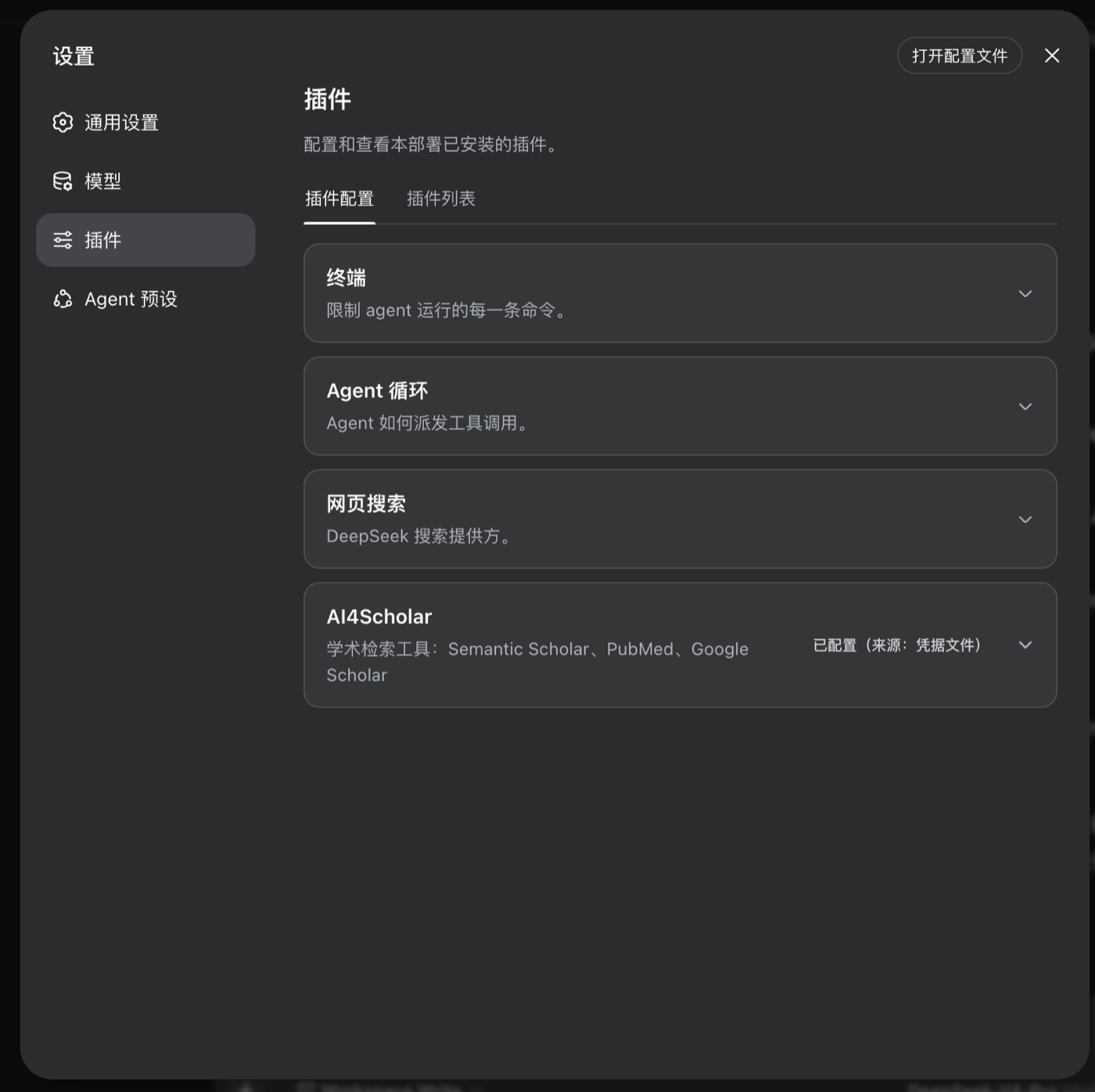 |
| 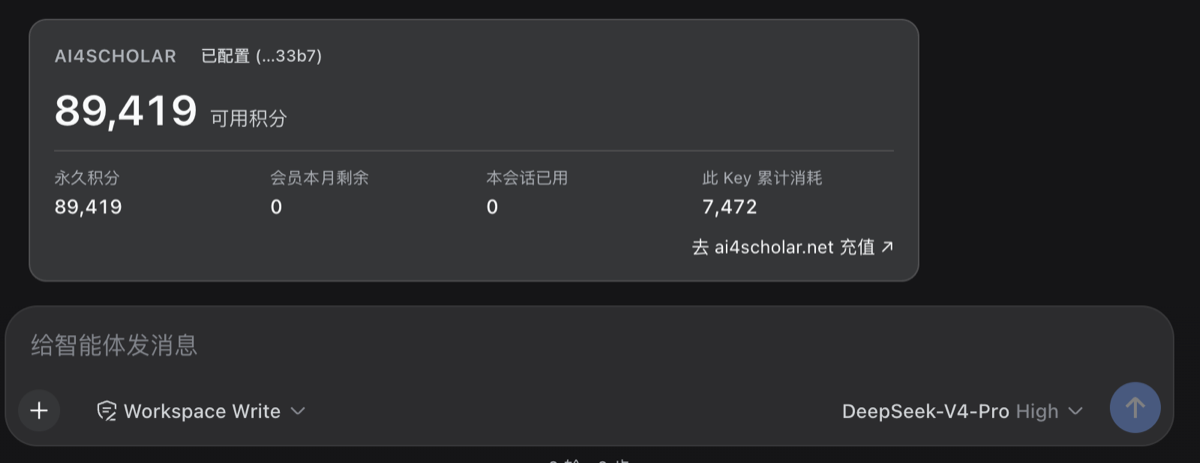 |
|
Install
Quick start (macOS / Linux; Windows PowerShell is the same):
# 0. Prerequisites: Node.js ≥ 22.19 (or ≥ 24) and pnpm (dsh manages plugins with pnpm)
node -v
npm i -g pnpm                     # skip if you already have it

# 1. DeepSeek Harness
npm i -g @deepseek-ai/dsh
dsh --version

# 2. This plugin (into the web profile; use --profile headless for the CLI runner)
dsh plugin --profile web add dsh-ai4scholar

# 3. Start
dsh web                           # prints http://127.0.0.1:3080
Then, once, in the browser:
- Settings → Models — paste your DeepSeek API key (platform.deepseek.com).
- Settings → Plugins → AI4Scholar — paste your AI4Scholar API key (ai4scholar.net) and press Save. The card stores it in the dsh credentials store (
$DSH_HOME/.credentials.yaml, mode 0600, the same place the Models page keeps provider keys), tests it at once (✓ Key works · 89,419 credits available), and it takes effect on the next tool call — no restart. A Refresh link re-checks any time; the browser never sees the key (the check goes through the plugin's host routeGET /ai4scholar/balance).
Pick a workspace folder and ask away. Upgrades: dsh plugin --profile web add dsh-ai4scholar@latest, then restart dsh web.
Prefer files or CI? The plugin resolves the credential reference AI4SCHOLAR_API_KEY, so any of these also work (highest precedence first): export AI4SCHOLAR_API_KEY=… in the shell that launches dsh · a line in $DSH_HOME/.credentials.yaml · a line in the project or $DSH_HOME/.env. The card reports which layer is supplying the key and goes read-only when the environment does. Headless has no settings page, so use one of these there.
Releases are pushed to npmmirror right after publishing, so the default registry in China serves new versions within a minute as well.
Verify the layer without booting: dsh --profile web --dump-config prints a # == dsh-ai4scholar section.
Then just ask:
Find recent papers on CRISPR base editing for sickle cell disease and compare their delivery methods.
Search PubMed for GLP-1 receptor agonists and cardiovascular outcomes since 2022, sorted by date.
Which paper is "Attention Is All You Need"? Give me its DOI and citation count.
Configuration
The bundle mounts one row (id: ai4scholar) with these defaults. Override from your profile's cordis.patch.yml (a patch replaces the whole config, so restate every key you keep):
- id: ai4scholar
  config:
    apiKeyEnv: AI4SCHOLAR_API_KEY   # credential reference; the key itself never lives in config
    baseUrl: https://ai4scholar.net
    # tool families
    semanticScholar: true
    pubmed: true
    googleScholar: true
    arxiv: true
    biorxiv: true                    # bioRxiv + medRxiv
    doi: true
    fullText: true                   # the read_* tools (PDF download + text extraction)
    autoCite: true
    sciDraw: true
    creditsTool: true                # get_ai4scholar_credits
    command: true                    # the /ai4scholar slash command
    balanceRoute: true               # GET /ai4scholar/balance for the settings card's key test
    showCredits: true                # credit line on billed results
    promptGuidance: true             # short system-prompt section describing the tools
    promptOrder: 150
    # sizes
    defaultMaxResults: 10            # when the model omits max_results
    maxResultsCap: 50                # hard upper bound per call
    abstractMaxChars: 600            # abstract characters shown per paper; 0 hides abstracts
    readMaxChars: 60000              # characters per full-text slice
    # timeouts / retry
    requestTimeoutMs: 30000          # per HTTP attempt
    pdfTimeoutMs: 120000             # per PDF download
    generationTimeoutMs: 300000      # auto_cite / sci_draw
    maxRetries: 3                    # attempts on 429 / network errors
    retryBackoffMs: 2000             # doubles per attempt
    toolTimeoutMs: 180000            # cooperative per-call budget enforced by dsh
The API key is resolved per call through ctx.credentials, so storing or rotating it takes effect on the next tool call without a restart. When the credentials service is absent (a custom composition), the plugin falls back to process.env[apiKeyEnv].
The settings card always edits AI4SCHOLAR_API_KEY (the browser half does not receive the row config); a deployment that overrides apiKeyEnv manages that reference through the environment or the credentials file instead. The session credit tally is process-local (it restarts with dsh); the balance itself always comes from the API.
How it fits dsh
- Two halves in one package: the Node half registers the tools; the browser half (
exports["./client"], declared bydsh.client) contributes the settings card through thesettings.plugin.itemslot and talks to the Host only through the credentials wire API — the key literal never rides a response, and it never reaches the model. - Tools are registered on
ctx.toolswithdefineTool: typed, schema-validated arguments; a canonical JSON value per call ({ source, query, total, papers[], truncated, nextOffset? }); a Markdown rendering for the model; and awebresult card (structured sources) for the Web UI. - A single
tool:ai4scholarsystem-prompt section tells the model when to use which platform and to cite by DOI/link. - Everything is an effect: unloading the plugin (or editing its config, which triggers HMR) withdraws every tool and the prompt section.
- No model-visible input is added outside the tool results, so sessions stay fully replayable from the log.
Development
pnpm install
pnpm test          # builds lib/ (Node half via tsc, browser bundle via tsdown), then runs:
                   #   unit tests, a smoke test against the real ToolRuntime, and a jsdom test that
                   #   loads the built client bundle under the dsh module-host contract and drives the card
pnpm typecheck

# try it in a dsh profile without publishing:
dsh plugin --profile web add /absolute/path/to/dsh-ai4scholar
dsh plugin add github:<you>/dsh-ai4scholar also works: the prepare script builds lib/ from source, and pnpm asks you to allow it once via allowBuilds in the profile's pnpm-workspace.yaml.
Notes
download_by_doi/read_by_doiresolve through doi.org and known publisher PDF patterns (Elsevier, Springer/Nature, Wiley, T&F, MDPI, IEEE, ACM, ACS, RSC, PLOS, Frontiers, bioRxiv/medRxiv, arXiv). Paywalled articles only download when dsh runs on a network with institutional access; a refusal names the landing page so the user can fetch it by hand.- Full-text extraction uses
pdf-parse(pdf.js) in-process; scanned/image-only PDFs yield an explicit error rather than empty text. - The same tool set ships for OpenClaw, Codex and Hermes.
License
MIT