
dsh-bilibili-summary
v0.1.3
Published
Bilibili video understanding for DeepSeek Harness: sign in once by QR code, pull a video's AI/CC subtitle track, and summarize it into a self-contained HTML document.

Maintainers
 adamaik
Readme
dsh-bilibili-summary
English | 中文
给 DeepSeek Harness 的 B站 视频理解插件:扫码登录一次,抽取视频的 AI/CC 字幕轨道,汇总成一份 自包含的 HTML 文档;视频确实没有字幕时,下载音频做本地 ASR 转写兜底。
B站 对未登录用户隐藏 AI 字幕,插件走官方扫码登录流程并把 Cookie 存在本地;二维码由插件自己渲染成 PNG,不会发往任何第三方图床。
提供什么
| 工具 | 作用 |
| --- | --- |
| bilibili_subtitles | 抽取官方 AI/CC 字幕为带时间轴的文稿;校验通过才返回,支持双语合并,输出 Markdown / 文本 / SRT / ASS / LRC / JSON |
| bilibili_video_info | 视频元信息、字幕轨道列表、B站 AI 总结;视频无字幕时自动附带评论区长评(降级来源) |
| bilibili_transcribe | 最后兜底:下载 DASH 音频(多路候选自动重试),用 faster-whisper 本地转写 |
| bilibili_series | 列 UP 的最近投稿 / 合集系列 / 合集内视频,用于批量任务 |
| bilibili_login | 扫码登录(start / poll / status / logout) |
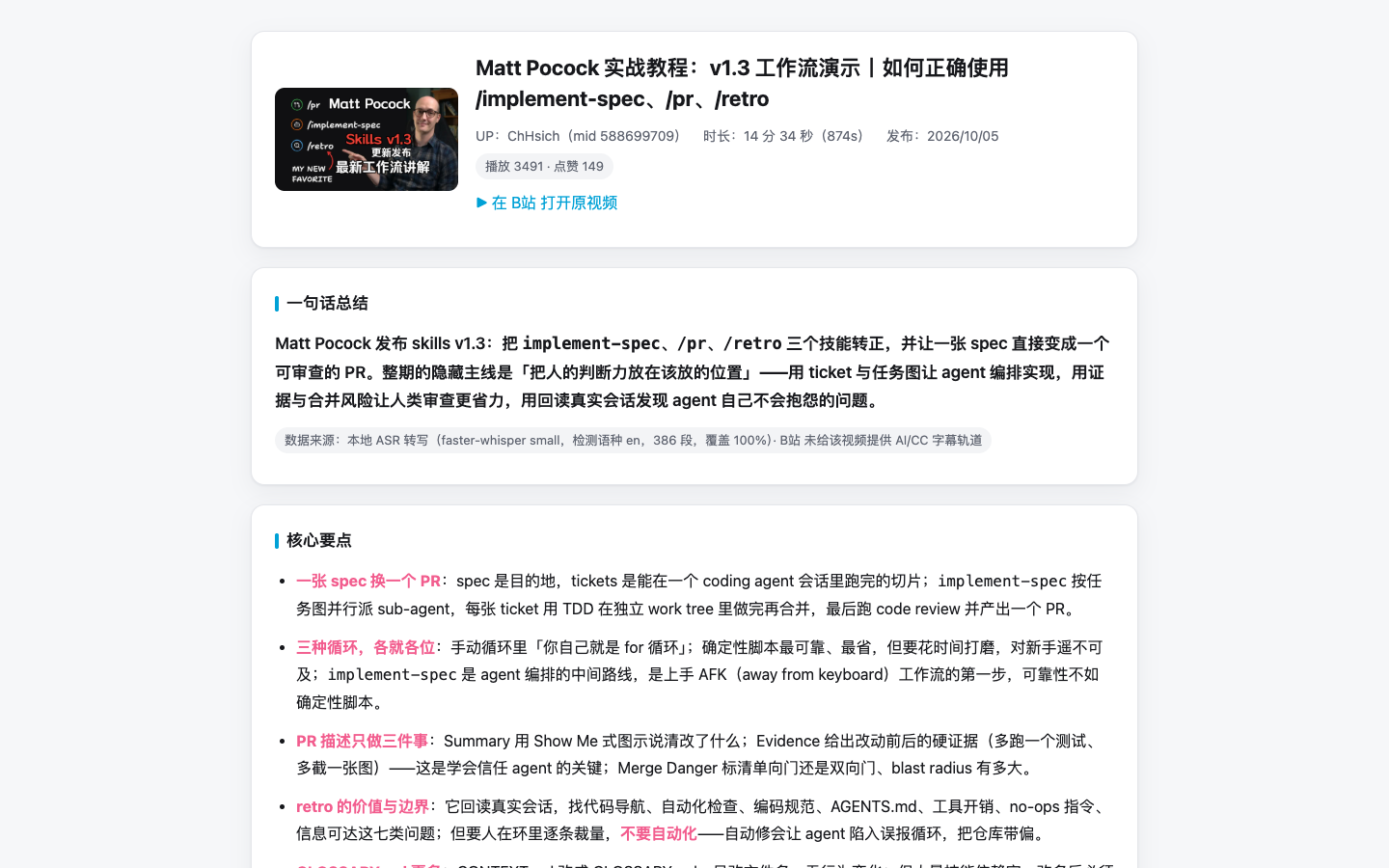
实际产物:信息卡、一句话总结、核心要点,以及可点击跳回原片的时间轴。
外加 bilibili-summary 技能:按内置模板产出中文 HTML 报告(信息卡 → 一句话总结 → 核心要点 → 可点击时间轴 → 关键概念 → 背景注释 → 金句 → 行动清单 → 可折叠全文)。
安装
dsh plugin --profile <profile> add dsh-bilibili-summary从源码目录安装:
cd dsh-zcode-plugins
mkdir -p dist
(cd packages/bilibili-summary && npm pack --pack-destination ../../dist)
dsh plugin --profile <profile> add ./dist/dsh-bilibili-summary-0.1.0.tgz
安装后请保留 dist/:profile 记录的是 tarball 路径。
登录
直接让 agent 汇总一条 B站 链接即可。当取字幕提示未登录时,它会:
bilibili_login { action: "start" }   # 返回二维码 PNG 路径,展示给你扫
bilibili_login { action: "poll" }    # 等待扫码完成并保存 Cookie
用 B站 手机 App(「我的」→「扫一扫」)扫码确认。Cookie 写入 $DSH_HOME/bilibili-cookies.json(权限 0600)。也可以跳过扫码,在 $DSH_HOME/.env 里直接给:
BILIBILI_SESSDATA=你的_sessdatabilibili_login { action: "status" } 查看当前账号;{ action: "logout" } 删除凭据。
字幕到底怎么取
看起来最像的那个接口其实是错的。x/player/v2 现在仍带 subtitle.subtitles 字段,但在限流状态下会返回属于别的视频或被截断的文稿——静默采用就会把别人的话写进你的报告。
网页播放器真正走的是 x/v2/subtitle/web/view,它返回 protobuf,而且给回的路径不能直接下载:
x/web-interface/view把 BV 号换成aid/cid;x/v2/subtitle/web/view?oid=<cid>&pid=<aid>&type=1&…(WBI 签名)返回 protobuf。插件直接按 wire format 解析(不依赖生成式 schema,B站 加字段也不会挂),取出lan/lan_doc/subtitle_url;- 每个
//subtitle.bilibili.com/<path>要按播放器的F/U函数做 XOR 解码并改写成//aisubtitle.hdslb.com/<path>?auth_key=…。这两组密钥是从bfs/static/player/main/core.*.js里逐字符抠出来的,并且有单测钉住这个变换,避免再出现抄错一个字符的情况; - 最终 JSON 的
body[]就是字稿。
接口被限流时仍可能返回偏短的 body,所以 bilibili_subtitles 校验通过才返回,并以递增退避重试,每轮重新取轨道。
「校验通过」是什么意思
只看覆盖率分不出真字幕和很像真的假字幕——旧接口就返回过属于另一个视频、时长却完全对得上的文稿。所以插件给三个信号打分并给出结论:
| 结论 | 条件 | 处理 |
| --- | --- | --- |
| strong | 标题关键词命中 + 覆盖率 ≥ 50% | 直接使用 |
| weak | 覆盖率 ≥ 70% 但关键词零命中(标题党、或中文标题配英文原声) | 可用,但需在文档里标注"弱校验" |
| fail | 段数不足 / 覆盖率 < 50% / 覆盖率 > 200%(字幕比视频还长,多半是别人的) | 拒绝,继续降级 |
关键词同时匹配中文 2–4 字片段与英文 3 字母以上词条(去停用词),所以 implement-spec、React、海绵宝宝 都能命中。
降级链
bilibili_subtitles—— 真正的字幕轨道。bilibili_video_info—— B站 AI 总结 + 视频简介。bilibili_video_info的comments—— 长(≥200 字)、高赞(≥3)的评论;观众手写的「课代表」总结,视频无字幕时自动抓取。bilibili_transcribe—— 本地 ASR。
同语言下优先 UP 上传的 CC 字幕而非 AI 字幕;任何走了降级的来源都会在报告里标注。
双语与格式
bilibili_subtitles 可以把第二条轨道按时间重叠合并到每行下面:
bilibili_subtitles({ url: "BV1TXHY6aETi", lang: "ai-zh", bilingual: "ai-en", format: "srt", out: "bilingual.srt" })支持格式:markdown / text / srt / ass / lrc / json。
报告里的背景注释
文稿里全是"离开上下文看不懂"的名字。技能要求报告必须注释:人物与团队、产品与库、组织、黑话与缩写、被引用的事件。每条 1–2 句——是什么 + 视频里为什么提到它;凡是用联网检索核实的都给出可点来源,无法核实的写「(未能核实)」。正文角标鼠标移上去就展开注释浮层(纯 CSS 实现,离线可用、任何浏览器都能看),点数字则跳到文末完整清单,方便通读与打印。浮层与清单由同一份文本生成,不会出现两处不一致。
音频兜底
字幕被压制进画面的视频没有轨道可抽,用 bilibili_transcribe:
- 通过
x/player/wbi/playurl取最佳 DASH 音轨; - 用 ffmpeg 下载并重采样成 16 kHz 单声道 WAV;
- 在
$DSH_HOME/bilibili-asr/venv这个独立虚拟环境里用 faster-whisper 转写——首次会用系统 Python 创建,因为 DSH 运行时 Python 在 macOS 上无法加载 pip 安装的原生扩展(签名不匹配); - 输出形状与字幕轨道一致,并标注为机器转写。
首次运行要付 venv + 模型下载的时间,之后只付转写时间。已有带 faster-whisper 的解释器时,把 asrPython 指过去即可跳过 bootstrap。
配置
所有字段都可选。在 profile 的 patch 层里配置:
- id: bilibili-summary
  name: 'dsh-bilibili-summary'
  config:
    cookieFile: ~/.dsh/bilibili-cookies.json
    sessdata: ''
    language: ai-zh
    retries: 6
    retryBaseDelayMs: 8000
    timeoutMs: 20000
    ffmpegPath: ''
    asrPython: ''
    asrVenv: ''
    asrModel: small
    asrModelDir: ''
    asrLanguage: auto
| 字段 | 默认 | 说明 |
| --- | --- | --- |
| cookieFile | $DSH_HOME/bilibili-cookies.json | 凭据存放位置 |
| sessdata | '' | 直接指定 SESSDATA,优先于文件 |
| language | ai-zh | 首选字幕轨道 |
| retries | 6 | 取字幕的最大尝试次数 |
| retryBaseDelayMs | 8000 | 首次退避;每轮再加 3 秒 |
| timeoutMs | 20000 | 单次请求超时 |
| ffmpegPath | 自动探测 | 音频兜底用的 ffmpeg |
| asrPython | '' | 带 faster-whisper 的 Python;留空则使用/创建 venv |
| asrVenv | $DSH_HOME/bilibili-asr/venv | 兜底用的虚拟环境 |
| asrModel | small | faster-whisper 模型规格 |
| asrModelDir | $DSH_HOME/bilibili-asr/models | 模型缓存 |
| asrLanguage | auto | 兜底转写的语种 |
也支持环境变量或 $DSH_HOME/.env 中的 BILIBILI_SESSDATA、BILIBILI_COOKIE_FILE。
用法
bilibili_video_info({ url: "https://www.bilibili.com/video/BV1puH46qE5x/" })
bilibili_subtitles({ url: "BV1c3HL6qEyq", out: "bilibili/BV1c3HL6qEyq/transcript.md" })
bilibili_subtitles({ url: "BV1TXHY6aETi", lang: "ai-zh", bilingual: "ai-en", format: "srt", out: "bilibili/BV1TXHY6aETi/bilingual.srt" })
bilibili_transcribe({ url: "BV1puH46qE5x", language: "zh", out: "bilibili/BV1puH46qE5x/transcript.md" })
bilibili_series({ url: "https://space.bilibili.com/588699709", kind: "collections" })
两个字稿工具都会返回:视频信息、所选轨道(或 ASR 模型)、覆盖率统计、合并后的 timeline(带播放器跳转链接)、纯文本文稿与原始分段。
已知限制
- 以中文优先:默认轨道
ai-zh,其它语言用lang指定。 - 转写质量取决于模型规格;
small是速度与准确度的折中,机器输出没有标点、可能有同音错字。 - B站 限流较严,抽取失败通常是暂时的。
- 多分P视频按
page参数一集一集处理。