
dsh-billing-badge
v0.1.4
Published
Billing season and account balance chip for the DeepSeek Harness web GUI composer: a native-looking pill after the cache-hit stat, with a panel on click. DeepSeek Harness 计费时段与余额插件

Maintainers
 devacc8
Readme
English | 中文
dsh-billing-badge


DeepSeek Harness 网页界面的计费时段与账户余额插件。它在输入框的统计行里、原生 Cache hit 读数之后加一个小胶囊,点击后展开一个小面板,把完整信息一次说清。
2288M tok · Cache hit 99.8% · ● Off-peak · 2h13m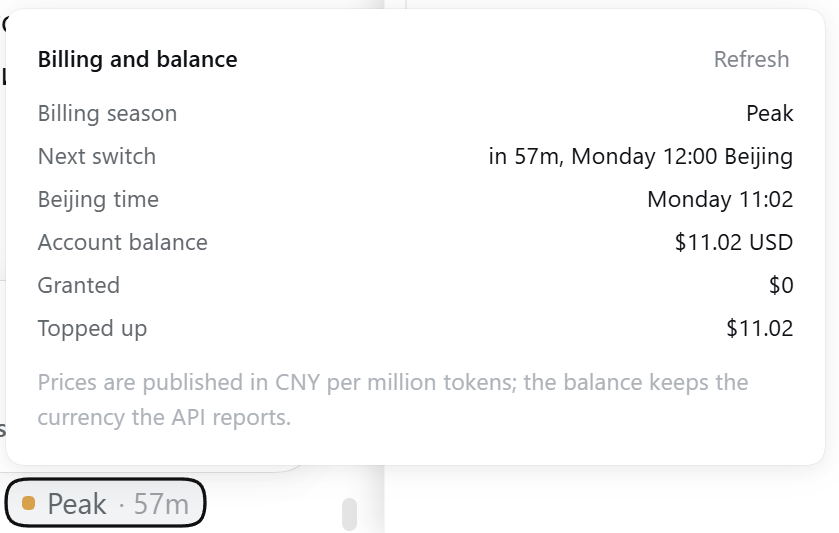
显示内容
| 位置 | 内容 | |---|---| | 胶囊 | 一个圆点(高峰为琥珀色,非高峰为绿色)、当前时段,以及距离切换的倒计时 | | 面板(点击展开) | 计费时段、下次切换时间与北京时间、当前北京时间、账户余额及其货币、账户确实拆分为两部分时的赠送与充值明细,以及刷新按钮 |
计费时段采用官方公布的规则:高峰为北京时间周一至周五 09:00-12:00 与 14:00-18:00,其余时间(含整个周六与周日)均为非高峰,价格为半价。
余额
三个数字来自官方 GET /user/balance 接口,含义各不相同:
total_balance = granted_balance + topped_up_balancetotal_balance,界面显示为 Account balance,是你可以动用的全部金额。granted_balance,界面显示为 Granted,是官方赠送的额度。接口只返回尚未过期的部分,过期的赠送额度会自动从这一行消失。topped_up_balance,界面显示为 Topped up,是你自己充值的金额。
只有在账户确实拆分为两部分时,面板才会列出赠送与充值。没有赠送额度时,充值额就等于全部余额,拆分只会重复上面那行账户余额,因此这种账户只显示一行;接口一旦报告赠送额度,Granted 就会出现。
is_available 是响应顶层的字段,只回答一个问题:余额是否足够调用接口。只有接口报告余额不足时,面板才会加一行警告,其余时候保持安静,因为任何有余额的账户这个字段都是 true。
货币一律取自接口返回值,不做假设:返回 USD 的账户不会被标上人民币符号。
为什么再做一版
社区里已经有两个插件覆盖了其中一部分,它们各自教了一件事:
- dsh-price-phase 显示计费时段。它的倒计时曾在周五收盘后指向周六 09:00,而那个事件根本不会发生;它的徽标用哈希 CSS 类居中,模型名一长就与模型标签重叠。本插件把每个候选边界与其前一瞬对比,只计入真实的状态翻转;胶囊是原生统计行里的普通 flex 子元素。
- dsh-usage-monitor 显示余额,但无论接口返回什么货币都按人民币格式化。
本插件有意不做费用与 token 记账。
安装
从 npm 安装:
dsh plugin --profile web add dsh-billing-badge或直接从仓库安装:
dsh plugin --profile web add github:devacc8/dsh-billing-badge然后重启 dsh web。包内声明了 dsh.bundle.patch,宿主部分会自动写入 profile 的 bundle 列表。
兼容 DeepSeek Harness 0.1.5 与 0.1.6。旧版本把输入框统计渲染成一行带标记的元素,胶囊加入这一行;0.1.6 把这些读数移进输入框底栏,变成一排胶囊按钮,胶囊会跟随缓存命中那个胶囊加入同一行。
在本地开发这个插件时,改为按路径安装检出目录:
dsh plugin --profile web add link:/absolute/path/to/dsh-billing-badge安全
余额的暴露面很小,插件就让它保持小:
- API key 只在宿主进程中通过 DSH credentials 接口读取(
ctx.credentials.resolve('DEEPSEEK_API_KEY'),环境变量兜底),不会进入浏览器; - 唯一的路由要求请求头
x-dsh-billing-badge: 1并拒绝跨站Origin,因此第三方页面无法访问它; - 不写任何文件,除
api.deepseek.com外不访问任何地址; - 缺少 key、HTTP 错误或网络故障都会降级为面板可渲染的状态,不会抛异常。
开发
时段逻辑放在 lib/season.js,是一个普通 ESM 模块,可以直接测试。浏览器端包无法导入同目录文件(加载器只解析平台种子、已物化的包和已注册的工厂,用子路径 require 自身会抛 "missed the module table"),因此 scripts/inline-season.mjs 把该模块去掉 export 后复制进 lib/client.js 的两个标记之间,test/client-sync.test.mjs 在副本漂移时失败。
npm test          # 30 项测试:时段规则、倒计时不变量、宿主路由、浏览器端包
npm run sync      # 把 season.js 重新内联进浏览器端包
npm run check     # 校验内联是否同步,并对两半做语法检查
倒计时用的是不变量测试而不是固定样本:九天之内每 13 分钟取一个时刻,报告的目标必须在未来、必须改变时段,并且时段不能在它之前改变。
目录结构
lib/season.js    时段规则、倒计时与格式化(唯一事实来源,有测试)
lib/index.js     宿主部分:余额路由
lib/client.js    浏览器部分:胶囊与面板,season.js 已内联
cordis.patch.yml 把宿主部分挂载进 profile
scripts/         内联脚本
test/            时段、内联同步、宿主与浏览器端包的测试
GitHub Actions 在 Node 20 与 22 上运行 npm test 与 npm run check。
MIT.