
dsh-blend-preview
v0.1.0
Published
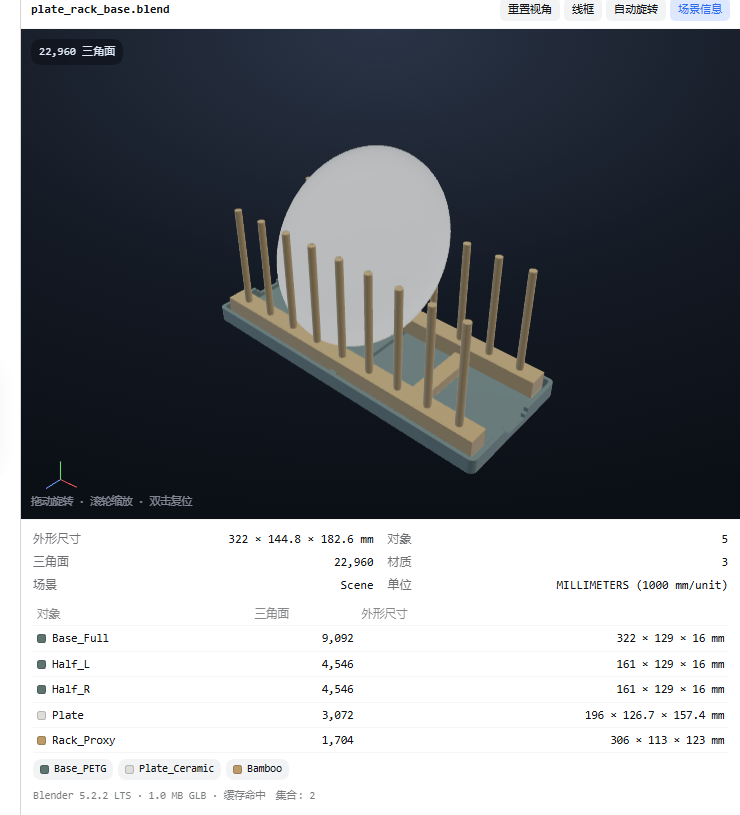
Preview Blender .blend files inside DeepSeek Harness: the Host half exports a cached GLB with Blender headless and the right-Sidebar document preview draws it in an interactive WebGL viewport with scene statistics.

Maintainers
 vfvrpq
Readme
dsh-blend-preview
Preview Blender .blend files inside DeepSeek Harness: the right-Sidebar document preview turns the scene into an interactive 3D viewport (orbit / zoom / wireframe) with a scene-information panel, instead of the built-in “binary file, no preview” empty state.
What it does
- Registers a document-preview renderer for
.blendfiles, so clicking one in Workspace files opens it in the right Sidebar. - Runs
blender --backgroundonce per file version to export a GLB plus a scene JSON (objects, triangles, materials, real-world size in mm, units, cameras, lights, collections). - Draws the GLB with a small dependency-free WebGL viewer written for this plugin: orbit, pan, wheel zoom, double-click reset, wireframe mode, auto-rotate, a soft contact shadow and an axis triad. No CDN, no three.js.
- Caches conversions under
~/.dsh/cache/blend-preview; the second open is instant (a few milliseconds). - Shows the scene facts that matter for CAD/3D-printing work: per-object triangle counts and bounding-box sizes in millimetres, material swatches, scene units.
Requirements
- DeepSeek Harness 0.2.x (declared compatible with
0.2.0-rc.2and0.2.1-rc.2). - Blender 3.6 / 4.x / 5.x installed. The plugin auto-detects
DSH_BLENDER,BLENDER_PATH,blenderonPATH, the Steam library, andC:\Program Files\Blender Foundation\Blender*. SetblenderPathif your install lives elsewhere. - A browser/GPU with WebGL (the DSH desktop app always has it).
Install
# into a normal (non-desktop) profile
dsh plugin --profile <profile> add dsh-blend-preview

# the desktop profile is owned by the Electron app; add it there through the
# plugin manager UI, or compose it manually and restart the app
The package ships a cordis.patch.yml, so installation adds the plugin row automatically. Restart DSH after installing.
Configuration
Settings → Plugins → Blender preview (namespace blend-preview):
| Key | Default | Meaning |
|---|---|---|
| enabled | true | Register the renderer and the conversion route. |
| routePath | /api/blend-preview | Authenticated conversion route. Must stay under /api; otherwise the authenticated fence is bypassed, so it falls back to the default. |
| extensions | ["blend"] | Suffixes that open in the 3D preview. |
| blenderPath | "" (auto) | Absolute path of blender.exe / blender. |
| cacheDir | "" → ~/.dsh/cache/blend-preview | Where exported GLB files and scene JSON live. |
| timeoutMs | 180000 | Wall-clock ceiling for one cold conversion. |
| maxBytes | 1073741824 | Largest .blend converted (1 GiB). |
| applyModifiers | true | Apply modifiers during export, so the preview matches what Blender renders. |
| cacheEntries | 24 | Cached conversions kept on disk before the oldest are pruned. |
How it works
Workspace file click
        │
        ▼
document preview body (lib/client.js)
        │  GET /api/blend-preview?path=…&kind=info   (scene JSON)
        │  GET /api/blend-preview?path=…&kind=glb    (model bytes)
        ▼
Host half (lib/index.js, lib/route.js)
        │  cache key = sha1(realpath, size, mtime, recipe, modifiers)
        ▼
lib/blender.js ── spawn blender --background --python lib/scene.py
        │            → model.glb + scene.json (+ meta.json)
        ▼
~/.dsh/cache/blend-preview/<key>/lib/scene.pyexports withexport_apply,use_visible, Y-up, no cameras/lights, and writes the scene description (world-space AABBs through the evaluated depsgraph, Principled base colours converted to sRGB swatches).- The route lives under
/api, so the connection service authenticates every request (Host/Origin fence + session cookie). Arbitrary local files are not exposed. - The viewer is a hand-written glTF 2.0 subset renderer (POSITION + NORMAL, indexed triangles, PBR factors, node TRS/matrix). Textures, skinning and animation are out of scope; the Host only exports still scenes.
Development
dev/client-body.js   client UI (single CJS factory for the DSH module loader)
dev/viewer.js        the WebGL renderer, spliced into the bundle at build time
scripts/build-client.mjs   builds lib/client.js from the two files
scripts/e2e-browser.mjs    Playwright end-to-end against a temporary DSH host
scripts/live-selftest.mjs  cold/warm/concurrent conversion against a real .blend
node --test test/*.test.js
lib/client.js is generated — edit the files under dev/ and rebuild. The DSH client loader hands the bundle a require limited to the platform seed modules, so the package cannot pull a renderer dependency at runtime; the single generated file is the intended shape.
Notes and limits
- A cold conversion takes roughly 2–10 s for a small scene (Blender startup dominates); it is cached per file version, so rotating/zooming never re-runs Blender.
- Very large scenes (millions of triangles) export slowly and may exceed
timeoutMs. - Textures are not shown in the viewport (base colours only); the Blender renders next to the file are still the reference.
- Nothing is uploaded: Blender runs locally and the GLB stays in the local cache.