
dsh-checkpoint-rewind
v0.6.24
Published
Unified DSH checkpoints: session + workspace + config three-state snapshots with one-shot rollback — /checkpoint and /rewind commands, a checkpoint tool, automatic interval snapshots, a Settings page timeline with pairwise diffs, and seed-replay session r
Downloads
5,389

Maintainers
 perrylink
Readme
⏪ dsh-checkpoint-rewind
- 1024 store channel:
npm i -g dsh1024once, thendsh1024 plugin --profile web add dsh-checkpoint-rewind(counts toward the deepseek1024.com install ranking).

Unified DeepSeek Harness checkpoints — session + workspace + config three-state snapshots with one-shot rollback.
The Claude Code Checkpoints equivalent, built as a capability-seam plugin: capture before every mutation, restore any of the three states with one approved command.
Official repository. This is the only official repository of dsh-checkpoint-rewind, maintained by PerryLink. Same-name repositories under other accounts are not affiliated.









English · 简体中文 · Español · Português · हिन्दी
📖 Ecosystem knowledge base — measured data, not marketing: plugin development guide · plugin-selection data · maintenance criteria.
⭐ 如果它帮到了你
这个插件是 DSH 插件家族的一员(40+ 个,全部 Apache-2.0)。如果你在用,给个 star —— 它不会解锁任何功能,但会让下一个人在搜索里更容易找到它。
English: part of a 40+ plugin family for DeepSeek Harness. If it is useful, a star helps the next person find it — nothing is gated behind it.
What is dsh-checkpoint-rewind?
Unified DeepSeek Harness checkpoints — session + workspace + config three-state snapshots with one-shot rollback.
The Claude Code Checkpoints equivalent, built as a capability-seam plugin: capture before every mutation, restore any of the three states with one approved command.
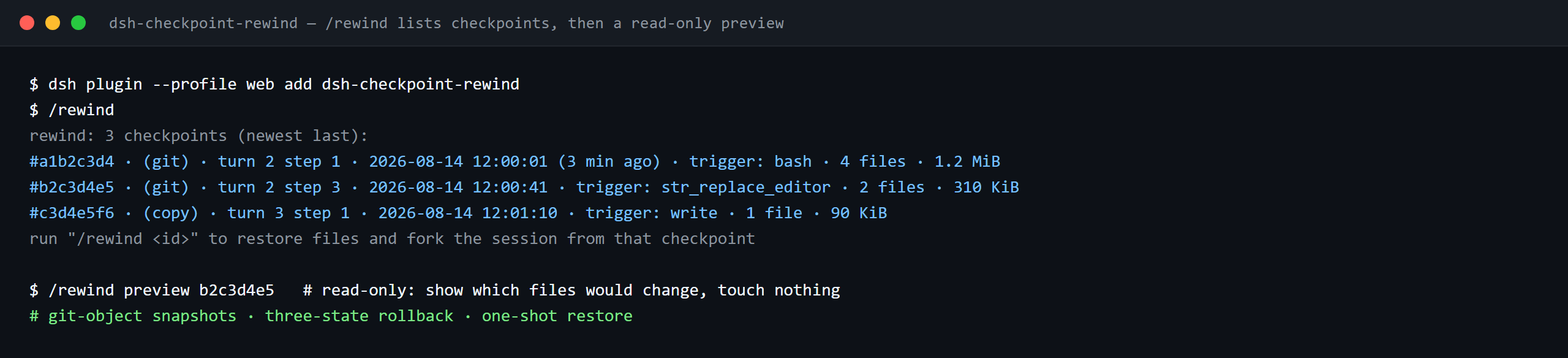

The same run, animated.
Comparison
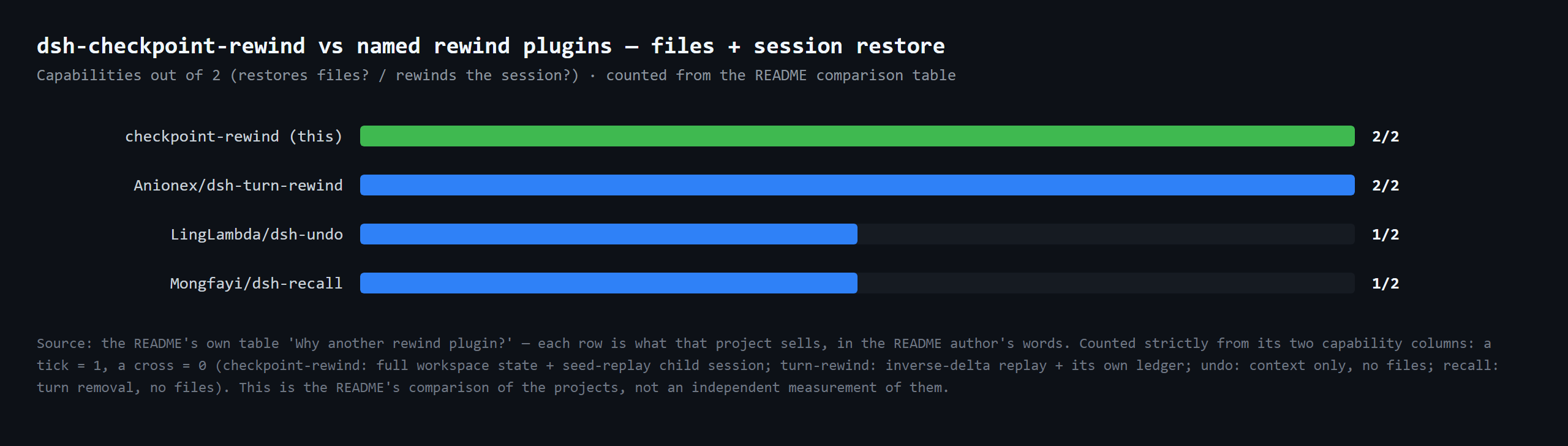
Capabilities out of 2 (restores files? / rewinds the session?) · counted from the README comparison table
Compatibility
| Surface | Status |
|---|---|
| Harness | DeepSeek Harness dsh-v0.2.1-alpha.1 (GitHub tag, verified 2026-09-25; npm pin 0.1.7-rc.2, peers >=0.1.6-0 <0.2.0 || >=0.1.7-0 <0.2.0) (adapted 2026-10-04): the host removed @deepseek-ai/dsh-settings-file and replaced the ctx.settings namespace-registration surface with SettingsForms, which projects each Loader entry's Config into the Settings form and persists edits on the profile patch — plugin config fields are now declared volatile() and read live, strict typert codecs carry only their create() factory, and the rewind notice declares its own message-source kind. The legacy settings.register path is kept for 0.1.5-rc.2/0.1.6-alpha.2 hosts. Verified 2026-09-22 against the dsh-v0.1.7-alpha.1 checkout (typecheck against the alpha.1 type surface + full unit suite + assembled-headless integration). |
| Node | ^22.19.0 \|\| >=24.0.0 |
| Platforms | All (host commands + listeners; optional Settings page timeline via the settings capability) |
| Model | Any (no model calls — snapshots and restores are deterministic) |
What you get
dsh-checkpoint-rewind captures a three-state unified checkpoint — workspace, session cursor, and plugin config — and restores one or all three with a single approved command:
- Three-state record — every checkpoint stores the workspace state (git tree SHA, or a copy manifest), the session event cursor (
seq+ turn boundary), and a config snapshot, tagged by source (manual/auto/guard/mutation). - Four capture triggers — before every mutating tool (
fs/write-intent,fs/edit-intent,tools/pre-execute), on automatic interval (autoCheckpoint, default every step), manually (/checkpointand thecheckpointtool), and as a guard before every rewind. - git-first provider —
git stash create/commit-treeproduce unreferenced snapshot objects that never touch your worktree, index, or history; restore is worktree-only and path-explicit. Non-git directories (and unborn-HEAD repos) degrade to an incrementalcopyprovider with hardlink reuse. - One-shot rollback —
/rewind workspace|session|config|all <target>restores the selected states;previewis a read-only impact report,diff <a> <b>compares two checkpoints,cleardeletes them (this session;clear --allspans all sessions and workspaces). - Fork-based session rollback — session rollback replays events up to the checkpoint boundary through the official
SessionStore.forkprimitive into a new child session (falling back to the seededsessions.createpath when the host has no fork or the checkpoint has no boundary); the original session keeps its full history. - Settings page timeline — the
Plugins → Checkpointstab renders the session's checkpoints with pairwise line-level diffs.
Why another rewind plugin?
| Plugin | What it sells | Restores files? | Rewinds the session? | |---|---|---|---| | dsh-checkpoint-rewind (this) | git-object snapshots + three-state rollback + one-shot restore | ✅ full workspace state | ✅ seed-replay child session | | Anionex/dsh-turn-rewind | persistent Change Ledger of per-mutation deltas | ✅ by replaying inverse deltas | ✅ its own ledger model | | LingLambda/dsh-undo | pure context rollback to the last completed step | ❌ | ✅ context only | | Mongfayi/dsh-recall | message recall (remove a turn and everything after) | ❌ (explicitly) | ✅ turn removal |
The difference in one sentence: dsh-checkpoint-rewind captures the workspace state with side-effect-free git primitives before each mutation, and makes "back to step N" one approved command — guard checkpoint first, files restored second, config restored third, session replayed fourth, each phase logged. No delta bookkeeping to drift, no message-level editing (that belongs to a different plugin), no cross-device sync.
Quick start
dsh plugin --profile web add github:PerryLink/dsh-checkpoint-rewind# 1. install the bundle into your profile
dsh plugin --profile web add github:PerryLink/dsh-checkpoint-rewind
# or from npm (published releases)
dsh plugin --profile web add dsh-checkpoint-rewind
# 2. restart and verify the row
dsh --profile web --dump-config | grep -A4 'id: checkpoint-rewind'Checkpoints persist through the storageDomain service. The plugin mounts without it and never blocks profile startup — checkpoint/rewind commands then return a structured error naming the exact rows to add. Compose the storage stack once to enable checkpoints:
- insert:
    - id: checkpoint-rewind-storage
      name: '@deepseek-ai/dsh-storage'
    - id: checkpoint-rewind-storage-json
      name: '@deepseek-ai/dsh-storage-json'
      config:
        root: !!js dshHomePath('checkpoint-rewind/storage')
    - id: checkpoint-rewind-storage-domain
      name: '@deepseek-ai/dsh-storage-domain'
      config:
        backend: json
The package is pure ESM with no build step — index.mjs and lib/ are the shipped artifacts. Workspace mutations now create checkpoints automatically; run /rewind to list them:
rewind: 3 checkpoints (newest last):
#a1b2c3d4 · (git) · turn 2 step 1 · 2026-08-14 12:00:01 (3 min ago) · trigger: bash · 4 files · 1.2 MiB
#b2c3d4e5 · (git) · turn 2 step 3 · 2026-08-14 12:00:41 · trigger: str_replace_editor · 2 files · 310 KiB
#c3d4e5f6 · (copy) · turn 3 step 1 · 2026-08-14 12:01:10 · trigger: write · 1 file · 90 KiB
run "/rewind <id>" to restore files and fork the session from that checkpoint
Address a checkpoint by its unique id prefix, by step number, or by latest:
/rewind b2c3d4e5
/rewind step 2
/rewind latest
/rewind preview b2c3d4e5   # read-only: show which files would change, touch nothing
/rewind workspace b2c3d4e5 --files src/a.ts,src/b.ts   # selective restore: only these files (approval-gated)
/rewind clear              # confirmed deletion of this session's checkpoints (files untouched)
/rewind clear --all        # confirmed deletion across ALL sessions and workspaces (files untouched)
preview resolves through the same addressing and prints the impact without asking for confirmation or writing anything. --files restores only the named files through the same approval-gated transaction (unknown paths fail closed; it is incompatible with workspaceRestore: reset-hard and disabled when selectiveRestore: false).
Install & uninstall
- git channel (latest
main):dsh plugin --profile web add github:PerryLink/dsh-checkpoint-rewind— pure ESM, noprepareorallowBuildsstep. - npm channel (published releases):
dsh plugin --profile web add dsh-checkpoint-rewind. - tarball channel:
npm packin this repo, thendsh plugin --profile web add ./dsh-checkpoint-rewind-<version>.tgz. - storage stack (required for checkpoints, optional for mounting):
@deepseek-ai/dsh-storage+@deepseek-ai/dsh-storage-json(configroot) +@deepseek-ai/dsh-storage-domain(configbackend: json) — see Quick start; the plugin still mounts without them and every command explains the fix. - uninstall:
dsh plugin --profile web remove dsh-checkpoint-rewind— snapshot files stay until you delete$DSH_HOME/dsh-checkpoint-rewind; git objects are garbage-collected.
Configuration
All tunables are Schemastery Config fields (changeable from cordis.yml). Nothing is hardcoded. Provider options (gitBin, snapshotDir, excludeGlobs, verifyByHash) are read from the live config at use time, so cordis.yml changes apply without a restart.
| Key | Default | Meaning |
|---|---|---|
| enabled | true | Master switch; false removes the commands, listeners, and providers entirely |
| provider | auto | Snapshot provider: auto (git if available, else copy) · git · copy |
| gitBin | git | Git executable path |
| snapshotDir | $DSH_HOME/dsh-checkpoint-rewind (fallback ~/.dsh/dsh-checkpoint-rewind when $DSH_HOME is unset) | Root for copy-provider snapshots |
| maxSnapshots | 50 | Checkpoints kept per session (oldest pruned first) |
| maxSnapshotBytes | 536870912 (512 MiB) | Global incremental-byte soft quota (newest per live session always retained) |
| pruneOnTurnEnd | true | Run quota pruning when a turn ends |
| mutationTools | ['bash','write','edit','str_replace_editor','pwsh','terminal_send'] | Tools treated as mutating at tools/pre-execute |
| excludeGlobs | ['node_modules','.git','.dsh','dist','build'] | Glob patterns skipped by the copy provider |
| confirmVia | auto | Confirmation channel: auto (userQuestions first) · userQuestions · approval |
| listLimit | 10 | Checkpoints shown by bare /rewind |
| preRewindCheckpoint | warn | Guard checkpoint before restore: warn · require · off |
| verifyByHash | false | Copy-provider content-hash comparison and restore verification |
| autoCheckpoint.enabled | true | Automatic interval snapshots on step/start |
| autoCheckpoint.intervalMinutes | 0 | Interval; 0 = every step |
| workspaceRestore | restore | Workspace rollback: restore (safe overwrite) · reset-hard (CC-style, opt-in) |
| diffRenderer | pairwise | Settings-page diff renderer: pairwise (line-level text) · side-by-side (per-file two-column) |
| selectiveRestore | true | Per-file selective restore (/rewind … --files) and the panel's per-file checkbox + size total |
| promptSection | true | Inject a short role-statement prompt section |
| checkpointTool | true | Register the checkpoint model tool |
- insert:
    - id: checkpoint-rewind
      name: dsh-checkpoint-rewind
      config:
        provider: auto
        maxSnapshots: 50
        maxSnapshotBytes: 536870912
        pruneOnTurnEnd: true
        confirmVia: auto
        preRewindCheckpoint: warn
Tools & surfaces
| Surface | Kind | Notes |
|---|---|---|
| /rewind | command | [workspace\|session\|config\|all] <id-prefix\|step <N>\|latest> · diff <a> <b> · preview <target> · clear [--all] |
| /checkpoint | command | [note <text>\|list\|diff <a> <b>] — capture a manual checkpoint |
| checkpoint | tool | Capture a manual checkpoint with an optional note |
| fs/write-intent · fs/edit-intent · tools/pre-execute | listeners | Pre-mutation capture (prepend pass-through; never steals the policy slot) |
| session/event | listener | Turn/step tracking, auto interval, boundary backfill, turn-end pruning |
| checkpoints projection | session projection | Timeline strip folded from the session log |
| Settings page timeline | client | Plugins → Checkpoints tab with pairwise (diffRenderer) diffs and per-file selective restore (selectiveRestore) |
Safety model
- Git history is untouchable. The git provider runs only whitelisted side-effect-free primitives —
stash create,commit-tree,restore --worktree,ls-tree,diff-tree,ls-files,status,rev-parse,cat-file -e— enforced by a runtime assertion, and object refs are validated as hex ids before being passed to git (a tampered record cannot inject git options). Noreset --hardby default, noclean, no index/history mutation, ever (seeworkspaceRestorebelow). - Overwrite rollback, never deletion. Restore only overwrites captured files, and the git provider restores explicit paths (
git restore … -- .would delete filesgit add-ed after the checkpoint). Files created after the checkpoint (untracked or staged) are reported and left in place. - No writes through links, no path traversal. The copy provider validates checkpoint refs before joining them into snapshot-directory paths, and refuses to restore through a destination (or ancestor) that has become a symbolic link — so a restore can never follow a link out of the workspace.
- Restore requires approval. Overwriting user files always goes through the confirmation seam with
asksemantics; a missing, throwing, or answering-no answerer fails closed./rewind previewis the read-only way to inspect the impact first. - Rewind is reversible. Before restoring, a guard checkpoint captures the current state; restoring the guard undoes the rewind.
preRewindCheckpoint: requireaborts the rewind when the guard cannot be captured. - Fixed-order transaction. Guard first, workspace second, config third, session replay fourth; every phase is logged; a failed restore leaves files, checkpoints, and session untouched.
workspaceRestore: 'reset-hard'is CC-equivalent and opt-in. It runsgit reset --hard <snapshot commit>(branch head moves to the snapshot commit; pre-snapshot history stays recoverable via reflog; untracked files untouched). It is off by default.- Model-visible ⟺ logged. Everything a user or model sees reconstructs from
command/run+command/done(and, once the host knows them,checkpoint/*events) plus the durablecheckpointsdomain.
How it works
capture ── fs/write-intent · fs/edit-intent · tools/pre-execute (prepend, pass-through)
        ── step/start auto interval ── /checkpoint · checkpoint tool ── pre-rewind guard
             │
             ▼  ProviderRegistry.resolve(auto)  →  git: stash create / commit-tree
             │                                     copy: incremental dir + hardlinks
             ▼
        checkpoints storage domain (SQLite rows / JSON file)  +  checkpoint/* event (adaptive gate)

/rewind <target> ── confirm (userQuestions / approval, fail-closed) ──▶ guard checkpoint
             ├─ workspace: provider.restore(ref)  (restore | reset-hard)
             ├─ config:   settings write-back (persisted on the profile patch)
             └─ session:  SessionStore.fork(source, boundary) → new child session (original untouched)
Full decision record, event vocabulary, and the provider seam contract: ARCHITECTURE.md.
Session events (rc.2 note)
The plugin declares checkpoint/snapshot, checkpoint/bound, checkpoint/prune, and checkpoint/rewind as log-only SessionEventMap members. Harness rc.2 has no plugin event-registration surface and Session.append does not stamp the ignorable envelope (its third argument is surface intent, not options), so appending unknown types would make the session unreadable on reload. The plugin therefore appends through an adaptive gate: a runtime probe (on a detached, never-persisted session store) detects whether the host's append stamps the ignorable envelope — on rc.2 the gate stays closed; on hosts that support it, checkpoint/* events are appended with ignorable: true automatically. Until then the authoritative audit chain is command/run + command/done (harness-known) plus the durable checkpoints storage domain.
Web UI anchor
The plugin returns the new session id in the command result (session: <id>) and the Web shell can navigate there. The session-projection unit checkpoints is shipped: whenever ctx.sessionProjections exists, the plugin registers the unit via ctx.inject (folds checkpoint/snapshot|bound|prune|rewind into a whole-value list) — it stays an empty list on rc.2 hosts until a harness build ships the checkpoint/* vocabulary or the ignorable envelope, then fills in with zero plugin changes.
FAQ
Does this replace git? No — it uses git where available. In a git repo you get byte-perfect, deduplicated snapshot objects without touching history; in any other directory the copy provider does the same with plain files. Regular commits remain your long-term history.
Why not git reset --hard by default? Because destroying state is not the job of a safety net. The plugin only creates unreferenced objects and performs worktree-only, path-explicit restores by default, so a bad rewind can never lose history, the index, or files created after the checkpoint. reset-hard is available behind workspaceRestore: 'reset-hard' for users who explicitly want CC parity.
How long is a checkpoint restorable? No ref is held on git-provider snapshots. They're unreferenced stash create/commit-tree objects by design, and discard deletes only the record, leaving the object itself for git gc. Two independent things bound how long a checkpoint actually stays restorable: the plugin's own quota pruning (maxSnapshots, default 50 kept per session; maxSnapshotBytes, a default 512 MiB global soft quota enforced via pruneAll() on capture and swept on turn ends), and the host repo's git gc. With git's defaults, unreferenced objects survive until an auto-gc runs, and even then only objects older than gc.pruneExpire (2 weeks by default) get pruned. A manual git gc --prune=now, an aggressive repack, filter-repo, or a fresh clone can drop them immediately. Pruned objects are now detected up front: the git provider probes the snapshot object before restore (git cat-file -e) and fails loudly when it is missing instead of silently restoring nothing, and a doctor pass walks every checkpoint record to probe object existence and badge unrestorable ones ([UNRESTORABLE: object missing] in the list). The doctor pass is implemented and tested but not yet wired into the restore path (restore does not yet consult the unrestorable marking; tracked in discussion #13).
Can I rewind to a step in the middle of a turn? File restoration is step-precise (/rewind step <N> = nearest snapshot ≤ N). The session replay, however, respects the harness's replay granularity: the child session is seeded up to the checkpoint's turn boundary.
What happens if nobody can answer the confirmation? Nothing is touched — the plugin fails closed (unavailable/rejected), keeps the checkpoint, and returns an explanatory error. With confirmVia: approval on rc.2 the message says to mount userQuestions, because approval requires an open turn and commands run between turns.
Can I undo a rewind? Yes — every approved rewind captures a guard checkpoint of the pre-rewind state first; the result prints rewind guard: <id>, and /rewind <guard-id> restores that state.
How do I address checkpoints? Unique id prefix (the 8-char short id in the list works), /rewind step <N>, /rewind latest, /rewind clear deletes this session's checkpoints, and /rewind clear --all deletes checkpoints across all sessions and workspaces (files untouched). /rewind preview <target> uses the same addressing to show the impact without changing anything.
What does preview do — and not do? It resolves the checkpoint, then runs a read-only comparison: which files would be overwritten (or recreated), which already match, and which files created after the checkpoint would be left in place. It never prompts, never writes, never forks, and records no checkpoint/rewind event — the approval gate only runs on a real /rewind <id>.
Demo
A real assembled-headless integration run (npm run test:integration) drives the full flow: the agent modifies files across two turns, then /rewind preview inspects the impact read-only (no confirmation gate, no writes) and /rewind <id> restores the files and replays the session into a new child session. The run asserts the file contents, the replayed child context, the guard checkpoint, and that files created after the checkpoint survive — for both the copy and git provider flows (the git flow also asserts HEAD and the reflog are untouched). The driver lives in test/integration/rewind-headless.mjs.
Permissions & data
- Permissions: the workshop manifest declares
workspace:read,workspace:write,git:read,git:write,snapshot-storage:write,session-log:read,settings:write, andnetwork:none. - Data: checkpoint records live in the
checkpointsstorage domain (SQLite rows or a JSON file); copy snapshots live undersnapshotDir. Fully local — no network, no credentials. The domain is opened dual-version: 0.4.x-era media (domain v1) are opened in a compatibility mode that keeps old records readable and stores new captures in the v2 shape, so upgrading the plugin never orphans an existing medium. - Session log:
checkpoint/*events are appended through the adaptive gate; the authoritative audit chain iscommand/run+command/doneplus the durable domain.
Security boundaries
- Git history is untouchable. Whitelisted side-effect-free primitives;
reset --hardonly behind the opt-inworkspaceRestore: 'reset-hard'mode. Nogit clean, ever. - Overwrite rollback, never deletion. Restore overwrites captured files only; files created after the checkpoint are reported and left in place.
- No writes through links, no path traversal. Copy
refs are validated as snapshot ids; restore refuses to follow symbolic links out of the workspace. - Restore requires approval. A missing or denying answerer fails closed.
- Rewind is reversible. A guard checkpoint of the pre-rewind state is captured first.
Known limitations
- On rc.2,
checkpoint/*session events are suppressed by the adaptive gate; the audit chain ridescommand/run+command/doneplus the storage domain until a host ships the vocabulary or theignorableenvelope. confirmVia: approvalneeds an open turn, and commands run between turns — mount userQuestions (or setconfirmVia: userQuestions) on rc.2.- Session rollback forks a new child session at the checkpoint boundary; it never rewrites or truncates the original session.
workspaceRestore: 'reset-hard'moves the branch head to the snapshot commit; it is off by default.- A checkpoint captured before any closed turn has no replay boundary — session rollback then creates a fresh child session with empty context.
Troubleshooting
| Symptom | Cause / fix |
|---|---|
| /rewind <id> says rewind cancelled: no confirmation answerer | No userQuestions/approval channel is mounted — the plugin fails closed. Run in the Web UI (or mount a question provider); confirmVia selects the channel. |
| /rewind <id> says approval requires an open turn … | Commands run between turns and approval needs a turn — mount userQuestions or set confirmVia: userQuestions. |
| rewind: checkpoint registry unavailable | The checkpoints storage domain could not open. Either the storageDomain service is not composed (add the storage stack rows from Quick start: @deepseek-ai/dsh-storage + @deepseek-ai/dsh-storage-json with config root + @deepseek-ai/dsh-storage-domain with config backend: json) or the backend is erroring; check the harness logs. |
| A checkpoint lists as fork: pending (turn not closed) | Its turn has no turn/end yet; files can still be restored, but the session replay waits for the turn to close. |
| files restored … but the session was NOT replayed | The transaction's session phase failed (no closed boundary, or replay rejected). Files stay restored; use the printed rewind guard: <id> to undo. |
| rewind: aborted — the pre-rewind guard checkpoint could not be captured | preRewindCheckpoint: require refused the rewind because the guard capture failed; fix the storage (or set warn/off). |
| A checkpoint lists as (copy) even though the directory is a repo | Unborn HEAD (no initial commit): git snapshot primitives require HEAD, so the plugin degrades to copy until the first commit. |
| MISSING_CREDENTIAL in headless runs | Unrelated to this plugin: no DEEPSEEK_API_KEY is configured for the model provider. |
| Snapshot storage grows | Pruning runs after every snapshot and at turn/end (pruneOnTurnEnd); lower maxSnapshots / maxSnapshotBytes, run /rewind clear, or delete $DSH_HOME/dsh-checkpoint-rewind after uninstalling. |
Development
npm install               # peer deps: @deepseek-ai/[email protected], schemastery, zod
npm test                  # node --test test/**/*.test.mjs (provider suites incl.)
npm run test:integration  # assembled-headless verification (test/integration/)
No build step: pure ESM — index.mjs/lib/ are the published artifacts.
Interoperability with other DSH plugins
Verified against DSH 0.2.0-rc.2 (the runtime this README ships for) and the high-star plugin set surveyed on 2026-10-05.
This plugin does not interfere with other plugins, including the widely installed high-star ones:
- No tool-name collision. Every tool is namespaced; no bare name owned by a shipped tool or another plugin is registered.
- No service-key collision. It provides no service key at all, so it cannot collide on one.
- No slot collision. It registers no client slot key, so it cannot contend for a
shadows-shipped-uiseat. - No HTTP route collision. It registers no
webServerprefix. - No patch-layer collision. The bundle patch only
inserts its own row; it never overrides a built-in row'sconfig. - No global mutation. It does not patch prototypes, rewrite
process.env, or replace the global fetch dispatcher.
Shared event listeners are non-interfering by construction. It observes the ordering-sensitive events fs/edit-intent, fs/write-intent, tools/pre-execute with ctx.on() — Cordis's broadcast registration, where every listener runs and none can starve another. Every listener here delegates through next(), so the chain is never short-circuited, and a mutation is applied to the value next() produced rather than returned in its place:
tools/pre-execute— also used bycc-safety-net(1576★).
Static evidence: dsh-plugin-doctor K10–K13 report pass for every check on this repository.
Topics
deepseek-harness, dsh, dsh-plugin, rewind, checkpoint, snapshot, session-replay, session-fork, config-restore, workspace-safety, undo, cordis-plugin
Contributors
- @PerryLink — creator and maintainer: the three-state checkpoint model, the git/copy provider seam, the three-phase rewind transaction, the Settings page timeline, docs, CI/CD and releases.
- @tmpdot (rmUnlucky) — v1-medium dual-version compatibility (#8), lazy
storageDomainresolution (#9), checkpoint dedup reply hints (#10), and the$DSH_HOME-unset snapshot-dir bug report (#4). - @shipinliang — checkpoint panel wire-contract reports: the missing
acceptsUndefinedon thelimitparameter (#5) and the#depsprivate-field proxy failure (#6). - @hwz1456 — web-profile checkpoint-capture report (#3).
- @Andiii208 —
plugin_checkpublishing-spec report (#2). - @alexchenzl (Ashu) — DSH Directory listing invitation (#7).
PerryLink DSH Plugin Family
This project is one of the 33 actively maintained DeepSeek Harness plugins from PerryLink — the roster is 42, of which 6 are frozen and 3 retired; every one keeps its row below, with the reason in the Status column. If this one helps you, the others likely will too:
| Plugin | One-liner | Status |
|---|---|---|
| dsh-auto-review | Second-model auto-review on the approval chain, fail-closed by default | |
| dsh-autotier | Automatic strong/cheap model-tier routing with deterministic risk guards and a /tier command | |
| dsh-background-agents | Durable background child agents with a Web UI sidebar, messaging and interrupt | 🚫 RETIRED — see the note above |
| dsh-budget | Cost governance for DeepSeek Harness: budgets, carbon, and latency in one panel. | 🧊 FROZEN — see the repo README |
| dsh-catalog | DSH Desktop Market standard catalog source for the PerryLink family | |
| dsh-cert-mcp | Read-only MCP server exposing the certification registry: grades, snapshots and five-dimension evidence | |
| dsh-checkpoint-rewind | Claude Code /rewind-equivalent: snapshots, session forks, one-shot restore | |
| dsh-claude-move | Migrate Claude Code sessions, memory, skills and CLAUDE.md into DSH | 🧊 FROZEN — see the repo README |
| dsh-click | Cross-platform native desktop control for DeepSeek Harness — Windows first. | |
| dsh-composer-history | Terminal-style input history for the web composer: arrows, Ctrl+R search | |
| dsh-data-quality | Dataset quality checks and citation cross-checks (the optional numeric bridge consumed here) | |
| dsh-defend | Prompt-injection, jailbreak, and secret-leak defense for DeepSeek Harness. | 🧊 FROZEN — see the repo README |
| dsh-doublecheck | Engineering-discipline guard: requirements grill, test gates, adversary review | |
| dsh-draw | Unified static-image generation routing for DeepSeek Harness. | 🧊 FROZEN — see the repo README |
| dsh-fast | Read-only performance diagnostics for DeepSeek Harness. | |
| dsh-fund-research | Deterministic research reports for Chinese public mutual funds | |
| dsh-github | GitHub PR/issues integration for DSH, every write gated by approval | |
| dsh-industry-research | Industry research orchestration that seals its deliverables through this plugin's ctx.researchReport.assemble | |
| dsh-laya | Laya typed decisions (noul/choice/score) as a first-class Cordis service and model-visible tools | |
| dsh-library | Local document knowledge base for DeepSeek Harness. | |
| dsh-local-ai | Local-model (Ollama) integration for DeepSeek Harness. | |
| dsh-lsp-actions | LSP diagnostics, formatting, completion, code actions and rename over language servers | |
| dsh-mask | PII masking middleware: anonymize at the model boundary, restore at the display layer | |
| dsh-mcp-panel | Read-only MCP runtime panel: /mcp command + Settings tab with status, tools and errors | |
| dsh-memento | Approval-gated cross-session memory: ctx.memory seam + SQLite + memory tool | 🧊 FROZEN — see the repo README |
| dsh-observe | OpenTelemetry and Langfuse observability exporter for DeepSeek Harness. | |
| dsh-output-styles | Claude Code outputStyles-equivalent runtime style switching | |
| dsh-permission-rules | Claude Code-style declarative allow/deny/ask permission rules with audit | |
| dsh-plugin-certification | Community certification registry with repro-checkable grades and badges | |
| dsh-plugin-doctor | Zero-dependency static + sandbox smoke detector for DSH plugins | |
| dsh-plugin-guide | Plugin-development knowledge base as an on-demand agent skill | |
| dsh-plugin-kit | Shared zero-runtime-dependency toolkit for the PerryLink DSH plugins | |
| dsh-plugin-upgrade | One-package, one-corridor-index plugin upgrade skill: routes a repository to the matching closed corridor card | |
| dsh-plugin-upgrade-015 | Merged 0.1.3-alpha.1 → 0.1.5-rc.1 upgrade corridor card plus a zero-dependency seam scanner | 🚫 RETIRED — corridors carried by dsh-plugin-upgrade |
| dsh-reach | Multi-channel approval/question bridge: WeChat/Telegram/Feishu, session console | 🧊 FROZEN — see the repo README |
| dsh-research-report | Verifiable research-report engine: content-addressed evidence ledger and sealed versions | |
| dsh-score | Multi-dimensional quality scoring for DeepSeek Harness plugins. | |
| dsh-session-pin | Pin sessions in the Web sidebar with durable ordering | 🚫 RETIRED — see the note above |
| dsh-session-sync | Cross-device session sync for DeepSeek Harness — a dedicated git mirror of your session store. | |
| dsh-skill-pack-security | Security-audit skill pack: secret scan, dependency and supply-chain review | |
| dsh-talk | Voice-first session loop for DeepSeek Harness: talk to it, hear it answer. | |
| dsh-team-rooms | Cross-session team rooms: shared message bus, task board and timeline | 🚫 RETIRED — see the note above |
| dsh-test-drive | Isolated install-and-smoke test drives for DeepSeek Harness plugins. | |
| dsh-ticktick | TickTick/Dida365 task bridge: session-header panel + 11 tools | |
| dsh-translate | Vendor parameter translation and deterministic JSON repair for DeepSeek Harness. | |
Install from the DSH Desktop Market
All PerryLink plugins are browsable in the built-in DSH Desktop Market: Market → Sources → add source → paste https://perrylink-dsh-catalog.perrylink.workers.dev/catalog-source.json → select it. Installation still goes through the Market's npm-identity verification and your confirmation.
License
Apache License 2.0 © 2026 dsh-checkpoint-rewind contributors