npm package discovery and stats viewer.

Discover Tips

  • General search

    [free text search, go nuts!]

  • Package details

    pkg:[package-name]

  • User packages

    @[username]

Sponsor

Optimize Toolset

I’ve always been into building performant and accessible sites, but lately I’ve been taking it extremely seriously. So much so that I’ve been building a tool to help me optimize and monitor the sites that I build to make sure that I’m making an attempt to offer the best experience to those who visit them. If you’re into performant, accessible and SEO friendly sites, you might like it too! You can check it out at Optimize Toolset.

About

Hi, 👋, I’m Ryan Hefner  and I built this site for me, and you! The goal of this site was to provide an easy way for me to check the stats on my npm packages, both for prioritizing issues and updates, and to give me a little kick in the pants to keep up on stuff.

As I was building it, I realized that I was actually using the tool to build the tool, and figured I might as well put this out there and hopefully others will find it to be a fast and useful way to search and browse npm packages as I have.

If you’re interested in other things I’m working on, follow me on Twitter or check out the open source projects I’ve been publishing on GitHub.

I am also working on a Twitter bot for this site to tweet the most popular, newest, random packages from npm. Please follow that account now and it will start sending out packages soon–ish.

Open Software & Tools

This site wouldn’t be possible without the immense generosity and tireless efforts from the people who make contributions to the world and share their work via open source initiatives. Thank you 🙏

© 2026 – Pkg Stats / Ryan Hefner

dsh-client-ui-theme-xp

v0.1.1

Published

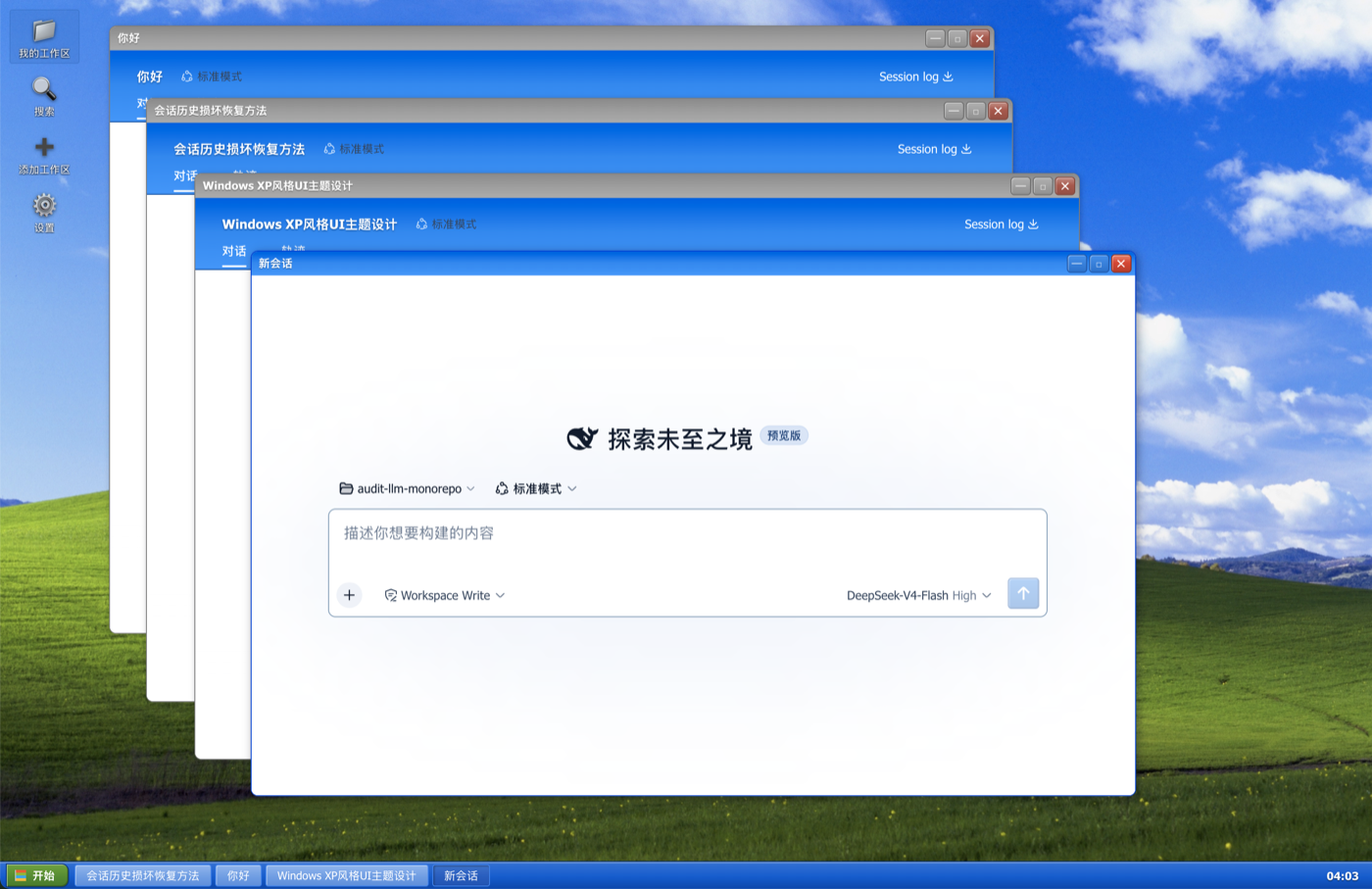
Windows XP Luna desktop theme for the DeepSeek Harness web GUI: floating window manager with taskbar and desktop icons, Explorer-style workspace/session browser, native directory picker, search and the Luna token palette.

Readme

🪟 dsh-client-ui-theme-xp

Windows XP (Luna) 桌面化主题 for DeepSeek Harness Web GUI —— 把整个界面变成一台 Windows XP 电脑:Bliss 壁纸、桌面图标、浮动窗口、任务栏。

GitHub stars GitHub license GitHub last commit Windows XP Awesome DSH Plugin

Screenshot

✨ 功能

  • XP 桌面 —— 顶部窗口变成桌面:Bliss 壁纸、左侧桌面图标列(我的工作区 / 搜索 / 添加工作区 / 设置)、底部任务栏(开始按钮 + 窗口列表 + 时钟)。
  • 浮动窗口 —— 会话以真正的 XP 窗口打开:可拖拽、缩放、最小化/最大化/关闭,窗口场景自动持久化(刷新后恢复)。
  • 我的工作区 —— 资源管理器式浏览器:工作区 = 文件夹,会话 = 文件夹里的图标;每个工作区内有「新建会话」图标,一键在该工作区真正新建一个会话并打开。
  • 添加工作区 —— 走宿主原生目录选择器(macOS Finder / Windows 资源管理器),不需要手填路径。
  • 搜索 —— 会话内容检索窗口(基于 sessions.search),点结果直接打开会话窗口。
  • 设置 —— 桌面图标直接弹出 app 原生设置面板(无需打开新窗口)。
  • Luna 细节 —— XP 蓝 #316ac5 配色、Tahoma 字体、经典蓝选区、XP 滚动条、圆角窗口/按钮、黄色工具提示;空白会话与官方侧边栏一致地隐藏。

📦 安装

已发布到 npm。用你启动 web 的方式调用插件命令即可(无需全局安装 dsh):

# 首选:从 npm 安装(预构建,免 allowBuilds 构建授权)
npx @deepseek-ai/dsh plugin --profile web add dsh-client-ui-theme-xp

也可以直接从 GitHub 安装(总是最新提交):

npx @deepseek-ai/dsh plugin --profile web add github:SamizuHM/dsh-client-ui-theme-xp

如果全局安装过 dsh,把上面的 npx @deepseek-ai/dsh 换成 dsh 即可。

重启 dsh web 后刷新页面即可。主题为纯浏览器端插件dsh.client),改动走 bundle rev 缓存穿透,日常更新只需刷新。

🖱️ 使用提示

  • 桌面图标:单击选中,双击打开
  • 会话窗口内部就是完整的 DSH 应用(自带会话/工作区数据),窗口标题栏实时同步会话标题。
  • 任务栏点击窗口项可切换/最小化窗口。

📄 License

MIT