
dsh-companion
v0.1.1
Published
A friendly status and context-pressure companion for DeepSeek Harness Web

Maintainers
 gjnzsu
Readme
DSH Companion
English | 简体中文
一个运行在 DeepSeek Harness Web 中的轻量 Agent Companion。它把当前会话的活动状态、上下文压力和用量信息,变成一个可以快速扫一眼就理解的 Living Data Orb。
状态优先,用量按需;友好,但不打扰。
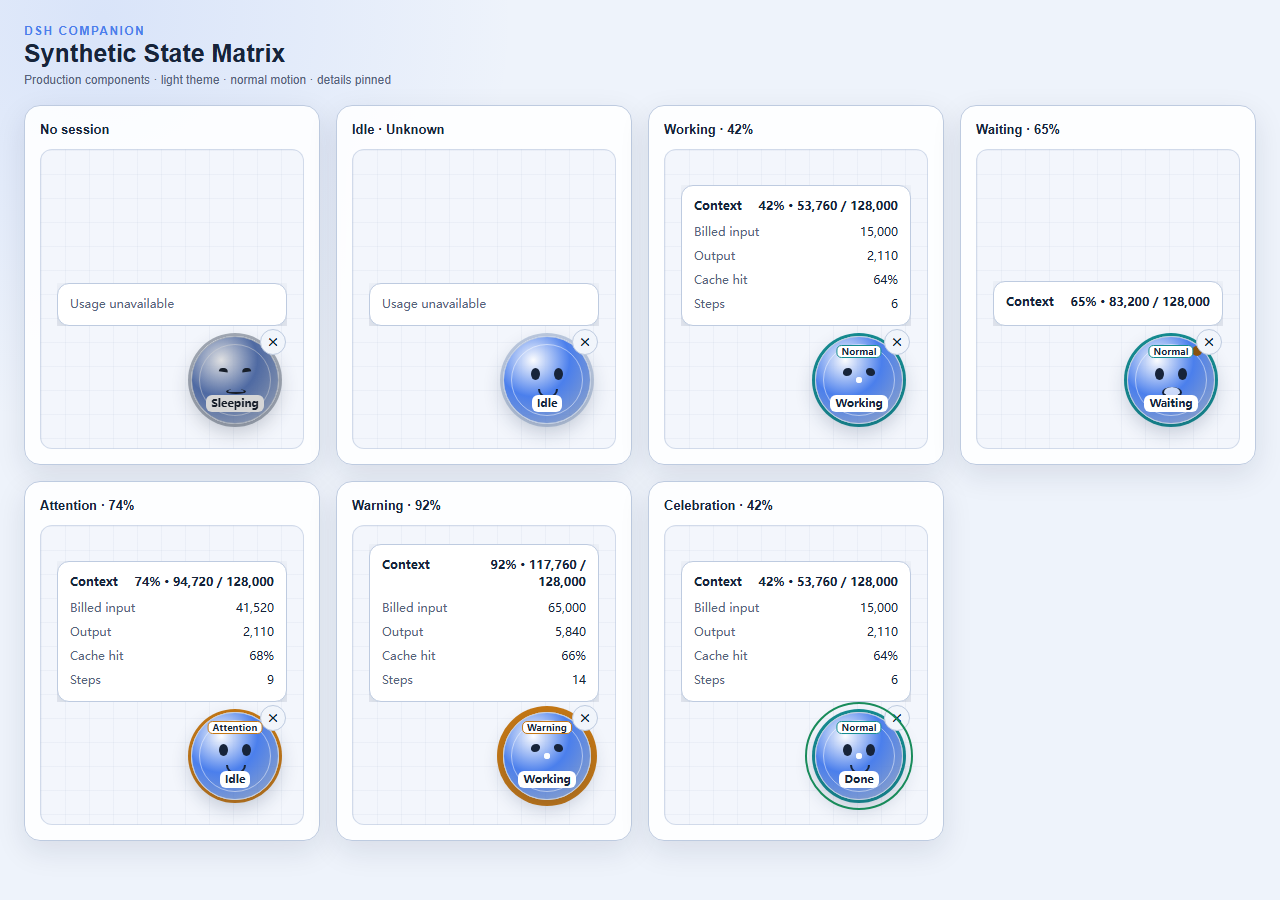
上图是由生产组件和合成状态生成的视觉回归基线,覆盖无会话、空闲、工作、等待、上下文提醒、上下文警告和任务完成反馈。
一分钟了解它
DSH Companion 同时表达两个互相独立的信号:
- 活动状态:Agent 正在休眠、空闲、工作,还是等待你响应。
- 上下文压力:预计下一次请求会占用多少模型上下文窗口。
点击或悬停宠物后,才会进一步显示 Context、Billed input、Output、Cache hit 和 Steps。这样日常工作时只需要看状态,需要诊断时才查看数字。
| 视觉层 | 回答的问题 | 表现方式 | | --- | --- | --- | | 表情与状态标签 | Agent 正在做什么? | Sleeping、Idle、Working、Waiting、Done | | 压力环与文字标签 | 上下文是否需要关注? | Normal、Attention、Warning、Unknown | | 用量面板 | 当前会话用了多少资源? | 只展示 DSH 已提供的可用指标 |
设计理念
状态优先,用量按需
默认界面只传达活动状态和上下文压力。详细数字不会持续占据注意力,只有在悬停、键盘聚焦或点击固定面板时出现。
安静陪伴,而非打扰
宠物可以表达工作、等待和完成,但不会闪烁、拦截整个页面或要求持续阅读。用户可以拖动它,也可以折叠成屏幕边缘的恢复标签。
友好,但不游戏化
Living Data Orb 使用表情和轻量动效帮助理解状态;MVP 不包含喂养、升级、奖励、皮肤、留存任务或多宠物系统。
对数据保持诚实
缺少 projection 时,指标会保持 Unknown 或直接省略。插件不会把未知数据显示为 0,也不会估算价格、余额或流式 token。
原生融入 DSH
插件通过 shell.overlay 以附加方式挂载,跟随当前选中的 session,读取 DSH 已有 projections,并遵循宿主的生命周期、语义样式和无障碍模式。
观察型、隐私优先
插件不会修改 prompt、tool、模型请求或 session event。它不读取对话内容、推理内容、工具输入输出、文件、凭证或供应商账户,也没有遥测和远程服务。
工作原理
flowchart LR
    DSH["DeepSeek Harness"] -->|"selected SessionSummary"| Adapter["DSH client adapter"]
    Adapter -->|"status + numeric projections"| Derive["Pure state derivation"]
    Derive --> ViewModel["CompanionViewModel"]
    ViewModel --> Orb["Living Data Orb"]
    ViewModel --> Panel["Usage panel"]
    Preferences["Browser-local position and collapse state"] --> Orb
DSH 负责维护事件日志和 projections。Companion 从 Web 客户端已经提供的当前 session summary 开始工作,不扫描事件日志,不轮询后端,也不重新实现上游统计逻辑。
更详细的设计资料:
状态说明
活动状态
| 状态 | 含义 | | --- | --- | | Sleeping | 当前还没有选中的 session | | Idle | 当前 session 已准备好,没有正在执行 | | Working | Agent 正在执行任务 | | Waiting | Agent 正在等待问题、审批或其他用户交互 | | Celebration / Done | 同一个 session 从 Working 进入 Idle 后的短暂完成反馈 |
Waiting 的优先级高于 Working,因为需要用户响应通常是更重要的信息。
上下文压力
| 等级 | 预计占用率 | 含义 |
| --- | ---: | --- |
| Unknown | 无法可靠计算 | projection 缺失或数据无效 |
| Normal | < 70% | 暂时不需要处理 |
| Attention | 70% – < 85% | 上下文正在增长,值得留意 |
| Warning | ≥ 85% | 可以考虑完成任务、压缩上下文或创建新 session |
压力等级同时使用文字、环形粗细和颜色表达,不依赖颜色作为唯一提示。
交互方式
- 悬停或键盘聚焦:临时查看用量。
- 点击宠物:固定或取消固定用量面板。
- Escape 或点击外部:关闭已固定面板。
- 拖动:移动宠物;位置会保存在当前浏览器中。
- 折叠:缩成最接近屏幕边缘的
Show DSH Companion标签。 - 恢复:点击边缘标签回到保存位置。
外层 overlay 是 click-through 的,只有宠物、面板和恢复标签接收指针输入。
用量指标
| 指标 | 定义 | | --- | --- | | Context | 预计 token 数除以模型 context window | | Billed input | uncached input + cache read + cache write | | Output | 供应商已报告并累计的 output token 数 | | Cache hit | cache read ÷ billed input,四舍五入为整数百分比 | | Steps | 已完成的 session steps |
不可用的指标会被省略,而不是被估算。
安装
从 npm 安装到 DSH Web profile:
dsh plugin --profile web add dsh-companion
dsh web
也可以从源码构建本地 tarball:
git clone https://github.com/gjnzsu/dsh-companion.git
cd dsh-companion
pnpm install --frozen-lockfile
pnpm build
pnpm pack --pack-destination .
dsh plugin --profile web add ./dsh-companion-0.1.1.tgz
dsh web
卸载:
dsh plugin --profile web remove dsh-companion隐私
插件只读取当前 session 已经交付到 Web 客户端的状态和数字 projections:
- session id、running 和 pending interaction 状态;
- token usage、context pressure 和 steps;
- 浏览器本地保存的位置与折叠状态。
插件不会读取或发送:
- prompt、消息、推理过程、工具参数或工具结果;
- 文件内容、工作区数据、API key 或供应商账户;
- 价格、余额或账单信息;
- 遥测、分析事件或云同步数据。
兼容性
[email protected] 精确面向 DeepSeek Harness 0.1.0-rc.5。Harness 仍处于 developer preview,后续 release candidate 可能需要 Companion 更新。
开发与测试
需要 Node.js ^22.19.0 || >=24.0.0 和 pnpm 11.15.1。
pnpm install --frozen-lockfile
pnpm test
pnpm typecheck
pnpm build
pnpm gallery
pnpm test:visual
pnpm pack:check
针对 Harness 源码运行无 API Key 的真实 Web smoke:
$env:DSH_REPO='C:\SourceCode\deepseek-harness'
pnpm test:smoke
测试体系分为两层:
- 合成状态测试负责覆盖状态、压力边界、视觉主题、窄屏、reduced motion 和交互组合。
- 真实 Web smoke负责证明打包后的插件能安装进 DSH,并跟随真实选中 session 更新。
MVP 限制
0.1.0 只支持 DSH Web 和当前选中的 session。它暂不提供流式 token 估算、价格或成本、历史趋势、成长系统、多宠物、prompt/tool 内容分析或云同步。