
dsh-context-zip
v0.1.10
Published
Context compaction that keeps its receipts: a five-section handoff summary, a durable segment index, review tools that read compacted text back, optional working notes, and a read-only extraction exit. Mounts as the compaction-basic row's replacement; cha
Downloads
2,185

Maintainers
 brunhildzhou
Readme
dsh-context-zip




给 DeepSeek Harness(DSH)用的上下文压缩插件:接管宿主自带的压缩摘要器,改成固定五段式交接摘要,被压掉的原文进分段目录、可回查。 版本 0.1.10,MIT 许可。见 npm 上的 dsh-context-zip。English
能力一览
- 五段式交接摘要:压缩那一步改走本插件,摘要按
Goal and intent、Decisions、Current state、Next steps、Anchors五段产出。 - 原文可回查:每次压缩记一段,段号、被替换的事件号、摘要事件号都能列出来,原文按段号或事件号读回。
- 检索工具与导出:
history_segments、history_read、history_search、history_find只读本会话历史,另有只读服务与/zip-export导出。 - 可选能力:模型工作笔记、机械摘要兜底、散文摘要排版重排,默认都是关的;一个设置面板控制以上全部。
安装与升级
两条路,任选一条。
路 A:从 npm 装。 装完能启动、面板能打开,但压缩不生效(缺行重定向)。补法:设置面板 ContextZip 一节里,点「压缩后端」那一行右端的「接管」,然后重启 harness 一次。
dsh plugin --profile web add dsh-context-zip升级把版本换掉再跑一次:
dsh plugin --profile web add dsh-context-zip@<版本>实测事实:pnpm 不会清掉重定向,所以接管只需做一次,之后升级不用重新接管。
路 B:从源码检出装。 一步装好本体与重定向。profile 至少启动过一次,再跑:
node install.mjs --profile-dir <profile 目录>例如 node install.mjs --profile-dir <harness home>/profiles/web。完整参数、卸载与回滚见 docs/安装与卸载.md。
它接管的是哪一步
DSH 在上下文接近窗口上限时自动压缩会话。默认实现让模型自由写一段摘要,原文之后难找。本插件把这一行替换掉:
自动压缩触发
  │
  ├─ 未接管:内置后端写自由摘要,原文难回查
  │
  └─ 已接管:本插件写五段交接摘要
        ├─ 摘要落盘(压缩后唯一的权威)
        └─ 原文进分段目录(按段号 / 事件号回查)
接管是逐行替换,不是并行挂载。插件不修改 DSH 自身代码,不往会话日志写任何事件。
能力表格
| 能力 | 说明 | 默认状态 |
|---|---|---|
| 压缩接管 | 五段式交接摘要,软目标 3072 token,硬上限 6144 | 关(新建会话走内置后端,面板里可开) |
| 分段目录 | 每次压缩记一段,可列出段号、被替换事件号、摘要事件号 | 常开 |
| 检索工具 | history_segments、history_read、history_search、history_find,只读本会话 | 常开 |
| 工作笔记 | notes_write / notes_read / notes_search,草稿上限 6000 字符,下一次压缩时并入摘要 | 关 |
| 机械摘要兜底 | 连续失败到设定次数(默认 5)后用台账摘要使压缩落地 | 关 |
| 排版重排 | 无小标题结构的摘要追加一次只改排版的调用,不重发原文 | 关 |
| 检索节流 | 检索回执、增量过滤、收窄与读取上限;效果从未确立 | 关 |
| 设置面板 | ContextZip 一节:压缩方式、摘要兜底、摘要重排、实验与排障、压缩分段;输入框旁有压缩方式芯片 | 常开 |
| 导出与手动压缩 | 只读服务 contextZip 与 /zip-export 命令;/zip-compact 命令不受总开关管辖 | 常开 |
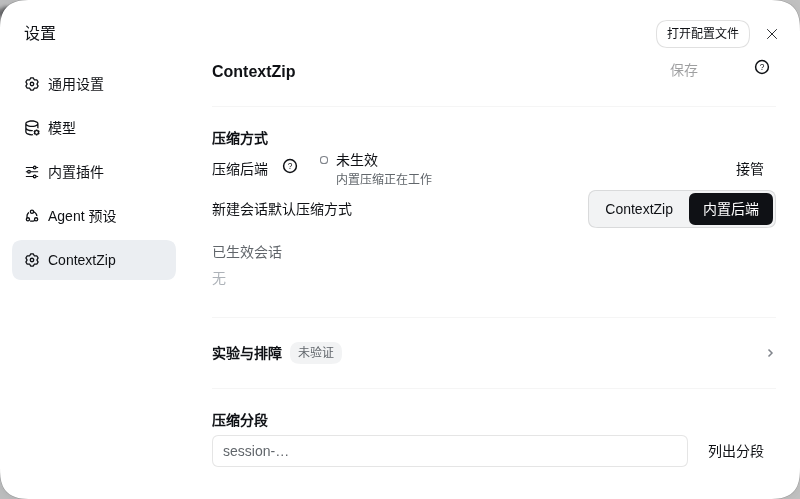
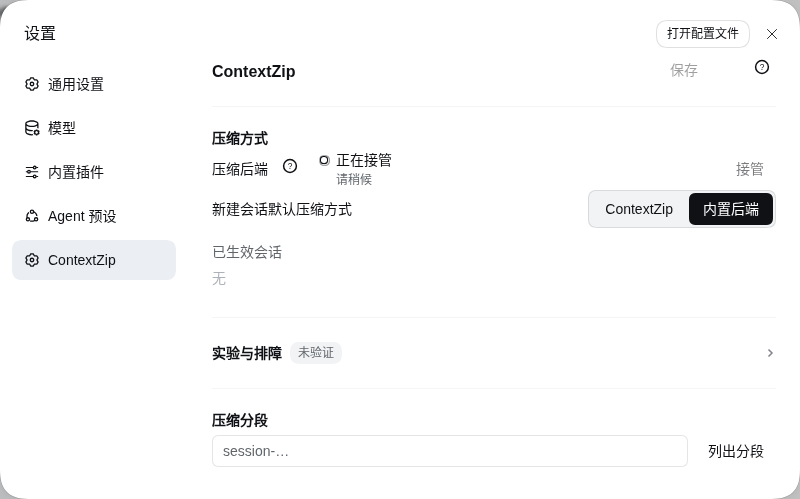
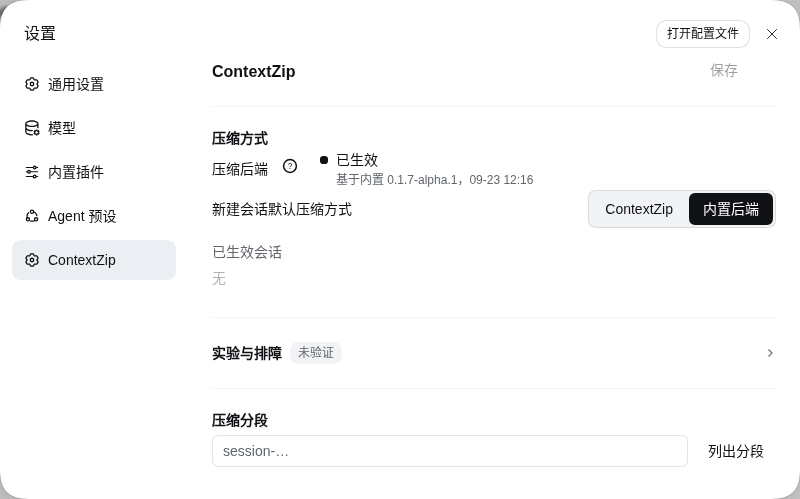
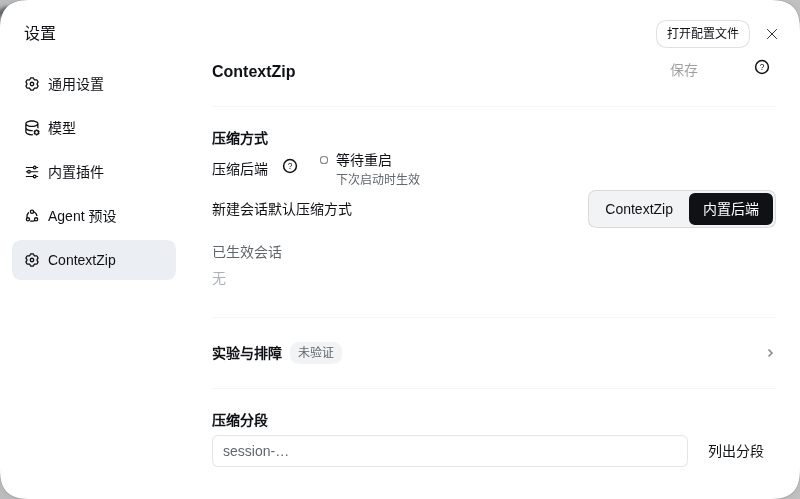
面板那一行长这样:左标题带问号气泡,中间主行加副行,右端按钮。共九态:未生效、正在接管、已生效、待更新、等待重启、被占用、接管不完整、状态未知、接管失败。其中「被占用」在面板上主行显示「未生效」,副行说明那个位置已被别的实现占着。
截图
面板「压缩后端」那一行的四种状态:
检索工具的输出与压缩后的五段式交接摘要:
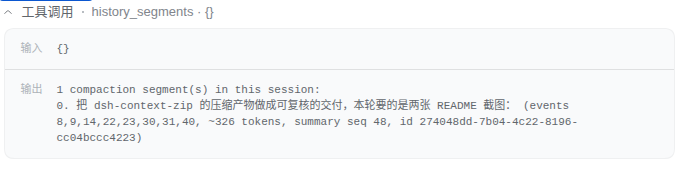
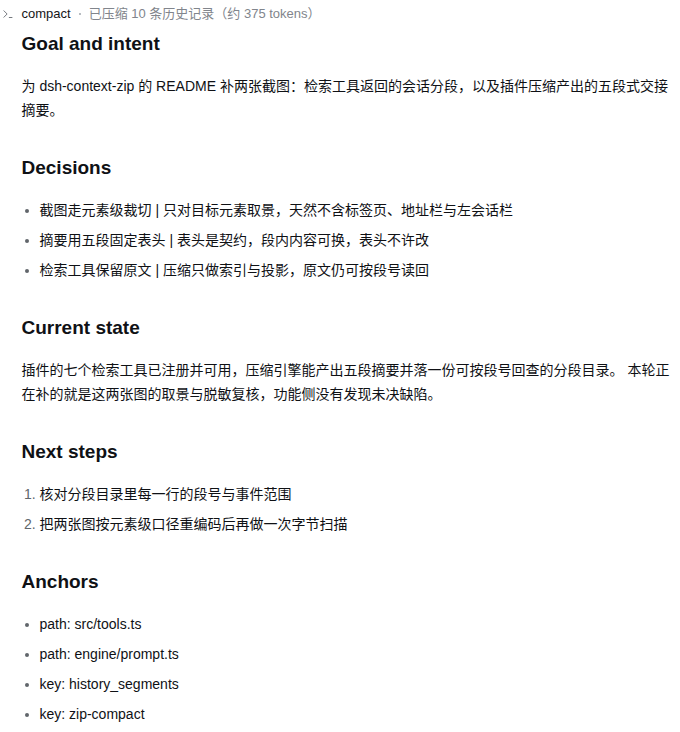
四态截图取自隐藏虚拟桌面里的一个临时 DSH 实例(临时 DSH_HOME、端口 3190),不是用户真机;后两张的会话内容由本地桩模型驱动,用来展示界面形态,不作为能力或效果证据。逐图来源与脱敏口径见 docs/截图清单.md。
兼容性与边界
- 宿主:DeepSeek Harness。
0.2.1起按engines.dsh判定(>=0.1.5-rc.2 <0.2.0-0 || >=0.2.0-rc.2 <0.3.0-0),更早的宿主按 12 条 peer 判定,两条路径覆盖的区间等价。实测通过的是0.1.5-rc.2、0.1.6-alpha.2、0.1.7-alpha.1、0.1.7-rc.1、0.2.0-rc.2与0.2.1-rc.2,其余版本未逐一实测。 - Node.js:
^22.19.0 || >=24.0.0(dsh-context-zip/package.json的engines)。 - peer 依赖由 profile 的
node_modules解析,不随本插件安装。 @deepseek-ai/schemastery:peer 下限^3.18.1,取的是已知能跑的最低版本。Schema.volatile()是 3.18.3 才有的 API,低于它的版本上插件照常压缩、照常读写行配置,只是设置页不会生成表单、设置写入走插件面板的配置编辑器;想要那张自动表单,需要 profile 那份 schemastery 升到 3.18.3。- 界面语言中英双语,面板文案两套,键集合一致。
- 只支持 DSH,不能独立运行。
redirect/是本地重定向包,沿用@deepseek-ai/dsh-compaction-basic包名把调用接到本插件。它不是官方包(private: true),安装器拒绝覆盖真实包。- 升级 DSH 之后重定向可能落后,用
--check确认并重跑安装刷新。 - 其余边界(节流效果未确立、会话名最长 60 秒更新、标题备忘录无容量上限、按会话覆盖表在面板上只读、安装器不留快照)见
docs/局限性与已知问题.md。
怎么自己验证
插件自带运行时检查,--installed 加 --deliverable 一档实测 1360 条全过。跑法与覆盖见 evidence/套件说明.md。
仓库布局
仓库根是发布包:README.md / README.en.md、本插件目录 dsh-context-zip/、文档 docs/、证据 evidence/、RELEASE-NOTES.md、LICENSE。完整导览见 docs/仓库布局.md,功能入口见 docs/。
用着还行的话
欢迎到 GitHub 点个 star,或者提 issue 说哪里不好用。
许可与致谢
MIT,许可全文见 LICENSE。运行环境是 DeepSeek Harness。与同类插件的对照(含本插件不如别人的地方)见 docs/同类插件对比.md。