
dsh-data-quality
v0.3.19
Published
Deterministic data profiling, cleaning, and verification for DeepSeek Harness: a ctx.dataQuality capability seam (Service Definition / local Provider / tool Consumers) with data_profile, data_clean, and data_verify model tools, a frozen cross-plugin verif

Maintainers
 perrylink
Readme
dsh-data-quality
Deterministic data profiling, cleaning, and verification for DeepSeek Harness.
- 1024 store channel:
npm i -g dsh1024once, thendsh1024 plugin --profile web add dsh-data-quality(counts toward the deepseek1024.com install ranking).





Deterministic data profiling, cleaning, and verification for DeepSeek Harness.
All computation is plain TypeScript in the harness process — the model never does the math. A ctx.dataQuality capability seam (Service Definition / local Provider / tool Consumers) exposes three model tools plus a frozen cross-plugin citation-checking contract.
English · 简体中文 · Español · Português · हिन्दी
📖 Ecosystem knowledge base — measured data, not marketing: plugin development guide · plugin-selection data · maintenance criteria.
⭐ 如果它帮到了你
这个插件是 DSH 插件家族的一员(40+ 个,全部 Apache-2.0)。如果你在用,给个 star —— 它不会解锁任何功能,但会让下一个人在搜索里更容易找到它。
English: part of a 40+ plugin family for DeepSeek Harness. If it is useful, a star helps the next person find it — nothing is gated behind it.
What is dsh-data-quality?
Deterministic data profiling, cleaning, and verification for DeepSeek Harness.
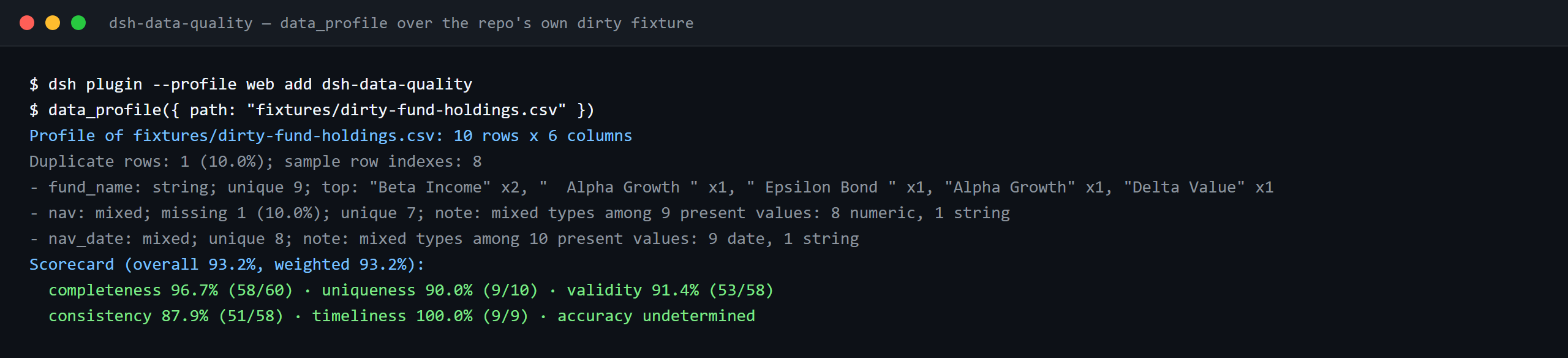

The same run, animated.
Comparison
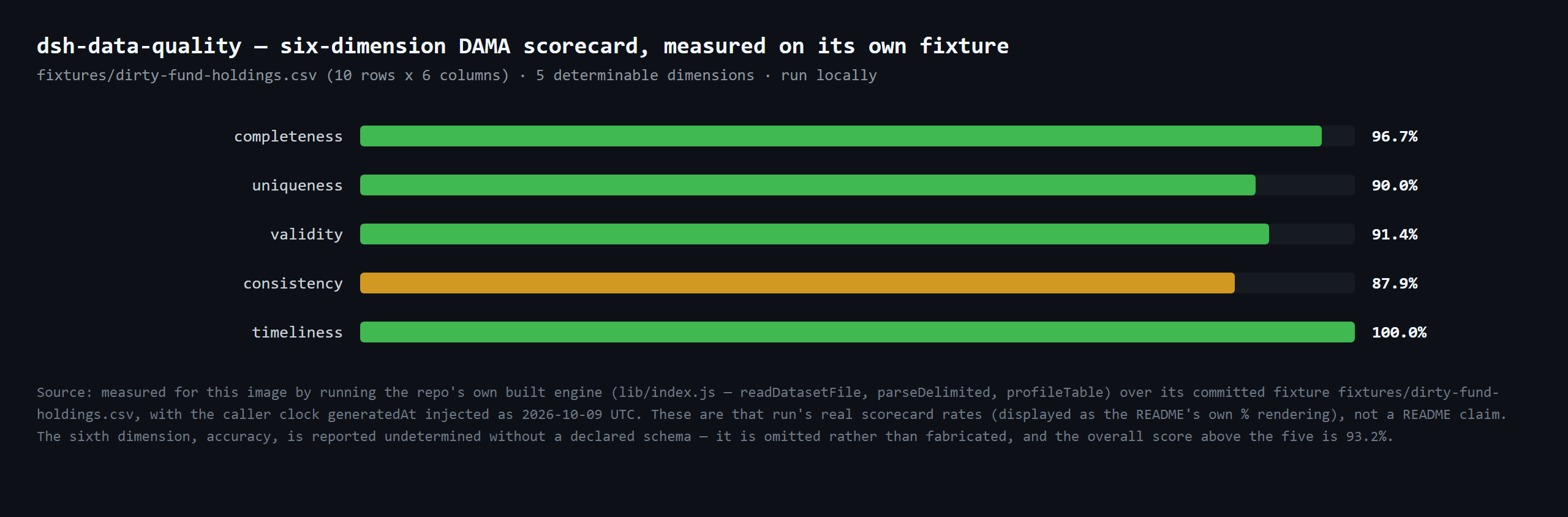
fixtures/dirty-fund-holdings.csv (10 rows x 6 columns) · 5 determinable dimensions · run locally
Compatibility
| Component | Version |
|---|---|
| DeepSeek Harness | dsh-v0.2.1-alpha.1 (adapted 2026-10-04): the peer range now admits the alpha.2 line; there Session.append's third parameter exists only for surface-eligible types and is a SurfaceIntent, so the audit gate still skips and the storage-domain report stays the durable copy. Verified 2026-09-24 (dual typecheck rulers + full test suite green). |
| Node.js | ^22.19.0 \|\| >=24.0.0 |
| Package manager | [email protected] |
| Platform | Windows / macOS / Linux (host-only plugin) |
What you get
ctx.dataQualityservice — a Cordis service other plugins may optionally consume (inject = ['dataQuality']). Besides the three dataset operations behind the tools, it implements the frozenverifyCitations(request)contract: verify that numbers/strings cited in a document match a dataset snapshot, with relative-tolerance numeric comparison andverified/mismatch/not-found/unverifiablestatuses.data_profiletool — dataset profiling: row/column counts, inferred column types (number/date/boolean/string/empty/mixed), missing rates, unique counts, numeric distributions (min/max/mean/median/p25/p75), IQR outlier counts, mixed-type suspicion notes, and full-table sha256 content-hash duplicate detection with the duplicate rate and a bounded sample of duplicate row indexes. Adds a deterministic DAMA six-dimension scorecard (completeness, uniqueness, validity, consistency, timeliness, accuracy — accuracy is reported undetermined without a declared schema, never fabricated). Optional deterministic systematic sampling for large files.data_cleantool — ordered declarative cleaning rules:dedupe(by column group),fill-missing(constant/mean/median/forward),coerce-type(number/date/boolean; failures counted and set to missing),normalize-unit(e.g. 万/亿 suffixes to base units),trim,map-values(enum mapping). Returns a per-rule audit log, a pre-delivery contract validation summary (dedupe before/after, uniqueness, non-null and type regressions), and a bounded preview; writes the cleaned dataset only whenoutputPathis given, and never overwrites the source.data_verifytool — declarative verification rules:not-null,unique,range,regex,enum,cross-column(e.g.startDate < endDate),freshness(date column within N days of a reference date). Per-rule pass/fail with capped failing-row evidence; an overall failure is a normalpassed: falseresult, not a tool error.data_reporttool — read persisted reports back from thedata_qualitystorage domain: by exactreportKey(path-safe validation, missing keys fail loud) or bykind(chronological listing). Returns the report envelope(s) — kind, dataset, timestamp, and the full stored report.format: htmlrenders one profile/clean report as a self-contained offline HTML document (inline CSS/JS, no external requests) with the DAMA six-dimension scorecard and the profile/cleaning summary tables.- Durable reports — every profile/clean/verify/citation run persists to the
data_qualitystorage domain (JSON backend), keyed by run timestamp plus a dataset-path fingerprint; the key is returned asreportKeyin tool results. Clean reports also persist the bounded preview and the contract summary, so every model-visible result is reconstructable from itsreportKey; each clean run additionally persists aclean-diffbefore/after profile report. - Session events — on hosts that can carry them safely, runs append
data-quality/profile/data-quality/clean/data-quality/verifyevents (with theignorablemarker where supported). On the published0.1.7-rc.2line (as on earlier rc lines) the append is skipped by design — the storage-domain report is always the durable copy (see "Known limitations").
Quick start
dsh plugin --profile web add github:PerryLink/dsh-data-qualitynpm channel
dsh plugin --profile web add dsh-data-qualityTarball channel (no build permission needed)
pnpm pack                                  # produces dsh-data-quality-<version>.tgz
dsh plugin --profile web add ./dsh-data-quality-<version>.tgz
Git channel
dsh plugin --profile web add github:YOUR_ORG/dsh-data-quality#<commit-sha>The first add fails because pnpm blocks the package's prepare build; copy the exact key pnpm printed into the profile's pnpm-workspace.yaml and re-run:
allowBuilds:
  'dsh-data-quality': true
Restart the profile after installing (bundles activate on restart). Then ask the agent, in a workspace containing a CSV:
Profile
holdings.csv, then clean it by trimming whitespace, deduplicating onfund_code, and normalizing theholding_valuecolumn's 万/亿 units; finally verifyfund_codeis unique and not null.
Install & uninstall
dsh plugin --profile web add dsh-data-quality      # install (npm) — or the forms above
dsh plugin --profile web remove dsh-data-quality   # uninstall
Configuration
All keys are optional (defaults shown); invalid values fail loudly at load. Every key is settable from cordis.yml (the bundle ships cordis.patch.yml with the same defaults).
| Key | Default | Description |
|---|---|---|
| enabled | true | Master switch; false mounts nothing at all. |
| maxRows | 200000 | Hard row cap per dataset load; larger inputs reject loudly (use the tool's sample parameter). |
| maxFileSizeMB | 64 | Hard file-size cap in MiB per dataset load. |
| defaultTolerance | 1e-9 | Default relative tolerance for numeric citation comparison when a citation omits tolerance. |
| evidenceRowLimit | 20 | Cap on failing-row evidence (verify) and preview rows (clean) in one result. |
| allowedExtensions | ['.csv', '.tsv', '.json', '.jsonl'] | Extensions accepted as datasets. |
| workspaceRoot | "" | Absolute root for SERVICE-level calls (e.g. verifyCitations) that carry no session workspace; empty = the harness process launch directory. Tool calls always use the session's workspace cwd. |
| storeReports | true | Persist run reports to the data_quality storage domain and return reportKey. |
| scorecardWeights | all 1 (equal) | Per-dimension weights (completeness/uniqueness/validity/consistency/timeliness/accuracy) for the scorecard's weighted overall total; each weight must be a non-negative number. |
Tools & surfaces
data_profile({ path, sample?, industryPreset? })
Profiles a workspace dataset. path is workspace-relative (.csv/.tsv/.json/.jsonl; JSON must be an array of flat objects). sample takes every ceil(N/sample)-th row for the column cards (deterministic; row counts stay exact). industryPreset (retail/saas/fund/real-estate/e-commerce/healthcare/logistics/manufacturing/energy) injects that industry's expected columns so the scorecard accuracy dimension becomes determinable; unknown ids fail loud. Returns the structured report — the duplicate rate, bounded duplicate-row indexes, numeric count/distinct distributions, file encoding (UTF-8 BOM + validity), and the weighted six-dimension DAMA scorecard — and renders a human-readable per-column summary plus scorecard.
data_clean({ path, rules, outputPath?, dryRun? })
Applies rules in array order, each seeing the previous rule's output. Rule reference:
| Rule | Extra fields | Semantics |
|---|---|---|
| dedupe | columns? | Remove rows whose key-column values duplicate an earlier row (first kept; all columns when omitted). |
| fill-missing | column, strategy, value? | Fill missing cells: constant (needs value), mean/median (numeric columns), forward (previous non-missing). |
| coerce-type | column, to | Coerce to number/date (ISO)/boolean; failures become missing and are counted in the log. |
| normalize-unit | column, factors | Strip a unit suffix and multiply ({"万": 10000, "亿": 100000000}); plain numerics convert too. |
| trim | columns? | Trim whitespace of string cells (all columns when omitted). |
| map-values | column, map, else? | Exact-match mapping; unmapped values stay (keep, default) or become missing. |
The source file is never overwritten. With outputPath the cleaned dataset is written there (workspace-confined, format by extension); without it the run is preview-only. With dryRun: true no file is written and nothing is persisted — the result returns the per-column cleaning plan and the expected contract/diffPreview. The result also carries a pre-delivery contract summary (dedupe before/after rows, uniqueness over the dedupe key or full rows, non-null regression for fill-missing columns, type regression for coerce-type columns, and the per-column decision trace), and a clean-diff before/after profile report is persisted to the storage domain.
data_report({ key?, kind?, format? })
Reads persisted reports back from the storage domain. Pass key (the exact reportKey a prior run returned) to fetch one report, or kind (profile/clean/clean-diff/verify/citations) to list every report of that kind chronologically; exactly one of key/kind is required. Malformed or missing keys fail loud. format: html (with key) renders the report as a self-contained offline HTML document — inline CSS/JS, no external requests, the DAMA six-dimension scorecard, and the profile/cleaning summary tables (profile/clean reports only).
data_verify({ path, rules, expectations? })
Evaluates verification rules. Rule reference:
| Rule | Extra fields | Semantics |
|---|---|---|
| not-null | column | Fail missing cells (null/empty/whitespace). |
| unique | columns | Fail every row whose key combination repeats (missing participates). |
| range | column, min?, max? | Fail missing/unparseable cells and values outside the inclusive bounds (at least one bound required). |
| regex | column, pattern, flags? | Fail missing or non-matching cells (full JS regex). |
| enum | column, values | Fail cells whose trimmed text is not listed. |
| cross-column | left, op, rightColumn?, value? | Compare per row: numeric when both sides parse, dates compare as epochs, strings only for ==/!= (exactly one of rightColumn/value). |
| freshness | column, maxAgeDays, asOf? | Fail dates older than maxAgeDays before asOf (default: now); unparseable/missing fails. |
expectations reconciles deterministic metrics against expected values: rowCount, columnSum, columnMean, uniqueCount, nullCount (each with column except rowCount, plus expected and an optional relative tolerance in [0, 1]). Each expectation yields passed plus actual/expected/tolerance; a mismatch is a normal passed: false verdict, never a tool error. Invalid metrics, missing columns, and out-of-range tolerances fail loud.
A missing cell fails every rule that reads it. Evidence is capped at evidenceRowLimit failing rows per rule.
ctx.dataQuality (for other plugins)
const result = await ctx.dataQuality.verifyCitations({
  dataset: 'holdings.csv',          // resolved against workspaceRoot
  citations: [
    { id: 'c1', path: 'rows[3].nav', value: 1.234, tolerance: 0.01 },
    { id: 'c2', path: 'summary.annualReturn', value: '12.34%' },
  ],
})
// result.results[i] = { id, status: 'verified' | 'mismatch' | 'not-found' | 'unverifiable', actual?, note? }
Locators walk the dataset document: CSV/TSV load as { columns, rows } (so rows[3].nav resolves), JSON is the parsed value, JSONL the array of parsed lines. Numbers compare with relative tolerance (|a-b| <= tolerance * max(|a|, |b|)); a CSV string cell that parses numerically compares as a number; strings compare exactly; incomparable type pairs are unverifiable. The service also exposes profileDataset / cleanDataset / verifyDataset (the same operations the tools call).
Permissions & data
- Reads workspace dataset files (allowlisted extensions only).
- Writes only: the
data_cleanoutput file (explicitoutputPath, workspace-confined, never the input) and reports in thedata_qualitystorage domain under the harness data directory. - No network, no credentials, no external processes — all parsing and statistics are in-process TypeScript.
- Reports may contain sample cell values from your datasets (bounded by
evidenceRowLimitand display truncation); the session log records tool arguments and results as usual.
Security boundaries
- Path confinement — dataset and output paths must resolve inside the session workspace (
verifyCitationsusesworkspaceRoot);..escapes and outside absolute paths reject, and both sides are normalized before comparison (Windows slash-safe). - Bounded work —
maxRows/maxFileSizeMBguards reject oversized inputs loudly; abort signals cancel long loads mid-stream. - No overwrite —
data_cleanrefuses anoutputPathequal to the input path. - Deterministic computation — same input, same output; the only clock is the one injected for
freshnessdefaults and report timestamps.
Known limitations
- Session events are adaptive. The published
0.1.7-rc.2line (like the earlier rc lines) has no plugin session-event registration surface and itsSession.appendcannot stamp theignorablemarker, so appending an unknowndata-quality/*type would make the session log unreadable on restore. The plugin therefore appends only when the host knows the vocabulary or supports theignorableappend flag; on the published line the storage-domain report is the durable record. - CSV dialect — comma/tab with RFC-4180 quoting, header row required, blank lines skipped, no delimiter auto-detection or comment lines.
- Type parsing is strict — numbers have no thousands separators; dates are
YYYY-MM-DD/YYYY/MM/DD/ ISO-like datetimes (UTC); booleans aretrue/false/yes/no/1/0. Everything else profiles asstring/mixed— clean it withcoerce-typewhen intended. - JSON must be tabular for the tools (array of flat objects);
verifyCitationswalks arbitrary JSON documents. - No ML anomaly detection, no PII masking, no databases, no SQL — rule-based suspicion notes only.
Development
pnpm install
pnpm run typecheck && pnpm run typecheck:ci && pnpm run typecheck:checkout && pnpm test && pnpm run build
pnpm run verify:self-contained && pnpm run verify:artifacts && pnpm run verify:readme-sync && pnpm pack- Tests run vitest against the REAL
Context/Session/ToolRuntime/storage domain from the 0.1.7-rc.2 peers (no hand-written service mocks) plus pure engine specs; every clean/verify rule has positive and negative cases, andverifyCitationscovers all four statuses. scripts/loader-runner.mjsboots the real Loader composition and executes the profile → clean → verify chain againstfixtures/without an API key.- Release:
node scripts/release.mjs <x.y.z>(never pushes; the tag triggersrelease.yml).
Topics
dsh · dsh-plugin · deepseek-harness · cordis · data-quality · data-cleaning · data-profiling · data-verification
Contributors
Thanks to everyone who has shaped this plugin.
- PerryLink — maintenance and releases (
0.1.2/0.1.3), peer-dependency upgrades, the npm version/downloads/CI badges, and recent fixes. - dsh-data-quality contributors — the initial scaffold, the
ctx.dataQualityseam and frozenverifyCitationscontract, the deterministic dataset layer and pure engines, thedata_qualitystorage-domain reports, the real-service vitest suite, the CI/compat/release workflows, and the five-language READMEs.
This repository has no public issue or pull request history yet; individual PR/issue numbers will be credited here as they arrive.
PerryLink DSH Plugin Family
This project is one of the 33 actively maintained DeepSeek Harness plugins from PerryLink — the roster is 42, of which 6 are frozen and 3 retired; every one keeps its row below, with the reason in the Status column. If this one helps you, the others likely will too:
| Plugin | One-liner | Status |
|---|---|---|
| dsh-auto-review | Second-model auto-review on the approval chain, fail-closed by default | |
| dsh-autotier | Automatic strong/cheap model-tier routing with deterministic risk guards and a /tier command | |
| dsh-background-agents | Durable background child agents with a Web UI sidebar, messaging and interrupt | 🚫 RETIRED — see the note above |
| dsh-budget | Cost governance for DeepSeek Harness: budgets, carbon, and latency in one panel. | 🧊 FROZEN — see the repo README |
| dsh-catalog | DSH Desktop Market standard catalog source for the PerryLink family | |
| dsh-cert-mcp | Read-only MCP server exposing the certification registry: grades, snapshots and five-dimension evidence | |
| dsh-checkpoint-rewind | Claude Code /rewind-equivalent: snapshots, session forks, one-shot restore | |
| dsh-claude-move | Migrate Claude Code sessions, memory, skills and CLAUDE.md into DSH | 🧊 FROZEN — see the repo README |
| dsh-click | Cross-platform native desktop control for DeepSeek Harness — Windows first. | |
| dsh-composer-history | Terminal-style input history for the web composer: arrows, Ctrl+R search | |
| dsh-data-quality | Dataset quality checks and citation cross-checks (the optional numeric bridge consumed here) | |
| dsh-defend | Prompt-injection, jailbreak, and secret-leak defense for DeepSeek Harness. | 🧊 FROZEN — see the repo README |
| dsh-doublecheck | Engineering-discipline guard: requirements grill, test gates, adversary review | |
| dsh-draw | Unified static-image generation routing for DeepSeek Harness. | 🧊 FROZEN — see the repo README |
| dsh-fast | Read-only performance diagnostics for DeepSeek Harness. | |
| dsh-fund-research | Deterministic research reports for Chinese public mutual funds | |
| dsh-github | GitHub PR/issues integration for DSH, every write gated by approval | |
| dsh-industry-research | Industry research orchestration that seals its deliverables through this plugin's ctx.researchReport.assemble | |
| dsh-laya | Laya typed decisions (noul/choice/score) as a first-class Cordis service and model-visible tools | |
| dsh-library | Local document knowledge base for DeepSeek Harness. | |
| dsh-local-ai | Local-model (Ollama) integration for DeepSeek Harness. | |
| dsh-lsp-actions | LSP diagnostics, formatting, completion, code actions and rename over language servers | |
| dsh-mask | PII masking middleware: anonymize at the model boundary, restore at the display layer | |
| dsh-mcp-panel | Read-only MCP runtime panel: /mcp command + Settings tab with status, tools and errors | |
| dsh-memento | Approval-gated cross-session memory: ctx.memory seam + SQLite + memory tool | 🧊 FROZEN — see the repo README |
| dsh-observe | OpenTelemetry and Langfuse observability exporter for DeepSeek Harness. | |
| dsh-output-styles | Claude Code outputStyles-equivalent runtime style switching | |
| dsh-permission-rules | Claude Code-style declarative allow/deny/ask permission rules with audit | |
| dsh-plugin-certification | Community certification registry with repro-checkable grades and badges | |
| dsh-plugin-doctor | Zero-dependency static + sandbox smoke detector for DSH plugins | |
| dsh-plugin-guide | Plugin-development knowledge base as an on-demand agent skill | |
| dsh-plugin-kit | Shared zero-runtime-dependency toolkit for the PerryLink DSH plugins | |
| dsh-plugin-upgrade | One-package, one-corridor-index plugin upgrade skill: routes a repository to the matching closed corridor card | |
| dsh-plugin-upgrade-015 | Merged 0.1.3-alpha.1 → 0.1.5-rc.1 upgrade corridor card plus a zero-dependency seam scanner | 🚫 RETIRED — corridors carried by dsh-plugin-upgrade |
| dsh-reach | Multi-channel approval/question bridge: WeChat/Telegram/Feishu, session console | 🧊 FROZEN — see the repo README |
| dsh-research-report | Verifiable research-report engine: content-addressed evidence ledger and sealed versions | |
| dsh-score | Multi-dimensional quality scoring for DeepSeek Harness plugins. | |
| dsh-session-pin | Pin sessions in the Web sidebar with durable ordering | 🚫 RETIRED — see the note above |
| dsh-session-sync | Cross-device session sync for DeepSeek Harness — a dedicated git mirror of your session store. | |
| dsh-skill-pack-security | Security-audit skill pack: secret scan, dependency and supply-chain review | |
| dsh-talk | Voice-first session loop for DeepSeek Harness: talk to it, hear it answer. | |
| dsh-team-rooms | Cross-session team rooms: shared message bus, task board and timeline | 🚫 RETIRED — see the note above |
| dsh-test-drive | Isolated install-and-smoke test drives for DeepSeek Harness plugins. | |
| dsh-ticktick | TickTick/Dida365 task bridge: session-header panel + 11 tools | |
| dsh-translate | Vendor parameter translation and deterministic JSON repair for DeepSeek Harness. | |