
dsh-dev-memory
v0.4.15
Published
Lightweight project memory library for DeepSeek Harness: markdown files, three tools, session-start retrieval. No Claude Code or extra skill required.

Maintainers
 markzero
Readme
dsh-dev-memory


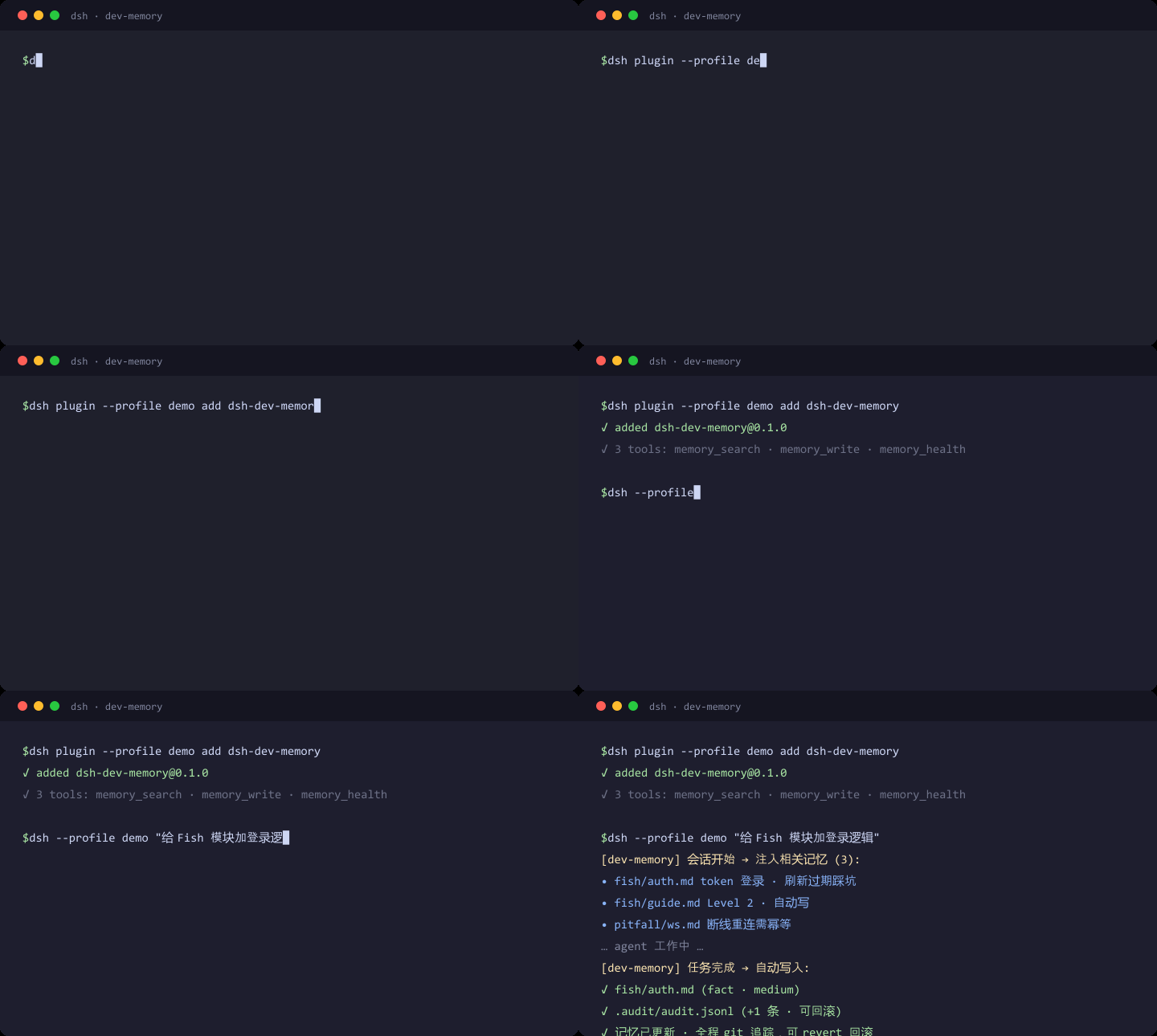
English readers: a complete English section follows the Chinese one — see English.
dsh-dev-memory 是给 DeepSeek Harness(DSH)用的
轻量项目记忆库:markdown 文件 + 三个工具 + 会话开始自动检索。它是独立的 DSH 插件,
不依赖 Claude Code,也 不依赖 本机再装一份 dev-memory 技能。
只在 该查时查 / 该更新时更新 / 该创建时创建:
- 该查时查 —— 会话开始时自动检索并注入相关记忆(token 有界);需要时也可主动调用
memory_search。 - 该更新时更新 —— goal 完成 / 会话空闲时提醒调用
memory_write沉淀增量。 - 该创建时创建 —— 新模块通过分类门后直接落盘。对话里调用
memory_write就是确认。
给别人用只需 DSH + 本插件:
dsh plugin --profile web add dsh-dev-memory然后重启 DSH。不必装技能,不必有 ~/.claude。
别人需要什么 / 不需要什么
| 需要 | 不需要 |
|---|---|
| Node.js ≥ 18 | Claude Code / ~/.claude |
| 已安装的 DSH(例如 dsh web) | 本机 ~/.dsh/skills/dev-memory 技能 |
| dsh plugin --profile <name> add dsh-dev-memory | 任何本仓库以外的脚本路径 |
插件包内自带运行时脚本:search-memory.mjs、memory-crud.mjs、health-check.mjs、utils.mjs。
安装
dsh plugin 会把剩余参数转发给 profile 目录里的 pnpm,因此等价于在 profile
目录里执行 pnpm add:
# 从 npm 安装(推荐给朋友)
dsh plugin --profile <name> add dsh-dev-memory

# 开发 / 本地安装
dsh plugin --profile <name> add <local-path>
安装后必须 重启 DSH。web profile 装的是
~/.dsh/profiles/web/node_modules/dsh-dev-memory 的静态副本,当前 GUI 进程不会热替换。
dsh --help/dsh plugin帮助里未提供github:前缀的安装形式,故此处只记录上两种经过验证的写法。
脚本从哪来
查 / 体检 / 索引同步仍是 spawn 那四个 .mjs,但 默认不必再指向别人的技能目录。
解析顺序(第一个目录里四个文件都在就用它):
- 配置里的
scriptsDir(非空且文件齐全) - 本机技能
~/.dsh/skills/dev-memory/scripts(你本机若还留着技能,继续用这份,行为不变) - 插件包内
scripts/(朋友没有技能时走这条)
本机技能和包内副本 不会被插件同时调用。技能若还在,只是说明书 / 人手动跑 CLI 的另一条通道,不是安装冲突。
记忆文件写在哪
记忆是普通 markdown,按工作区 slug 分目录。slug = 工作区路径把 :、\、/、_ 都换成 -。
空 memoryRoot 时自动选根:
- 若已有
~/.claude/projects/<slug>/memory(本机以前用 Claude / 旧技能留下的库)→ 继续用,零迁移 - 否则 →
~/.dsh/dev-memory/projects/<slug>/memory(纯 DSH,不依赖 Claude)
建议对记忆根 git init,方便回滚。所有 DSH profile 共用工作区注册表
~/.dsh/dev-memory/workspaces.json。会话开始按当前 cwd 自动登记。
设置页可以浏览别的工作区;浏览不会改变当前会话的写入目标。
配置
配置写在 cordis.patch.yml 的 config 段,随 profile 层挂载:
| 键 | 默认 | 含义 |
|---|---|---|
| memoryRoot | '' → 见上一节 | 显式记忆根。空则按 slug 自动选 Claude 旧库或 DSH 新库 |
| scriptsDir | '' → 技能脚本,否则包内副本 | 显式配置优先;空则按「脚本从哪来」解析 |
| maxInjectTokens | 1500 | 会话开始注入记忆的 token 预算 |
| autoWriteLevels | [2, 3] | 历史字段;对话里 memory_write 通过分类门就会落盘,不再按级别拦到设置页 |
| writeConfidenceMin | 'medium' | 写入的最低置信度(低于该档拒绝) |
| autoWrite | true | 新对话的自动更新默认值。关掉后仍在会话开始查询并注入,三个工具仍可用 |
设置页开关 = 新对话默认。输入栏「自动记忆」= 只改当前对话,存
~/.dsh/dev-memory/session-auto-write.json,不写进会话事件流。子会话继承父会话覆盖值。
对话里能看到什么
- 输入栏左侧「自动记忆」开关(
conversation.input.left)。 - 自动写盘进行中时,输入框上方出现「正在写入记忆 / 停止」,宽度与输入框相同
(
conversation.input.dock)。点停止只取消这一轮催写,不关自动记忆开关。 - 写盘中若用户消息进入排队:停掉催写、保留排队消息并叫醒,优先处理用户消息。
memory_search/memory_write/memory_health显示可折叠工具卡;本轮成功写入会在回答末尾出现「记忆变更」摘要。
三个工具
memory_search — 按需查询记忆
参数:query(必填)、top(可选,默认 5)。
返回 { query, terms, results: [{ file, score, confidence, matched, suggestedRead }] }。
{
  "query": "结算 金币",
  "top": 3
}
memory_write — 从结构化 proposal 写入记忆
参数 proposal 必填:module / category(fact | pitfall | open_question)/
confidence(low | medium | high)/ evidence(非空数组)/
draft(relPath + content),可选 moduleLevel。对话里调用就是确认。
{
  "proposal": {
    "module": "fishing/settlement",
    "category": "fact",
    "confidence": "high",
    "evidence": ["src/settlement.lua"],
    "draft": {
      "relPath": "modules/fishing/settlement.md",
      "content": "# 结算"
    }
  }
}
memory_health — 体检
无参数。返回 { summary, issues }(索引一致性 / 孤儿 / 断链等)。
完整示例见 examples/tool-calls.md。
工作原理
注入 & 写盘
- 会话开始:按工作区 目录名(不是完整 cwd 路径)检索 top-2 → 按
maxInjectTokens截断(整条命中保留)→agent.inject();无命中则跳过。此项 不受 自动记忆开关影响。 - 自动更新:该会话
autoWrite开,且 agent 变为 idle 时,用followup催一次memory_write。 写盘那一轮结束后不再跟;下一个用户回合才可再催。goalcomplete时注入边界提醒。 关掉自动记忆只停催写,不停会话开始查询,也不拦三个工具。
分类门
- 允许:
fact/pitfall/open_question。 changelog永不落盘。evidence为空拒绝;置信度低于writeConfidenceMin拒绝。
可回滚
每次落盘追加 <memoryRoot>/.audit/audit.jsonl。记忆根用 git 跟踪即可回滚。
架构
lib/
├── index.js        # HOST:工具、生命周期钩子、HTTP、工作区登记、脚本/记忆根解析
├── client.js       # CLIENT:设置面板、自动记忆开关、写盘状态条、工具卡
├── workspaces.js   # 全局工作区注册表
├── contract.js     # DSH 接口契约
├── service.js      # spawn 包内或技能目录的 CLI 脚本
├── orchestrator.js # 分类门 → 落盘 + 审计
├── classify.js     # 写前分类门
├── http.js         # same-origin 状态 / 配置 / 工作区路由
├── session-auto-write.js
└── audit.js
scripts/            # 包内运行时脚本(随 npm 发布)
已知限制
- 工作区选择器只改变面板浏览目标,不会把当前会话绑到另一个项目。
- 默认只显示已绑定工作区;「显示仅发现」才扫描未绑定记忆库。
- 从列表隐藏登记不会删除记忆文件。
- 这是 DSH 插件,不能脱离 DSH 单独跑。
- 本机若仍保留
dev-memory技能,模型偶尔可能既调插件工具又按技能说明书跑 CLI(不崩,可能重复检索)。
开发
node --test
node scripts/e2e-smoke.mjs
dsh plugin --profile <name> add <repo-root>
示例
License
MIT
English
dsh-dev-memory is a lightweight project memory library for
DeepSeek Harness (DSH): markdown files, three
tools, and automatic retrieval at session start. It is a standalone DSH plugin.
It does not require Claude Code and does not require a local dev-memory skill.
It queries when a session starts, updates at goal/idle boundaries, and
creates module memory when a memory_write proposal passes the classification
gate. Calling memory_write in the conversation is the confirmation.
Friends only need DSH + this plugin:
dsh plugin --profile web add dsh-dev-memoryThen restart DSH. No skill install, no ~/.claude.
What others need / do not need
| Required | Not required |
|---|---|
| Node.js ≥ 18 | Claude Code / ~/.claude |
| A working DSH install (e.g. dsh web) | ~/.dsh/skills/dev-memory |
| dsh plugin --profile <name> add dsh-dev-memory | Any extra script path on the author's machine |
The npm package ships search-memory.mjs, memory-crud.mjs, health-check.mjs, and utils.mjs.
Install
dsh plugin --profile <name> add dsh-dev-memory
dsh plugin --profile <name> add <local-path>
Restart DSH after install. The web profile copy is static
(~/.dsh/profiles/web/node_modules/dsh-dev-memory); the running GUI does not hot-swap.
Where scripts come from
Resolution order (first directory that contains all four .mjs files wins):
- Configured
scriptsDir - Local skill
~/.dsh/skills/dev-memory/scripts(kept if you already have the skill) - Packaged
scripts/(used when the skill is absent)
The plugin never runs both copies at once.
Where memory files go
Markdown, one directory per workspace slug (: \ / _ → -).
Empty memoryRoot:
- Keep
~/.claude/projects/<slug>/memoryif that library already exists (zero migration) - Otherwise write to
~/.dsh/dev-memory/projects/<slug>/memory(DSH-owned, no Claude)
git init the memory root for rollback. All profiles share
~/.dsh/dev-memory/workspaces.json. Browsing another workspace in settings never
changes the current conversation write target.
Configure
| Key | Default | Meaning |
|---|---|---|
| memoryRoot | '' → see above | Explicit root, or auto-select Claude library vs DSH library |
| scriptsDir | '' → skill, else bundled | Explicit config, else the resolution order above |
| maxInjectTokens | 1500 | Session-start inject budget |
| autoWriteLevels | [2, 3] | Legacy; conversation memory_write is not gated on the settings page |
| writeConfidenceMin | 'medium' | Minimum confidence to write |
| autoWrite | true | Default for new conversations. Session-start search and the three tools stay available when off |
Settings toggle = default for new chats. Composer “自动记忆” = current session only
(~/.dsh/dev-memory/session-auto-write.json). Child sessions inherit the parent override.
Conversation UI
- Composer-left “自动记忆” toggle.
- While a write-pass is running, a “正在写入记忆 / 停止” row sits above the composer, same width as the input card. Stop cancels that turn only; it does not turn auto-memory off.
- A queued user message preempts the write-pass and is kept (the driver is woken). Plugin followups do not preempt themselves.
- Tool cards for the three tools; a turn-tail summary after successful writes.
The three tools
memory_search (query, optional top), memory_write (structured proposal),
memory_health. See examples/tool-calls.md.
Allowed write categories: fact / pitfall / open_question. changelog is never
written. Empty evidence is rejected.
Session-start inject uses the workspace directory name, not the raw cwd path, and
is not gated by auto-memory. Idle followup write-pass reminders are.
Known limitations
- The workspace selector does not rebind the live write root.
- Hiding a registry row never deletes memory files.
- This plugin cannot run without DSH.
- If the optional skill remains installed, the model may occasionally use both the plugin tools and the skill CLI (harmless duplication, not an install clash).
Development
node --test
node scripts/e2e-smoke.mjs
dsh plugin --profile <name> add <repo-root>
License
MIT