
dsh-diagram
v0.6.0
Published
Turn articles in DeepSeek Harness into editable Excalidraw canvases

Maintainers
 hanzhangz
Readme
dsh-diagram
English | 简体中文



把 DSH 里读过的文章,变成可以继续修改、保存和导出的图。
这是 DeepSeek Harness(DSH)Web 的画布插件。Agent 先整理图表,你在同一会话中用 Excalidraw 修改文字和布局;不必把结果搬到另一个应用里重画。
已有 DSH Web 的用户,在终端安装:
npx -y @deepseek-ai/[email protected] plugin --profile web add [email protected]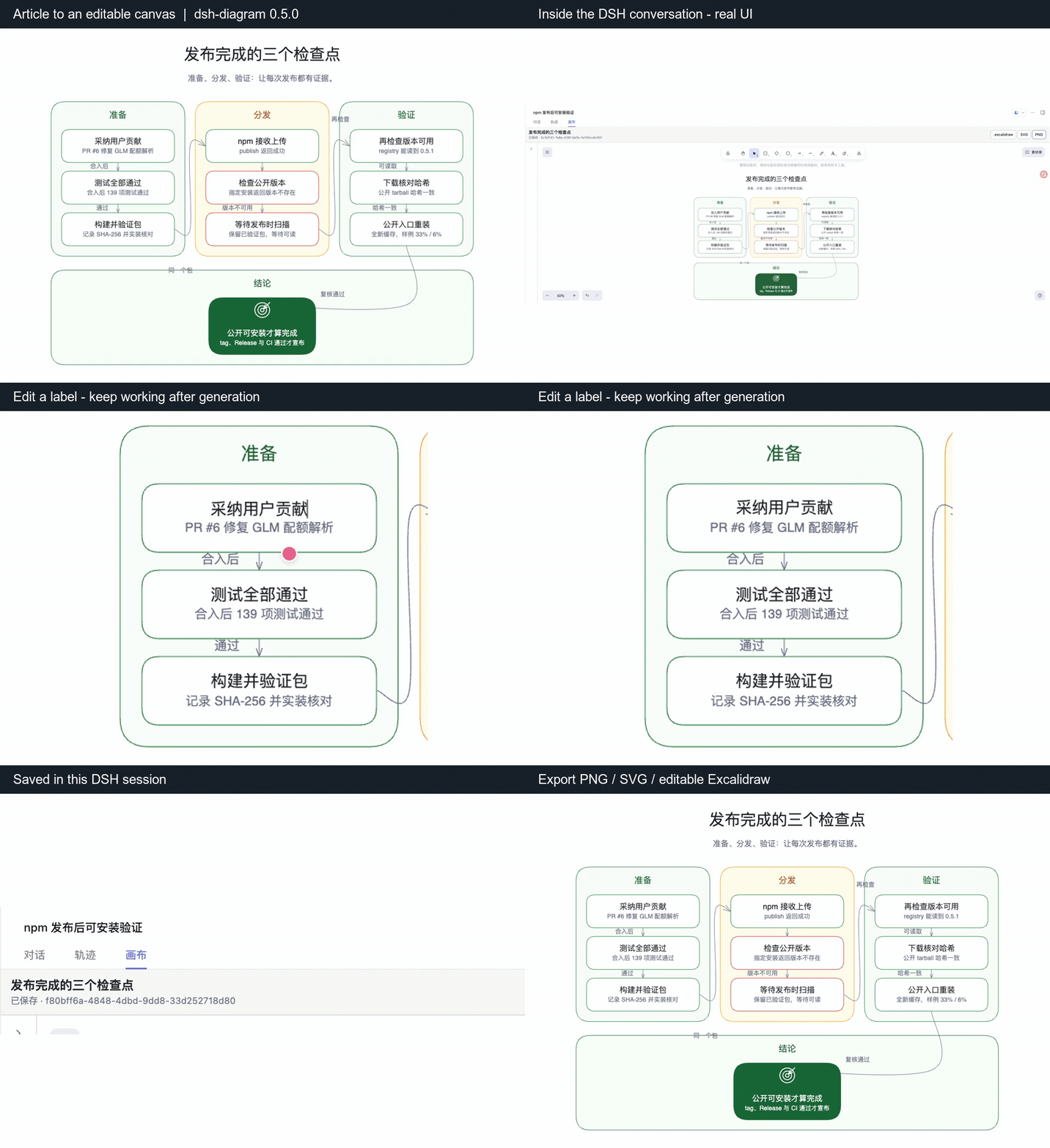
dsh-diagram 0.5.0 的真实操作。 展示文字修改、保存及实际导出;片段经过裁切,不含模型生成等待。
先完成一次试用
重启 DSH Web,在会话中提供一段文章内容,输入 / 选择 canvas-diagram,然后发送:
把上面的文章整理为一张图,只保留三个主要步骤,每个节点用短句。
请使用画布,我需要继续修改和导出。
打开顶部“画布”标签,改一处文字,等到“已保存”,再点 PNG 导出。找不到入口时,先看快速安装和常见问题。尚未使用 DSH?先按 DSH 官方说明完成宿主与模型配置,再安装此插件。
为什么留在 DSH 里画?
- 沿用文章上下文。 文章已在当前对话中,直接让 Agent 整理成图;插件本身不抓取网页。
- 生成后继续改。 在 Excalidraw 中调整文字、节点和布局,自动保存到当前会话。
- 带走可继续使用的结果。 导出 PNG/SVG 用于分享,或导出
.excalidraw继续编辑。要让 Agent 理解手动修改,请先让它读取画布。
一个实际导出结果
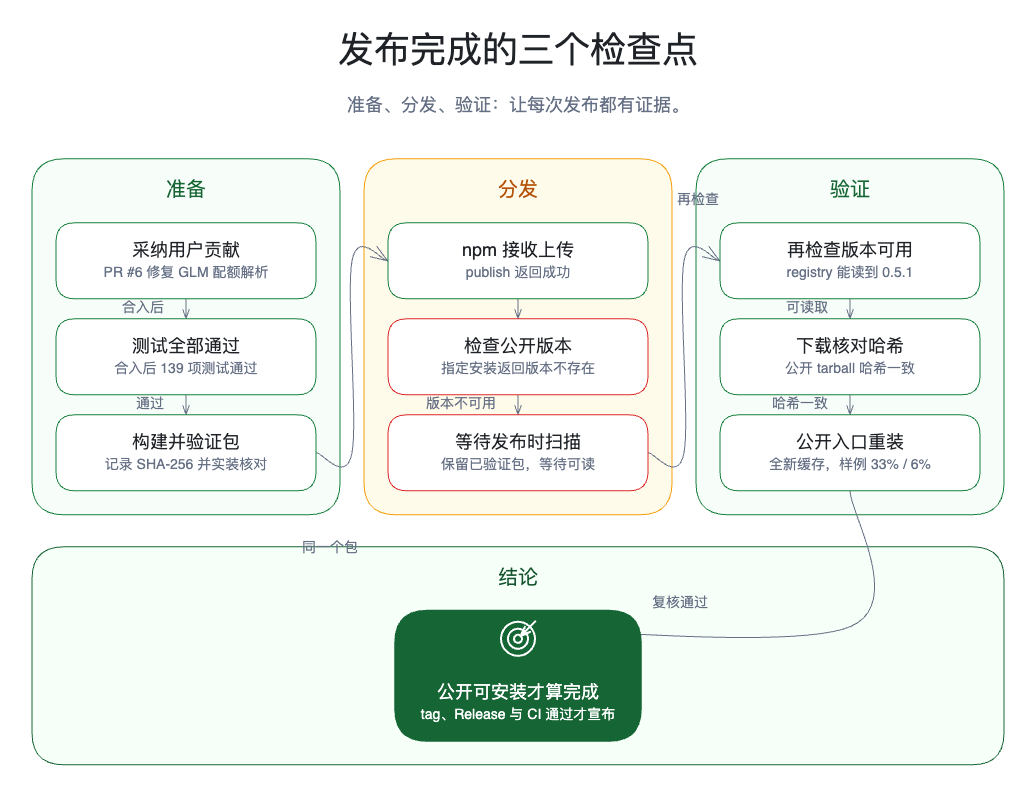
这张三阶段报告看板来自一次真实发布复盘。下图由已发布的 0.5.0 生成,在画布中手动调整后导出,不是界面模型图。点击查看大图。
0.6.0 新增:先看分类全貌,再查完整明细
较大的分类树可以生成可编辑的 总览+完整明细。总览中每根细条对应一个末级条目,明细保留全部名称和说明;在画布中点击「分类总览」「阅读明细」,即可切换阅读位置,避免把全部文字缩进一屏。
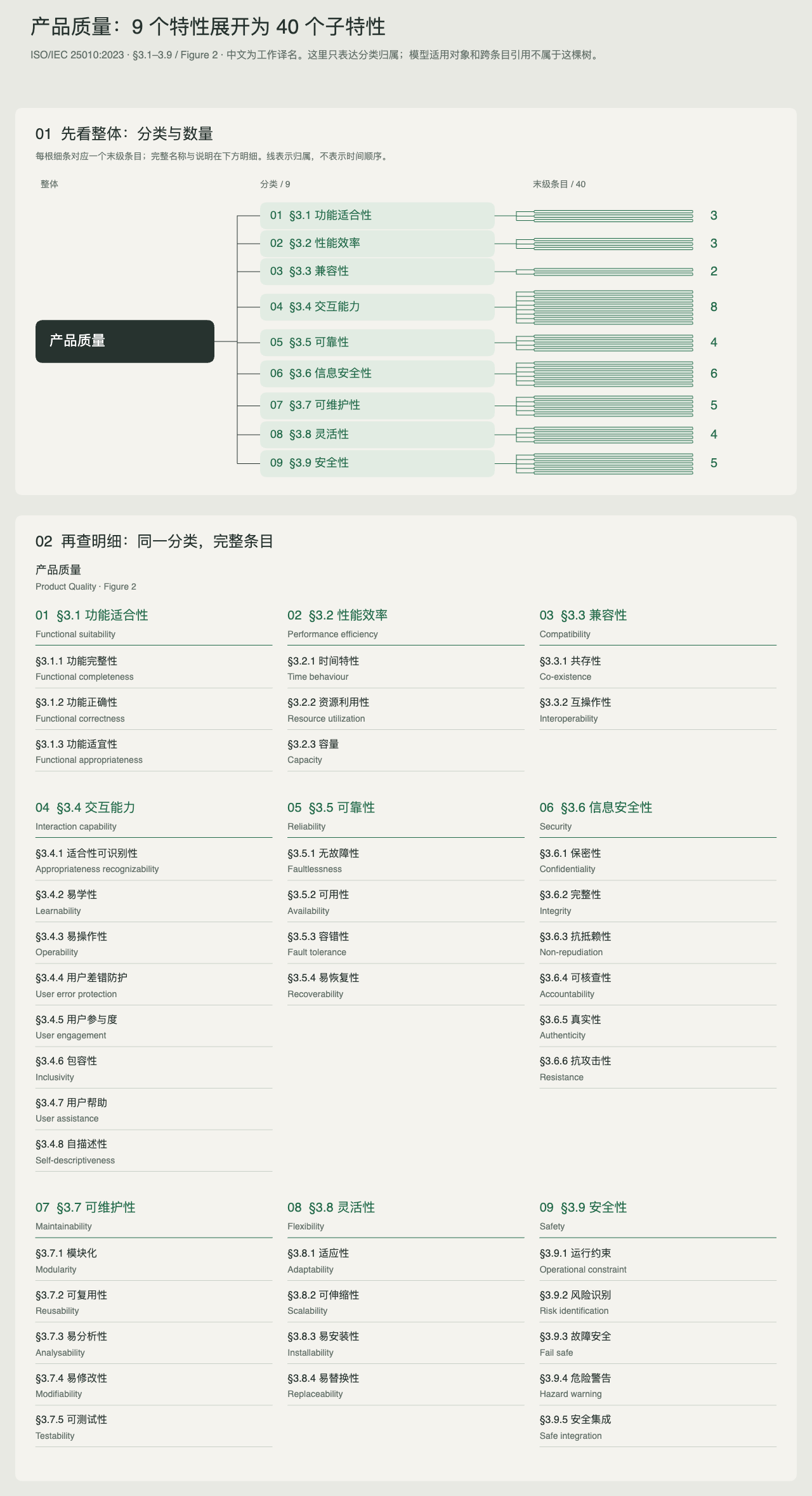
上图是从固定的 ISO/IEC 25010:2023 Figure 2 分类输入生成的原生画布导出:50 个节点、49 条关系。它展示确定性渲染,不代表已自动转换整份 PDF;中文为工作译名。
选择 /canvas-diagram 后,可以这样说:
把上面的分类内容生成可编辑的总览和完整明细。
仅在原文是“一个根→分类→末级条目”时,使用 diagram_create,
设置 kind: hierarchy、composition: atlas,保留全部名称、说明和关系。
如果存在交叉关系或更多层级,请换合适图型,不要删掉关系来套版式。
适用边界: 默认清晰风格、无分组的三层分类树。循环、多父节点、更深层级及没有条目的分类会被拒绝。手动修改后的重复标签与数量不会自动同步,连线可以编辑但不会自动重新布局;已有保存画布保持原样。
快速安装
前置条件:
- DeepSeek Harness
0.1.5-rc.1(最新版);0.1.5-rc.2、0.1.2-rc.1同样经过真实安装验证。DSH0.1.1-rc.2及更早版本请使用 dsh-diagram0.4.0 - Node.js
^22.19.0或>=24.0.0 PATH中可用的 pnpm>=10(DSH 的插件命令会把包管理交给 pnpm)- DSH Web 绑定
127.0.0.1
DeepSeek Harness 默认不会安装全局 dsh 命令,官方启动方式是通过 npx。满足前置条件的机器都可以直接执行:
npx -y @deepseek-ai/[email protected] plugin --profile web add [email protected]
npx -y @deepseek-ai/[email protected] --profile web --dump-config
npx -y @deepseek-ai/[email protected] web
配置输出中应出现:
# == dsh-diagram
- id: diagram
  name: dsh-diagram
如果 DSH Web 已经在运行,添加或更新插件后需要重启。打开一个已有会话后,顶部应出现“画布”标签。
从 DSH 源码运行
在与受支持发行版 API 匹配的 DeepSeek Harness 源码目录执行相同命令,前缀改为 pnpm dsh:
pnpm dsh plugin --profile web add [email protected]
pnpm dsh --profile web --dump-config
pnpm dsh web
如果 dsh 已在 PATH 中
如果你全局安装了 CLI 或配置了 shell alias,短形式效果相同:
dsh plugin --profile web add [email protected]
dsh --profile web --dump-config
dsh web
后文各节以短形式 dsh 书写;请按你实际的启动方式替换为 npx -y @deepseek-ai/[email protected] 或 pnpm dsh 前缀。
创建第一张图
打开已经包含文章内容的 DSH 会话,或先让 Agent 使用 DSH 现有的文件或 Web 工具读取文章。
在输入框敲
/选择 canvas-diagram——插件自带这个 skill,不需要记住任何工具名。「把这篇文章画成架构图」这类自然说法也会自动路由到画布。显式提示同样有效:为这篇文章提炼一张清晰的主图。选择最合适的 diagram 类型,调用 diagram_create,标题和节点文字保持简洁。如需本文演示的编辑式手绘风格,明确提出即可:
把这篇文章做成一张可编辑的 sketchnote 图,只给关键概念使用语义图标。工具执行完成后,点击会话顶部的“画布”。
直接修改画布。“已保存”表示 Host 已完成持久化写入。
导出结果;如果希望 Agent 继续处理手工修改后的内容,先让它调用
diagram_read。
支持报告图、流程图、架构图、时间线、层级图、对比图和关系图。可以要求 sketchnote 手绘风格,或保留默认的 clean 清晰风格。
插件增加了什么
| 界面或能力 | 行为 |
| --- | --- |
| diagram_create | 根据紧凑的语义描述,为当前 Agent Session 创建 diagram。visualStyle: "sketchnote" 启用可选手绘编译器;受控 icon 会编译成可编辑原生图元,而不是图片。 |
| diagram_read | 把当前可编辑 scene 的受限摘要读取到正常对话记录中。 |
| canvas-diagram skill | 内置中英双语路由入口:可在输入框 / 菜单中选择,泛化的图表请求也会自动命中,无需在提示里点名工具。 |
| 对话内嵌预览 | diagram_create 之后,对话流中出现一张预览卡片,始终以静态 SVG 展示该图表的当前内容(含画布后续编辑)。 |
| “画布”标签 | 只在用户打开时加载 Excalidraw 编辑器,不进入普通聊天首屏启动路径。 |
| Diagram 列表 | 可在桌面端折叠,窄屏改为选择器。 |
| 自动保存 | 去抖持久化、revision 冲突保护和当前浏览器标签内的待保存草稿恢复。 |
| 导出 | 下载 .excalidraw、SVG 或 PNG 文件。 |
插件不会抓取文章,也不会向任意网站注入 UI。文章内容仍由 DSH 对话、文件工具或 Web 工具取得。
兼容性
| 项目 | 0.6.0 支持范围 |
| --- | --- |
| DeepSeek Harness | 0.1.5-rc.1、0.1.5-rc.2、0.1.2-rc.1(更早的 DSH 请用 [email protected]) |
| Profile | web |
| Web 绑定地址 | 仅 127.0.0.1 |
| Node.js | ^22.19.0 或 >=24.0.0 |
| 编辑器 | Excalidraw 0.18.1 |
| 存储 | 插件独立的 DSH storage-domain sidecar |
| 安装产物 | 预构建 npm 包,或带 SHA-256 校验值的 GitHub Release |
npm 包没有 install lifecycle script。安装只会把 bundle 加入指定的 DSH profile,不会现场编译,也不会修改 DeepSeek Harness 源码。
管理安装
更新
npx -y @deepseek-ai/[email protected] plugin --profile web update [email protected]更新后重启 DSH Web。
安装最新公开 GitHub Release 的精确产物
Release 页面提供同一份预构建 tarball 及其 SHA-256 校验值:
dsh plugin --profile web add \
  https://github.com/hanzhangzzz/dsh-diagram/releases/download/v0.6.0/dsh-diagram-0.6.0.tgz
校验值和版本说明见 v0.6.0。
移除
dsh plugin --profile web remove dsh-diagram移除 bundle 不会删除已保存的 diagram sidecar 数据。重新安装后,同一个 Session 身份仍可读取这些数据。
数据、安全与限制
- Excalidraw scene 是当前文档;创建时的语义描述只保留为来源记录。
- Diagram 绑定 Session id 与
{createdAt, cwd}生命周期指纹;复用的 Session id 无法读取旧数据。 - Session fork 和 Session export 不复制或携带 diagram sidecar。
- Editor 资源与字体均由 bundle 自托管,画布不依赖外部 CDN。
- Host 会在持久化前校验静态路径、RPC 请求体、请求来源、Session 归属和 scene 内容。
- 当前版本拒绝 image、iframe、embeddable、外部 link 和非空 binary files。
- 默认每个 scene 最多 1 MiB,全部 diagram 记录合计最多 64 MiB;元素数、文字、diagram 条数和字节限制均显式配置在
cordis.patch.yml。 - DSH Web 绑定
0.0.0.0时插件会拒绝加载;当前版本不把画布 RPC 暴露到局域网。
常见问题
刚发布的版本没有装上?
pnpm 11 的 minimumReleaseAge 默认会排除发布不满 24 小时的版本。发布当天请指定精确版本,不要依赖 @latest;上面的试用命令已经固定到演示使用的 0.6.0。
为什么没有“画布”标签?
确认插件安装到了 web profile,--dump-config 输出包含上面的 dsh-diagram 配置块,并在安装后重启了 DSH Web。
为什么 Agent 写了 SVG 或 Mermaid 文件,而不是用画布?
模型会在会话内所有工具和工作区 skill 中自主选择。插件自带 canvas-diagram skill,泛化的图表请求通常会自动路由到画布;如果工作区里存在描述更匹配的 skill 抢走了请求,在 / 菜单里选择 canvas-diagram,或明确点名画布——例如「调用 diagram_create,我要在画布标签里编辑结果」。
为什么 Agent 不知道我手工修改了画布?
手工修改不会静默注入模型上下文。明确要求 Agent 调用 diagram_read,结果才会写入正常对话记录。
插件能直接抓取网页文章吗?
不能。先让 DSH 通过对话、文件工具或 Web 工具取得内容,再要求生成 diagram。
为什么使用 0.0.0.0 会启动失败?
当前版本的画布 RPC 不面向局域网暴露。除非 DSH Web 物理绑定 127.0.0.1,否则插件会失败关闭。
出现 revision 冲突怎么办?
编辑器会保留本地稿。如果需要保留两个版本,先“导出本地稿”,再选择“重新载入服务器版本”。
为什么导出 SVG 时控制台可能出现字体 fallback 日志?
在严格 CSP 下,Excalidraw 可能从 glyph subsetting 回退到内嵌完整的自托管字体。导出的 SVG 仍然自包含;插件不会为了消除日志开启 unsafe-eval。
从源码构建
git clone https://github.com/hanzhangzzz/dsh-diagram.git
cd dsh-diagram
pnpm install --frozen-lockfile
pnpm run bundle
pnpm pack
然后从 DeepSeek Harness 源码目录安装生成的 tarball:
cd /path/to/deepseek-harness
pnpm dsh plugin --profile web add /absolute/path/to/dsh-diagram-VERSION.tgz
pnpm dsh --profile web --dump-config
pnpm dsh web
开发检查:
pnpm run typecheck
pnpm run test
pnpm run bundle
pnpm pack --json
pnpm run smoke:dsh-install
每个可安装的开发提交都必须使用新的预发布版本,禁止修改代码后继续以旧版本号重新打包。公开发布前只打包一次,并从上一公开版本通过真实 DSH profile 更新链路更新到这一个确定的 tarball:
pnpm run smoke:dsh-install -- \
  --tarball /absolute/path/to/dsh-diagram-VERSION.tgz \
  --upgrade-from PREVIOUS_PUBLIC_VERSION
该验证不会发布候选包,但会覆盖客户端更新机制以及更新前、更新后的两次 Web 启动。npm @latest 的 registry 发现能力在版本公开发布后另行验证。
产品和实现决策见 DESIGN.md。
参与贡献
欢迎通过 GitHub Issues 报告问题或提交范围明确的改进。如果它改善了你的文章配图流程,可以给仓库一个 Star,让更多 DSH 用户找到它。
许可证
插件自有代码使用 MIT License。发布包内嵌的 JavaScript 与自托管字体许可见 THIRD_PARTY_NOTICES.md 和 third_party_licenses/。
贡献者可运行 pnpm review:atlas,打开 /tests/visual/atlas.html 做确定性对照;添加 ?case=release 可查看第二个主题。