
dsh-emotion-pet
v0.1.6
Published
Emotion Ball pet dock for the DeepSeek Harness Web composer
Downloads
1,123

Maintainers
 kenvie
Readme
Emotion Pet for DeepSeek Harness
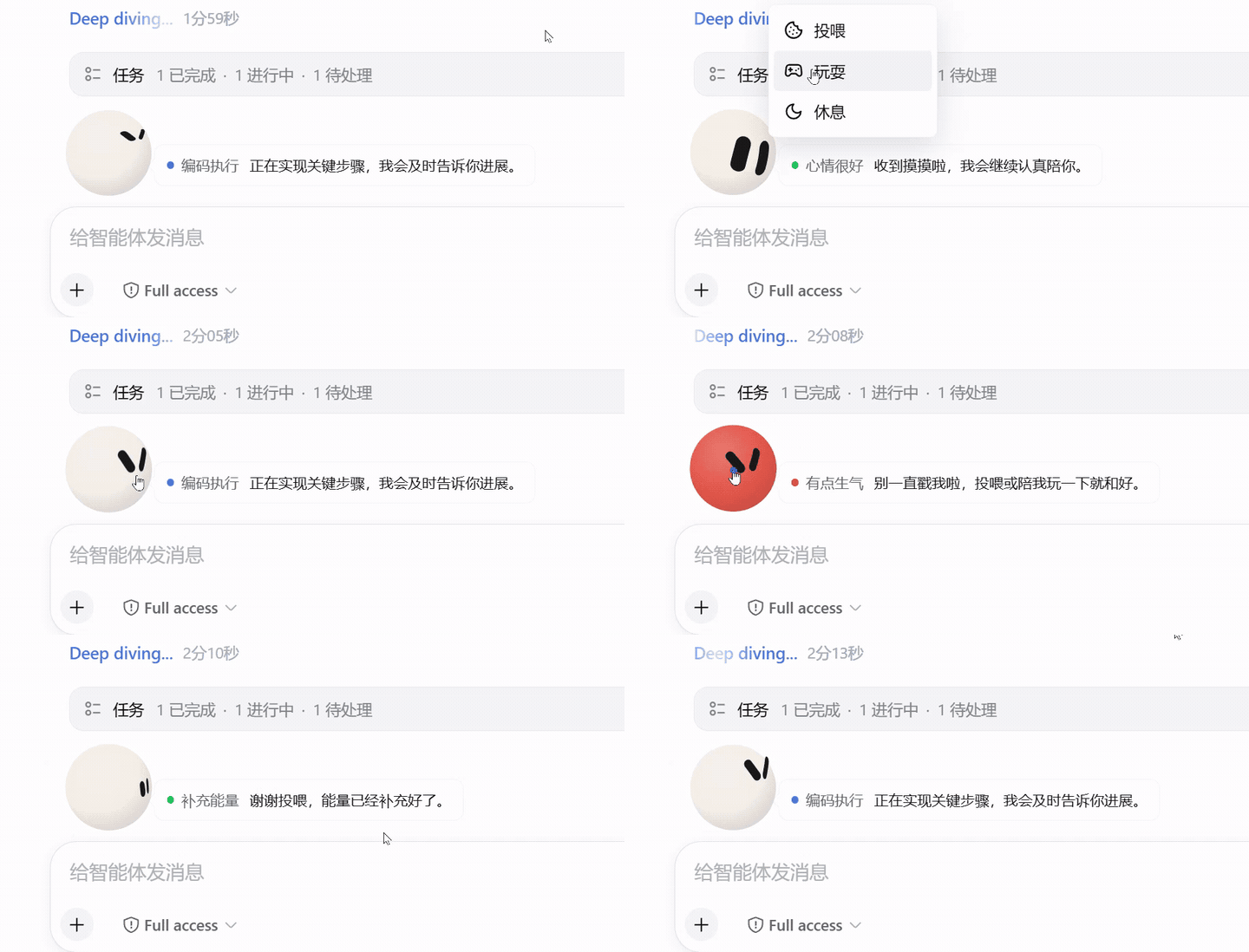
点击预览可打开完整效果视频。
Emotion Pet 是一个陪伴 DeepSeek Harness Web 会话的动态宠物插件,可停留在输入框左上方,也可缩小后跟随对话运行状态。它完整集成了 Emotion Ball 的 32 个表情,会根据 Agent 当前状态展示接收任务、思考、检索、编码、回复、等待确认、完成和错误等表情,并通过视线、弹跳、自旋和彩带等动画陪伴任务过程。
本插件采用了 Emotion Ball 的 SVG 表情、表情配置和动画引擎,并针对 DeepSeek Harness 的会话状态与输入区域进行了集成。
功能
- 根据 Agent 状态自动切换接收、思考、检索、编码、回复、等待、完成和错误表情
- 新任务开始时随机轮换接收、疑惑、困惑、惊讶和害羞表情
- 缺少信息时短暂失落或慌张;等待审批、会话终止时展示对应状态
- 长时间没有任务时依次进入发呆、疲惫和休眠,点击宠物即可苏醒
- 同一工作阶段自动轮换兼容表情,避免长时间保持同一姿态
- 输入区大球的眼睛会跟随鼠标位置,并保留眨眼、呼吸、巡视等待机动画
- 左键点击宠物进行摸摸互动
- 右键打开互动菜单,可选择投喂、玩耍、休息或唤醒
- 右键菜单可切换圆润、三角和宝石形状,并选择预设或自定义颜色
- “随对话”提供持久化开关,启用后在任务运行时缩成小球,跟随新版“深度求索中 / Deep diving”可见内容行
- 对话内小球不跟随鼠标,会按接收、思考、检索、编码和回复等阶段展示表情与忙碌动画
- 任务结束后小球自动返回输入区,不影响下一次互动或菜单操作
- “关于”二级菜单提供插件简介和 GitHub 开源地址
- 休息状态会在新任务开始时自动结束
- 支持明暗主题、窄屏布局、键盘菜单和减少动态效果设置
使用前提
- 已安装 DeepSeek Harness Web、官方 DeepSeek Harness Desktop,或 DSH Desktop
- Emotion Pet 0.1.6 面向 Harness 0.2.1-rc.3 起的 0.2.x 接口,支持官方 Desktop 0.2.1-rc.5 的运行状态行;不再支持旧版会话接口
- 浏览器版可以在终端中使用
dsh命令;桌面版通过应用内的插件管理入口安装 - 使用包含 Web 界面的 Profile,例如默认的
web
在 DeepSeek Harness Web 中使用
将插件安装到默认 Web Profile:
dsh plugin --profile web add dsh-emotion-pet启动 DeepSeek Harness Web:
dsh --profile web终端显示 dsh web: 地址后,在浏览器中打开该地址。宠物会出现在会话输入框正上方。
在 Desktop 中使用
官方 DeepSeek Harness Desktop 使用 ~/.dsh/profiles/desktop,在应用内的插件管理页安装并启用 dsh-emotion-pet,按提示重启应用。普通终端的 --profile web 只管理 Web 环境,不会修改官方 Desktop。
DSH Desktop 复用 Harness Web 界面和插件系统,Emotion Pet 使用同一个安装包。
在应用内打开插件管理页,使用安装入口输入 dsh-emotion-pet,并启用该插件。需要安装尚未发布的本地版本时,输入下文生成的 .tgz 文件的绝对路径。操作结果提示需要重启时,选择 Harness → 重启 Harness,再打开已有会话或选择工作区创建会话。
Desktop 默认将插件放在自己的 harness/profiles/web 下。Windows 正式版的数据目录为 %APPDATA%/dsh-desktop,源码开发版默认为 %APPDATA%/dsh-desktop-dev,开发启动参数可以覆盖该目录。普通终端的默认 DSH_HOME 与 Desktop 不同,不能仅靠 --profile web 将插件安装到 Desktop;优先使用应用内安装入口。
安全模式会屏蔽第三方插件。若旧版 Emotion Pet 导致启动或渲染失败,可进入安全模式处理旧插件,再返回正常模式安装新包。
形状、颜色、“跟随表情”和“随对话”设置保存在当前页面的 localStorage 中,Web 与 Desktop 各自保存。
从源码构建与本地安装
在本项目目录运行:
pnpm install --frozen-lockfile
pnpm run pack:plugin
命令会完成类型检查、测试和构建,生成 dsh-emotion-pet-0.1.6.tgz。在 Harness 或 Desktop 的插件管理页输入该文件的绝对路径即可安装;Web 命令行也可使用:
dsh plugin --profile web add "D:/Projects/emotionPet/dsh-emotion-pet-0.1.6.tgz"路径按实际位置调整。本地打包不会发布 npm,发布前直接从 npm 安装仍会获得旧版本。
互动方式
- 移动鼠标:输入区大球的视线会跟随指针,对话内小球专注展示任务状态
- 左键点击宠物:摸摸宠物并触发开心弹跳
- 连续快速点击:宠物会生气;投喂或玩耍后恢复,不会影响任务输入和发送
- 右键点击宠物:打开投喂、玩耍和休息菜单
- 形状和颜色:在右键菜单底部切换外观,选择会保存在当前浏览器
- 随对话:任务运行时缩小到“深度求索中 / Deep diving”内容行左侧,与状态文字对齐;状态行隐藏或任务结束后自动回到输入区
- 关于:悬停后查看插件简介,并可在新标签页打开 GitHub 开源主页
- Shift + F10:使用键盘打开宠物菜单
- 投喂:补充能量并触发彩带效果
- 玩耍:触发旋转和开心表情,彩带沿多个不同角度的轨道交错展开
- 休息:保持睡眠状态,点击宠物或右键选择唤醒;开始新任务时也会自动醒来
更新
更新到 npm 上的最新版本:
dsh plugin --profile web update dsh-emotion-pet --latest在 DSH Desktop 中,从插件管理页更新 Emotion Pet,并按操作结果提示重启 Harness;尚未发布的版本使用本地 .tgz 安装。
更新后重启 Web Profile,并在浏览器中刷新页面:
dsh web如果浏览器仍显示旧版本,可使用 Ctrl + F5 强制刷新。
卸载
dsh plugin --profile web remove dsh-emotion-pet在 DSH Desktop 中,从应用内插件管理页停用或移除 Emotion Pet,并按提示重启 Harness。
重启对应 Profile 后,插件会从 Web 界面移除。
常见问题
安装后没有看到宠物
确认插件已经加入当前 Profile:
dsh --profile web --dump-config输出中应包含 dsh-emotion-pet。然后重启 Profile,并强制刷新浏览器页面。
在 Desktop 中,请在应用内插件管理页确认插件已安装、启用且版本为 0.1.6 或更新版本,然后按提示重启 Harness,并退出安全模式。宠物依附已绑定会话的输入区,尚未选择工作区、尚未创建会话时不会显示。
页面地址暂时无法访问
首次冷启动可能需要一些时间。保持启动命令所在的终端窗口开启,等待服务完成初始化后再次刷新终端显示的 dsh web: 地址。
表情来源与许可
本插件的表情、表情配置数据和 SVG 动画引擎来自 sam70361/emotion-ball,原项目版权归 sam70361 所有。
Emotion Ball 使用社区许可,并非 MIT 许可。本插件保留了原项目的 LICENSE、LICENSE-COMMERCIAL.md、NOTICE.md 和版权声明,允许个人学习、研究和非商业技术交流。球形角色的身体造型、配色和彩带等视觉形象禁止商业用途,且不提供商业授权;表情引擎源代码与表情配置数据可另行向原作者取得商业授权,但商业集成须搭配自有或另行合法授权的角色形象。具体条款以随包提供的许可文件和原项目说明为准。
社区
LinuxDo