npm package discovery and stats viewer.

Discover Tips

  • General search

    [free text search, go nuts!]

  • Package details

    pkg:[package-name]

  • User packages

    @[username]

Sponsor

Optimize Toolset

I’ve always been into building performant and accessible sites, but lately I’ve been taking it extremely seriously. So much so that I’ve been building a tool to help me optimize and monitor the sites that I build to make sure that I’m making an attempt to offer the best experience to those who visit them. If you’re into performant, accessible and SEO friendly sites, you might like it too! You can check it out at Optimize Toolset.

About

Hi, 👋, I’m Ryan Hefner  and I built this site for me, and you! The goal of this site was to provide an easy way for me to check the stats on my npm packages, both for prioritizing issues and updates, and to give me a little kick in the pants to keep up on stuff.

As I was building it, I realized that I was actually using the tool to build the tool, and figured I might as well put this out there and hopefully others will find it to be a fast and useful way to search and browse npm packages as I have.

If you’re interested in other things I’m working on, follow me on Twitter or check out the open source projects I’ve been publishing on GitHub.

I am also working on a Twitter bot for this site to tweet the most popular, newest, random packages from npm. Please follow that account now and it will start sending out packages soon–ish.

Open Software & Tools

This site wouldn’t be possible without the immense generosity and tireless efforts from the people who make contributions to the world and share their work via open source initiatives. Thank you 🙏

© 2026 – Pkg Stats / Ryan Hefner

dsh-everforest

v1.6.0

Published

Everforest color themes (Dark/Light × Hard/Medium/Soft) for DeepSeek Harness Web/Desktop.

Readme

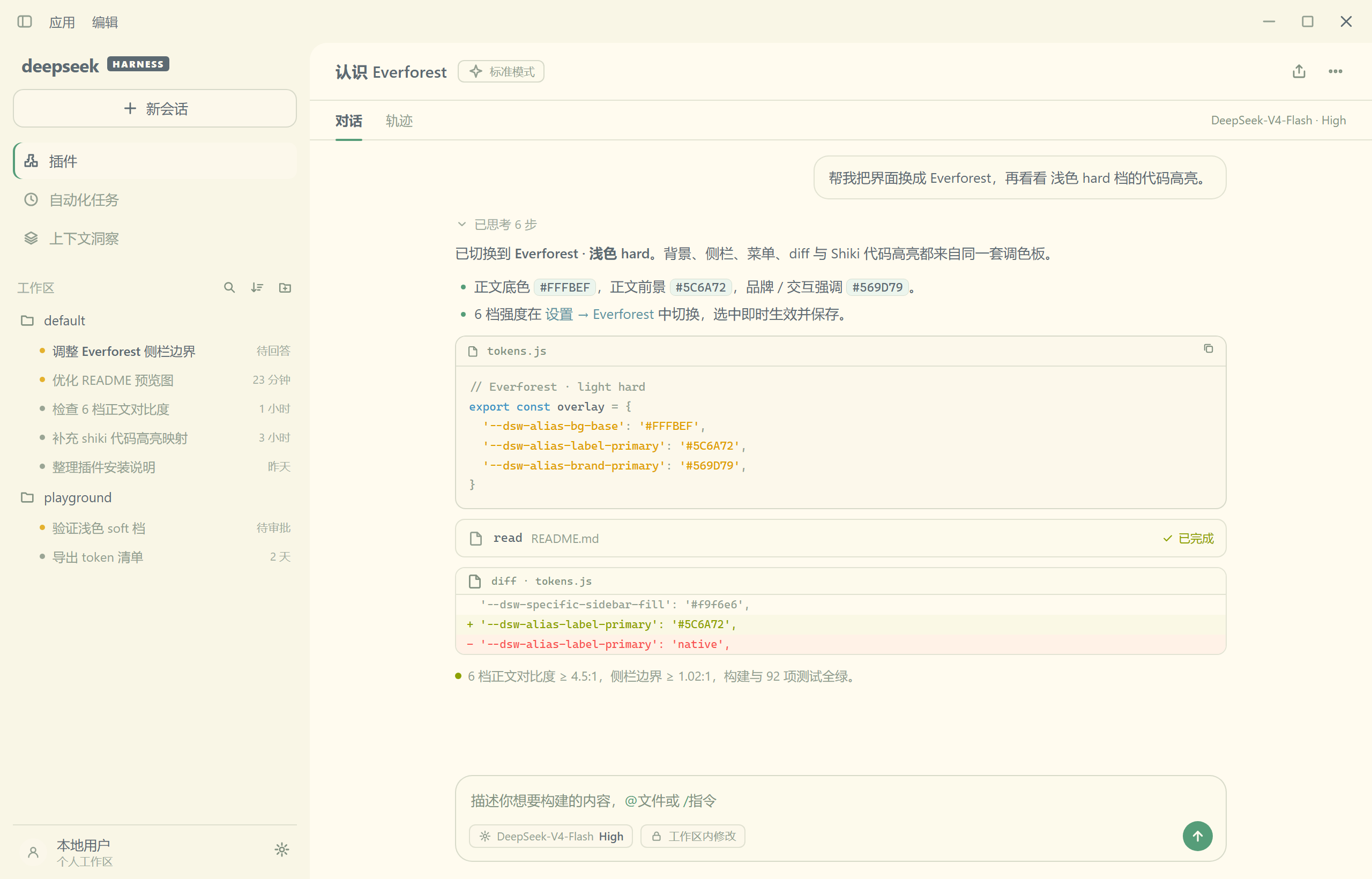
dsh-everforest 为 DeepSeek Harness 提供 Everforest 配色主题,同时支持网页和桌面端。以森林为色调,深色与浅色共 6 档配色。对聊天内容(标题、代码、链接、表格等)做样式优化、独立着色,所有色调及饱和度都逐一调校,提供温暖柔和的护眼体验。

✨ 预览

深色 · Soft(默认)
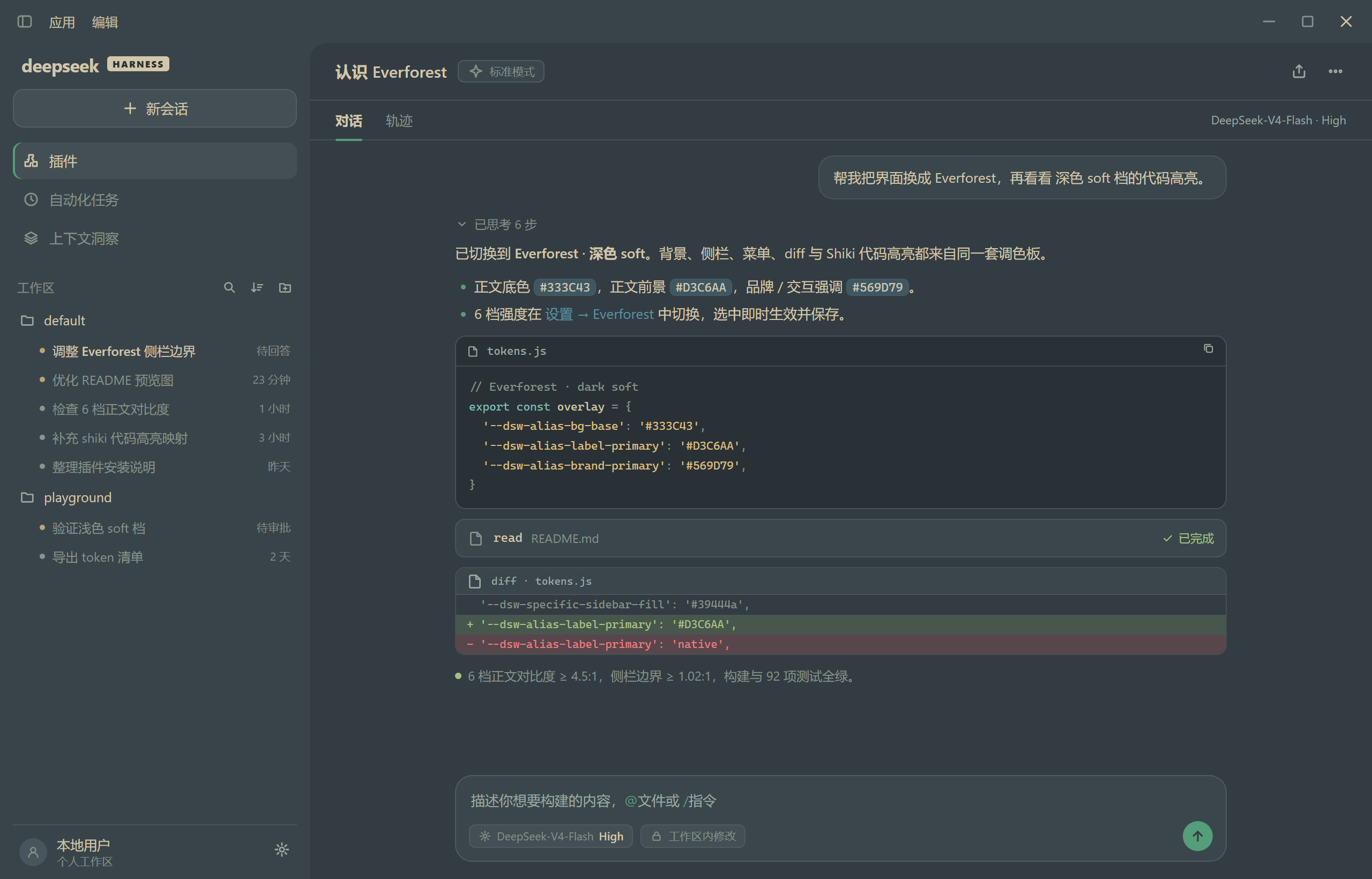
Everforest Dark Soft

浅色 · Hard(默认)

Everforest Light Hard

🚀 安装

  1. 🧩 打开侧栏 插件(Plugins)页。
  2. 📃 点 添加插件(Add plugin)旁的箭头,选 安装第三方插件(Install a third-party plugin)。
  3. ✅ 输入 dsh-everforest 安装,装好后点 立即启用。

🔥 特性

  • 🌳 颜色以柔和的森林绿与暖米色为主调,自然耐看。
  • 👀 以护眼为设计的基础,对比度、饱和度对眼睛更友好。
  • 🎨 设计了深色和浅色两套主要基调颜色,按喜好选择。
  • 🖌️ 聊天内容着色:标题、文字、代码等都适配了 Everforest 配色,6 档配色采用 6 种不同的设计。
  • 📐 聊天中表格显示边框,可拖动表头右边缘调整列宽,刷新或切换会话后保持。
  • 📄 工作区会话列表按状态着色:待确认 / 已完成一眼分辨。
  • ⌛️ 进入应用时的 loading 页面适配当前配色,启动更自然。
  • ⚙️ 打开 Settings → Everforest,可选 6 档强度:
    • 深色:
      • Soft(默认) 对比度最低、最柔和;
      • Medium 对比度适中;
      • Hard 对比度最高、清晰锐利。
    • 浅色:
      • Soft 对比度最低、最柔和;
      • Medium 对比度适中;
      • Hard(默认) 对比度最高、阅读更清晰。

✅ 功能实现

配色与覆盖

  • ✅ 6 套 Everforest 配色:深色 / 浅色 × 软 / 中 / 硬
  • ✅ 默认配对对齐上游:深色 Soft、浅色 Hard
  • ✅ 全站颜色 token 覆盖(含 shiki 代码高亮、diff、侧栏、浮层、边框、状态色)
  • ✅ 六档配色分别校验对比度。

内容着色与样式

  • ✅ Markdown 富文本:h1–h6 六色标题、加粗 / 斜体、行内代码、内部文件链接、引用块、分隔线、任务列表、表格(表头 / 斑马纹 / hover)
  • ✅ 会话状态行:待确认(黄底)、已完成未查看(绿底),附状态点
  • ✅ 工作区当前会话行高亮
  • ✅ 原生文本选区配色,保留文字自身颜色
  • ✅ 首屏 loading 页、spinner 环与进度弧使用当前配色
  • ✅ 表格样式优化,提供列宽调整与记忆功能

设置与持久化

  • ✅ 设置页:6 档强度 + 外观控制(浅色 / 深色 / 跟随系统)
  • ✅ 切换即时生效,无需重启
  • ✅ 偏好写入当前 profile 的 Host 配置:重启保持、同一 profile 多浏览器共享
  • ✅ 深浅切换聚光灯动画

发布与工程

  • ✅ npm 安装、插件市场收录、真机截图与市场截图清单
  • ✅ 自动化测试覆盖配色、设置页、持久化、切换动画与表格列宽交互
  • ✅ 构建与对比度校验自动执行

待实现

  • ⬜ 更多界面语言(当前中 / 英,其余语言回退英文)
  • ⬜ 更细粒度的自定义配色选项
  • ⬜ 思考过程中的内容与工具调用的差异化着色
  • ⬜ 首屏页面显示效果丰富化优化
  • ⬜ 下拉选项的着色优化
  • ⬜ 内置白天黑夜模式自动切换配置
  • ⬜ 其他第三方插件页面兼容性优化

📚 参考

  • 整体配色基于 sainnhe 原创的 Everforest 方案。
  • 部分配色参考 Everforest Enchanted。

📜 License

MIT 许可证。