
dsh-git-ai
v0.1.2
Published
DeepSeek Harness plugin that records agent edits with git-ai (agent-v1 checkpoints)


Readme
dsh-git-ai
English | 中文
一个 DeepSeek Harness 插件,把 agent(智能体)编辑了哪些文件、用的是哪个模型、属于哪个会话,记录到 git-ai 中。它监听 harness 的 tools/pre-execute / tools/post-execute 拦截点,把每次相关工具调用翻译成 git-ai 的通用 agent-v1 checkpoint payload,并在 stdin 上传入该 JSON 后调用 git-ai checkpoint <preset> --hook-input stdin。git-ai 本身无需修改;agent 提交后,git-ai 会把归属写入 git notes,并按 tool-model 组合报告 ai_additions/ai_accepted。
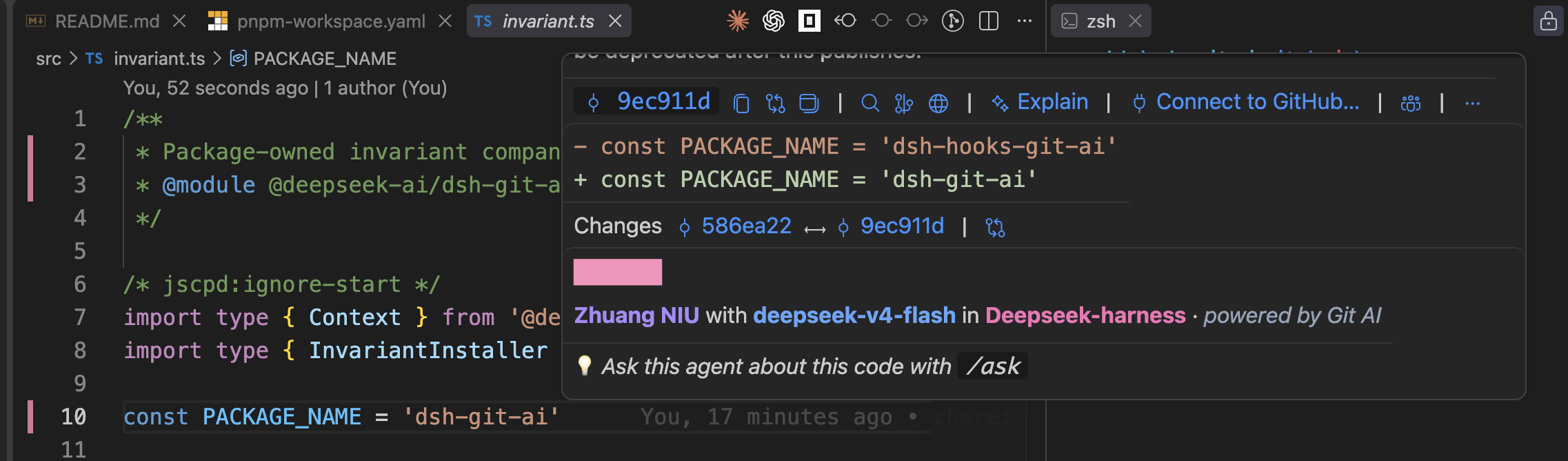
效果预览
将鼠标悬停在 VS Code 的代码行上,即可看到这段代码是由谁、使用哪个模型、在哪个 DeepSeek Harness 会话中生成的:
环境要求
- 通过 npm 安装 DeepSeek Harness(
npx @deepseek-ai/dsh@latest)——插件以官方@deepseek-ai/*包为 peer 依赖。 - 安装 git-ai 并加入
PATH(或通过gitAiPath指定)。
安装
本包以 profile bundle 形态发布:安装并激活只需要一条命令。
dsh plugin --profile web add dsh-git-aipnpm ≥ 10 提示:
dsh plugin add底层转发给 pnpm,而 pnpm 10+ 会拒绝在 workspace root 上直接添加依赖(ERR_PNPM_ADDING_TO_ROOT)。dsh 的 profile 按设计就是 pnpm workspace root,因此在 pnpm ≥ 10 的机器上请使用-w(或一次性在~/.dsh/profiles/<profile>/pnpm-workspace.yaml中加入ignore-workspace-root-check: true):dsh plugin --profile web add -w dsh-git-ai
dsh plugin 在 profile 目录内转发给 pnpm,并因为包声明了 dsh.bundle 而自动激活该 bundle。不使用 bundle 机制(或在自定义 profile 中加载)时,在 profile 的 cordis.patch.yml 中加入一行:
- dsh-git-ai:
    gitAiPath: git-ai
    agentName: deepseek-harness
配置
import type { Config } from 'dsh-git-ai'
const config: Config = {
  gitAiPath: 'git-ai',                  // optional: git-ai executable (bare name resolves through PATH)
  agentName: 'deepseek-harness',        // optional: `agent_name` stamped on every checkpoint
  model: '',                            // optional: explicit model; empty falls back to agent.options.model
  checkpointPreset: 'agent-v1',         // optional: the git-ai generic-integration preset
  timeoutMs: 10_000,                    // optional: git-ai invocation timeout
  trackBash: true,                      // optional: emit pre/post shell checkpoints for bash/pwsh
}
Checkpoint 映射
| Harness 点 | 工具 | git-ai payload |
|---|---|---|
| tools/post-execute(成功) | write、edit | ai_agent,edited_filepaths 取自 file_path |
| tools/post-execute(成功) | str_replace_editor(非 view) | ai_agent,edited_filepaths 取自 path |
| tools/pre-execute | bash、pwsh | pre_shell_command,含 command 与 tool_use_id |
| tools/post-execute | bash、pwsh | post_shell_command,含 command 与 tool_use_id |
Payload 身份字段:repo_working_dir 为会话 cwd(缺失时回退到进程 cwd),agent_name 为 config.agentName,model 为设置了 config.model 时取其值否则取 agent.options.model(再否则为 ''),conversation_id 为会话 id。相对 file_path/path 会基于会话 cwd 解析为绝对路径;绝对路径原样透传。str_replace_editor 的 view 命令是只读的,从不归因。
失败的编辑(result.isError === true)不发任何内容;失败的 bash 命令仍会发出 post_shell_command,从而闭合前后配对。bash 跟踪以工具 callId 为键,因此 pre 与 post checkpoint 共享 tool_use_id。
失败隔离
git-ai 是可选的(optional)外部依赖。二进制缺失、非零退出、超时或执行器拒绝都只会记录警告而不会向上传播:工具调用与 agent 轮次的运行方式与插件不存在时完全一致。
验证流程
# 1. 启动加载了本插件的 harness
dsh web
# 2. 让 agent 在 git 仓库里修改文件
# 3. 检查 git-ai 是否收到 checkpoint
git-ai status --json
# 4. 提交
git add -A && git commit -m "test"
# 5. 查看归因统计
git-ai stats HEAD --json
开发
pnpm install
pnpm test          # vitest,src/ 覆盖率 100%
pnpm typecheck
pnpm build         # 生成 lib/ 供发布
发布
pnpm build
pnpm publish --access public
已知局限与后续工作
- 文件编辑工具只发编辑后的
ai_agentcheckpoint。 git-ai 以 HEAD 或最后一次 checkpoint 的值为基准来归因文件的改动行,因此 agent 编辑前对同一文件已有的未提交改动(例如用户自己改的)也会被归因给 agent。在每次编辑工具之前补一个humancheckpoint 就能隔离这些改动;bash 的 pre/post 配对已为 shell 命令提供了这种隔离。 - 可能出现未配对的
pre_shell_command。 如果 bash 工具在 pre 与 post 之间被拒绝或取消,pre 快照会保持开放,之后对同一文件的新改动在下一次 checkpoint 之前会被 git-ai 视为 untracked。 - 同步调用延迟。 每个被跟踪的工具调用都会先等待其 git-ai checkpoint(上限为
timeoutMs)再让工具结果落定。 - bash 输出归因基于快照。 git-ai 从文件快照推断改动文件,因此修改仓库树外文件的命令不会被归因。
许可
MIT