
dsh-github-link
v0.4.6
Published
Hover cards for GitHub / GitLab / Gitee URLs plus click-to-open in the DSH sidebar browser, scoped to the conversation transcript (GenUI blocks included).

Maintainers
 zengevent
Readme
dsh-github-link
DSH 插件:把对话区回复里的仓库 URL(GitHub / GitLab / Gitee)变成「可悬停的信息卡片」, 并让点击直接在 DSH 右侧栏自带的浏览器标签页里打开。
它不改 GenUI(@changfenhuang/dsh-genui)本体:截图里那套结论块 / 指标卡 / 表格是
GenUI 渲染的,本插件只是给它的链接和裸 URL 补上 hover 与点击行为,因此 GenUI 升级不会把这层改动冲掉。
效果
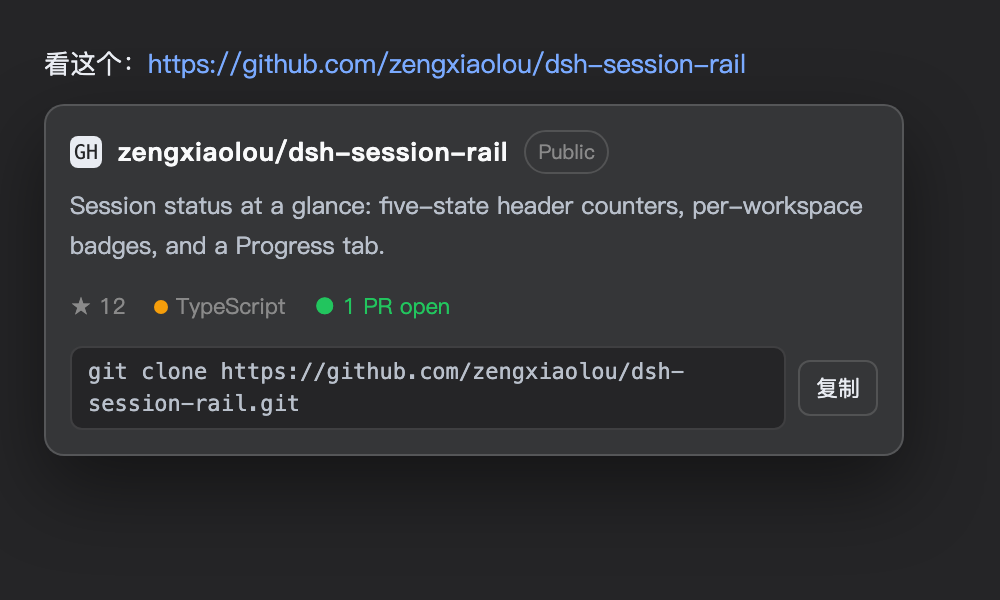
示意图(按主题令牌渲染):回复里的 GitHub / GitLab / Gitee 链接变成可悬停的信息卡片——简介、星标、语言、issue/PR 状态,底部一行
git clone可一键复制;点卡片直接在右侧栏浏览器打开。
作用范围
只在对话正文里生效([data-conversation-content],即 Conversation 外壳的对话区:
助手回复、GenUI 块、工具卡片)。菜单、会话列表、左侧工作区树、右侧栏标签页里的链接
一律不装饰 —— 那些地方的链接属于各自功能,本插件不接管。
判定在事件入口完成(inConversation()):mouseover / click 的目标不在对话区内就直接返回,
连 preventDefault 都不做。悬浮卡片本身挂在 document.body 上,单独放行,
否则鼠标从链接移到卡片会被判成「离开对话区」而收起。
行为
| 场景 | hover | 点击 |
| --- | --- | --- |
| 对话区内 GenUI 块里的链接(data-genui 内) | 出卡片 | 拦截 → 右侧栏浏览器 |
| 对话区内回复正文里的裸 URL(https://github.com/a/b) | 出卡片 | 拦截 → 右侧栏浏览器 |
| 对话区内普通 markdown 链接(宿主自己渲染) | 出卡片 | 不拦截,交给宿主的 linkOpening 设置 |
| 对话区外(菜单 / 会话列表 / 工作区 / 右栏) | 无 | 不拦截,插件完全不介入 |
| 任意情况下 ⌘/Ctrl/Shift/Alt + 点击 | — | 不拦截,走系统浏览器 |
卡片内容:仓库全名、来源(GitHub / GitLab / Gitee)、公开/私有/归档标记、简介(3 行截断)、 星标 / 复刻 / 开放议题、主语言、许可证、Topics、最近活动,以及底部两个按钮:
| 按钮 | 出现条件 | 行为 |
| --- | --- | --- |
| 在 DSH 打开 PR | 仅 github.com 的 PR,且 dsh-github-flow 的 github-pr tab 已注册 | 右栏 PR 面板打开这条 PR:sidebarRight.openTab('github-pr', { params: { repo, number } }) + layout.openRightbar(true, false) |
| 复制 clone | 有仓库路径时 | 写 git clone https://<host>/<fullName>.git |
两个按钮都不走「打开网页」:点按钮只做各自那件事,点卡片/链接才在右侧栏浏览器打开 PR 页面。
按钮的出现是按「页面里真有那个 tab 类型」判定的(sidebarRightTabs.get('github-pr')),
没有就整颗按钮不渲染——不做点了没反应的死按钮。
当 URL 指向 issue / PR / MR 时,额外显示该条目的标题、状态(开启中 / 已关闭 / 已合并)与作者:
https://github.com/facebook/react/issues/1
→ react/react · 议题 #1 · [已关闭] Run each test in its own <iframe> · 由 benjamn
数据从哪来
GET /github-link/card?url=<encoded>(host 半注册在同一个 web server 上),按主机分派:
| 主机 | 上游 | 认证 |
| --- | --- | --- |
| github.com | api.github.com | GITHUB_TOKEN / GH_TOKEN,否则本机 gh auth token(60/h → 5000/h) |
| gitlab.com | gitlab.com/api/v4 | 匿名即可(支持多级 group 路径) |
| gitee.com | gitee.com/api/v5 | 匿名即可 |
- 成功结果缓存 10 分钟,失败 60 秒;缓存上限 400 条。
- 只接受上述三个主机的仓库形 URL;
/marketplace、/explore、/orgs等保留路径直接忽略。 - issue/PR 明细是 best-effort:拉不到就只显示仓库卡片,不会让整张卡失败。
- 拒绝
sec-fetch-site: cross-site的请求,避免被别的网页当成查询代理。
点击是怎么走到「内置浏览器」的
用的就是 DSH 自己的右侧栏页面服务:
ctx.get('sidebarRight').openTab('browser', { params: { url } })和 sidebar_open 工具、以及聊天里普通链接的默认行为是同一个 API;browser 类型不存在时
自动退回 window.open。
自检:客户端半到底加载了没有
client 半是从页面的 boot payload 注入的,改完 client.js 后只有「刷新后的窗口」才会带上它。
这个进程看不到那个窗口,所以插件自己上报:
| 路由 | 用途 |
| --- | --- |
| GET /github-link/status | client.loaded 是否为真、最近一次 hello 的时间/协议/UA、打开与回退计数、缓存大小 |
| POST /github-link/hello | client 半每次页面加载上报一次,带 location.protocol |
| POST /github-link/event | client 半在打开链接时上报 open 或 fallback |
loaded 只认真正的页面(dsh-app: 或 http(s):):用 curl 之类直接 POST 一个不带 protocol 的
hello 会返回 loaded: false 并提示这是探测,不会被误判成「已生效」。
curl -s http://127.0.0.1:50845/github-link/status | jq .client桌面壳的形状(为什么 GitHub 能显示)
这版 Desktop 的主窗口加载的是 dsh-app://app/,preload 在同源主框架下才暴露完整的
window.dshDesktop(protocolVersion: 1 + browser 桥)。侧栏浏览器据此选择 Electron
<webview> 而不是 <iframe>,所以 github.com 的 x-frame-options: deny 不影响它。
插件的请求也按这个前提解析:走 document.baseURI 的相对路径(github-link/card),
由壳的非静态路径转发送到 Host,保持同源;不用 __DSH_TRANSPORT__.streamBaseUrl
(那是另一个 origin,会变成跨域 POST)。
已知限制
右侧栏浏览器在 Desktop 应用里走 Electron <webview>(真实 Chromium 视图),三者都正常显示;
如果用普通浏览器打开 dsh web 的地址,那里是 sandboxed <iframe>,而 github.com 会发
x-frame-options: deny,页面会被浏览器拦掉。此时点击仍会算成功打开,但内容为空——用 Desktop 应用即可。
文件
index.js— host 半:/github-link/card路由、三主机 URL 解析、各自的上游读取、token、缓存。client.js— client 半:document 级 hover/click 委派、浮动卡片、PR 面板按钮、复制 clone、sidebarRight打开。cordis.patch.yml— 插入github-link装载行。locale/{zh,en}.json— 插件市场/设置里的标题与描述。
改动生效方式
- client 半:刷新一次 GUI 页面(新模块在下次 boot 注入)。
- host 半:在插件市场里把
GitHub 链接卡片关一次再开,或重启 DSH;进程内 ESM 缓存不会自己更新。
卸载
插件市场里停用或移除 dsh-github-link 即可;profile 只是把它软链到本目录。