
dsh-herdr-bridge
v0.3.0
Published
Bridge DeepSeek Harness (DSH) sessions into Herdr Core as hc terminals

Maintainers
 hariketsu
Readme
dsh-herdr-bridge
English | 简体中文
一个 DeepSeek Harness(DSH)插件,把 DSH 的会话接进 Herdr Core(hc)。每个会话变成一个 hc 终端,Herdr 里的 Agent 可以像操控 Claude Code、Codex 一样读取和操控 DSH。适用于 DSH Desktop 和 dsh web。
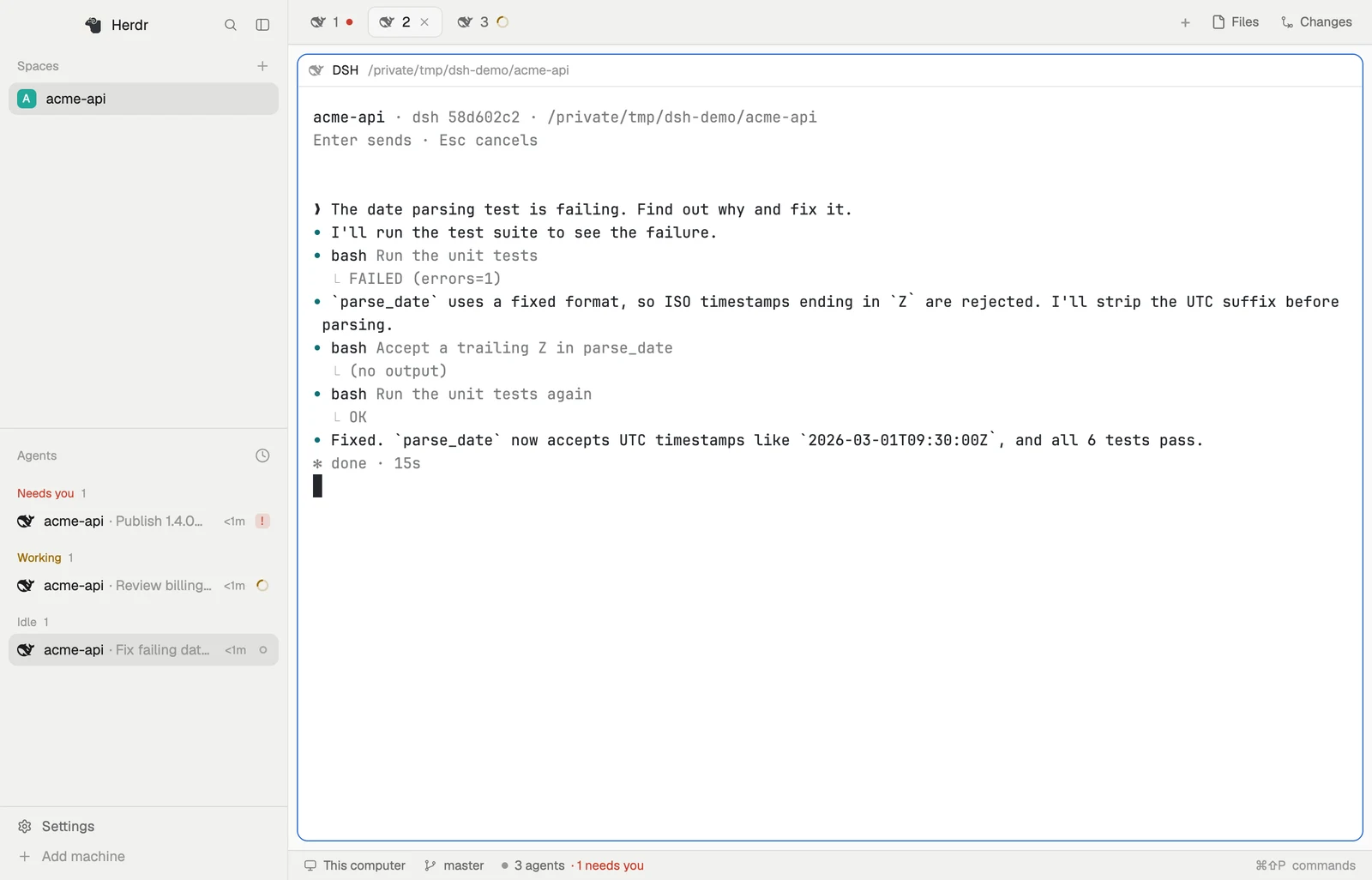
- 在 Herdr 里看到 DSH 会话,状态实时更新:工作中、完成、需要你、出错。
- 让其他 Agent 使用 DSH:带着任务新建会话、追加消息、读取回复,或者接管你在 DSH 里开的会话。
- 让 DSH 使用其他 Agent:DSH 会话里的模型可以启动 Claude Code、Codex 或另一个 DSH 会话,并收到它们的回报。
- 审批两边都能答:在 DSH 窗口或 hc 里回答都行,先答的生效。
要求
| | 测试过的版本 |
|---|---|
| DSH Desktop 或 dsh web | 0.2.2-rc.1 |
| herdr-core(hc) | 0.1.20,需要在登录 shell 的 PATH 上 |
| Herdr App | 0.1.15(可选) |
在 macOS 上测试过。Windows 和 Linux 已实现,但没有测试。DSH 的插件接口仍在变化,升级 DSH 后可能需要更新插件。
安装
退出 Desktop(⌘Q)或停掉 dsh web,把插件加到你用的 profile(desktop 或 web):
dsh plugin --profile desktop add dsh-herdr-bridge重新打开 DSH,在任意会话里发一条消息。Herdr App 和 hc ls 里会出现一个 dsh-<短 id> 终端,hc templates 里会列出 dsh。
使用
照常使用 DSH。 会话第一次运行时就会出现在 Herdr 里。想让还没运行过的会话也出现,在里面输入 /herdr。
让 Agent 运行 DSH。 会用 hc 的 Agent(通过 herdr-core skill)可以像启动其他 Agent 一样启动 DSH:
hc run --bg --name fix --cwd ~/repo dsh "修复 x.rs 里失败的测试"
hc wait fix
hc read fix
hc send --wait fix "边界情况也覆盖一下"
hc interrupt fix                         # 取消当前回合
这个会话也会出现在 DSH 里;在 Herdr App 里,它显示在启动它的 Agent 下面。
接管在 DSH 里开的会话。
~/.dsh/herdr-bridge/bin/dsh-hc ls                                        # 最近的会话
hc run --bg --name login ~/.dsh/herdr-bridge/bin/dsh-hc attach 3b729fc9  # 用 id 或标题的一部分
让 DSH 启动其他 Agent。 在 DSH 会话的 shell 里,hc 的用法和在 hc 里运行的 Agent 一样:它启动的 helper 显示在它下面,并向它回报。
审批
会话请求审批或向你提问时,在 DSH 窗口或 hc 里回答都行。先答的生效,另一边的对话框随之关闭。
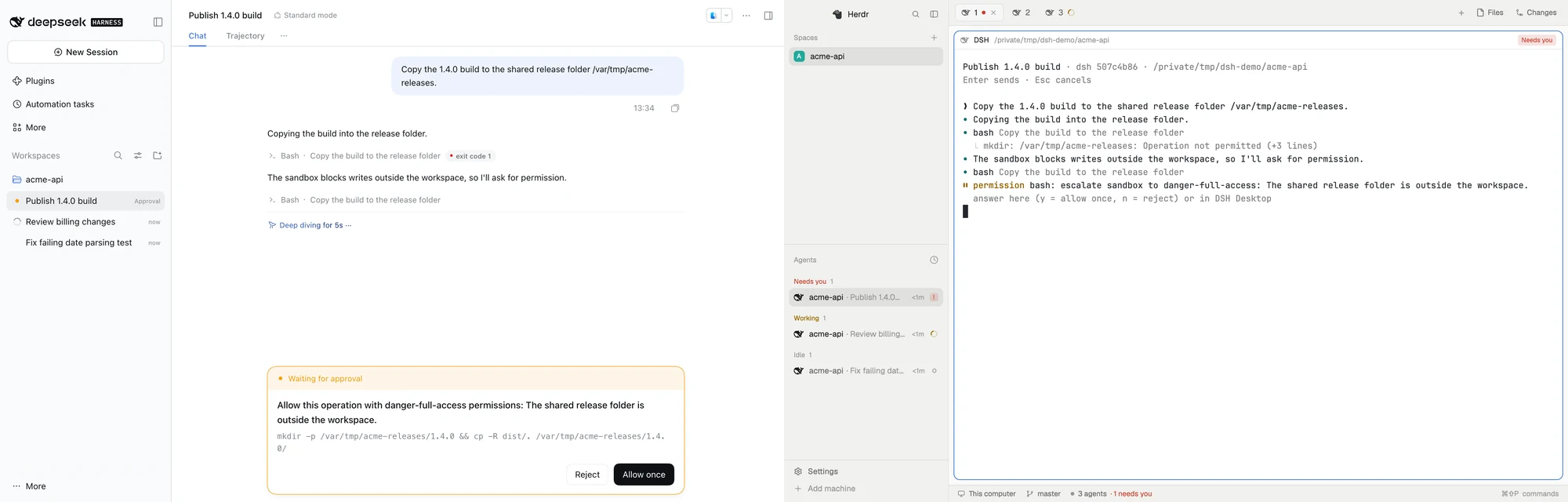
hc send --force fix y      # 允许一次;n 拒绝
hc send --force fix 1,3    # 回答提问:选项编号,或直接写文字
和 hc 里所有 Agent 一样,回答正在等待的会话需要 --force。能使用你的 hc 的程序都能操控 DSH 会话;通过 hc 发来的消息,会作为用户消息交给模型。
设置
在 DSH 里打开 插件 → Herdr Bridge,选择在 DSH 里开的会话显示在 Herdr App 的哪里:按文件夹分组(默认)、都放进一个名为 DSH 的 space,或者不显示。也可以写在 ~/.dsh/profiles/<profile>/cordis.patch.yml 里:
- id: herdr-bridge
  config:
    herdrPlacement: folder      # folder、dsh 或 none
    herdrSpace: sp123           # 改用一个固定的 Herdr App space id
    reconnectGraceSeconds: 30   # 终端等 DSH 回来的时间
    hc: /path/to/hc             # hc 不在登录 shell 的 PATH 上时指定
故障排查
日志在 ~/.dsh/herdr-bridge/bridge.log。
| 问题 | 怎么办 |
|---|---|
| hc ls 里没有会话 | 看日志。确认 DSH 能找到 hc(必要时在配置里设置 hc),以及 Desktop 和 dsh web 没有同时运行 |
| hc ls 里有,Herdr App 里没有 | 检查显示位置是不是设成了“不显示” |
| hc templates 里没有 dsh | 插件没有加载,看日志。你自己写的 dsh template 会保留 |
| 终端提示协议版本不符 | 它是插件升级前开的。关掉它,重新 attach |
| 升级 DSH 后插件不工作 | 带上日志提 issue |
已知限制
- Desktop 和
dsh web同一时间只能有一个接入 Herdr,先启动的那个生效。 - 在 Herdr 里看过会话,不会清掉 DSH 侧栏的提醒。
- 插件升级前开着的终端仍用旧版本,重开后才更新。
卸载
退出 DSH,执行 dsh plugin --profile <profile> remove dsh-herdr-bridge,并删掉 cordis.patch.yml 里的 herdr-bridge 条目(如果有)。然后删除 ~/.dsh/herdr-bridge/、~/.config/herdr-core/templates/dsh.md、~/.config/herdr-app/programs.json 里的 dsh 条目,以及 ~/.config/herdr-app/icons/dsh-herdr-bridge.svg。
深入阅读
许可
MIT。assets/dsh.svg 是 DeepSeek Harness 的标志,取自 deepseek-ai/deepseek-harness(MIT,Copyright (c) 2026 DeepSeek)。DeepSeek 的名称和标志归其所有者。