
dsh-inkstone
v0.1.2
Published
文房四宝 · Inkstone: a DeepSeek Harness plugin bundle for Trilium Notes, Zotero, Typst typesetting and a joint engineering pipeline.

Maintainers
 abl312
Readme
文房四宝 · Inkstone
一套把 文献收集 → 排版 → 归档 串起来的 DeepSeek Harness 插件包。四个插件取“文房四宝”意象:
Topics:dsh-plugin · deepseek-harness · trilium-notes · zotero · typst · mcp · literature-review · typesetting · pipeline

| 插件 | 行 id | 显示名 | 职责 |
|---|---|---|---|
| trilium-paper | inkstone-trilium | 纸 · Trilium Notes | ETAPI + 官方 MCP 双通道:检索、读写笔记、附件、属性、历史 |
| zotero-ink | inkstone-zotero | 墨 · Zotero 文献 | 本地 API + .bib 工程:检索、citekey、导出/合并/校验、PDF 全文与批注、在线补全 |
| typst-brush | inkstone-typst | 笔 · Typst 排版 | Typst CLI 编译/导出 PDF·SVG·PNG,规则化自愈,中文模板 |
| inkstone-flow | inkstone-flow | 砚 · 联合流水线 | 声明式配方引擎 + 检查点续跑 + 运行记录,串联前三者 |
- 插件包名:
dsh-inkstone(单 bundle 四行插件) - 仓库:github.com/ABL312/dsh-inkstone
- npm:www.npmjs.com/package/dsh-inkstone
- 设计文档:docs/DESIGN.md · 实现契约:docs/CONTRACT.md · 更新日志:CHANGELOG.md
输出预览
由 paper-delivery 流水线生成的两页中文论文示例(图、表、公式、引用编号):
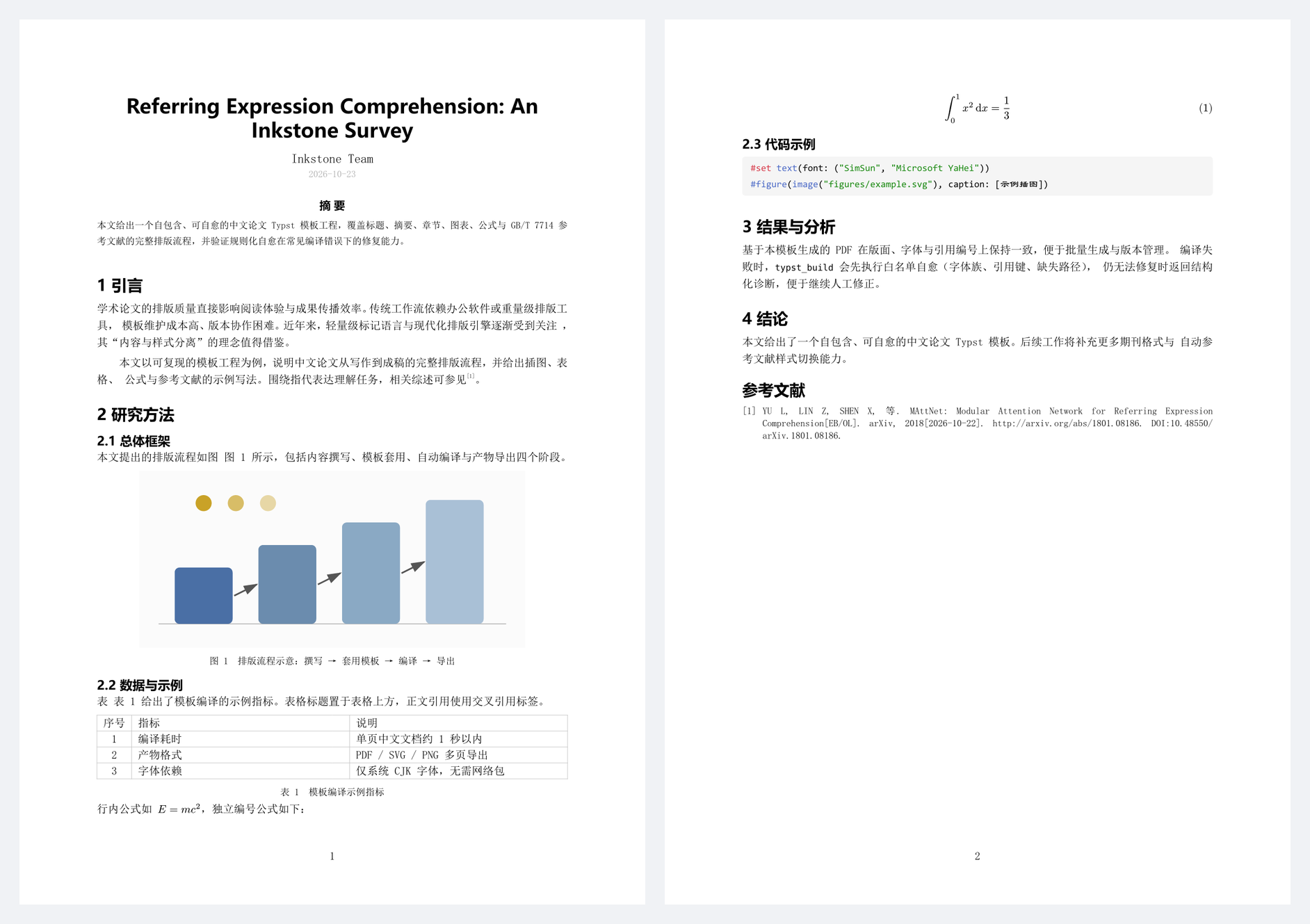
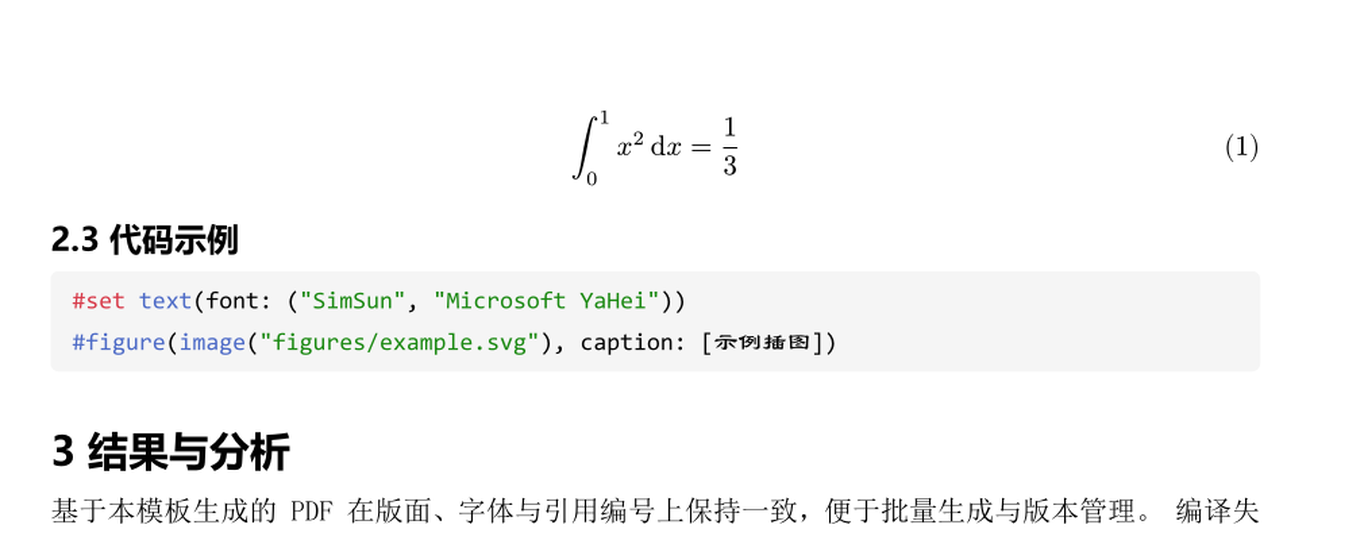
第 2 页可见独立编号公式、代码块与 GB/T 7714 参考文献;公式与代码块细节:
已具备的能力
纸 · Trilium(trilium_*)
trilium_search、trilium_read、trilium_write、trilium_attach、trilium_history;
advancedTools: true 时追加 trilium_attributes、trilium_delete。
- 认证走 ETAPI token(裸
Authorization头);MCP 行另用 Bearer。 - 写入只发生在显式调用;
allowWrites: false可整体拒绝写操作。 - Markdown 内容会转换为安全 HTML 子集再写入。
墨 · Zotero(zotero_*)
zotero_search、zotero_item、zotero_bib(index/export/validate/merge)、zotero_pdf(path/text/annotations)、
zotero_enrich(Crossref/OpenAlex/arXiv);advancedTools + ZOTERO_API_KEY 时追加 zotero_write(Web API)。
- 读取只依赖 Zotero 本地 API(127.0.0.1:23119),无需密钥。
.bib解析器自研:嵌套花括号、引号值、@string、#拼接、UTF-8、BBT 字段、重复 key、缺字段检查。- PDF 文本用
pdftotext(自动探测 dsh-ops 内置 Poppler、Git/MSYS2、winget Poppler、PATH)。 - Zotero 原生 citation key(Zotero 7+)即可用;Better BibTeX 为可选增强。
笔 · Typst(typst_*)
typst_build(默认自愈)、typst_export(多页 SVG/PNG)、typst_probe;
advancedTools 时追加 typst_compile_raw、typst_clean。
- 二进制探测顺序:配置/
TYPST_BIN→ PATH → WinGet Links → WinGet Packages → cargo/scoop。 - 自愈白名单:未知字体族、未知引用键(编辑距离 ≤2)、缺失图片/bib/include 路径;改前备份到
<项目>/.inkstone/backups/,最多 3 轮,无进展即停。 - 模板:
paper-zh、report-zh、slides-zh(16:9)、poster-zh(A2 竖版),自包含、无网络包。
砚 · 流水线(pipeline_*)
pipeline_list、pipeline_run、pipeline_status;advancedTools 时追加 pipeline_validate。
内置配方:
| 配方 | 场景 | 步骤 |
|---|---|---|
| paper-delivery | 期刊/会议论文 | 文献→bib→论文模板→检查点写作→自愈编译→PNG 预览→Trilium 发布→报告 |
| course-report | 课程论文/实验报告 | 报告模板→检查点写作→自愈编译→预览→可选发布→报告 |
| lit-review | 文献综述/读书笔记 | Zotero 检索→按选中条目导出 bib→生成综述 Markdown→可选归档 Trilium→报告 |
| slides-poster | 幻灯片/海报 | 模板→检查点写作→编译→逐页 PNG→可选发布→报告 |
运行目录:<项目>/.inkstone/runs/<runId>/(run.json、report.md、产物、诊断 JSON)。
安装与更新
前置:DeepSeek Harness(desktop profile)、Node.js 22+;按需准备 Trilium、Zotero 7+、Typst 0.13+。
从 npm 安装(推荐):
plugin_manager install_bundle target="[email protected]"
npm i dsh-inkstone只下载包文件,不会自动注册 bundle;注册仍通过plugin_manager。
从 GitHub 安装:
plugin_manager install_bundle target="git+https://github.com/ABL312/dsh-inkstone.git"本地开发时可以直接 link 仓库目录:
git clone https://github.com/ABL312/dsh-inkstone.git
plugin_manager install_bundle target="<仓库绝对路径>"
更新已安装版本(替换包需要先移除再安装):
plugin_manager remove_bundle  target="dsh-inkstone"
plugin_manager install_bundle target="git+https://github.com/ABL312/dsh-inkstone.git"
本地 linked bundle 的代码改动需要重新安装才会被 Host 进程重新加载。Windows 上偶发
EPERM package.json属瞬时文件锁,重试一次即可。
凭据与本地服务
Trilium ETAPI token(发布/检索必需)
- Trilium → Options → ETAPI → Create new token。
- 二选一:
- 写入
%USERPROFILE%\.dsh-inkstone\trilium-etapi-token.txt(首行,推荐;无需重启 DSH);或 - 在启动 DSH 前设置环境变量
TRILIUM_ETAPI_TOKEN。
- 写入
MCP 行(mcp__trilium__*)只在 DSH 启动时能读到 TRILIUM_ETAPI_TOKEN 才会启用;否则使用
ETAPI 工具(能力等价)。ETAPI 与 MCP 共用同一个 token。
Zotero 本地 API
已在本机启用:Zotero 设置 → 高级 → 允许本机应用通信(等价预置 user.js 中的
extensions.zotero.httpServer.localAPI.enabled = true),并已重启 Zotero。验证:
curl -s -o /dev/null -w "%{http_code}\n" "http://127.0.0.1:23119/api/users/0/items?limit=1" # 200Typst
已由 winget 安装 0.15.1;typst_probe 会返回实际路径与 CJK 字体清单。
快速上手
在 DSH 对话里直接说:
- “把
<项目目录>做成期刊论文交付,题目《…》,用 Zotero 的<collection>文献” → 模型应调用pipeline_run { recipe: "paper-delivery", inputs: {...}, projectDir }。 - “帮我把这批文献整理成综述笔记” →
pipeline_run { recipe: "lit-review", inputs: { topic, limit } }。 - 手工单步:
zotero_search→zotero_bib { action: "export" }→typst_build→trilium_write/trilium_attach。
检查点协议:运行到 checkpoint 会返回 status: "awaiting" 与 runId;模型按提示写
<run 目录>/main.typ,然后 pipeline_run { runId } 继续。构建失败时修复后同样用同一 runId
续跑,不要新建 run。
配置
配置位于 bundle 的 cordis.patch.yml 行;可在 cordis.patch.yml 的用户层覆盖,或用
plugin_manager/Settings 调整。
| 行 | 配置项 | 默认 |
|---|---|---|
| inkstone-trilium | baseUrl/tokenEnv/tokenFile/defaultParentNoteId/allowWrites/advancedTools/timeoutMs | http://127.0.0.1:8080、TRILIUM_ETAPI_TOKEN、true、false、15000 |
| inkstone-zotero | localApiUrl/dataDir/bibFiles/citationStyle/advancedTools/timeoutMs | http://127.0.0.1:23119、~/Zotero、[]、gb-7714-2015-numeric |
| inkstone-typst | binaryPath/fontPaths/maxHealRounds/timeoutMs/advancedTools | null、[]、3、120000 |
| inkstone-flow | projectDir/runsDir/recipesDir/defaultParentNoteId/publish/advancedTools | null、.inkstone/runs、null、null、true |
环境变量:TRILIUM_ETAPI_TOKEN、TRILIUM_ETAPI_URL、ZOTERO_API_KEY、ZOTERO_API_USER_ID、
ZOTERO_LOCAL_API_URL、ZOTERO_DATA_DIR、INKSTONE_PROJECT_DIR、TYPST_BIN、PDFTOTEXT_PATH。
本地 secret 文件:~/.dsh-inkstone/trilium-etapi-token.txt、~/.dsh-inkstone/zotero-api-key.txt。
故障排查
| 现象 | 处理 |
|---|---|
| Trilium ETAPI token is not available | 按上文创建 token 并写入 secret 文件;无需重启 |
| 无法连接 Zotero 本地 API | 启动 Zotero;Settings → Advanced 勾选“允许本机应用通信” |
| typst 找不到 | winget install --id Typst.Typst -e;或配置 binaryPath/TYPST_BIN |
| 编译失败但已自愈 | 看错误里的诊断 JSON 路径与“已尝试修复”;修完用同一 runId 续跑 |
| 发布步骤被跳过 | 未配置 token(可选步骤);配置后新建/续跑 run 即可 |
| MCP 工具不存在 | DSH 启动时没有 TRILIUM_ETAPI_TOKEN 环境变量;用 ETAPI 工具即可,或带变量重启 DSH |
| pipeline_run 返回 awaiting | 正常检查点;按提示写文件后 pipeline_run { runId } |
开发与测试
git clone https://github.com/ABL312/dsh-inkstone.git
cd dsh-inkstone
npm test                        # = node scripts/test-all.mjs,四套测试串行
node scripts/test-trilium.mjs   # 51 passed
node scripts/test-zotero.mjs    # 49 passed(含真实 pdftotext 正/负路径)
node scripts/test-typst.mjs     # 46 passed(真实 typst 编译、4 模板、5 条自愈规则)
node scripts/test-pipeline.mjs  # 36 passed(引擎、检查点、占位符、可选步骤)
node scripts/live-check.mjs     # 环境体检(Trilium/Zotero/Typst)
约 10,700 行实现(lib + 插件)、3,500 行测试、900 行模板与配方。实现约束:纯 ESM、只用
node: 内置模块与包内相对导入,不依赖任何第三方包;工具用普通定义经 ctx.tools.register 注册。
实测状态(2026-10-23)
| 项目 | 结果 |
|---|---|
| Bundle 安装/激活 | applied,四行插件全部激活 |
| 工具注册 | 可见 trilium_* / zotero_* / typst_* / pipeline_* |
| Typst 中文 PDF | 通过(含图、表、公式、引用编号) |
| Typst SVG/PNG 多页导出 | 通过 |
| 规则自愈 | 现场 3 规则修复(字体/引用键/图片路径)+ 备份,编译成功 |
| Zotero 本地 API | 200;检索、条目/附件/批注、26 条真实 .bib 导出、校验、PDF 全文(pdftotext)通过 |
| 流水线 | course-report、lit-review、paper-delivery 真实跑通(含检查点续跑、报告) |
| Trilium ETAPI | 通过:app-info、检索、创建/追加/替换、附件上传、标签、历史/导出 |
| Trilium 发布 | 通过:流水线 publish 在真实 Trilium 创建子笔记 + PDF 附件 + inkstone/pipeline 标签 |
| MCP 端点 | 通过:Bearer token 初始化成功,列出 23 个官方工具(search_notes/get_note/…);插件 MCP 行需 DSH 启动时带 TRILIUM_ETAPI_TOKEN 才启用 |
已知限制
- 模板字体链面向 Windows 中文环境(SimSun/Microsoft YaHei 等);跨平台需追加
fontPaths或字体回退映射。 - Zotero 本地 API 只读;写回依赖 Web API key,未配置时不注册
zotero_write。 - 扫描版 PDF 无文本层时需 OCR;
zotero_pdf会明确说明。 - 自愈只处理白名单内的常见错误;超出范围会返回结构化诊断交给模型/人工修复。
- 同一工程的并发构建/导出可能竞争产物;流水线内部串行执行,不涉及该问题。
