
dsh-isolation-gate
v1.13.13
Published
Access gate for AI coding harnesses (DSH plugin + Claude Code hook): per-directory deny/read/full, roster groups, audit log, model-facing tools with owner-approved widening.

Maintainers
 huanlin-labs
Readme
门禁 · dsh-isolation-gate




给 DeepSeek Harness(DSH)的隔离区授权台:默认禁、名单制、点一下生效、可审计、agent 自己能查。
⚠️ 定位与免责声明(先看这段)
这个插件的主战场是 DeepSeek Harness(DSH)+ Windows —— 那是作者每天在用、也是唯一做过完整真机验证的组合。DSH 里的宿主工具执行门、面板、CLI、审计,都是在这个组合下逐项验过的。
别的 harness(Claude Code、ZCode、Gemini CLI、opencode、pi、MCP)和 别的操作系统(Linux、macOS)属于实验性支持:
- 有代码、有单测、CI 也在三平台上跑,但这不等于「在你那儿一定好用」;
- 可能不够完善,也可能因为对方版本一升级就失效;
- 各家的拦截强度也不一样 —— 有的能硬拦(前置钩子),有的只能"提示"(MCP),细节见下方支持矩阵。
欢迎提意见、报 bug、提 PR:https://github.com/huanlin-labs/dsh-isolation-gate/issues 。 没验证到的部分我不会写成「支持」;你遇到问题也不是你用错了,是本项目还没覆盖到。
安装 · 功能 · 它拦在哪一层 · CLI · English · 更新日志
dsh plugin --profile desktop add dsh-isolation-gate⭐ 如果它帮你少踩一次坑,点个 Star 能让更多人找到它 —— 这是这个项目唯一的「传播预算」。


这是什么(以及不是什么)
它不是又一个 allow/deny 规则引擎,也不是沙箱本身。
- 别人按「工具 / 命令 / 参数」立规则(
dsh-permission-rules、dsh-permissions这类:allow / deny / ask + glob / 正则); - 我们按「目录」立对象:这台机器上哪些目录属于禁区、现在给什么级别、谁改的、agent 自己怎么查。
规则引擎回答的是「这次调用准不准」,门禁回答的是「这个目录开不开」。两者可以叠着用,不冲突。
所以它的核心是管理面:
| 能力 | 说明 |
|---|---|
| 三级 | deny 禁(默认) / read 只读 / full 可读写删 |
| 两类受管对象 | 名字(D 根一级目录名,如 Zcode)或 任意绝对路径(如 <drive-root>\Zcode、E:\资料\合作档案\某项目) |
| 默认禁 + 名单制 | 只有名单里的对象受管;未列出的不归它管;新增对象一律先按「禁」处理 |
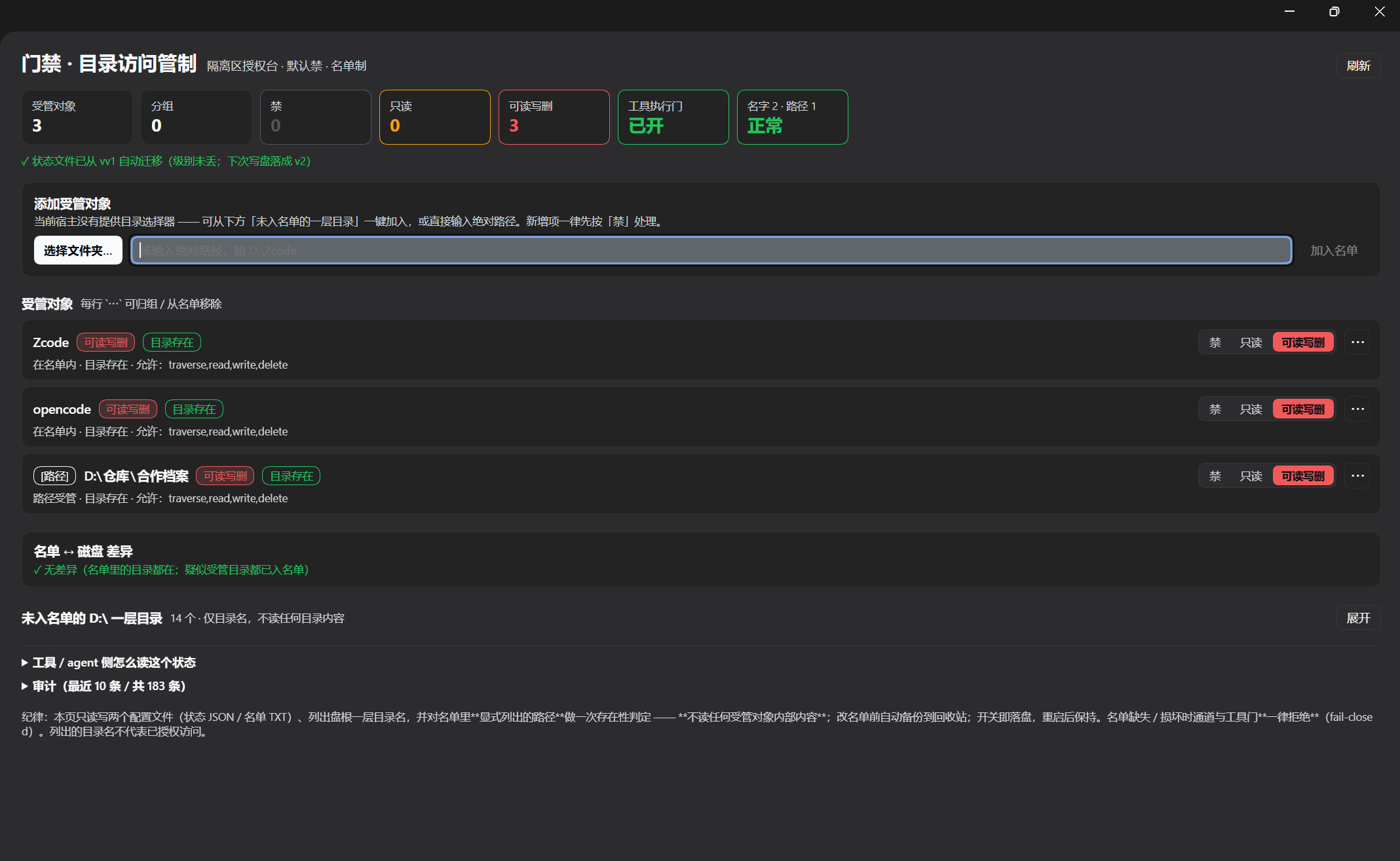
| 一屏开关 | 每个对象一个分段控件(禁 / 只读 / 可读写删),点了即落盘,重启后保持 |
| 分组 | 「harness 隔离」「跨家合作」这类命名组;组头一键切三档;组只存在状态文件里,名单仍是"一行一对象" |
| 选择文件夹 | 有原生目录选择器就用它;没有就退回「未入名单的一层目录一键加入 + 文本框」 |
| 两个拦截点 | ① 受管辖通道 bin/gate.mjs;② 宿主工具执行门 ctx.tools.guard()(2026-10-21 新增) |
| 审计 | ~/.dsh/dsh-isolation-gate/access-log.jsonl:只记时间/对象/级别/操作/允许与否/理由,不记文件内容 |
| agent 自查 | node bin/gate.mjs status —— 模型/脚本可以直接读策略,不用猜 |
它拦在哪一层
模型发起工具调用
   │
   ├─ tools/pre-execute  ← ★ 工具执行门(本插件 ctx.tools.guard)
   │      file tools 参数 / shell 命令文本 → 按三级判定 → 拒绝文案回到模型
   │
   ├─ 工具真正执行(read / write / edit / bash …)
   │
   └─ bin/gate.mjs  ← ★ 受管辖通道(agent 显式走它读写受管对象)
判定不通过 ⇒ 一个字节都不碰两条路都调用同一个 checkAccess,所以面板、CLI、工具门不会说两套话。
让模型自己管门禁(v1.1+)
插件注册 7 个模型可直接调用的工具,DSH 不必等人点面板:
| 工具 | 作用 | 权限 |
| --- | --- | --- |
| gate_status | 看默认级别、受管对象、待批数、授权窗口 | 只读 |
| gate_check | 预判某目标某操作会被放行还是拦下 | 只读 |
| gate_log | 读最近审计记录 | 只读 |
| gate_requests | 看自己提交的待批申请 | 只读 |
| gate_add | 把目录/名字纳入受管,固定为「禁」 | 只收紧 |
| gate_set_level | 改级别;放宽必须带户主授权窗口 | 收紧可直做 |
| gate_request | 提交「想放宽」的待批申请 + 理由 | 申请 |
不对称规则:模型能读、能加、能收紧,不能自己放宽——放宽只有两条路:
- 提交
gate_request→ 户主在「门禁」面板看到待批卡片 → 批准才生效; - 户主主动点「授权 AI 放宽 30 分钟」→ 窗口期内模型可直接放宽,到期自动收回。
没有任何「批准」工具,模型无法自己开门。所有工具调用都进审计日志。
对模型说一句就能用:
用 gate_status 看看现在什么被禁;确认 D:\仓库\合作档案 还是禁的话,帮我提个只读申请,理由写"核对合作档案里的结论"。
在别的 harness 里用(Claude Code 已支持)
策略引擎是纯 Node、跟 DSH 无关;别的 harness 只多一层适配器(读它的事件、喂给同一套判定)。
| harness | 状态 | 怎么接 |
| --- | --- | --- |
| DSH | ✅ 原生 | 装插件(本文其余部分) |
| Claude Code | ✅ v1.3 起 | PreToolUse hook → bin/gate-hook-claude.mjs,见 docs/CLAUDE-CODE.md |
| opencode | 🧪 v1.4 起(代码+单测通过,未真机验证) | .opencode/plugins/gate.mjs 或 opencode.json 的 plugin;见 docs/OPENCODE.md |
| Gemini CLI | 🧪 v1.5 起(代码+单测通过,未真机验证) | .gemini/settings.json 的 BeforeTool → bin/gate-hook-gemini.mjs,见 docs/GEMINI-CLI.md |
| 任何支持 MCP 的 harness(Cursor / Windsurf / Codex / Claude Desktop …) | ⚠️ advisory(只能问,不能硬拦) | stdio MCP 服务器 gate-mcp,见 docs/MCP.md |
| Codex CLI | 🧪 钩子能力随版本变(先自检再接线) | 通用适配器 gate-hook-generic,见 docs/CODEX.md |
| 任何「stdin JSON + 退出码」钩子 | ✅ v1.7 起通用 | gate-hook-generic(GATE_DENY_STYLE 可选 exit2 / json-claude / json-gemini / text),见 docs/GENERIC-HOOK.md | 有工具前置钩子的,照上面两个适配器写一层;只有 MCP 的只能做事前询问,不能硬拦 |
共用同一份策略:名单 / 级别 / 审计默认都在 .agents 那三个文件里,DSH 面板里改完,Claude Code 下一次工具调用立刻按新级别判。
所有判定都写审计(channel: hook/claude-code),所以"谁在什么时候试图碰哪个目录"两边一本账。
边界(写在前面):适配器只管那个 harness 的工具调用——你在终端里手动 cat 它不管;Bash 只靠命令行里的绝对路径判断,cd 后走相对路径会漏判。
各 harness 支持度(诚实矩阵)
「门禁」的本质是执行前拦住。有没有前置拦截点,决定了它是门禁还是记事本:
| harness | 拦截点 | 能硬拦? | 验证状态 |
| --- | --- | --- | --- |
| DSH | ctx.tools.guard(进程内,能看到工具参数) | ✅ | 真机验证(还有面板 / 7 个工具 / 分组 / 审计,唯一完整形态) |
| pi | extension 事件 tool_call(bin/gate-plugin-pi.mjs,gate-setup pi 一条命令接线) | ✅ | 适配器 + 8 条单测;已真机验证扩展加载与返回形状(pi 1.4.0),未跑完整模型循环,见 docs/PI.md |
| Claude Code | PreToolUse hook 返回 deny | ✅ | 单测通过,未真机 |
| ZCode | PreToolUse → permissionDecision: deny(与 Claude Code 同协议,复用同一适配器) | ✅ | 文档逐项对齐,未真机;见 docs/ZCODE.md |
| opencode | tool.execute.before 抛错阻断 | ✅ | 单测通过,未真机 |
| Gemini CLI | BeforeTool → decision:deny | ✅ | 单测通过,未真机 |
| 通用钩子 | 执行前调命令 + stdin 喂 JSON(gate-hook-generic) | ✅(前提成立时) | 单测 |
| MCP 客户端 | 模型主动调用 gate_check | ❌ 拦不住,只有建议 + 审计留痕 | 真握手 |
| Codex | 钩子随版本(pre_tool 或仅 notify) | ⚠️ 不确定 | 未验证,见 docs/CODEX.md |
怎么读这张表:
- 「能硬拦」= 模型即使不想配合也过不去;只有这一类才算门禁。
- MCP 一栏写的是 advisory:适合 Cursor / Windsurf / Claude Desktop 这类只有 MCP 的客户端,但它不能替代前置钩子,别把它当门禁卖点。
- opencode / Gemini CLI / pi 三家代码或文档已就绪但没有真机跑过,标 experimental;真机验证前不要写「支持」。
安装
路线 A:dsh plugin add(推荐,profile 自动追加一行)
dsh plugin --profile desktop add dsh-isolation-gate桌面版(Electron)也可以走「插件」页的添加插件,填包名或本地路径。
路线 B:profile link:(开发/自用)
// ~/.dsh/profiles/<profile>/package.json
"dependencies": { "dsh-isolation-gate": "link:/absolute/path/to/dsh-isolation-gate" }
# ~/.dsh/profiles/<profile>/cordis.patch.yml
- insert:
- id: isolation-gate
name: 'dsh-isolation-gate'⚠️ 改装配 = 要重启 dsh。开关本身不需要重启:改级别、改名单都是即时落盘。
零配置默认值
| 配置 | 默认 | 说明 |
|---|---|---|
| statePath | <data-root>/isolation-gate/state.json | 状态唯一真身 |
| rosterPath | <data-root>/isolation-gate/roster.txt | 名单(一行一对象) |
| backupDir | <backup-dir> | 改名单前备份 |
| root | <drive-root>\ | 列"一层目录"的根 |
| auditPath | ~\.dsh\dsh-isolation-gate\access-log.jsonl | 审计 |
| toolGate | true | 关掉就只剩通道层 |
| suspectVocabulary | ['pi','codex',…] 内置 | 追加"疑似受管目录"名谱(旧键 harnessVocabulary 仍读) |
状态文件(v3)
{
  "version": 3,
  "defaultLevel": "deny",
  "groups": { "harness 隔离": { "note": "", "updatedAt": "…" } },
  "objects": {
    "Zcode": { "level": "deny", "note": "", "group": "harness 隔离", "updatedAt": "…" },
    "E:\\资料\\合作档案\\某项目": { "level": "read", "note": "", "group": "", "updatedAt": "…" }
  },
  "profiles": { "严格交付": { "mode": "allowlist", "allow": [{ "path": "E:\\资料\\库", "level": "read" }], "network": "deny", "unknownTool": "deny" } },
  "sessionOverrides": { "<sessionId>": "严格交付" }
}- 旧格式仍可读:v1 的
harnesses: { key: { level } }与 v2 的objects读入时自动收敛成 v3(级别不丢,profiles/sessionOverrides缺省为空);下一次写盘才落成 v3。 - 文件缺失 = 全禁;坏 JSON = 全禁且不覆盖原文件。
- 无 BOM;写盘走临时文件 + rename(原子替换)。
state.harnesses在内存里保留为只读别名,磁盘上不再写它。
判定语义(别改坏)
- 给路径时先算真身路径(目标 realpath,或"最深已存在祖先 realpath + 剩余片段")⇒ 从别处 junction 绕进来也会被认出来;
- 在路径对象里找最长前缀命中(按路径段比较、忽略大小写,
<drive-root>\a\b不会命中<drive-root>\a\bc); - 没命中路径对象 ⇒ 退回"盘根一级目录名"匹配名字对象;
- 都不中 ⇒ 不属受管对象,本通道放行(它只管辖名单内的东西);
- 名单缺失 / 读坏 ⇒ 一律拒绝(fail-closed),不是"放行一切"。
工具执行门(ctx.tools.guard)
- 覆盖:
read / read_image / grep / glob / write / edit / str_replace_editor / apply_patch / mkdir / move / copy / delete / bash / pwsh / … - shell 命令会做词法分解:
cd+ 相对路径、重定向、管道、bash -c "…"都会跟进去; - 未知命令只要命令文本里出现受管绝对路径,就按写处理(只在
full放行)——宁可误拒,不可漏放; - 判定自身抛错 ⇒ fail-closed(按拒绝处理);
bin/gate.mjs自身的调用豁免工具门(它自己会判定,否则会双重拦截)。
CLI(agent / 脚本用)
node bin/gate.mjs status                       # 全部级别
node bin/gate.mjs policy                       # 紧凑策略行(可塞进提示词)
node bin/gate.mjs check  --name Zcode --op read
node bin/gate.mjs check  --path "<drive-root>\Zcode\某文件" --op delete
node bin/gate.mjs traverse --path "<drive-root>\Zcode"
node bin/gate.mjs read   --path "<drive-root>\Zcode\某文件"
node bin/gate.mjs write  --path "<drive-root>\Zcode\某文件" --text "内容"
node bin/gate.mjs delete --path "<drive-root>\Zcode\某文件"   # 删前自动备份到回收站
node bin/gate.mjs rmdir  --path "<drive-root>\Zcode\空目录"   # 只删空目录(不递归)
node bin/gate.mjs log    --limit 20
node bin/gate.mjs stats  --days 7             # 审计统计(放行/拒绝 · 对象 · 操作 · 按天)
node bin/gate.mjs grant  --name Zcode --for 30m --level read   # 临时授权:到期自动回原级别
node bin/gate.mjs grant  --list               # 看临时授权还剩多久
node bin/gate.mjs set --path "<drive-root>\Zcode\公开" --level read # 子目录单独设级(覆盖父目录)退出码:0 放行 / 成功 · 3 被拒(拒绝文案在 stderr)· 2 用错或环境错误。
护栏:判定在 I/O 之前;只删文件不删目录;删除前自动备份,备份失败即中止;名单不可用一律拒绝。
HTTP 路由(宿主半 · 本机同源)
| 方法 | 路径 | 作用 |
|---|---|---|
| GET | /__dsh-isolation-gate/ping | 身份 + 路由清单 + 能力(toolGate / picker) |
| GET | /__dsh-isolation-gate/state | 全量状态(名单 / 级别 / 分组 / 差异 / 审计 / 策略行) |
| POST | /__dsh-isolation-gate/level | { name, level } 改一个对象 |
| POST | /__dsh-isolation-gate/roster | { action:'add'\|'remove', name } 名单增删 |
| POST | /__dsh-isolation-gate/group-level | { group, level } 组级一键切 |
| POST | /__dsh-isolation-gate/group | { action:'assign'\|'delete', name?, group } |
| POST | /__dsh-isolation-gate/prune | 清理孤儿键 |
| POST | /__dsh-isolation-gate/pick | 调原生目录选择器(无则 400,面板自动走退路) |
| POST | /__dsh-isolation-gate/toolcheck | { tool, args } 工具门干跑(不执行工具) |
| POST | /__dsh-isolation-gate/check | { name?\|path?, op } 判定(不读内容) |
| GET | /__dsh-isolation-gate/log?limit= | 最近审计 |
带外部 Origin 的请求一律 403;错误方法 405;坏 JSON / 非法级别 400。
与其它插件的分工
| 插件 | 它管什么 | 与本插件 |
|---|---|---|
| dsh-house-guard(本机内建) | 体系资产:固定几个受保护路径,只有白名单管家会话可写 | 目的不同、对象不重叠;两边都拒则拒(更严者胜) |
| PerryLink/dsh-permission-rules | 规则引擎:allow/deny/ask + 工具参数/shell/网络 | 互补:它没有「只读」这一档;我们的面板不写它的 YAML,不依赖它 |
| cherrchen/dsh-plugin-multi-root-workspace | 给工作区加附加根(只读/读写),靠内核沙箱执行 | 互补:它是"扩权",我们是"划禁区";它强在拦截强度,我们强在管理面与分组 |
| azazo1/dsh-write-protect | 工作区内只读保护 + 额外可写根 | 互补;Windows 上它的 bash 侧有明确缺口 |
本插件不声明任何
@deepseek-ai/dsh*peer 依赖 —— dsh 升级不会因"版本豁免失效"被静默禁用。
1.0 的稳定性承诺
从 1.0 起,下面这些只增不破;要破坏会走 2.0 并附迁移说明:
| 面 | 承诺 |
|---|---|
| 状态文件 | 磁盘格式 v3;v1 / v2 一律读时兼容、写时升级,级别不丢。新增字段只追加,不改已有字段含义。 |
| CLI | bin/gate.mjs 的子命令与退出码(0 放行 / 3 拒绝 / 2 用错或环境错误)不改;新参数只增加。 |
| HTTP | /__dsh-isolation-gate/* 现有路径与方法不改;新路由只增加。 |
| 判定语义 | 三级(deny / read / full)、最长前缀命中、默认禁、fail-closed —— 这四项冻结;改它们等于换产品。 |
不承诺:面板的视觉与文案、审计日志的字段可以随版本演进;修 bug 不算破坏性变更。
已知边界(必须明说)
- raw fs 与独立进程拦不住。 任何程序、脚本、别的 agent 不经过 DSH 工具调用就直接读写磁盘,本插件看不到。
它拦的是经过 DSH 的工具调用与走
bin/gate.mjs的通道。 - shell 是文本启发式。 变量间接、命令替换、编码、符号链接、
cmd /c套一层等都可能绕过; 与同类实现同一层级的已知限制。要更强,需要内核沙箱(Windows ACL / Seatbelt / bwrap)。 - 不是内核级闸门。 它不修改任何系统 ACL、不接管沙箱。
- 工具门只覆盖宿主工具。 MCP 工具如果自己开进程读文件,同样只受其参数文本约束。
- Windows 优先:路径比较按 Windows 语义(盘符、
\、大小写不敏感);其他平台未验证。
自测
node test/run-all.mjs     # 16 个套件 · 全离线(不需要 GUI/dsh)
node --check lib/*.js
| 套件 | 覆盖 |
|---|---|
| run-data-layer.mjs(85) | 状态 v1/v2→v3 迁移 / 无 BOM / 坏 JSON 不覆盖 / 路径键 / 名单备份 / 分组 / 孤儿清理 |
| run-guard.mjs(74) | 三级×四操作矩阵 / 最长前缀 / 同前缀不误伤 / fail-closed / 真实 I/O 闭环 |
| run-profiles.mjs(45) | 隔离强度三档 / 白名单与黑名单语义 / 会话绑定只能加严 / 联网软禁 |
| run-profiles-runtime.mjs(11) | 档位文件读取 / 目录绑定 / 坏配置 fail-closed |
| run-routes.mjs(84) | 11 条路由 / 组级切 / 工具门挂载与干跑 / 选择器缺省 / 级别落盘 / 403/405/400 |
| run-client.mjs(97) | 两座位注册 / 摘要条 / 分组卡片 / 分段控件 / ⋯ 菜单 / 空态 / 交互接线 |
致谢
- 设计受
PerryLink/dsh-permission-rules(Apache-2.0)与 Claude Codepermissions的思路启发; 未复制其任何代码或 README 文字。 - 与
@dsh-external/dsh-house-guard同机共存,边界见上表。
许可
MIT · 见 LICENSE。
路线图
已在做 / 下一步
- [x] 截图四张:总览 / 组卡 / 审计与诊断 / 特别组草稿(见 docs/screenshots)
- [ ] 30 秒演示 GIF(欢迎贡献:录你自己机器上的演示;我们不录,整屏会带出无关窗口)
- [ ] 认知帷幕:受管路径的读取不直接回原文,只回字段摘要或打码内容(群友提的方向;比目录权限更接近「少看一点」)
- [ ]
gate export --csv:把审计日志导出成表格 - [x] 临时授权:给某对象一个到期时间,到点自动回到原级别(
gate grant --for) - [x] 子目录粒度:受管路径下按子目录单独设级别(
gate set --path) - [x]
gate stats:审计统计(放行/拒绝 · 对象 · 操作 · 按天) - [ ] 状态文件并发锁(多窗口同时改不互相覆盖)
- [ ] 拒绝原因解释器:告诉模型「是哪条规则、哪段路径命中的」
明确不做
- ❌ 内核级沙箱(该交给 Windows ACL / VM)
- ❌ 云端同步 / 账号体系(本插件只认本机状态文件)
有想法请开 Issue,说清处境比说清方案更有用。
参与
- 装不上 / 不会配 → Discussions
- 有 Bug → Bug 报告
- 想加功能 → 功能建议
- 改代码 → CONTRIBUTING.md(
npm test全绿即可提 PR) - 安全问题 → SECURITY.md(不要开公开 Issue)
Star
如果这个插件帮你避免了一次误删、少配了一次 ACL、或者只是让你看清了「哪些目录其实一直开着」——
点一下右上角的 ⭐ Star。它不会改变代码,但会让更多人在搜索 dsh plugin 时看到它。
五分钟走通(真实输出)
不想读长文:一页就够 —— 装、接线、三档权限、拦截文案、排错三连,全是实测输出。
已验证(不是自吹)
npm run verify:install:把仓库打成 tarball,在空临时目录里npm install,再跑doctor(应 0/7)→doctor --fix(应 7/7)→ 复查仍 7/7。- CI 在 Ubuntu / macOS / Windows 三平台跑同一脚本;另在 tag 上用
verify:publish直查 registry。
三分钟上手(中文)
见 docs/QUICKSTART.zh.md,或直接:npx dsh-isolation-gate doctor 看接线状态。
没有前端的 harness 怎么设(ZCode / opencode / pi / Claude Code)
dsh 用户有「门禁」面板;其它 harness 没有。所以带了一个本机设置页:
npx dsh-isolation-gate ui # 打开 http://127.0.0.1:19390/- 能看到名单里的对象、分组,一键切换 禁 / 只读 / 可读写删;
- 能新增对象(名字如
Zcode,或绝对路径如D:\secret,默认「禁」)、移出名单; - 能整组切档;只监听 127.0.0.1,写操作需页面内一次性 token;
- 写的是同一份状态文件(
D:\.agents\门禁-授权.json),所以 dsh 面板与其它 harness 共用一套策略; - 改完要让对应 harness 新开会话(ZCode 有 session 快照;其它同理拿最新状态)。
支持矩阵(真实验证状态见 docs/VERIFY.md)
| harness | 拦法 | 硬拦? |
|---|---|---|
| dsh | 原生工具闸门 | ✅ |
| Claude Code | PreToolUse 钩子 | ✅ |
| ZCode | PreToolUse 钩子 | ✅ |
| opencode | 进程内插件 | ✅ |
| pi | 扩展 tool_call | ✅ |
| Gemini CLI | BeforeTool 钩子 | ✅ |
| Codex CLI | MCP 工具 | ⚠️ advisory(无钩子) |
| Cursor / Windsurf | MCP(setup mcp) | ⚠️ advisory |