
dsh-jev-advisor
v0.1.5
Published
Jev (TypeSafe System One) gives the human a second opinion, not the agent. When DSH's model asks you a multiple-choice question, dsh-jev-advisor builds a structured Jev request and floats the recommendation, probability spread and confidence beside the op

Maintainers
 gordanzhang
Readme
dsh-jev-advisor
English | 中文
Jev gives you a second opinion — not the model.
Every other Jev plugin for DeepSeek Harness hands
Jev to the agent. This one hands it to the human. When the model asks you a multiple-choice
question, dsh-jev-advisor turns it into a structured TypeSafe request
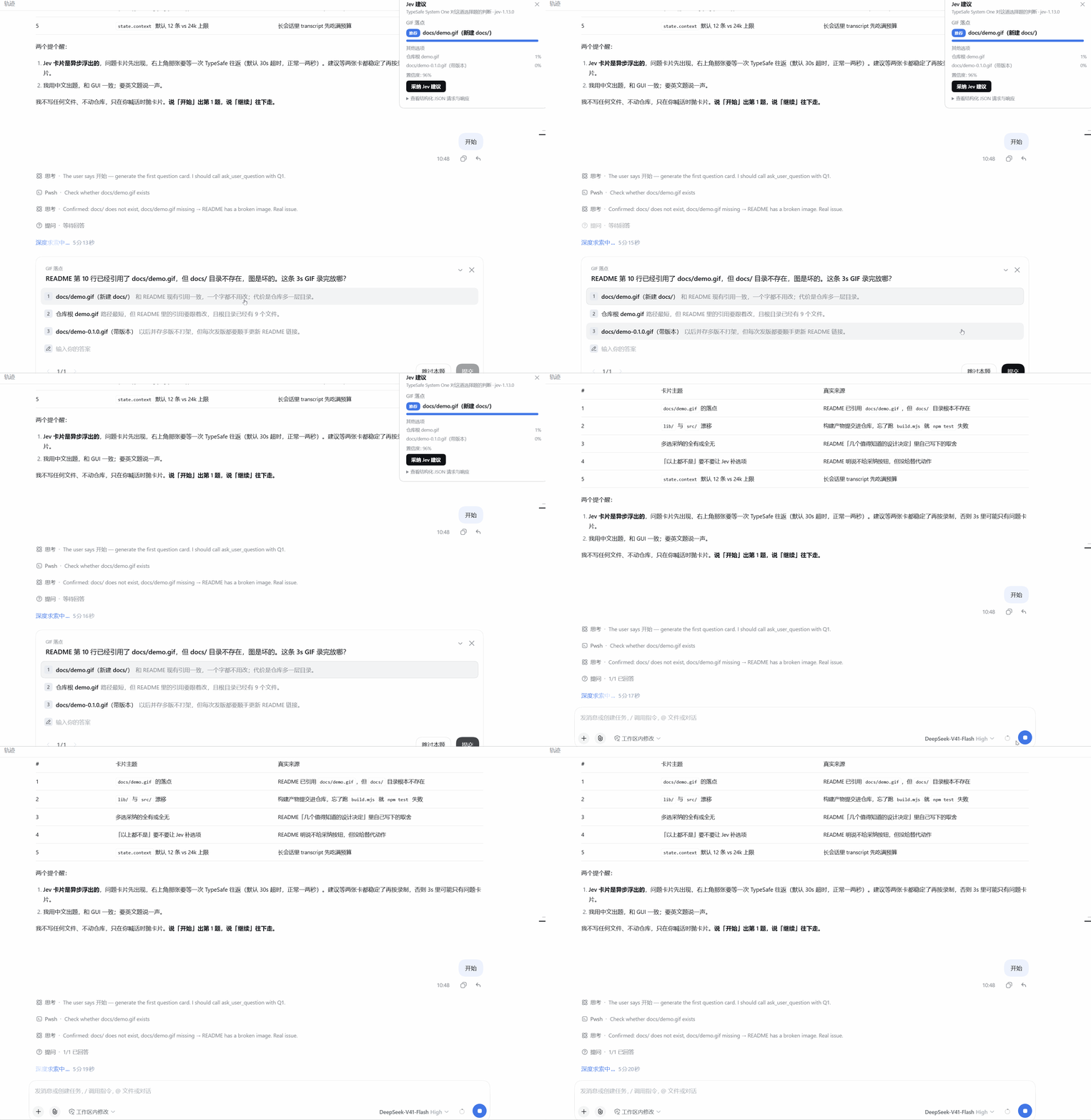
and floats the recommendation beside the options — the full probability spread, Jev's confidence,
the exact JSON that crossed the wire, and one click to adopt it.
| | |
| --- | --- |
| Install | dsh plugin --profile <p> add github:gordan-code/dsh-jev-advisor |
| Setup | paste an API key in Settings → Jev. That is the entire configuration. |
| Surfaces | shell.overlay + settings.section — it never replaces the question card |
| Model changes | none: no prompt edits, no tool the model has to remember to call |
| Tests | request building · client wiring · live round trip against a mock endpoint |
| License | MIT |
What this is — and is not
Is: a decision aid for the human, at the one moment a coding agent actually asks for input.
Is not: an agent-loop gate. If you want Jev to restrict which tools are visible, assess a call before it runs, or route between models, use @buberlo/dsh-jev — it does that thoroughly, with shadow/enforce modes and benchmarks, and this plugin deliberately does not compete with it. Different table, different side of it.
The trade is deliberate. An agent-loop gate has to be configured — providers, thresholds, tool categories, failure rules — and it only pays off once you have tuned it. This plugin has one moving part you have to supply (an API key) and it does something useful on the first question you are asked. That is the whole product.
What you actually see
You ask the agent to do something. It stops and asks you to choose. Instead of guessing, you get:
- the recommended option, badged, with the probability Jev assigned to it;
- the rest of the distribution, so you can see whether it was 80/20 or 51/49;
- Jev's confidence in its own answer;
- the exact request and response behind the scenes, in a collapsible JSON block — nothing about the recommendation is hidden from you;
- one button that submits Jev's pick as if you had clicked it.
Nothing is auto-applied. If you disagree, ignore the card and answer normally — the shipped question card is untouched and still works exactly as before.
Install
Publishing to npm is not required — dsh plugin forwards to pnpm, so any spec pnpm can install
works. Pick one; do not mix them, because two installs of the same package mount the loader entry
and the API routes twice and fail the whole plugin tree.
Straight from the repository
dsh plugin --profile <your-profile> add github:gordan-code/dsh-jev-advisor
# or the full form:
dsh plugin --profile <your-profile> add git+https://github.com/gordan-code/dsh-jev-advisor.git
This needs no build step on your machine because the repository commits lib/. pnpm only runs a
prepare script for a git dependency, and blocks it until you allowlist the package in the profile's
pnpm-workspace.yaml; shipping the built files avoids that entirely. npm test runs
scripts/build.mjs --check, which fails when lib/ drifts from src/.
From a local checkout
dsh plugin --profile <your-profile> add /absolute/path/to/dsh-jev-advisorlink: installs skip the build too — run node scripts/build.mjs after editing src/.
From npm
Not published yet. The name is reserved and free.
dsh plugin --profile <your-profile> add dsh-jev-advisorThen restart the host and open Settings → Jev to paste your API key.
Update / uninstall
dsh plugin --profile <your-profile> remove dsh-jev-advisor
dsh plugin --profile <your-profile> add github:gordan-code/dsh-jev-advisor
A git install tracks the ref you asked for, so updating means re-running add (or pnpm update
inside the profile directory). There is no semver range unless you write
github:gordan-code/dsh-jev-advisor#semver:^0.1.0.
Configure
Settings → Jev
| Field | Default | Meaning |
| --- | --- | --- |
| API key | (empty) | TypeSafe key from https://console.typesafe.ai/keys. role('secret') removes it from settings reads; it is never echoed back to the browser. The profile's Cordis patch stores it in plain text, not encrypted. |
| Endpoint | https://api.typesafe.ai/v1/systemone | Evaluation endpoint. |
| Model | jev-latest | Jev model or alias (jev-1.13.0, jev-preview, …). |
| Enable Jev advice | on | Master switch. |
| Send the recent conversation as the state | on | Whether the transcript tail is attached as state.context. |
| Require confirmation before sending | off | Optional local preview; automatic advice remains the default. |
| Mask common credentials before sending | on | Best-effort masking in outbound question/context text, not a complete privacy filter. |
| Context messages | 12 | How many trailing transcript messages to include. |
| Timeout (ms) | 30000 | Total evaluation timeout, including response reading and retry backoff. |
Test connection sends one trivial noul question and reports the model that answered, so you can
verify a freshly pasted key without waiting for a real question.
The same values can be seeded from the cordis row's config (see cordis.patch.yml); user settings
resolve above those defaults. Composition config supplies deployment defaults, not enforced policy.
How it works
| Half | File | Responsibility |
| --- | --- | --- |
| Host | lib/index.js | The Config schema (the settings source of truth), session transcript read, outbound TypeSafe call, four loopback-only JSON routes. |
| Browser | lib/client.js | The floating advice card and the Settings → Jev section. |
The two halves talk over same-origin fetch to the host's own webserver:
| Route | Purpose |
| --- | --- |
| POST /dsh-jev-advisor/api/status | { enabled, hasKey, endpoint, model, … } — connection facts without the key. |
| POST /dsh-jev-advisor/api/test | One trivial evaluation, for the Test connection button. |
| POST /dsh-jev-advisor/api/prepare | Prepare an exact local request snapshot and a short-lived confirmation token; no Jev call. |
| POST /dsh-jev-advisor/api/advise | Build the structured request for a pending question batch, call Jev, map the answer back onto option labels. |
All four require both a real loopback TCP peer and a loopback authority, and defer to ctx.connection.requestRejection when the
Connection service is mounted. A supplied browser Origin must match the actual protocol, hostname
and port; cross-site and same-site-but-not-same-origin Fetch Metadata are rejected. Local diagnostic
clients without an Origin remain supported. Every POST requires Content-Type: application/json;
only /status also accepts GET. GET cannot trigger a paid evaluation.
Why a floating card and not a modified question card?
conversation.composer is a chain slot: it elects exactly one entry, and the shipped question
composer always wins for a pending question. Replacing it would mean reimplementing the whole
question UI and breaking every question shape this plugin does not model. shell.overlay is the
documented additive seat for a frame-wide surface, so the advice card renders beside the shipped
composer and reads pending interactions from useSessionStatus. Since this slot is root-scoped,
it subscribes separately to the public uiSession.adapter.current binding to follow the main Session.
Decisions worth knowing
Multi-select questions fan out into one noul question per option ("should this option be
selected?"), because Jev has no multi-label primitive. Options at or above 0.5 are the recommended
selection.
A "none of the above" option is always offered to Jev for single-choice questions. If it picks that, the card says so and disables adoption — you write the answer yourself, because Jev has told you the option list is wrong, not which option is right.
Adoption is all-or-nothing. Submitting an answer batch answers every question in it. If Jev has no decisive answer for one of them — or a question has no options at all — the button stays disabled and the card says so, rather than silently submitting an empty answer for the rest.
Correctness safeguards (0.1.5)
- Evaluation keys are generated per decision (
decision_0,decision_1_opt_0, …), independently of the original question IDs. Multiple multi-select questions cannot overwrite each other; answers still use the exact original IDs and option labels. - Missing or wrong-type answers, unknown choices, incomplete probability distributions, and
probabilities or supplied confidence outside
[0, 1]block adoption. Missing multi-select answers are not interpreted as a negative vote. If every option is below0.5, no fallback option is invented and the question stays manual. - Choice probability mass must be within
0.01of 1 (rounding tolerance); a zero-probability selection is never adoptable. Nested advice records are validated before rendering. - Advice is bound to the session, interaction key and full question contents. Replaced interactions hide old advice immediately, ignore late responses and reject stale submit handlers. Double clicks cannot submit the same interaction twice; a failed submission can be retried.
- Each browser evaluation carries a fresh request ID. The host echoes it together with the session, interaction key and question contents; the browser rejects mismatched or replayed response payloads.
- Duplicate question IDs and ambiguous option labels are rejected. Malformed request bodies return
400, oversized bodies413, unsupported content types415, and disallowed methods405.
Host integration and settings (0.1.5)
- The main Session's pending interaction takes priority over Map insertion order. If the main Session has no pending interaction, the card falls back to the first option-bearing question; a current approval stays with its own UI instead of displaying background advice over it.
- Saving settings validates the complete draft, then calls
ConfigFormController.mutateonce with the observed revision. A rejected write retains the draft and shows an error instead of "Saved". Loading, unavailable and read-only forms cannot save or clear credentials. Values typed during a pending save are retained; an empty key input does not clear a stored key. - Saving, clearing the key, and testing the connection are synchronously mutually exclusive. Key clearing uses a revision-bound atomic mutation and preserves a newer key draft typed while waiting. Unmounting aborts status/probe requests and suppresses late UI updates and follow-up requests; it cannot undo a configuration write already submitted to the host. A draft containing only a blank key shows clear-key guidance instead of a false "Saved" message.
- Binding mismatch diagnostics contain only comparison flags, not question text or a global conversation trace. The request ID, Session and interaction checks remain strict.
Privacy, layout and cost control (0.1.5)
- Automatic advice remains the default. Enable Require confirmation before sending to inspect the exact outbound JSON before pressing Confirm and send. Preparation stays on the local host. Confirmation uses that snapshot, not a newer transcript. Previews expire after two minutes; changing settings or request identity invalidates them. At most 32 previews are retained in memory.
- Common credential masking is on by default and applies to question/option/context text before
transmission. It recognizes common password/token assignments, Bearer tokens,
sk-…keys, private key blocks and URL credentials. It cannot identify every secret or personal datum. Disable transcript inclusion or use confirmation mode for sensitive conversations. Original option labels remain unchanged when submitting an answer to DSH. - The complete evaluation JSON has a local 64 KiB UTF-8 budget. Context is reduced first;
oversized questions/options return
413without a Jev call, rather than being silently cut. This budget is not a token estimate or a guarantee of the upstream service's acceptance. - Identical concurrent evaluations in the same host instance share one call, while each response keeps its own request ID. Completed host results are not cached, so an explicit retry stays fresh. Closing or switching an active request cancels its subscription; the upstream is aborted when no subscribers remain. Cancellation cannot undo work already processed or guarantee a billing refund.
- The card displays actual token usage when supplied by Jev, not a guessed currency price. The default position is left; switch sides to avoid a sidebar, collapse it, or dismiss and reopen it. Reopening a completed card does not request another evaluation; reopening a cancelled load does.
Decision helpers (0.1.5)
- Close-call warnings: a single-choice recommendation within 10 percentage points of its
strongest alternative (including “none of the above”) gets a probability-gap notice. Multi-select
options near the
0.5cutoff are marked as borderline. These are observations of Jev's reported scores, not calibrated correctness guarantees; they do not automatically submit or prohibit answers. A recommendation scored below another option gets a separate warning rather than a “clear winner” label. - Copy without adopting: copy a complete, valid suggested answer batch as readable text, keeping original question and option wording. Copying does not submit answers or request another evaluation. Incomplete, invalid and “none of the above” batches cannot be copied as if they were full answers.
- Remember layout: left/right docking and collapse state are stored in browser local storage. No API key, conversation text, request/response or decision preference is stored there. This is same-origin browser storage: changing the host's port or browser profile does not share the preference. If storage is blocked or damaged, the card safely falls back to the current page's layout state.
- Temporary decision preference: enter a short preference such as “prioritize stability”, “finish quickly” or “minimize code changes”, then click Apply and reevaluate. Typing alone makes no call. The text is limited to 500 UTF-16 code units and applies only to the current interaction; switching questions clears it. Applying or clearing an active preference requests a new evaluation (or a new local preview in confirmation mode). It does not change the agent prompt or persist to DSH settings. An explicit preference is sent even when transcript inclusion is off; credential masking and the full-request byte budget still apply. Changing it invalidates an old preview/advice identity.
The previously staged correctness, host integration and privacy improvements are included in this single 0.1.5 update from 0.1.4; intermediate development version labels were not release versions.
Development
npm ci                     # test dependencies; no real API keys needed
node scripts/build.mjs     # src/*.js -> lib/*.js (+ type stubs)
npm test                   # lib/ freshness, request building, client wiring
npm run check:pack         # the DSH packaging gate (see below)
npx playwright install chromium
npm run test:browser       # real Chromium + React DOM, isolated service fixtures
npm run test:host          # real DSH CLI, isolated scratch home (see below)
npm run test:install       # actual npm .tgz, offline install, real isolated host
npm run quality            # build -> base -> browser -> pack -> host -> install
npm pack --dry-run         # confirm the published file list
.github/workflows/ci.yml runs npm ci, npm test, and check:pack on Node 20, 22, and 24.
A Node 24 quality job runs the same unified gate with Chromium and pinned DSH 0.2.0-rc.2.
npm test also covers adversarial answer mapping, route rejection paths, deterministic hook/effect
lifecycle tests, and a real loopback HTTP bridge-to-mock round trip. Those tests need no real API key
and write no request dumps into the repository.
Two gates exist because this package can be broken in ways a unit test cannot see:
npm teststarts withscripts/build.mjs --check.lib/is committed (a git install runs no build), so asrc/edit without a rebuild would ship stale code. The check compares the two byte for byte.check:packasserts the DSH-specific packaging invariants.lib/client.jsandcordis.patch.ymlboth fail silently when missing: the first means the plugin installs and no UI ever appears, the second meansdsh plugin addnever appends the bundle and the plugin is never mounted at all. The gate checks they exist, thatfilesactually covers them, and that every entry pointpackage.jsonadvertises resolves.
test:browser uses Playwright 1.59.1 (development-only), real Chromium, and React DOM with isolated
service fixtures. It covers main-session switching, late responses, dismiss/retry, answer adoption,
and atomic/rejected/async settings writes, key clearing and settings unmount cancellation.
It is not a full DSH Desktop UI test.
test:host starts the real DSH CLI with a random temporary DSH_HOME, scratch profile, random
loopback ports, and an in-memory TypeSafe mock. It checks the mounted routes, request binding,
correct/wrong/missing keys, and HTTP rejection paths, then stops its processes and removes its
temporary profile. It never uses a real Jev key or the user's DSH profile. Set DSH_TEST_CLI to a
pinned CLI entry point (or install that CLI where module resolution can find it); no PATH-based
fallback is used. For example, in PowerShell:
$env:DSH_TEST_CLI = "<temporary-cli-directory>/node_modules/@deepseek-ai/dsh/lib/bin.js"
npm run test:host
npm run quality
test:install packs the already-built artifacts into a real .tgz under a temporary directory,
then runs npm install --offline --ignore-scripts in a fresh scratch profile with an empty npm
cache and an unreachable registry. Peer dependencies and their required dependency closure are
packed locally from the versions installed by npm ci, checked against package-lock.json, and
installed as real tarballs alongside the plugin. npm still validates peer ranges; there is no
--legacy-peer-deps, online fallback, source link, or dependency on registry metadata caching.
This verifies packaging/loading against the locked peer fixture, not live registry availability. The test loads
the package's shipped cordis.patch.yml through the profile bundle stack, checks live host advice,
and verifies the installed client is in DSH's boot graph and is served as a valid client module.
The plugin directory is asserted to contain real installed files, not a junction, and all owned
processes, tarballs and temporary profiles are cleaned up. No real key or user profile is used.
quality stops at the first failure and requires Chromium plus the real CLI configured above;
missing prerequisites are failures, not skipped checks. It ignores the development-only
DSH_CLIENT_SOURCE switch so release verification always tests lib/. It does not publish or
commit anything. npm ci, the Chromium installation and the pinned CLI installation are setup
steps, not automatically performed against a user's profile by the gate.
CI installs @deepseek-ai/[email protected] under the runner's temporary directory. Local full-host
verification used the same version on Node 24; the CI jobs still need to run on GitHub.
For a manual probe of an already running scratch host configured to the local mock, pass its
tokenized launch URL as DSH_E2E_BASE or node test/e2e.mjs <tokenized-url>. The mock CLI accepts
node test/mock-typesafe.mjs 0 to choose a free port and records requests only in memory by default.
Optional DSH_E2E_DUMP reads an explicitly supplied dump; optional DSH_E2E_BADKEY_BASE points to
a separate wrong-key scratch host. Without that second host, the manual probe explicitly skips the
wrong-key check instead of claiming it passed. The automated host suite always checks it.
The plugin is plain JavaScript: the host half is Node ESM, the browser half is already in the
__ModuleLoader__.load({ id, factory }) lazy-CJS form the DSH client module system expects. There is
nothing to transpile, so lib/ is a straight copy of src/ — and it is committed, because a git
install runs no build.
For the browser half, only the platform seed modules may be required (react,
react/jsx-runtime, react-dom, @deepseek-ai/cordis, @deepseek-ai/dsh-client-store,
@deepseek-ai/dsh-client-ui-slots, @deepseek-ai/dsh-client-ui-primitives,
@deepseek-ai/dsh-client-ui-dockkit). Cross-plugin collaboration goes through cordis services
(ctx.slots, ctx.locale, ctx.configForms, ctx.uiSession) or the host HTTP bridge — never through another
plugin's internals.
Troubleshooting
| Symptom | Cause |
| --- | --- |
| Card never appears | No pending question, Jev advice is off, or the host route is unreachable. Check /dsh-jev-advisor/api/status returns {"ok":true,...}. |
| no Jev API key is configured | Save a key in Settings → Jev. |
| Jev responded 401 | The key is invalid or revoked. |
| Jev responded 422 | Inspect the local request JSON. Report the error code and request byte size first; do not share keys or conversation text. |
| Jev responded 429 / 529 | Rate limited or overloaded; the plugin retries twice with backoff, then gives up. |
| host bridge is out of date | The browser loaded the new client while the host still runs old code. Restart the DSH host process, then refresh the browser; retrying or refreshing alone cannot reload the host. |
| returned advice for a different request | The echoed request identity or question contents do not match. Object key ordering is ignored, but question and option order still matter. If it persists after a host restart and browser refresh, report only the reqIdMatch, sessionMatch, keyMatch, and questionsMatch flags, not keys or conversation text. |
| Settings section missing | The client bundle did not load. Confirm dsh.client is present in node_modules/dsh-jev-advisor/package.json and that lib/client.js shipped. |
| duplicate loader entry id at boot | The package is mounted twice — two installs, or an aggregate bundle mounting it too. Remove one. |
Known limitations
- Requires Config-backed settings,
ConfigFormController.mutate, anduiSession.adapter.current(0.1.7-rc.1 or newer). These interfaces were checked against the published 0.1.7-rc.1 client bundles and local DSH 0.2.0-rc.2 code. There is no legacysettingsScopefallback. Full-host integration tests pin a specific runtime instead of silently testing whateverdshis on PATH. - Sidebar avoidance is manual (left/right docking), not private-DOM detection. A wide host panel can still overlap the card; switch sides or collapse/dismiss it. Narrow-screen overflow is covered by Chromium tests, but a full DSH Desktop visual test has not been automated.
- With more than one session holding a pending question at once, the card follows the current session and falls back to the first option-bearing pending interaction when the main Session has none.
- Plan-review questions are advised like any other option-bearing question; the card never replaces the approve/refuse buttons.
- The API key round-trips to the host process, which is what performs the HTTPS call. It is never returned to the browser, but it is stored in plain text in your profile's Cordis patch — protect that file as you would any credential.
- Loopback restrictions do not isolate malicious processes running as the same OS user. Use trusted DSH profiles. Request binding prevents stale response use; it is not per-session authorization.
- The transcript tail is capped at ~24k characters and may be shortened further by the full-request byte budget. Usage is per evaluation; shared results must not be counted as separate charges.
- No retry beyond the two documented overload codes (
429,529).
Prior art, and why this package is not called dsh-jev
dsh-jev is taken on npm (zhangxaochen/dsh-jev, v0.2.0) and at least five GitHub repositories
share the name, so this one is namespaced dsh-jev-advisor — and every identifier it owns
(settings entry id, API route prefix, locale namespace, loader entry id) is namespaced to match. It
can therefore sit beside those plugins without a duplicate-entry boot failure.
The Jev plugins already out there are worth your attention:
| Project | What it does |
| --- | --- |
| Devin-AXIS/jev-dsh-decision | Structured decision engine for agent harnesses; DSH-native plus OpenCode/Codex through iPolloWork |
| buberlo/dsh-jev | Jev bound to the agent loop: tool preselection, per-call assessment, model and skill routing |
| noetion/dsh-jev | A jev_ask tool for noul, choice and score answers |
They put Jev inside the agent's decision-making. This one puts it in yours. If you want both, they do not conflict — that is what the namespacing above is for.
Jev is a product of TypeSafe AI. This project is not affiliated with or endorsed by TypeSafe AI, DeepSeek, or any of the projects listed above.
License
MIT