
dsh-model-switcher
v0.3.0
Published
Richer model picker for the DeepSeek Harness Web composer: a searchable provider select (with logos, model counts, and key status) above a keyboard-first, fuzzy-searchable model list grouped by provider, with favorites, recents, context-window/vision/reas

Maintainers
 youssefsiam38
Readme
dsh-model-switcher
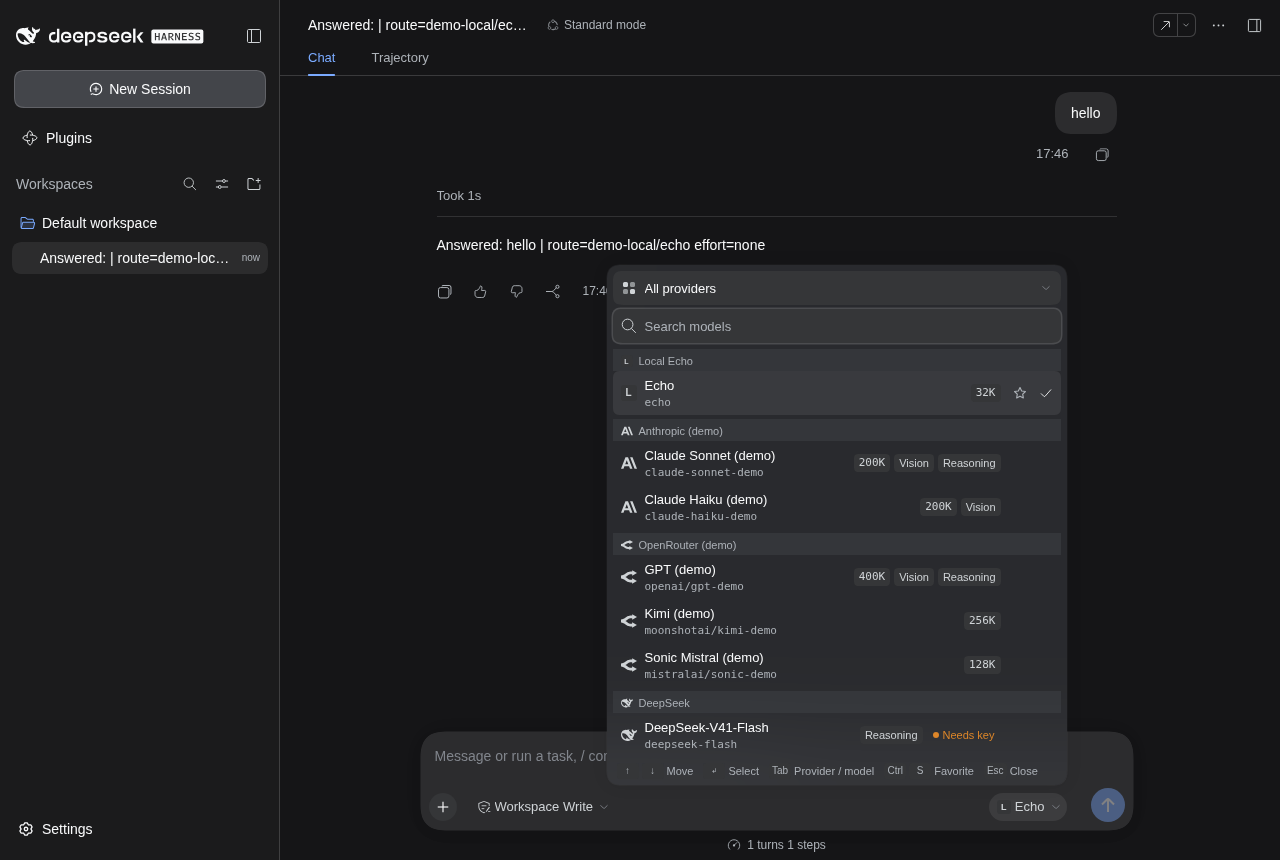
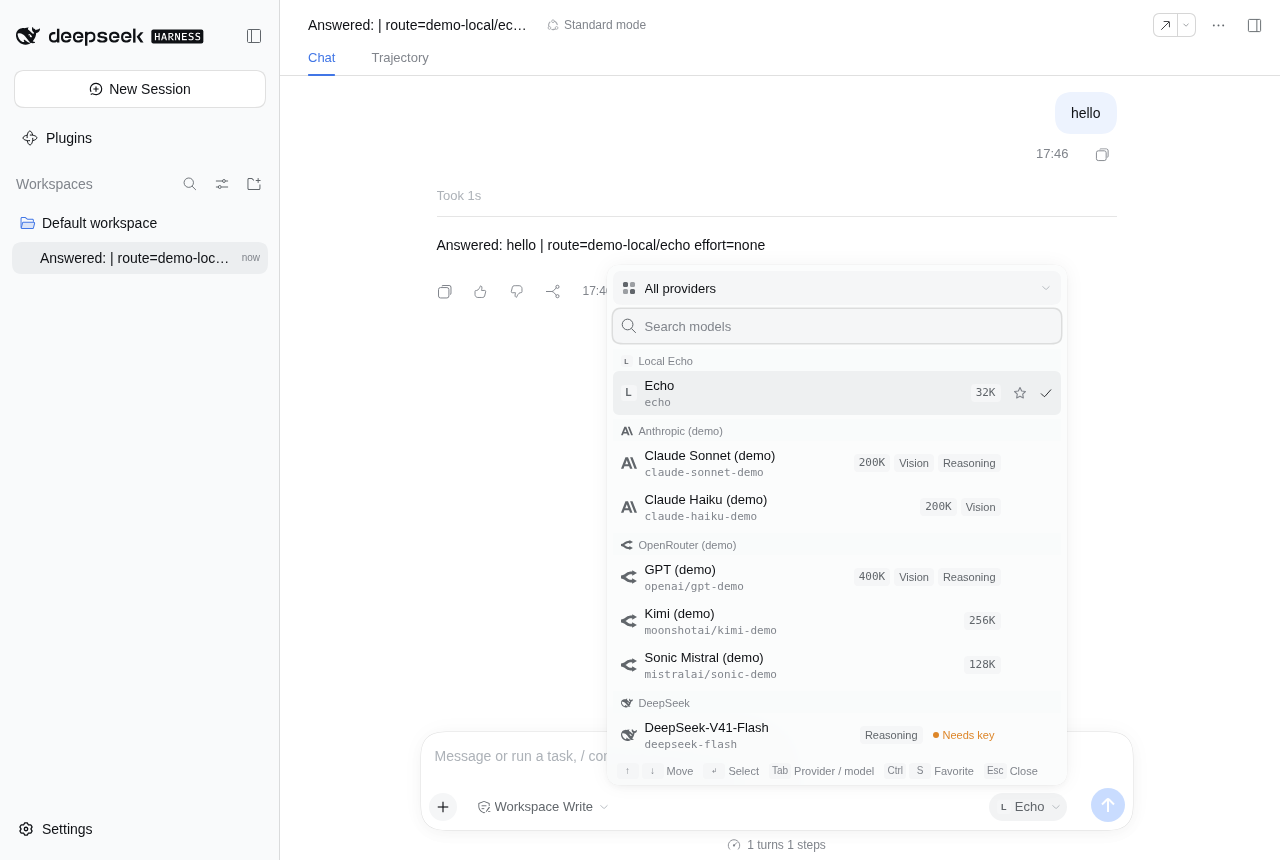
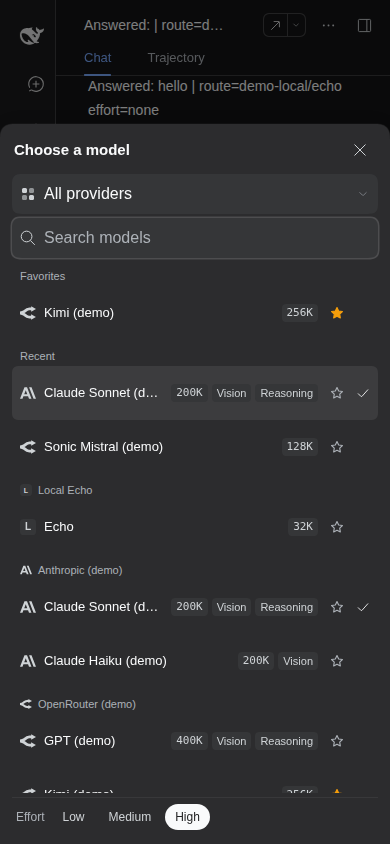
A richer model picker for the DeepSeek Harness (dsh) Web composer. It replaces the composer's model dropdown with a two-stage, keyboard-first popover:
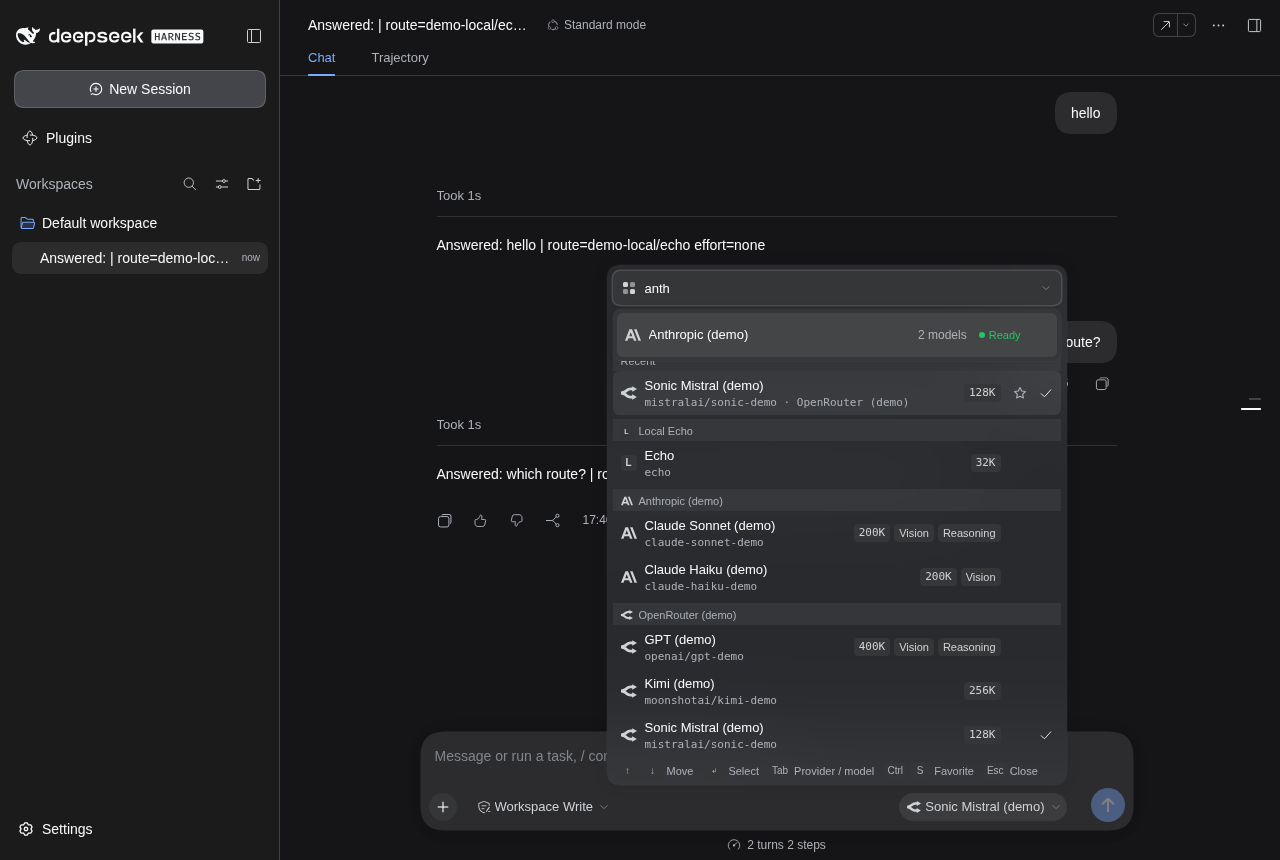
- Provider select at the top: searchable, "All providers" by default. Each provider shows its logo, how many models it lists, and its key status (Signed in, Ready, Needs key, Failed to load).
- Model search below: picking a provider moves focus there. With "All providers" the search covers every provider's models, grouped by provider. Rows show the model name and id, the context window, Vision and Reasoning badges, and a star. Favorites and Recent sit on top.
The reasoning-effort control is in the same popover. On narrow screens the picker opens as a full-width bottom sheet.
Other plugins can open the same popover to let you choose one or several models (see For plugin authors). dsh-model-compare uses it for its model list.
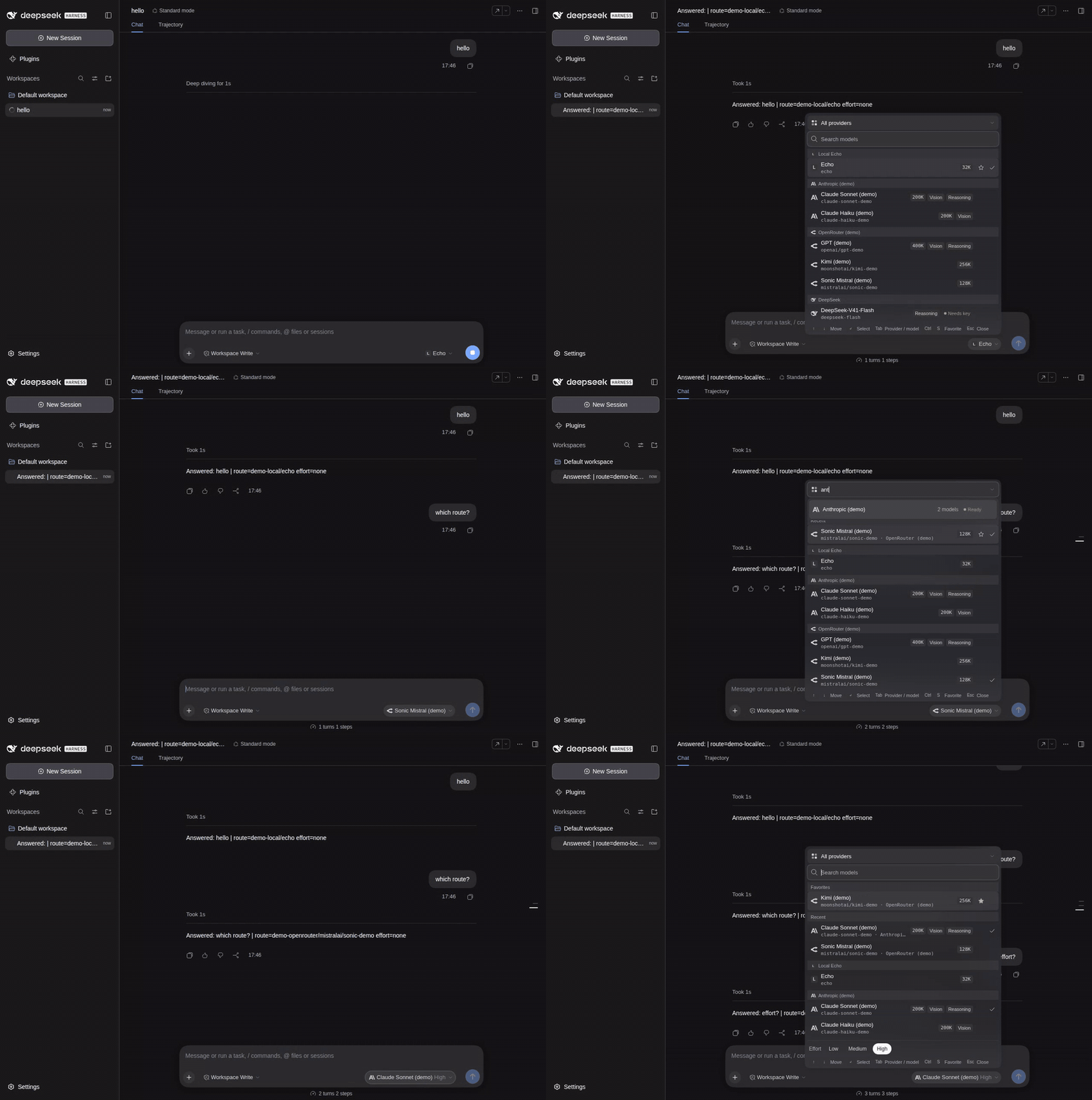
| Dark | Light | Provider stage | Phone |
|---|---|---|---|
|  |
|  |
|  |
|  |
|
The screenshots were taken by the browser test against stock dsh 0.1.7-rc.2 with demo model routes.
Contents
- Install
- Using it
- Keyboard
- What it shows, and where the data comes from
- What it changes
- Configuration
- For plugin authors
- Uninstalling
- Compatibility
- Known limitations
- Development
Install
dsh plugin --profile web add dsh-model-switcherFrom a packed tarball:
dsh plugin --profile web add /absolute/path/to/dsh-model-switcher-0.3.0.tgzThe bundle patch (cordis.patch.yml) inserts one plugin row with id model-switcher. The Web plugin page (Plugins in the sidebar) can do the same. Restart dsh if the profile does not reload live.
Using it
Click the model control in the composer (or focus it and press Enter). The popover opens with focus in the model search:
- Type to filter. Matching is fuzzy and covers the model name, the model id, and the provider name and id.
claude,cso(Claude SOnnet),v4-pro, andopenrouter kimiall work. Every word must match something. Name matches rank above provider matches. Ties go to favorites, then recently used models. - Press ↑/↓ to move and Enter to pick. The popover closes, and the choice applies to the session's next request, as with the stock control.
- Press Shift+Tab to reach the provider select. Type to filter providers, then press Enter. Focus moves back to the model search, which now covers only that provider. Choose All providers to search everything again.
- Star a model (the star on the row, or Ctrl+S / ⌘S on the active row) to keep it under Favorites. The last models you picked appear under Recent. Both sections show only while the search is empty. Favorites and recents are stored in this browser (
localStorage, keydsh-model-switcher:v1) and are shared across tabs. - The Effort row at the bottom sets the reasoning effort of the current model. It shows only the levels the model's adapter advertises, plus Default when the adapter has no default of its own. Models without reasoning metadata have no Effort row.
Keyboard
| Where | Key | Action | |---|---|---| | Model search | ↑ / ↓, Ctrl+P / Ctrl+N | Previous / next model (wraps) | | | PageUp / PageDown | Move 8 rows | | | Enter | Pick the active model | | | Ctrl+S / ⌘S | Add or remove the active model from Favorites | | | Esc | Clear the search. If it is already empty, close | | Provider search | ↑ / ↓ | Previous / next provider | | | Enter | Pick the provider and return to the model search | | | Esc | Clear the search, then return to the model search, then close | | Effort row | ← / → | Move between levels | | | Enter / Space | Set the level | | Anywhere in the popover | Tab / Shift+Tab | Cycle provider search → model search → effort row (and the sheet's Close button on phones) |
Focus stays in the search fields while you move through the lists. The active row is announced through aria-activedescendant. Both searches are ARIA comboboxes that control a listbox, models are grouped with role="group", and the result count is announced in a polite live region. Closing returns focus to the composer control.
What it shows, and where the data comes from
| Item | Source | When it is missing |
|---|---|---|
| Providers, models, names, descriptions, reasoning levels, current selection | The stock per-session model directory (ctx.modelDirectories, the same state behind /model) | The picker shows the stock load error with Retry |
| Context window, Vision badge | llm.discoverModels(settingsNs, { provider }) for each listed provider that has a settings address. Built-in catalog routes answer from their installed catalog. | No badge |
| Key status | llm.listConfigurableProviders gives the settings address, settings.describe (secrets redacted) gives the profile's apiKeyEnv, and credentials.describe says whether that reference holds a value | No status tag |
| Failed to load | Catalog failures from the directory | — |
| Logos | A configured URL, else a built-in mark for well-known providers (Anthropic, OpenRouter, DeepSeek, Google Gemini, Mistral, Ollama, Hugging Face, Kimi, Qwen, and others, from simple-icons, CC0), else a letter | Letter |
The status means:
- Signed in: the profile names a key reference, and a value is stored for it.
- Needs key: the profile names a reference, and no value is stored for it. The models stay selectable, as in the stock control.
- Ready: the route needs no stored key. It uses its provider's own authentication or declares no settings.
The enrichment is read when the popover opens, cached, and read again after dsh reports a change to adapters, settings, or credentials, or after a reconnect. It only reads. For routes whose adapter lists models live, such as an OpenRouter route with live listing, discoverModels asks the provider's model-listing endpoint with the stored key. Turn this off with metadata: false.
Costs and tool support are not shown, because dsh does not send them to the browser.
What it changes
- Composer model control: replaced. The picker registers in the composer's
conversation.input.modelslot at priority-10. The stock control stays registered at0, and the lowest priority renders. The picker writes through the same directory call as the stock control (session.selectModel):- picking a model sends provider and model, so the Host applies that model's default effort;
- the Effort row sends the current model with the chosen effort;
- picking the current model again closes the popover without a write;
- a refused selection keeps the popover open and shows the same toast as the stock control, including the "session in use" message;
- a
lockedcomposer disables the trigger; - addressed subagent sessions get no control, as before;
- the composer's compact mode (text hidden when the row is tight) is honored.
/modelpopup: unchanged. It shares the same directory, so the two always agree.- Settings pickers: unchanged. The Settings pages have no replaceable model-picker seat. The Models page is a provider editor, and the Subagent page's model choices are a multi-select checklist inside a card that is registered as a whole. Replacing either would mean re-implementing its whole card. This plugin changes only the composer.
The plugin adds no session events, no Host routes, and no model-visible input. It adds one browser service, modelSwitcher, which other plugins can call (next section).
Configuration
All settings are optional. Override them in your profile's cordis.patch.yml by targeting the row id:
- id: model-switcher
  config:
    priority: -10          # slot rank; must be negative (the stock control is 0)
    initialFocus: models   # or `providers` to open on the provider search
    recentLimit: 5         # 0 to 20; 0 hides the Recent section
    metadata: true         # context windows and input types via llm.discoverModels
    providerStatus: true   # key status via settings/credentials describe
    providerIcons:         # logo overrides by provider id (http, https, or data:image URLs)
      my-gateway: https://example.com/gateway.svg
Invalid values fail when the row loads. The Host half passes the settings to the page as the __DSH_MODEL_SWITCHER__ global through webserver/index-inject.
If another plugin also replaces the model control, the lower priority wins. Two plugins at the same priority make the second registration fail, so change priority if you see that error.
For plugin authors
The browser half provides a Cordis client service named modelSwitcher. Its pick() opens the same popover (a bottom sheet on phones) in picker mode: provider select, fuzzy model search, favorites and recents, badges, and keyboard all work as in the composer, but choosing a model changes no session. It lists the Host model catalog (session.modelCatalog). The effort row is not shown; the caller owns efforts.
pick(options?: {
  anchor?: HTMLElement      // open below this element and return focus to it; omitted: centered
  multiple?: boolean        // check several models, confirm with Done (or Ctrl/Cmd+Enter)
  max?: number              // most models a multiple pick returns
  exclude?: ModelRef[]      // models to leave out of the list
  initial?: ModelRef[]      // models checked when a multiple pick opens
  title?: string            // dialog label and sheet title
}): Promise<ModelRef[] | undefined> // ModelRef = { provider: string; model: string }- A single pick resolves with one model as soon as it is chosen. A multiple pick toggles checkmarks, shows the count (
2 of 3 selected), disables unchecked rows atmax, and resolves on Done with the models in the order they were checked. - Esc, the Close button or scrim on phones, and a pointer outside the popover resolve
undefined. So does unloading the plugin. - One pick is open at a time. A new
pick()cancels the open one. Callingpick()again with the sameanchorwhile it is open only closes it, so a toggle button needs no extra state.
To keep the switcher optional, read the service when you need it and do not import the switcher's runtime code. Its types are published as a types-only entry, dsh-model-switcher/service, which you can add as a dev dependency. Or copy the small structural type, as dsh-model-compare does:
import type { ModelSwitcherService } from 'dsh-model-switcher/service'

function switcher(ctx: Context): ModelSwitcherService | undefined {
  const service: unknown = ctx.get('modelSwitcher' as never)
  return typeof (service as { pick?: unknown } | undefined)?.pick === 'function' ? service as ModelSwitcherService : undefined
}

const picked = await switcher(ctx)?.pick({ anchor: button, multiple: true, max: 3, exclude: chosen })
if (picked !== undefined) addModels(picked)
Read it at call time (or each render) rather than listing modelSwitcher in inject, which would keep your plugin from loading without the switcher.
Uninstalling
dsh plugin --profile web remove dsh-model-switcherThe stock control comes back on the next load. Nothing is stored on the Host. The browser keeps its favorites and recents under dsh-model-switcher:v1 until you clear site data.
Compatibility
- dsh
>=0.2.0-rc.1 <0.3, Web profile. Tested against the npm release@deepseek-ai/[email protected]. - The composer picker needs
@deepseek-ai/dsh-client-ui-model-selection, which the Web profile ships. Without it the plugin registers nothing in the slot, so any other occupant keeps working. ThemodelSwitcherservice does not need it; it needs thesessionRemote namespace for the catalog and shows a load error without it. - Key status needs the
settingsandcredentialsRemote namespaces. Metadata needsllm.discoverModels. Either one missing only removes its enrichment. - React 18 is provided by the dsh Web shell. The browser bundle includes match-sorter 8.3.0 and is about 28 kB gzipped.
- Node.js
^22.19 || >=24.
Known limitations
- Costs and tool support are not shown, because the model catalog does not carry them.
- The Settings model pickers are not replaced (see What it changes).
- Favorites and recents are stored per browser, not per account.
- The phone sheet closes on the scrim, Esc, and the Close button, but not on the browser's Back button.
- Lists are not virtualized. A few hundred models render without trouble. Much larger catalogs may feel slow while the search is empty.
Development
pnpm install
pnpm --filter dsh-model-switcher run typecheck
pnpm --filter dsh-model-switcher test
pnpm --filter dsh-model-switcher run build
pnpm --filter dsh-model-switcher run pack:tarball   # writes .artifacts/dsh-model-switcher-<version>.tgz
pnpm --filter dsh-model-switcher run marks          # regenerate the provider marks from simple-icons
The unit tests cover:
- ranking and grouping;
- favorites and recents storage;
- the enrichment reads, including wire validation and a load that an invalidation overtakes;
- the component: the ARIA roles, arrow keys and Enter, the handoff from the provider search to the model search, the Tab cycle, effort, favorites, error toasts, loading and errors, and the phone sheet;
- the browser plugin on a real Cordis context;
- the
modelSwitcherservice: a single pick, cancel (Esc, outside pointer, unload, a newer pick, the same anchor again), a multiple pick up tomaxwith Done and Ctrl+Enter, excluded and initial models, catalog errors with Retry, and option normalization; - the Host half through the Cordis Loader, including config that must be refused.
The browser test (e2e/) installs the packed plugin and demo model routes into a throwaway DSH_HOME and boots the web profile. It drives Chromium through:
- fuzzy search with keyboard selection, checked in the model request;
- the provider stage;
- effort, checked in the request;
- favorites across a reload;
- the phone sheet;
- removal, after which the stock control is back.
The dsh-model-compare browser test drives the modelSwitcher picker end to end (a multiple pick, then a comparison of the picked models).
# @deepseek-ai/dsh from npm, at the version of the pinned @deepseek-ai/dsh-* dev dependencies
pnpm --filter dsh-model-switcher run test:e2e
# another npm version, a built dsh checkout, or any other launcher
DSH_E2E_VERSION=0.2.0-rc.2 pnpm --filter dsh-model-switcher run test:e2e
DSH_E2E_CHECKOUT=/path/to/deepseek-harness pnpm --filter dsh-model-switcher run test:e2e
DSH_E2E_BIN="npx -y @deepseek-ai/dsh@next" pnpm --filter dsh-model-switcher run test:e2e
DSH_E2E_MEDIA=<dir> saves screenshots and a video. It needs Playwright's Chromium (pnpm exec playwright install chromium). Design notes and the research behind the decisions are in docs/design.md.
License
MIT. Provider marks come from simple-icons (CC0-1.0). The brands belong to their owners.