
dsh-moe-clean
v0.15.3
Published
Lightweight blue-white glass theme for DeepSeek Harness: muted whale-maid artwork, frosted panels, custom new-session and plugin icons.

Maintainers
 keikurosawa
Readme
dsh-moe-clean · 鲸鱼娘轻量皮肤



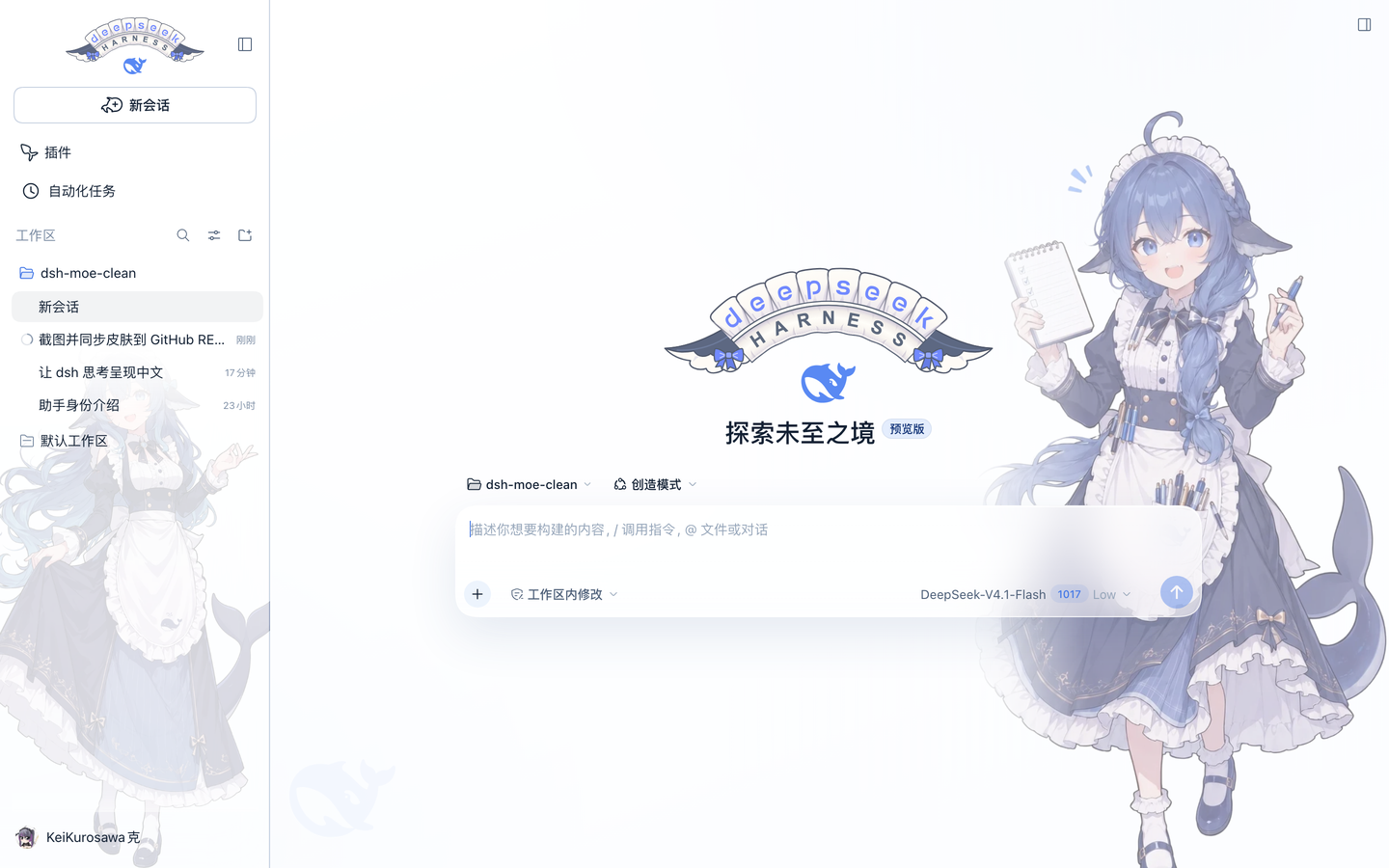
给 DeepSeek Harness(DSH)的一套安静、轻量的白蓝皮肤:白色为主、DeepSeek 蓝做点缀,侧栏和输入框是毛玻璃,右侧一张做了渐隐的鲸鱼娘女仆立绘。
界面
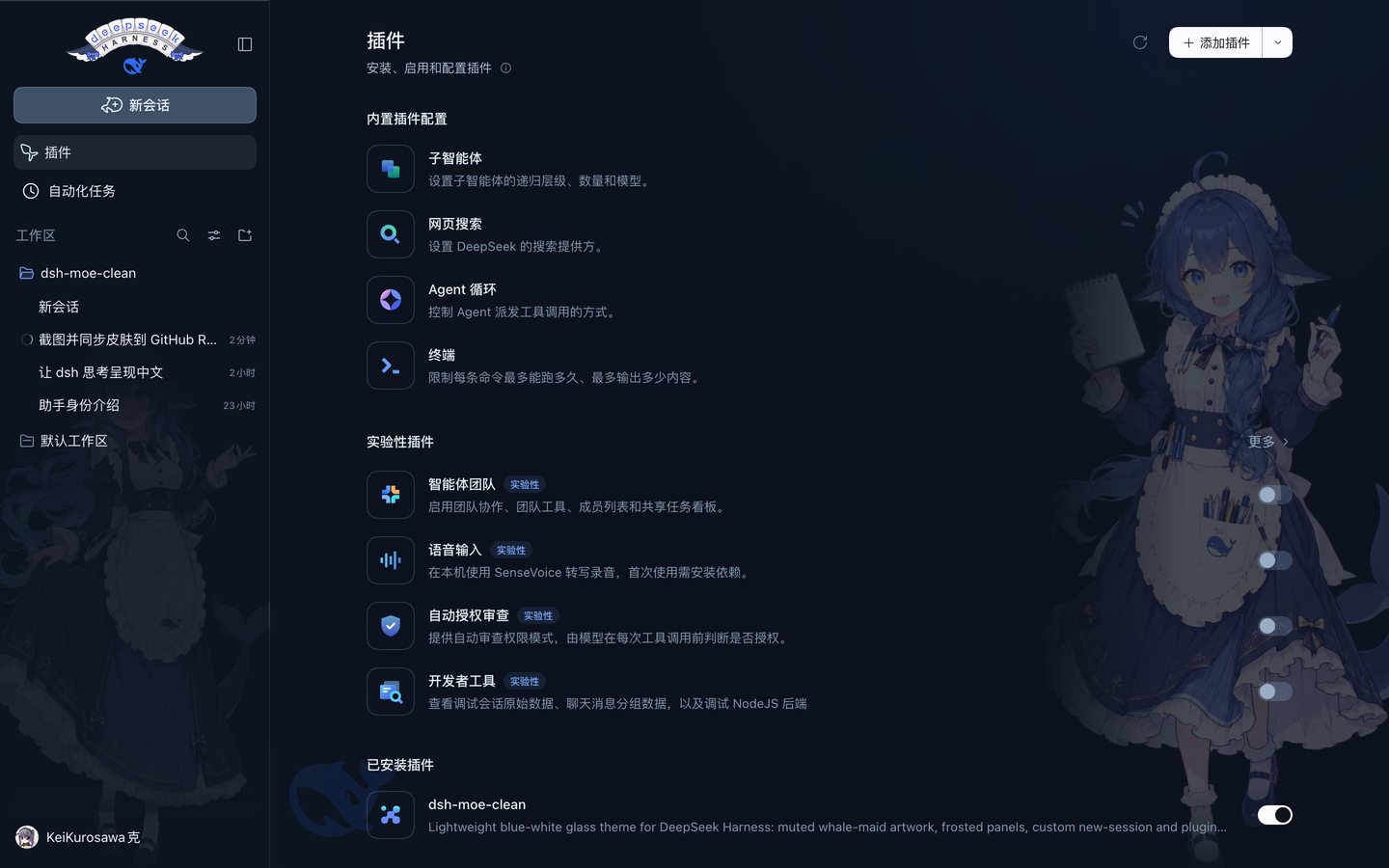
| 亮色 · 新会话 | 暗色 · 插件页 |
| --- | --- |
|  |
 |
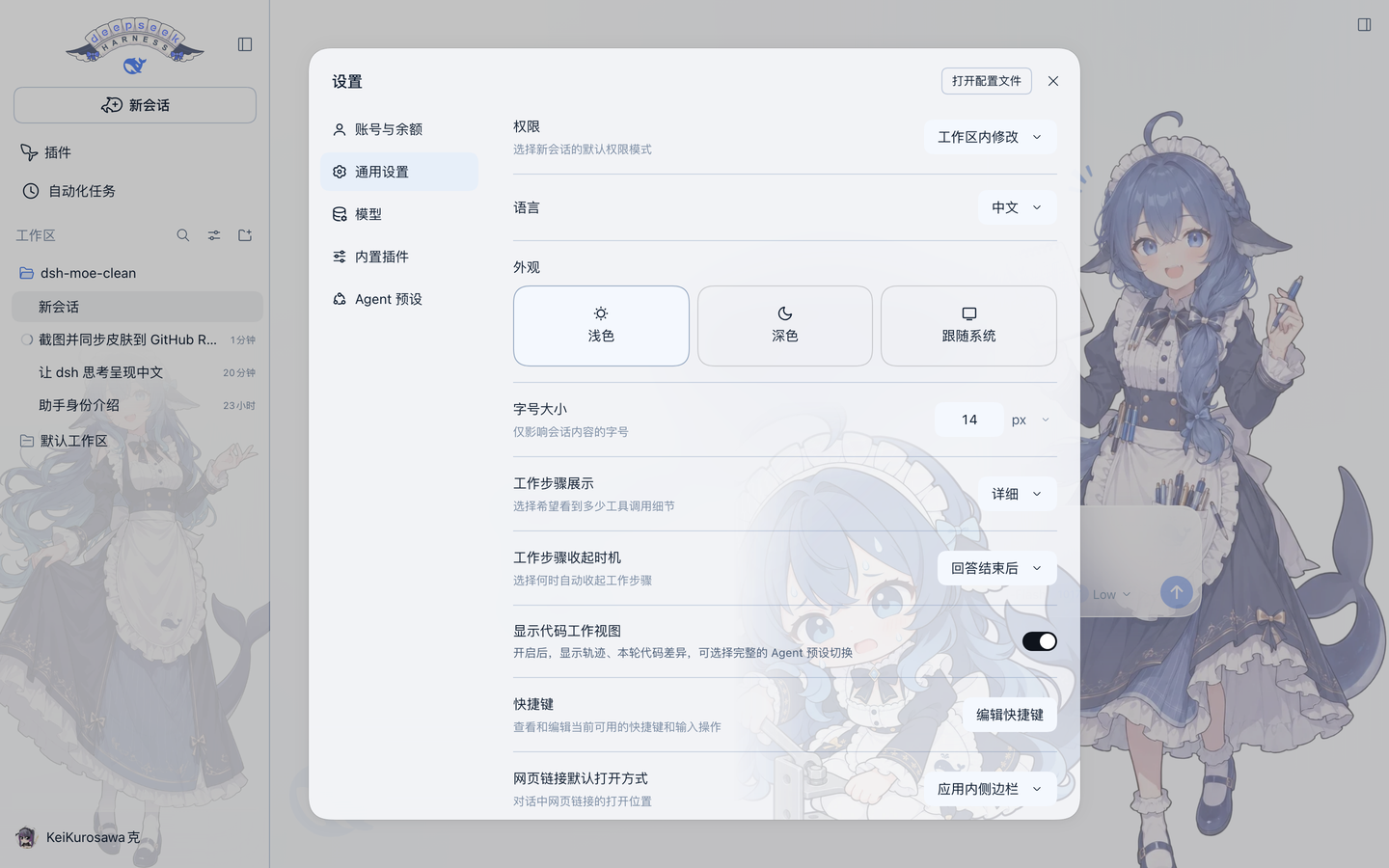
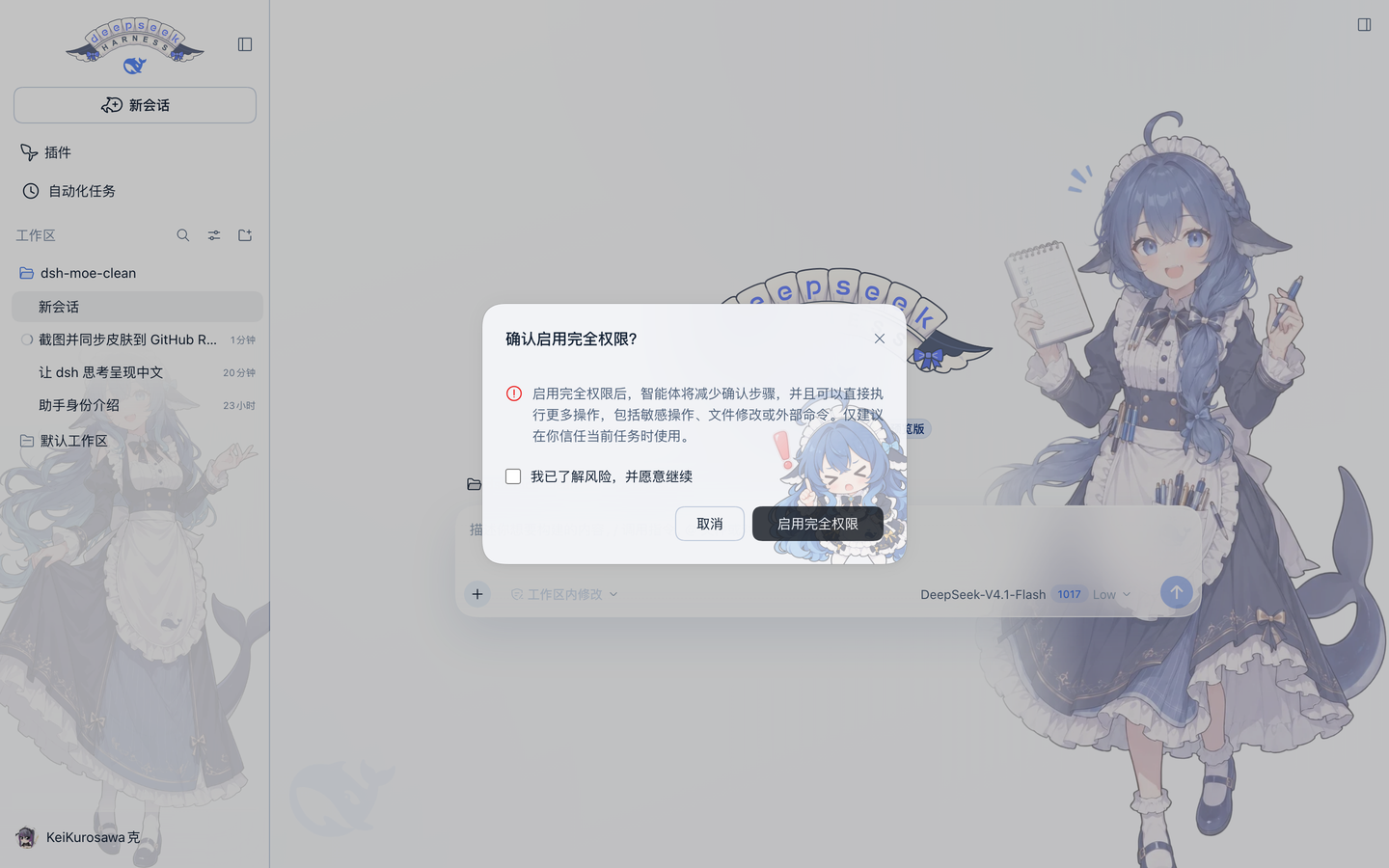
| 设置弹窗 | 完全权限警告 |
| --- | --- |
|  |
 |
演示视频
无配乐,53 秒:先看原版 DSH,再看换上鲸鱼娘皮肤后的同一套界面,最后是同界面左右对比。
为什么是轻量
- 无构建、无运行时依赖:装完即用,不需要 node_modules 里的第三方库;
- 只有 8 个静态资源:左右两张立绘、两张 Q 版女仆(弹窗底纹 / 完全权限警告)、鲸鱼水印、hover 动图及其首帧、堆叠字标 SVG;
- 纯外观:CSS 设计令牌 + 少量 DOM 装饰,宿主侧只注册一个只读资源路由;
- 可完整还原:卸载插件后原生图标、背景和尺寸都会回到原样。
特性
- 白 + 蓝:白色表面、冷蓝灰中性色,全界面只有 DeepSeek 蓝
#2f6bf0一个强调色; - 毛玻璃:只用在侧栏和输入框(
backdrop-filter),正文区保持通透;设置等弹窗是 86% 冷白rgba(250,252,255,.86)+blur(44px)的乳白磨砂面,不再透出背后的正文; - 右侧鲸鱼娘:默认 60%、暗色 72% 不透明度,左侧与底部用渐变蒙版淡出,右侧再加一层冷色雾化,压字不挡字;
- 插件页彩蛋:只有「设置 → 插件」页把右侧立绘换成举着「禁止鲸尾」牌子的 Q 版女仆(72%、暗色 80%),按页面标题自动识别,其它页面仍用原立绘;同页开关改为实心蓝灰轨道 + 阴影滑块,未选中态不再融进白底;
- 左侧栏底纹:另一张女仆立绘铺在侧栏底部,收起成图标栏时自动隐藏;
- 鲸鱼水印:左下角一枚 20% 不透明的 DeepSeek 鲸鱼,窄窗口自动隐藏;
- 堆叠字标:顶栏整块锁屏换成一张手绘双层蕾丝缎带 SVG——deepseek 在上、HARNESS 在下,两侧各一个蓝蝴蝶结,最下方居中放官方 DeepSeek 鲸鱼 logo;
- 蓝色字标:缎带上的 deepseek 仍是 DeepSeek 蓝,HARNESS 用深墨色;暗色下靠白色缎带保持对比;
- 插件图标 hover 动效:平时显示 GIF 的第一帧(22px 静态图),鼠标移上去才播放摇摆动画,移开回到第一帧;暗色自动反相;
- 弹窗女仆:设置/登录等弹窗右下角一枚 40% 透明(烘焙进立绘)的 Q 版女仆,58% 宽,贴着圆角往外压一点、被裁掉少许;蒙版沿左上→右下方向 135° 淡出,不留方形边缘;
- 完全权限警告:只有「确认启用完全权限」这个风险弹窗换成另一张会指人的 Q 版女仆——40% 透明、42% 宽,往右下角压得更深(尾巴和鞋被弹窗边缘裁掉),伸出的食指正好落在按钮上方;确认按钮的禁用态也从 40% 提到 80%,指人的女仆不会从按钮文字里透出来;
- 弹层不透明度下限:下拉菜单、popover 统一提到 94%;输入框上方的斜杠 / 命令面板直接改成实心(亮
#ffffff/ 暗#263040),背后的对话正文一点不透; - 输入框底衬:输入框底部的渐隐换成 60% 毛玻璃 + 20px 模糊(亮
rgba(255,255,255,.6)/ 暗rgba(13,20,31,.6)),最后一条消息不再从统计条后面透出锐利文字; - 自定义图标:「新会话」换成鲸鱼气泡加号,「插件」换成鲸尾,导航尺寸统一;
- 亮暗跟随:不需要手动切换,沿用 DSH 的
data-ds-dark-theme。
侧栏字标与图标:
安装
桌面版
侧栏「插件」→「添加插件」,填入:
github:KurosawaGeeker/dsh-moe-lite安装后重启一次 DSH。
CLI(web profile)
dsh plugin --profile web add 'github:KurosawaGeeker/dsh-moe-lite'装完重启 dsh web,刷新页面。
npm
dsh plugin --profile desktop add dsh-moe-clean
# 或
npm install dsh-moe-clean
本地目录 / tarball
git clone https://github.com/KurosawaGeeker/dsh-moe-lite dsh-moe-clean
dsh plugin --profile desktop add ./dsh-moe-clean
# 或
npm pack && dsh plugin --profile desktop add ./dsh-moe-clean-0.15.3.tgz
桌面版由应用管理自己的
desktopprofile,用webprofile 的命令不会装到桌面版里。
兼容性
| DSH | 状态 |
| --- | --- |
| 0.2.1-rc.2 | 实测(桌面版 / web) |
| 其它 0.2.x | 未实测,图标选择器依赖 aria-label |
只用到了 CSS 变量、data-* 属性和按钮的 aria-label,不触碰内部类名哈希。DSH 改版后如果图标没被替换,通常是 aria 文案变了,改一下 lib/client.js 里的正则即可。
自定义
立绘浓度、玻璃强度、图标大小都是普通 CSS,可以在自己的补丁层里覆盖:
/* 右侧立绘更淡 */
.dsh-moe-maid { opacity: 0.42; }

/* 侧栏底纹小一点 */
[class*="sidebarCol"] { background-size: 92% auto !important; }

/* 新会话图标再大一点 */
svg[data-moe-chat-icon] { width: 26px !important; height: 26px !important; }
卸载
插件页卸载,或:
dsh plugin --profile desktop remove dsh-moe-clean立绘、水印、图标和毛玻璃会一并移除,原生界面恢复。
目录结构
dsh-moe-clean/
├─ package.json          # dsh.bundle.patch + dsh.client
├─ cordis.patch.yml      # 单个 entry:ui-moe-clean
├─ lib/
│  ├─ index.js           # 宿主:只读资源路由 /api/dsh-moe-clean/assets
│  └─ client.js          # 浏览器:主题 CSS + 立绘 + 图标替换
├─ assets/
│  ├─ maid-left.webp     # 侧栏底纹
│  ├─ maid-right.webp    # 右侧立绘
│  ├─ maid-plugins.webp  # 插件页限定的「禁止鲸尾」Q 版立绘
│  ├─ whale.svg          # 左下角鲸鱼水印
│  └─ deepseek-harness-maid-stacked.svg  # 顶栏堆叠字标
├─ docs/0.15.2/          # README 截图(按版本归档)
├─ LICENSE               # MIT(代码)
├─ LICENSE-ARTWORK       # CC BY-NC-SA 4.0(美术)
└─ NOTICE                # 署名链
从 0.1 到 0.15
- 0.1:暖米色极简主题,去掉原版皮肤的巴洛克装饰;
- 0.2:加入毛玻璃和右侧立绘,立绘 60% 渐隐;
- 0.3:整体改成白 + 蓝,侧栏铺女仆底纹,加入鲸鱼水印;
- 0.4:按实际截图修布局——侧栏底纹按宽度缩放、整身可见、收起时隐藏;窄屏和暗色单独验证;加号居中到身体重心;
- 0.5:接入「新会话」鲸鱼气泡图标(替换原生 16×16 图标,Observer 防回退);
- 0.6:接入「插件」鲸尾图标,导航图标统一到 20px,「新会话」24px;
- 0.7:弹窗(设置、登录等)从半透明改成磨砂玻璃,
blur(44px)+ 55% 底色,不再透出页面正文; - 0.8:弹窗右下角加入 Q 版女仆水印(17% 透明、渐变淡出);
- 0.9:「插件」图标 hover 时播放摇摆 GIF;
- 0.11:静止态改为 GIF 的首帧,不再用线框 SVG;
- 0.11.3:弹窗女仆贴到右下角、允许被圆角裁掉少许,渐隐改成一条 135° 对角蒙版;
- 0.12:HARNESS 徽章换成手绘蕾丝缎带 + 蓝蝴蝶结;弹窗女仆提亮并往右下角压得更深;
- 0.13:弹窗改成 72% 冷白乳白面,斜杠 / 命令面板改成实心,完全权限警告单独换成会指人的 Q 版女仆,输入框底部加 60% 毛玻璃;
- 0.14:浮层透明度审计——菜单 / 弹层回到 94%,弹窗提到 86%(暗色 80%),hover 预览卡不再透字;完全权限确认按钮的禁用态提到 80%;
- 0.15:顶栏换成 deepseek + HARNESS 双层蕾丝缎带字标,原来的鲸鱼 + 字标 + 徽章组合与
harness-banner.webp一并移除; - 0.15.1:字标与「新会话」按钮中轴线对齐,品牌行固定 80px,旧字标连同鲸鱼一起彻底隐藏;
- 0.15.2:字标最下方加入官方 DeepSeek 鲸鱼 logo,居中放在两个蝴蝶结之间。
- 0.15.3:插件页换成「禁止鲸尾」Q 版立绘(其它页面不变),插件页开关与卡片悬停底色加实。
许可与署名
- 代码:MIT,见 LICENSE;
- 美术资源:CC BY-NC-SA 4.0,禁止商业使用,署名链见 NOTICE:
- 一创 上善 —— 鲸鱼娘角色形象原作(Pixiv);
- 二创 ZipZipPipe —— 加入 DeepSeek 元素的女仆鲸鱼娘(Pixiv);
- 三创 Small-tailqwq —— dsh-deep-whale 皮肤中的立绘整理;
- 图标:鲸鱼气泡与鲸尾图标由仓库作者基于 DeepSeek 元素改造;左下角水印使用 DeepSeek 鲸鱼标识。
本项目与 DeepSeek 官方无关。