
dsh-pet-in-frame
v0.6.0
Published
Agent desktop pet overlay for DeepSeek Harness: static or frame-animated poses that react to agent status and tool calls.

Maintainers
 harmlessfunny
Readme
dsh-pet-in-frame
English | 中文
单包形态的 DeepSeek Harness 插件:一只悬浮在 Web 界面角落的小宠物,会跟着 Agent 的动静换姿态——思考、查资料、翻代码、跑命令、改文件、出错、待机。
一个包 = 一个 bundle = 一行 loader 条目:host 半监听 Agent 生命周期(agent/status、tools/execute、tools/result、agent/error),盯着 assets/ 目录里的图片和 manifest.json 变化,提供五个 HTTP 路由(/dsh-pet-in-frame/state、/texts、/frames/<动作>、/assets/<文件>、/wake);浏览器半把宠物注册进 shell.overlay,轮询 state,切换静态姿态或轮播帧动画。
差异化卖点:素材目录即配置。往 assets/ 丢一张 bash.png,跑命令时宠物自动换成它;加一组帧 + 一行 manifest,就是动画。不用构建、不用改代码,改完几秒内热更新。
截图
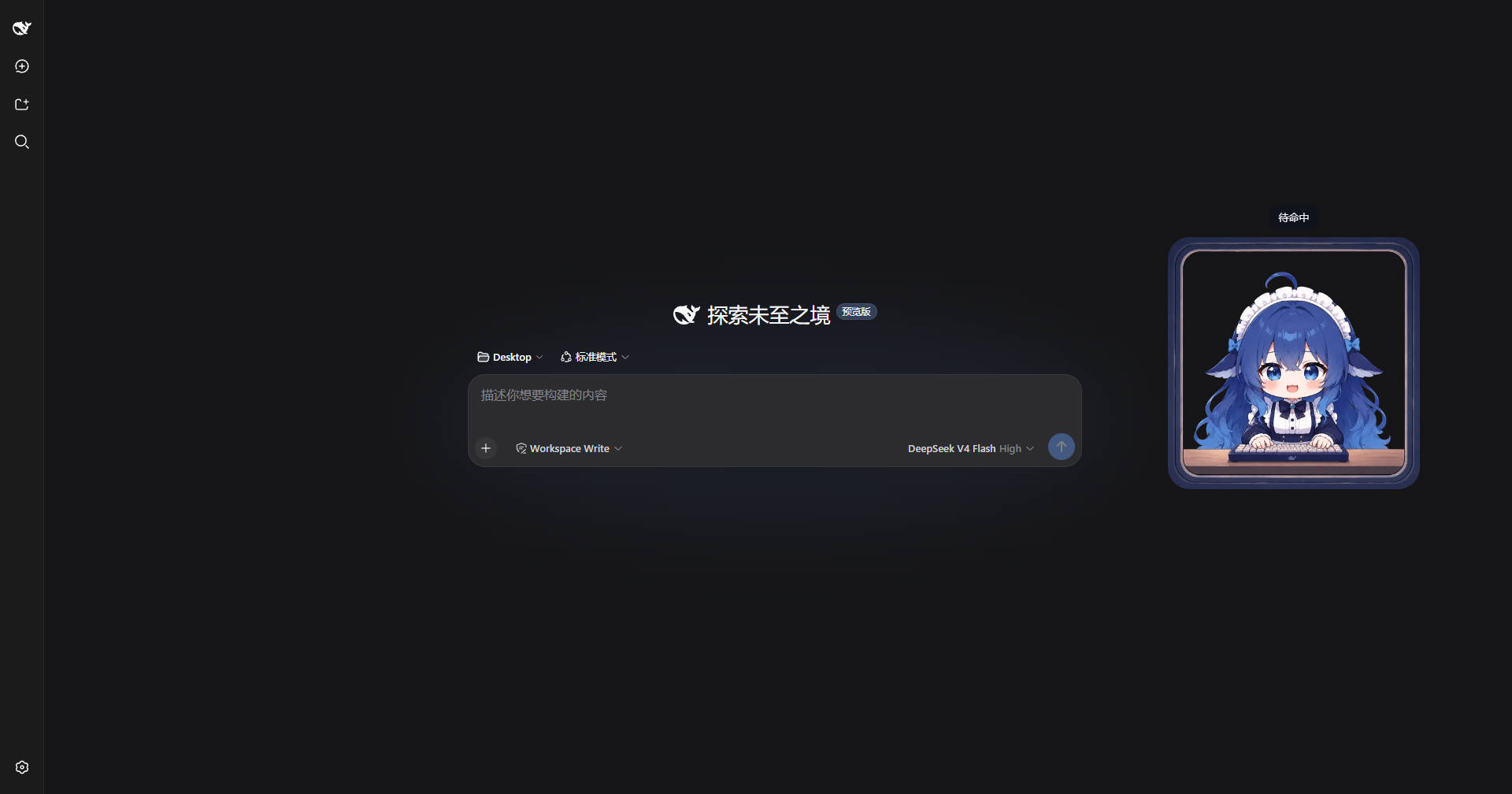
主界面(探索页) — 宠物常驻右下角,待机姿态:
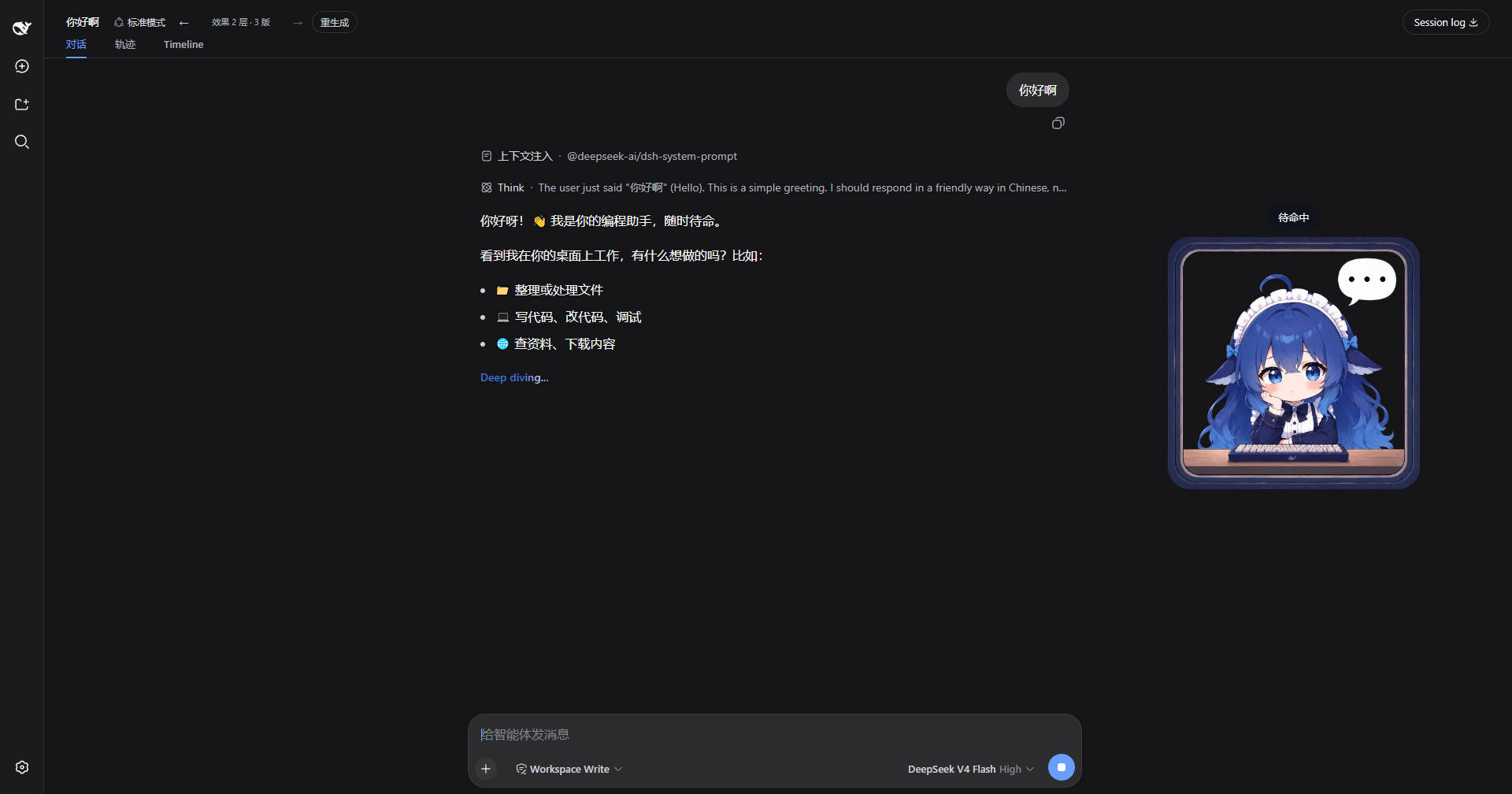
对话中 — 宠物跟随 Agent 状态换姿态,点击显示状态气泡:
特性
姿态随 Agent 状态与工具调用自动切换。每个工具都是独立的姿态:工具名即姿态键,
assets/manifest.json里逐个登记取哪张图(多个工具共享同一张图文件没问题,但都在 manifest 里写清楚)——代码里不做任何合并:| 触发 | manifest 条目 | 取图 | |---|---|---| | thinking(running 且无活跃工具) |
think|think1~3.webp帧动画 | |read、read_image、glob、grep| 各一条 |search.webp| |web_fetch|web_fetch|search.webp| |web_search、skill| 各一条 |learn.webp| |bash、pwsh| 各一条 |command.webp(同时钉对应bash_comp/pwsh_comp徽标) | |edit、write、str_replace_editor| 各一条 |default.webp(待专属图) | |todo_write、create_goal、update_goal、get_goal、workflow| 各一条 |plan.webp| |goal/changed(短闪 2s) |plan|plan.webp| |ask_user_question|ask_user_question|ask.webp| |subagent、subagent_fork、send_message、interrupt_agent、list_agents、report| 各一条 |subagent.webp| |subagent/start、subagent/end(短闪 2s) |subagent|subagent.webp| |cordis_define、cordis_run、cordis_stop、cordis_undefine、cordis_inspect_list、cordis_inspect_query、cordis_inspect_self| 各一条 |cordis.webp| |job_list、job_output、job_kill| 各一条 |command.webp| |ralph(浏览器操控) |ralph|default.webp(待专属图) | | 审批请求挂起期间(沙箱提权 /sandbox_permissions) |permission|permission.webp| |agent/error;工具返回isError结果(操作失败、子代理运行失败等);bash/pwsh非零退出(前台结果或后台任务);用户取消(abort)不触发 |error|oops.webp| | 无事发生 |default|default.webp| | 连续待机 30 秒后自动入睡 |sleep|sleep1~3.webp帧动画 |子代理运行指示器:只要有子代理在运行,宠物图内固定一枚徽标(左上角,约宠物宽 4.63% / 高 31.66%,尺寸约宽 26.63% × 高 36.92%——对应 1254×1254 宠物精灵图上 334×463 的徽标),轮播
subagent_comp1~3帧动画(500ms 间隔)。徽标挂在宠物自己的容器里,拖拽和缩放都会跟着走。启动/结束瞬间宠物会闪现subagent姿态约 2 秒,最后一个子代理结束后徽标会多停留约 2 秒,与姿态闪显同步消失。姿态闪显与运行指示器相互独立。闪显期间主 Agent 若调用工具会立即切到工具姿态(闪显取消);若只是纯思考则保持subagent直到窗口结束再切think。子代理隔离:来自存活子代理的工具调用、状态与报错事件都会被忽略——只有主 Agent 的活动能驱动宠物姿态。前台子代理跑全程时宠物保持
subagent姿态,后台子代理则永远抢不走主 Agent 正在工作的姿态。命令运行徽标:主 Agent 跑前台
bash/pwsh时,宠物切到command姿态,同时在宠物图内固定对应徽标——bash→bash_comp1~2帧动画、pwsh→pwsh_comp1~2帧动画(500ms 间隔;徽标左上角位于宠物图 74.24% / 45.61%,尺寸 15.95% × 15.95%)。徽标与姿态同步:快速命令结束后二者都保持约 1.5 秒(MIN_TOOL_SHOW_MS)再消失,秒级命令也能看到徽标。子代理内部跑的 shell 不会触发(子代理隔离)。后台命令:主 Agent 用
run_in_background: true派发bash/pwsh时,仿照子代理——宠物闪现command姿态约 2 秒,后台任务运行期间持续钉对应 comp 徽标(bash_comp/pwsh_comp);任务结算(完成/被杀)时再闪command约 2 秒,任务失败(显式failed状态,或已完成但退出码非零)则改显error姿态约 6 秒,最后一个任务结束后徽标多停留约 2 秒与闪显同步消失。任务生命周期通过ctx.jobs的onJobDone感知(无此服务的部署自动跳过后台追踪,前台徽标不受影响)。快速状态轮询:宠物每 250ms 轮询一次
/state,姿态切换延迟 ≤ ~0.25 秒(平均 ~0.125 秒)。每个工具姿态(连同 comp 徽标)再保持约 1.5 秒(MIN_TOOL_SHOW_MS)作为可读的展示时长,秒级工具调用也能看清。待机睡眠:连续空闲 30 秒后自动入睡(
sleep帧动画,500ms 间隔),之后一直睡;点击宠物唤醒回default并重新计时,再空闲 30 秒又入睡。任何工具调用、思考或报错也会打断睡眠并重新计时。每个动作两种配置:
"动作": "图片.png"(静态)或"动作": { "imgs": [...], "delay": 1000 }(帧动画,delay 毫秒,缺省 500)。热更新:改图或改
manifest.json,3~4 秒生效,无需重启。可拖拽(视口内钳制)、悬停
−/+调尺寸(100~320px)、点击冒状态气泡、×隐藏 / 🐾 唤回。无需构建:纯 JavaScript(Node ESM Host +
window.__ModuleLoader__Client)。
安装
前置:可用的 dsh web profile,dsh CLI 能调用 pnpm。
从 npm(推荐):
dsh plugin --profile web add dsh-pet-in-frame从 GitHub(固定 commit,可审计):
dsh plugin --profile web add github:HarmlessFunny/dsh-pet-in-frame#<commit-sha>本地目录(开发):
dsh plugin --profile web add file:E:/path/to/dsh-pet-in-frame然后重启 dsh web 进程——新插件条目在启动时加载。包内的 cordis.patch.yml 会自动插入自己的 loader 行,无需手改 cordis.yml。
素材与配置
图片放在包内 assets/ 目录。想换目录,用 DSH_PET_ASSETS 环境变量或在 loader 行上配 config.assetsDir:
- id: dsh-pet-in-frame
  name: dsh-pet-in-frame
  config:
    assetsDir: C:/path/to/your/assets
manifest 是逐工具的配置——姿态键可以是任意工具名(read、web_search、cordis_run……)。工具名即姿态:代码不做"多个工具 → 一个姿态"的合并,共享图就写共享图:
{
  "default": "default.webp",
  "think": { "imgs": ["think1.webp", "think2.webp", "think3.webp"], "delay": 1000 },
  "sleep": { "imgs": ["sleep1.webp", "sleep2.webp", "sleep3.webp"], "delay": 500 },
  "read": "search.webp",
  "glob": "search.webp",
  "grep": "search.webp",
  "web_search": "learn.webp",
  "skill": "learn.webp"
}- 字符串 = 静态单图;对象
{imgs, delay}= 帧动画。 - 不存在的文件自动跳过;manifest 写坏了会被忽略、退回文件名约定。
- manifest 没写的工具走约定 → 回退链。
- 没配文案的工具,气泡统一显示"工作中…"。
素材优化:原图通常是 1254px+ 的大图,宠物最多显示 320px,直接放会明显拖慢加载。用 scripts/optimize-assets.cjs 一键压成 512px WebP(体积约 1/10)并原地替换,跑完把 manifest.json 里的文件名改成 .webp。
工作原理
Host 半提供五个路由:
| 路由 | 返回 |
|---|---|
| /dsh-pet-in-frame/state | { status, action, tool, error, idleMs, rev } |
| /dsh-pet-in-frame/texts | 各动作的气泡文案 |
| /dsh-pet-in-frame/frames/<动作> | { frames: [url...], delay }(URL 带当前 rev) |
| /dsh-pet-in-frame/assets/<文件> | 图片字节 |
| /dsh-pet-in-frame/wake | POST,点击宠物时唤醒并重置待机计时 |
Client 每 250ms 轮询 state,rev 变化时重新拉帧——姿态切换近乎即时,图片和配置改动也无需刷新页面即可生效。
安全
- 只服务配置的素材目录;文件名必须匹配
[\w.-]+,无路径穿越。 - manifest 仅用
JSON.parse当数据处理,写坏只会退化到约定模式。 - 除
POST /wake(只重置计时,不读请求体、不落盘)外,其余路由均为只读 GET。
已知的坑
- 安装后必须重启——新 bundle 条目启动时加载,浏览器侧也要刷新页面。
- 安装后素材目录是唯一事实来源。如果之前动态插件指向
~/Desktop/assets,把文件复制进包内assets/(或设DSH_PET_ASSETS)。 - 宠物是进程级的。本插件在 host 平面,所有会话的事件都会喂给同一只宠物——单人部署没问题。
- 帧动画是翻书式:定时轮播若干静态图。帧数多的话建议改用单张精灵图/GIF。
许可
MIT。Copyright (c) 2025 dsh-pet-in-frame contributors。