dsh-plugin-memory
v0.19.5
Published
Long-term memory plugin for DeepSeek Harness: persistent cross-session markdown memory with a soul/persona file, auto-injected at every session start, plus remember/recall/consolidate/forget workflows and portable migration tooling.

Maintainers
 crazy_tong
Readme
dsh-plugin-memory
English | 中文
给 DeepSeek Harness 的长期记忆 —— 一个可迁移的 markdown 记忆库,还带一份灵魂,每次会话启动自动注入。
macOS · Windows · Linux 全平台支持 · Node ≥ 18 · DSH ^0.2.1-rc.5 / 0.2.2-rc.2 · MIT
⚠️ 如果你在用 DSH 0.2.2-rc.2 或更高版本,请务必先把插件升级到 0.19.2+。 早期 0.19.x 调用了
ctx.agents.roots(),而 rc.2 已换成list();这次抛错发生在 serial 的agent/created监听器里,会拒绝 agent 注册——表现就是开启插件后无法新建会话。0.19.2 改为兼容读取(绝不抛错),升级后需要完全重启 DSH 才生效。
双向兼容。 0.19.2+ 读取 agent 注册表时优先
agents.roots()、失败回退agents.list()——同一份构建既支持老宿主(0.2.1-rc.5 … 0.2.2-rc.1),也支持 rc.2。老版本 DSH 用户升级插件不会坏,rc.2 支持也不会丢掉老版本。
它是干什么的
一个 Cordis 插件,给 DSH 的 agent 装上跨会话、可迁移的持久记忆:纯 markdown + git(LLM Wiki 模式)、一份 SOUL.md 人格,以及通过 runtime context 自动注入的 boot 块——硬保证,不靠模型自觉去调 skill。
快速开始
# 1. 安装
dsh plugin --profile <profile> add dsh-plugin-memory也可以从插件索引安装:在 插件 → 实验性插件 里打开「自定义插件索引」,进 发现 → 添加索引源,粘贴
https://raw.githubusercontent.com/LittleBlackTong/dsh-plugin-memory/main/docs/market/index.json然后在列表里安装 记忆(Memory)(索引是本仓库里的官方格式 JSON)。
- 重启应用。第一个会话里 agent 会主动发起铸魂对话(不想聊也行:设置 → 记忆 → 人格基础,一次保存)。
- 验证:
dsh-memory doctor,或打开 设置 → 记忆 看健康看板与热改配置。
功能
- 跨会话记得住 —— boot 块 = SOUL + MEMORY 协议 +
index.md+ 最近动态,按文件分配预算,index 尾部不会先被截断。 - 有灵魂,不只是存储 —— SOUL + BOOTSTRAP 铸魂;快速铸魂卡片写入受管区块;人格名从 SOUL 读取,绝无硬编码。
- 你说了算 —— 会话级开关(chip /
/memory on|off/ 面板)+disabledWorkspaces工作区默认。 - 像个搭子 —— digest 提醒、主动追忆、每周成长回顾、按语境调语气;与其它主动插件共享发言权仲裁。
- 可迁移 —— 纯 markdown + git,
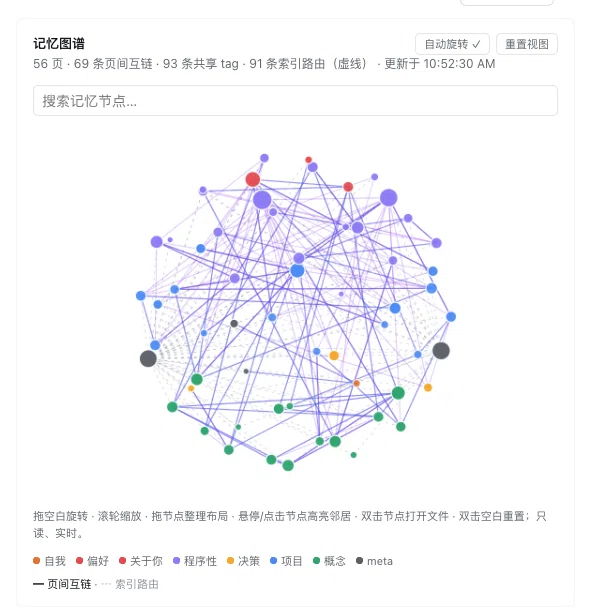
pack/unpack搬家,可选自动提交。 - 记忆图谱 —— 可交互 3D 球面:旋转/缩放/拖节点整理、搜索定位、悬停或点击点亮邻居;选中节点可 在 Finder 中显示 或 复制路径;双击节点直接在 DSH 侧栏打开该文件(打不开时回退系统文件管理器)。
- 健康工具 —— 看板、
checkup、lint、doctor、自动last_access。 - 零构建、面板双语、配置热改。
界面预览
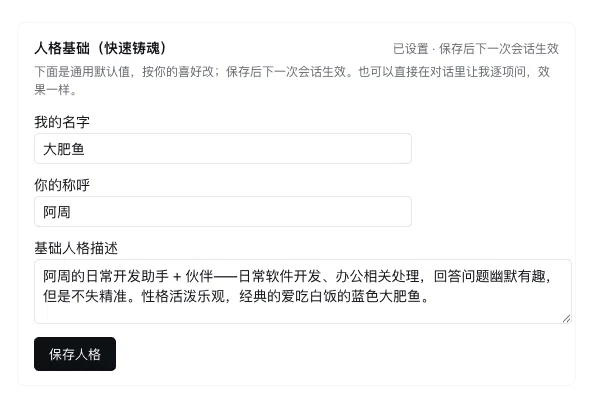
人格基础(快速铸魂) —— 一次保存我的名字 / 你怎么称呼我 / 基础人格,下次会话直接生效、不用重启;对话铸魂的老库也会从 SOUL.md 回显。
记忆图谱(3D) —— 记忆库的实时投影:旋转 / 滚轮缩放 / 拖节点整理,搜索即飞镜头定位,悬停或点击点亮邻居;选中节点可 在 Finder 中显示 或 复制路径,双击空白重置。
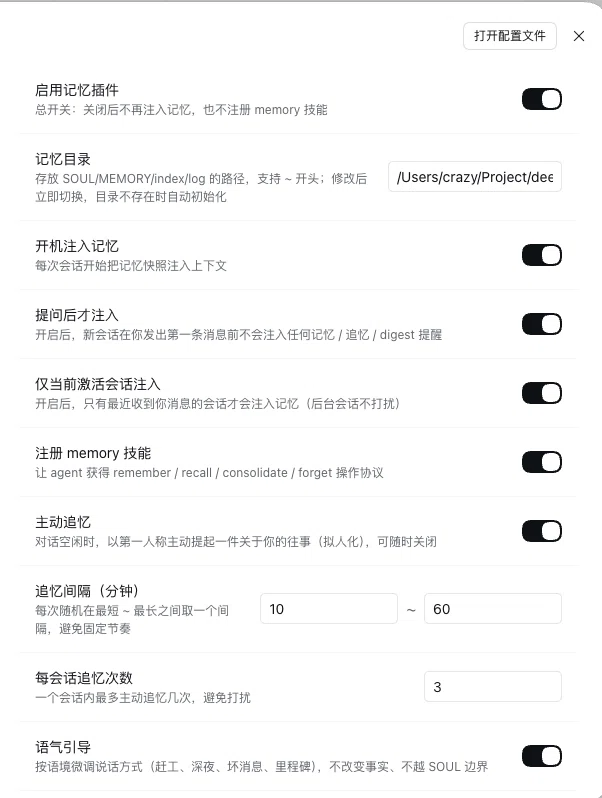
设置面板 —— 十六项设置即时生效(会话开关、注入闸门、追忆节奏、语气、工作区默认…),健康看板与图谱就在下面。
跨平台(含 Windows)
macOS、Windows、Linux 都支持。 路径配置里的 ~、~\、%USERPROFILE%、$HOME 会自动展开;CRLF 文件按 LF 解析、写回保留文件自身换行风格(不会被强行 LF 化);「在 Finder 中显示」在 macOS 是 open -R、Windows 是 explorer /select,(参数分开传,含空格路径安全)、Linux 是 xdg-open;disabledWorkspaces 在 Windows 上大小写不敏感。细节见 docs/CONFIGURATION.md。
配置
十七个热改项在 设置 → 记忆 里即时生效——含 bootSnapshot(默认 live;设为 session 会在本会话固化 boot 块,会话中途写记忆不再让前缀缓存失效)。完整配置表、boot 预算规则与组合层覆盖示例见 docs/CONFIGURATION.md。
CLI
dsh-memory init [dir]        # 生成记忆库脚手架
dsh-memory search <query>    # 全文搜索
dsh-memory checkup           # 一份带优先级的健康报告
dsh-memory doctor            # 环境体检 + 修复命令
dsh-memory graph --suggest   # 谁该链接到谁(只报告)
dsh-memory pack / unpack # 记忆库打包 / 恢复记忆库解析顺序:$MEMORY_DIR → ./.memory → ~/.memory。
文档
配置 · 设计说明 · 迁移 · 主动消息协议 · 贡献 · 安全 · 更新日志
FAQ
每次请求都烧 token 吗? 不会——runtime context 按投影去重,没变化只注入一次。
文件技能和插件的关系? 文件技能是软保证(只注入说明),本插件是硬保证;两者可共存(文件技能优先级更高),手写 persona 要删掉以免重复注入。
记忆库放哪? 默认 ~/.memory;按项目隔离就把 memoryDir 指进项目里。
开发
git clone https://github.com/LittleBlackTong/dsh-plugin-memory.git
cd dsh-plugin-memory
node scripts/memory.mjs --self-test   # 冒烟测试,无需安装依赖
node --test # 全量测试零构建:lib/ 直接就是运行时代码。CI 跑上面两条。
Roadmap
- [ ] Embedding / BM25 检索
- [ ] MCP server(让非 DSH 的 agent 共用记忆库)
- [ ] 记忆加密存储
- [ ] TypeScript 重写
反馈与交流
- 报 bug / 提需求 / 交 PR:提 issue——反馈与问题都走这里。
- 微信群「dsh-plugin-memory 插件沟通」:扫下面的码(二维码约 7 天过期;失效请提 issue)。