
dsh-preview-blender
v0.1.1
Published
Preview Blender .blend files inside DeepSeek Harness: the Host half exports a cached GLB with Blender headless and the right-Sidebar document preview draws it in an interactive WebGL viewport with scene statistics.

Maintainers
 vfvrpq
Readme
dsh-preview-blender
在 DeepSeek Harness 的右侧栏文档预览里直接打开 Blender .blend 文件:用 Blender 后台导出一份 GLB,再用插件自带的 WebGL 视口做可旋转、可缩放的 3D 预览,并列出场景信息。
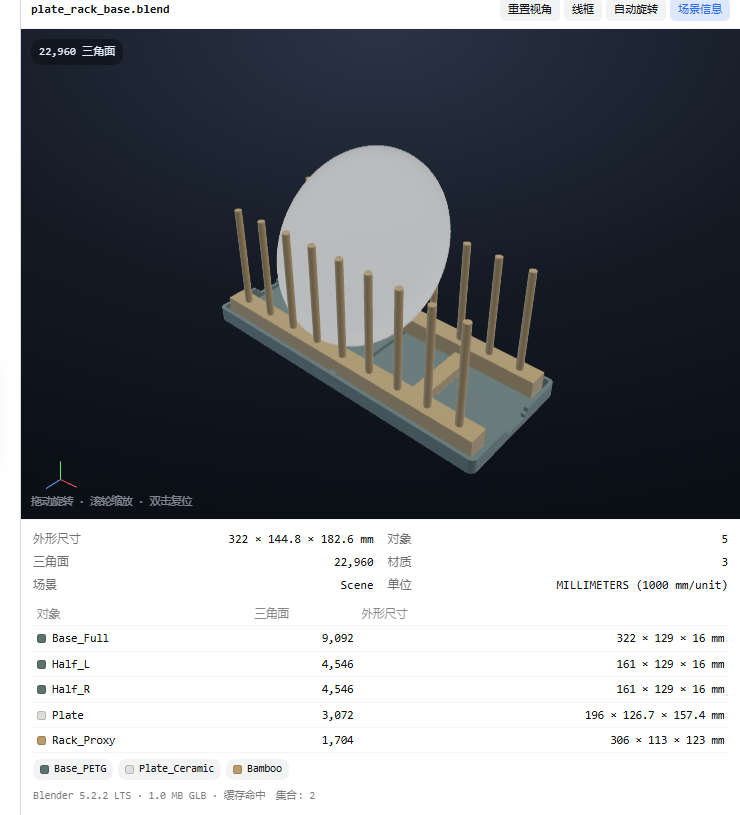
它做什么
- 给
.blend注册文档预览渲染器:在工作区文件树里点一下,右侧栏就打开 3D 预览,而不是「二进制文件无法预览」。 - 每个文件版本只跑一次
blender --background,导出 GLB + 场景 JSON(对象、三角面、材质、真实尺寸 mm、单位、相机、灯光、集合)。 - 插件自带一个零依赖的 WebGL 查看器:拖动旋转、右键平移、滚轮缩放、双击复位、线框模式、自动旋转、接触阴影、坐标轴。不依赖 three.js,不走 CDN。
- 转换结果缓存在
~/.dsh/cache/preview-blender,第二次打开是毫秒级。 - 面板直接给建模/打印关心的数:每个对象的三角面数与包围盒尺寸(mm)、材质色块、场景单位。
依赖
- DeepSeek Harness 0.2.x(声明兼容
0.2.0-rc.2/0.2.1-rc.2)。 - Blender 3.6 / 4.x / 5.x。会自动找
DSH_BLENDER、BLENDER_PATH、PATH里的blender、Steam 库、C:\Program Files\Blender Foundation\Blender*;装在别处就填blenderPath。 - 浏览器/显卡支持 WebGL(桌面版 DSH 天然满足)。
安装
dsh plugin --profile <profile> add dsh-preview-blender桌面版(desktop profile)由 Electron 应用管着,用设置页的插件管理器安装,或手工装入后重启应用。包内自带 cordis.patch.yml,装好即自动挂载。装完重启 DSH。
配置
设置 → 插件 → Blender preview(命名空间 preview-blender):
| 键 | 默认 | 含义 |
|---|---|---|
| enabled | true | 是否注册渲染器与转换路由。 |
| routePath | /api/preview/blender | 带鉴权的转换路由;必须留在 /api 下,否则回落到默认值(防止裸路由读本地文件)。 |
| extensions | ["blend"] | 走 3D 预览的后缀。 |
| blenderPath | ""(自动) | blender.exe / blender 的绝对路径。 |
| cacheDir | "" → ~/.dsh/cache/preview-blender | GLB 与场景 JSON 的缓存目录。 |
| timeoutMs | 180000 | 单次冷转换的墙钟上限。 |
| maxBytes | 1073741824 | 允许转换的最大 .blend(1 GiB)。 |
| applyModifiers | true | 导出时应用修改器,预览与 Blender 渲染一致。 |
| cacheEntries | 24 | 磁盘上保留多少个缓存条目,超出按最旧淘汰。 |
工作原理
点击工作区里的 .blend
        │
        ▼
文档预览 body(lib/client.js)
        │  GET /api/preview/blender?path=…&kind=info   (场景 JSON)
        │  GET /api/preview/blender?path=…&kind=glb    (模型字节)
        ▼
Host 半(lib/index.js、lib/route.js)
        │  缓存键 = sha1(realpath, size, mtime, recipe, modifiers)
        ▼
lib/blender.js ── spawn blender --background --python lib/scene.py
        │            → model.glb + scene.json(+ meta.json)
        ▼
~/.dsh/cache/preview-blender/<key>/lib/scene.py以export_apply、use_visible、Y-up 导出,不带相机/灯光;场景描述里的世界包围盒走 evaluated depsgraph(含修改器),材质底色从线性色转成 sRGB 色块。- 路由挂在
/api下,请求先经过 connection 服务的鉴权(Host/Origin + 会话 cookie),不会把任意本地文件暴露成裸接口。 - 查看器是手写的 glTF 2.0 子集渲染(POSITION + NORMAL、索引三角形、PBR 因子、节点 TRS/矩阵)。纹理、蒙皮、动画不在范围内——Host 只导出静帧场景。
开发
dev/client-body.js   客户端 UI(DSH 模块加载器要求的单个 CJS 工厂)
dev/viewer.js        WebGL 渲染器,构建时拼进 bundle
scripts/build-client.mjs   由上面两个文件生成 lib/client.js
scripts/e2e-browser.mjs    针对临时 DSH 实例的 Playwright 端到端
scripts/live-selftest.mjs  真实 .blend 的冷/热/并发转换自检
node --test test/*.test.js
lib/client.js 是生成物——改 dev/ 下的文件后重新构建。DSH 客户端加载器只给 bundle 一枚受限的 require(平台种子模块),不能在运行时拉 three.js,所以「单文件产物」是刻意设计。
已知边界
- 冷转换小场景约 2–10 秒(Blender 启动为主),之后按文件版本命中缓存,旋转/缩放不会重跑 Blender。
- 超大场景(数百万三角面)导出慢,可能超过
timeoutMs。 - 视口只显示底色,不显示纹理;纹理效果仍以 Blender 渲染图为准。
- 不上传任何文件:Blender 在本机跑,GLB 只留在本地缓存。