
dsh-preview-image
v0.1.1
Published
Image preview for DeepSeek Harness with real zoom, pan, fit modes, rotation and full screen in the right-Sidebar document preview, plus a zoomable full-screen viewer for images in the conversation.

Maintainers
 vfvrpq
Readme
dsh-preview-image
给 DeepSeek Harness 的图片预览补上真正的缩放、拖动、旋转与全屏:右侧栏文档预览和对话里的大图预览都能用。
English · 中文(本文件)
为什么做
DSH 自带的两个图片预览都很克制:
- 文档预览里的图片渲染器只有一个浮在底部、鼠标移进去才出现的缩放控件(适应宽度 / 固定比例),没有旋转,也没有全屏。
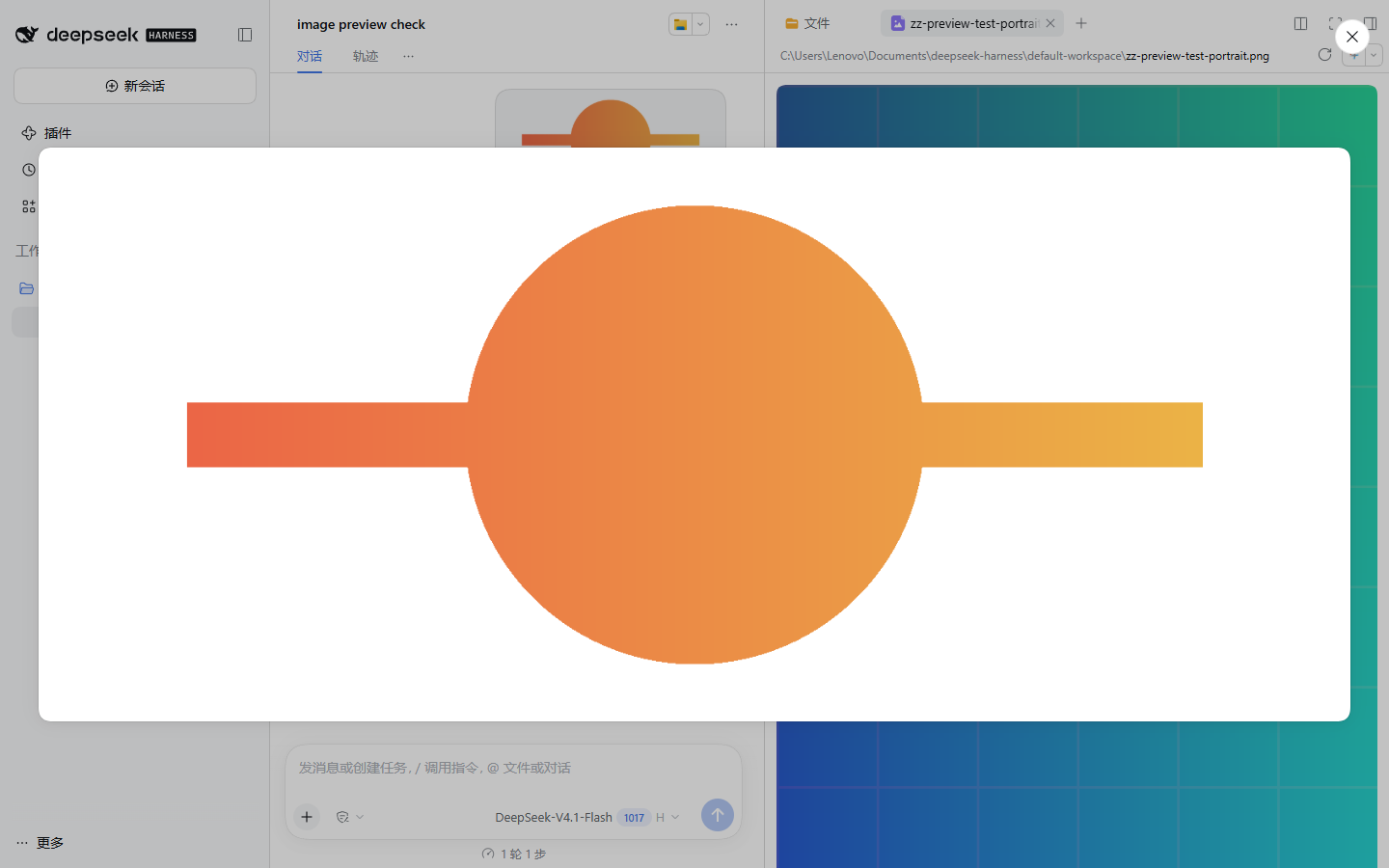
- 对话里点击图片打开的是“原图预览”灯箱,只按视口大小显示原图、不能缩放——附件包自己的文档就把“灯箱没有缩放和下载”列为限制。
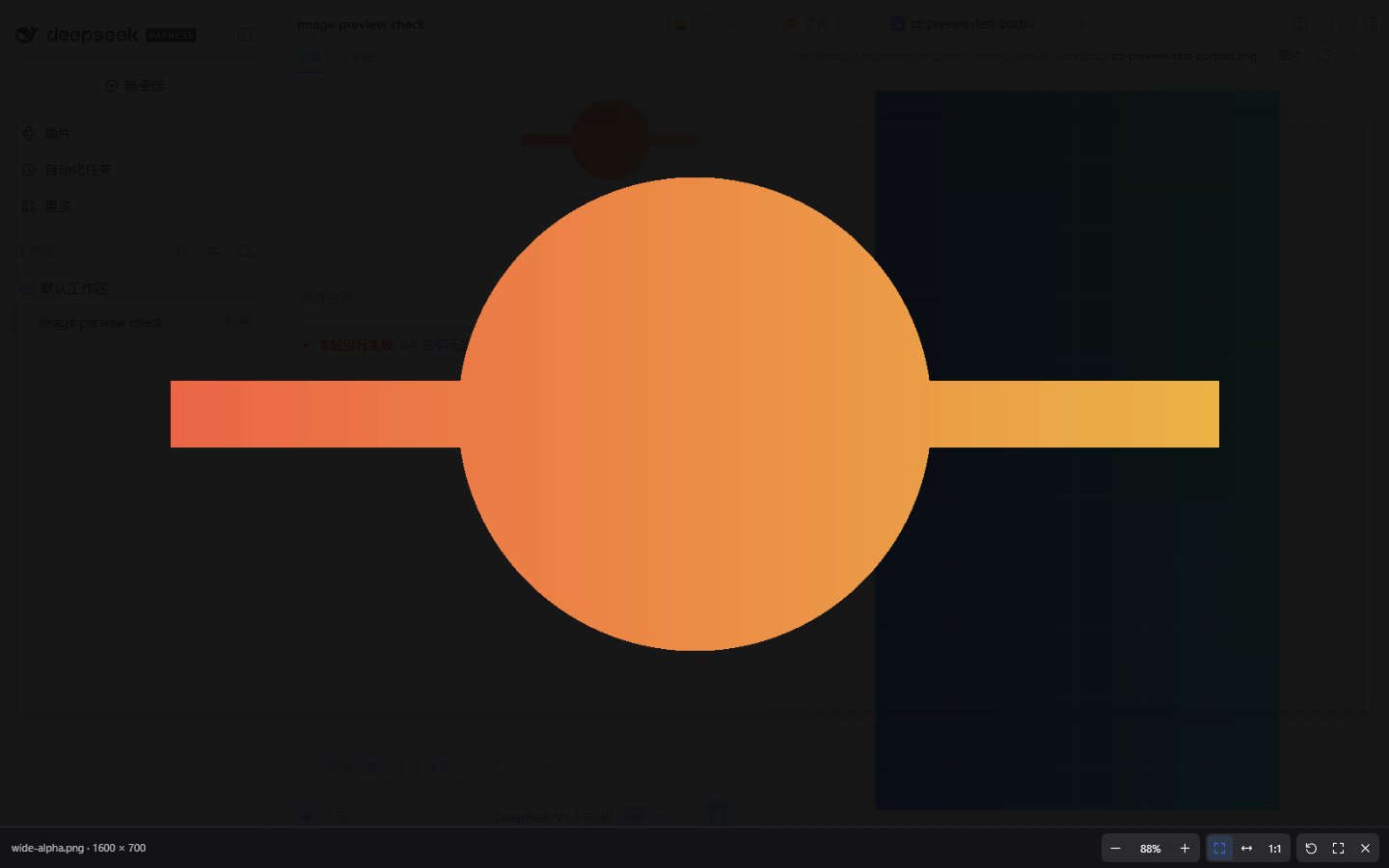
这个插件把两处都换成一个查看器:常驻工具栏提供缩放、适应、100%、旋转、全屏,另外支持滚轮 / 拖动 / 键盘。内置渲染器仍可从预览右上角的「打开方式」切回,SVG 也保留「纯文本」选项。
安装
dsh plugin --profile <profile> add dsh-preview-image重启桌面端(profile 补丁在启动时读取)。没有配置项。
验证:从「文件」页签打开任意图片,右侧面板会出现常驻工具栏;点击对话里的图片或输入框里的附件缩略图,会打开可缩放的灯箱,而不是内置灯箱。
前后对照
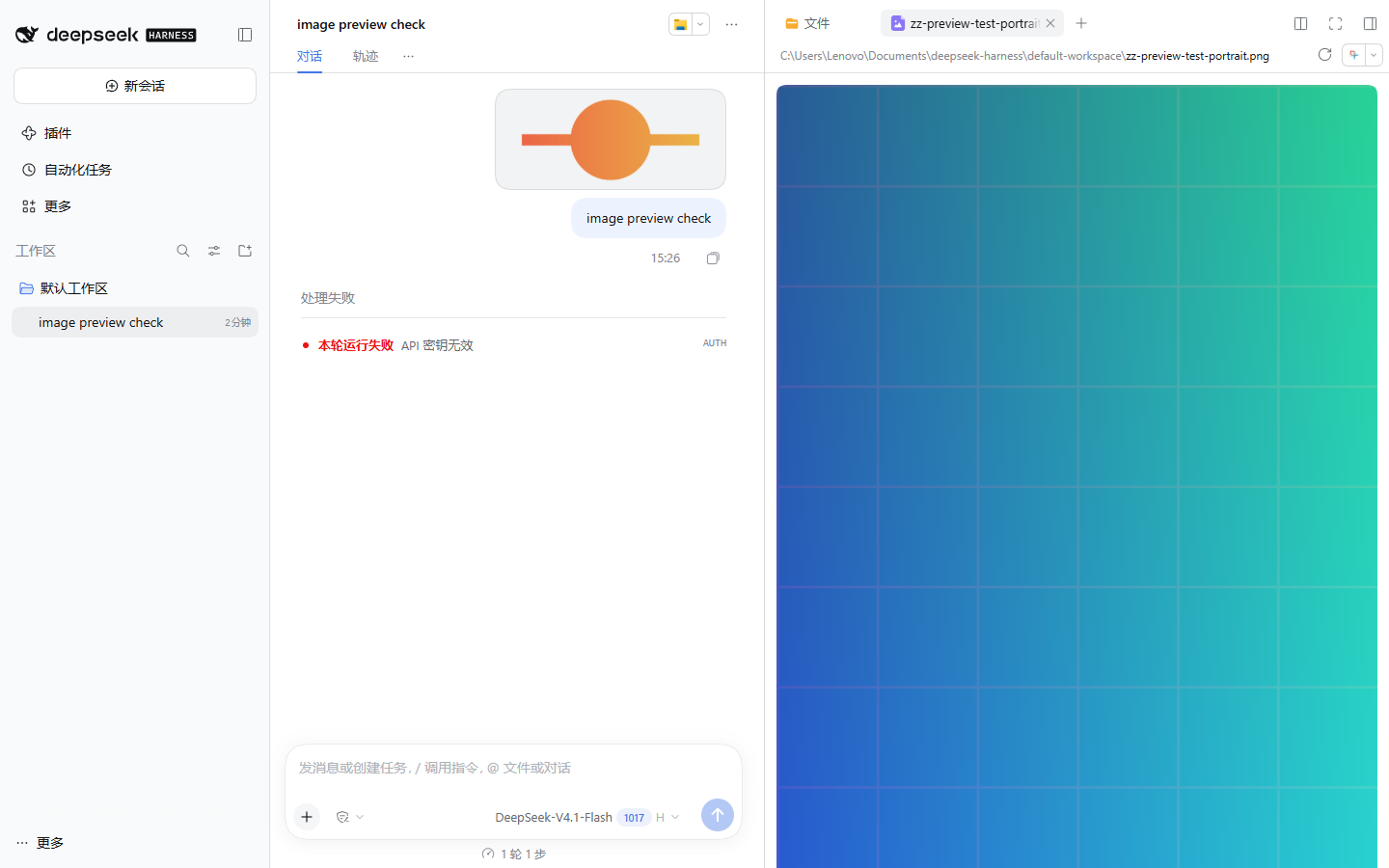
同一会话、同一工作区、同一 1440×900 浅色视口。「之前」的 profile 是 @deepseek-ai/dsh-base + @deepseek-ai/dsh-web-app;「之后」在此基础上加装本插件。
右侧栏文档预览
| 之前 —— 内置图片渲染器 | 之后 —— dsh-preview-image |
|---|---|
|  |
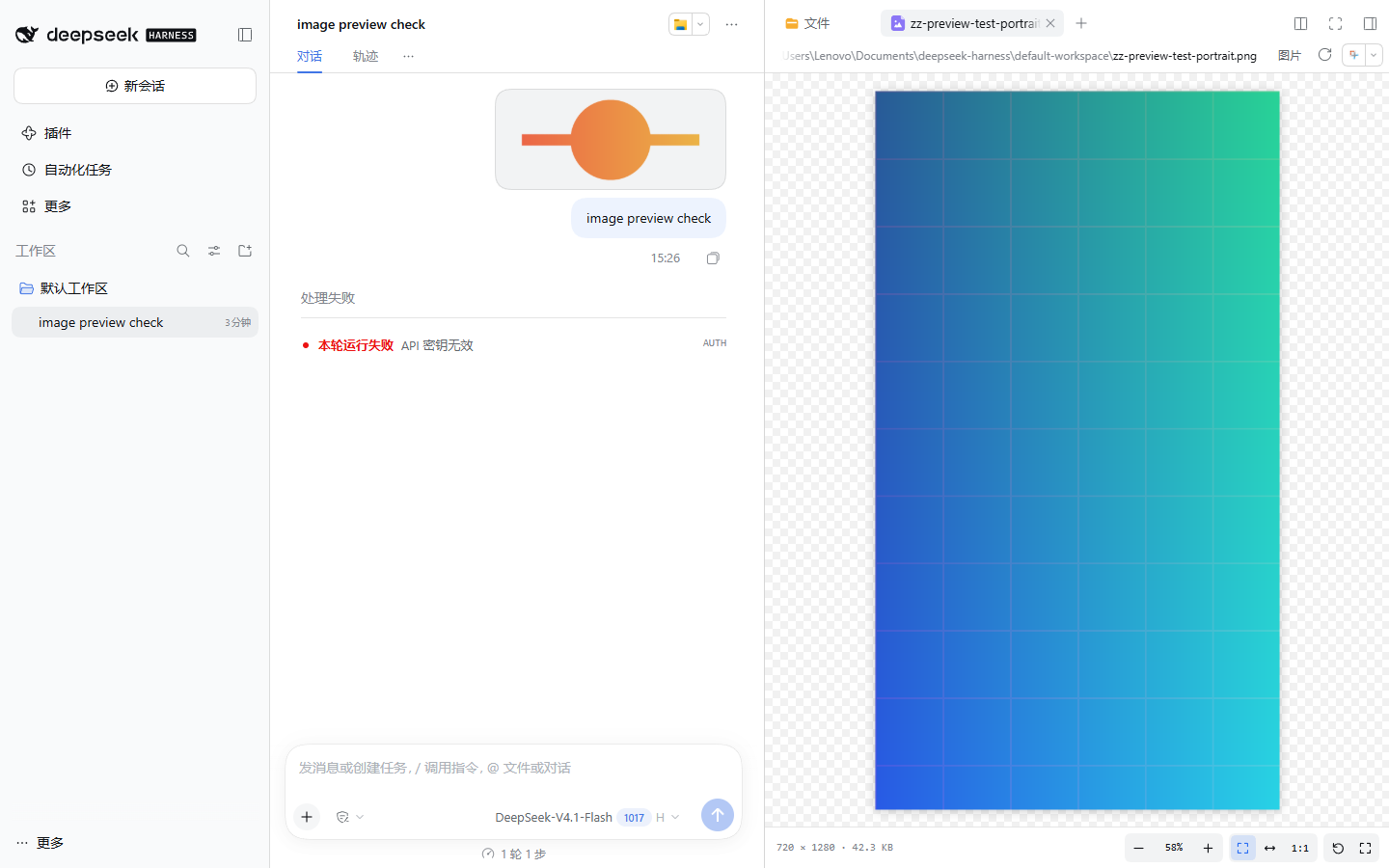 |
内置视图让图片铺满面板、缩放控件藏起来;插件版本有常驻工具栏、尺寸与体积信息(720 × 1280 · 42.3 KB)、透明区域棋盘格和明确的按钮。
对话灯箱
| 之前 —— 只能适应视口 | 之后 —— 可缩放 |
|---|---|
|  |
 |
全屏与透明背景
| 全屏(右上角最大化按钮) | 透明图片叠在棋盘格上 |
|---|---|
| 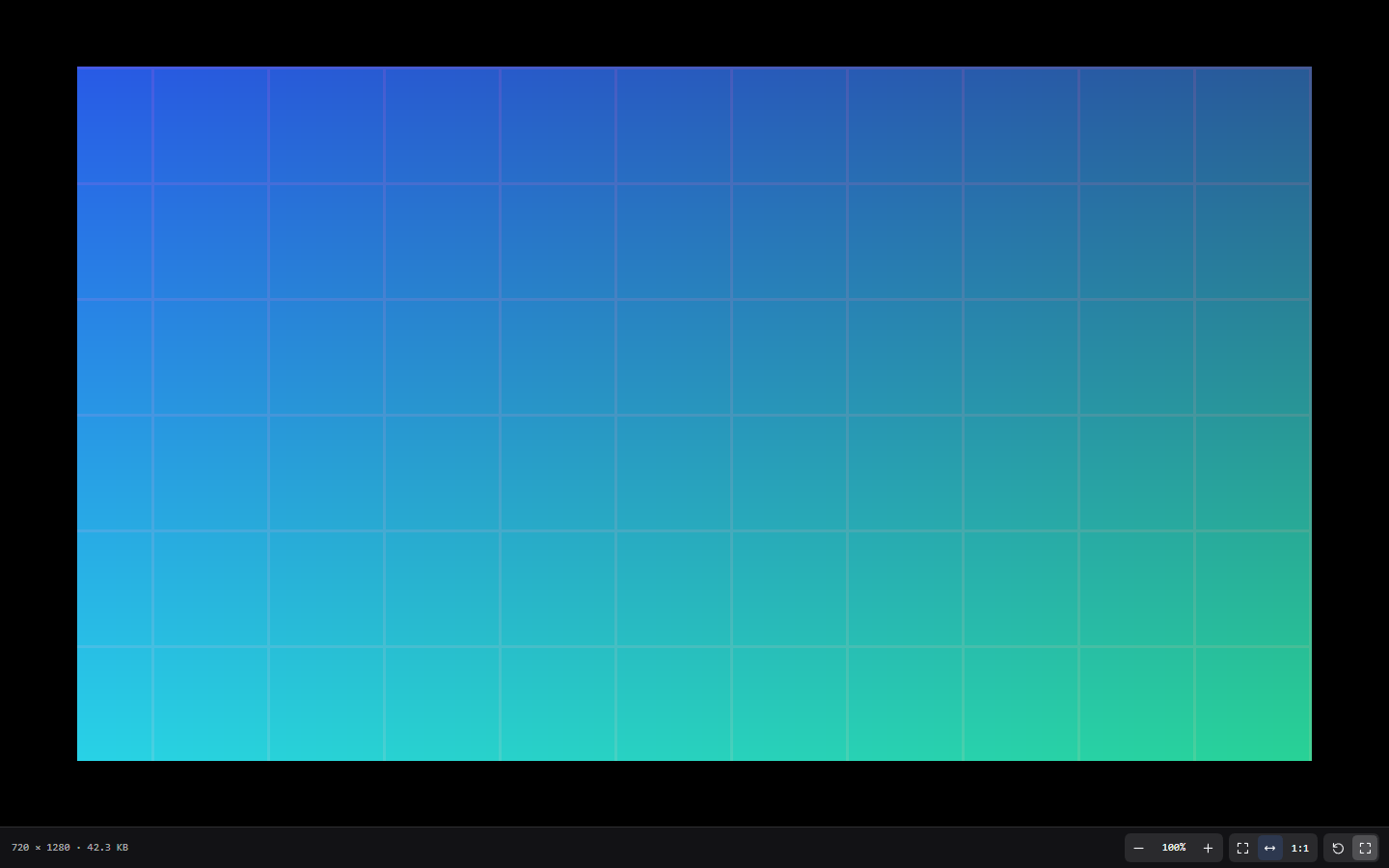 |
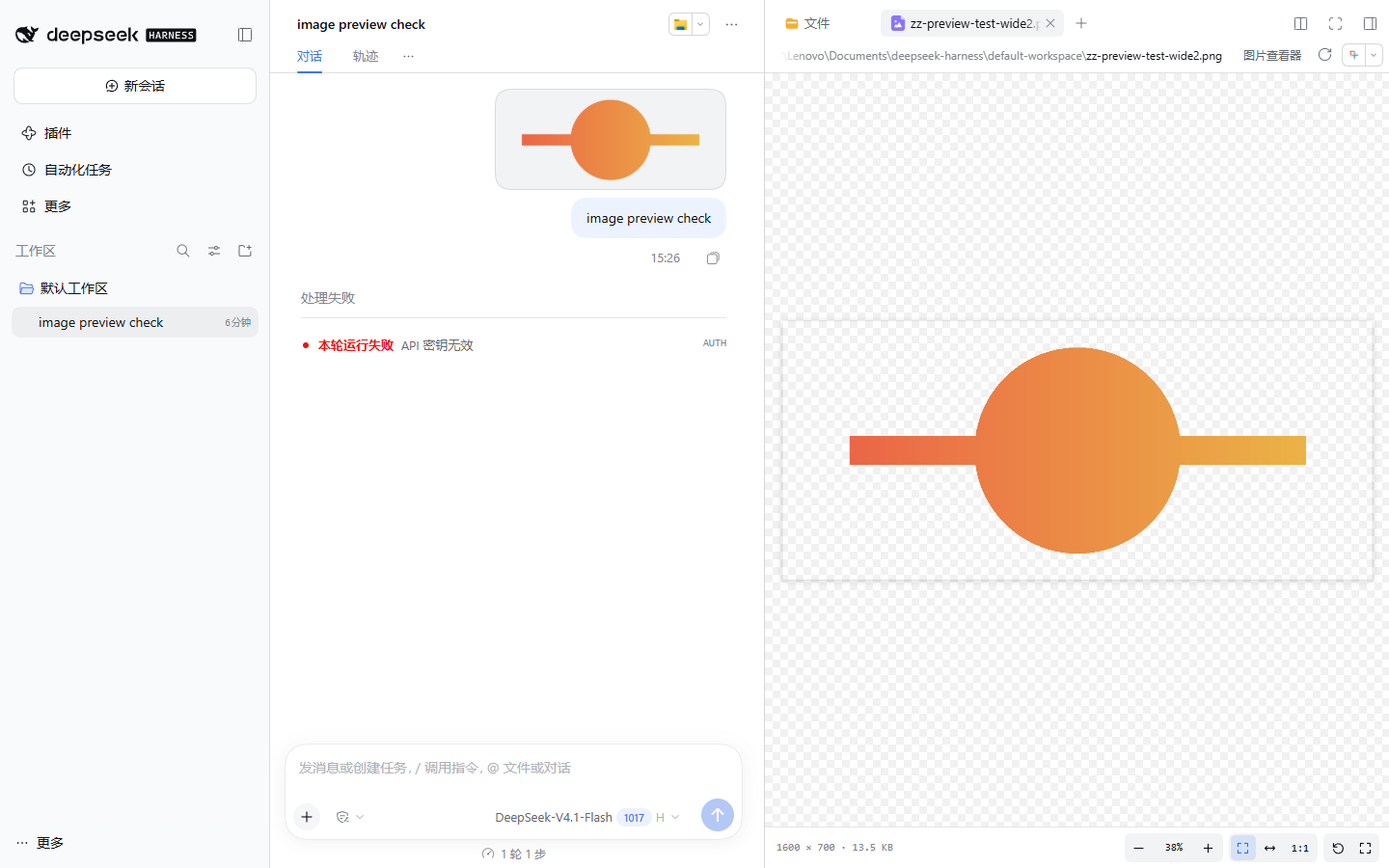 |
功能
- 文档渲染器:以
dsh-preview-image/viewer注册png、jpg、jpeg、jfif、gif、webp、avif、bmp、ico、svg,priority: "extension"、loading: "bytes-complete"。位图声明为二进制、不再提供纯文本兜底;SVG 仍可读文本,保留纯文本选项。 - 对话灯箱:在
conversation.chat.user.images、conversation.chat.message.images、conversation.trajectory.images、tool.call.images、conversation.input.attachments这些槽位里的图片上截获点击,换成插件查看器。Esc、点背景、关闭按钮都能关,关闭后焦点回到打开它的图片按钮。 - 控件:缩小、当前百分比(点击回到 100%)、放大、适应窗口、适应宽度、1:1、旋转 90°、全屏、关闭(灯箱)。工具栏常驻、窄面板自动换行;元数据显示原始尺寸,文档预览里还显示文件体积。
- 手势:拖动平移,滚轮平移,Ctrl/⌘+滚轮以指针为中心缩放,双击在适应窗口与 100% 之间切换。Chromium 把触控板双指缩放映射成同一条 Ctrl+滚轮路径。
- 键盘:
+/-缩放,0适应,1100%,R旋转,F全屏,方向键平移,Esc退出全屏或关闭灯箱。文档查看器聚焦时接收按键;灯箱在窗口级监听。 - 全屏:对查看器根节点调用 Fullscreen API;部署拒绝时退回固定定位的覆盖层,Esc 可退出。
Esc里也会主动调exitFullscreen(),这样浏览器默认处理被抑制时快捷键仍然有效。 - 平移边界:适应状态的小图始终完整可见;放大或旋转后的图不会被拖到完全离开视野。
- 透明背景:舞台下层是低对比度棋盘格,透明 PNG 能看出来。
操作对照
| 动作 | 按钮 | 指针 | 键盘 |
|---|---|---|---|
| 放大 / 缩小 | − / + | Ctrl/⌘+滚轮 | + / - |
| 平移 | — | 拖动、滚轮、Shift+滚轮 | 方向键 |
| 适应窗口 | 适应图标 | 双击 | 0 |
| 适应宽度 | ⇔ 图标 | — | — |
| 实际大小(100%) | 百分比 / 1:1 | 双击 | 1 |
| 旋转 90° | ↻ 图标 | — | R |
| 全屏 | ⤢ 图标 | — | F |
| 关闭灯箱 | × | 点背景 | Esc |
配置
无。后缀列表、缩放范围(2%–1600%)与步进(1.25×)都是 lib/client.js 里的常量。
代码结构
lib/index.js    宿主半:name / inject / apply(纯客户端插件,不注册路由)
lib/client.js   手写 module-loader bundle:渲染器、body、灯箱、样式
test/           node --test:bundle 接线、缩放/平移纯函数、包形态
scripts/        无头浏览器端到端脚本(验证用)
docs/           前后对照截图
浏览器半是 window.__ModuleLoader__.load({ id, factory }) 形式的经典 bundle,只 require react(灯箱 portal 另用 react-dom),不需要构建链,也不会与宿主 React 副本产生漂移。
开发
node --test test/*.test.js端到端脚本需要:一个装好本插件的运行中宿主、一个带图片消息的会话、以及该会话工作区里的图片文件:
node scripts/e2e-browser.mjs --base "http://127.0.0.1:<port>/?token=<token>" \
  --session "<会话标题>" --file <图片文件名> --out <截图目录>
逐项打印 PASS/FAIL,有失败时以非零码退出。
已知限制
- 一次只显示一张。 内置灯箱也是单张;没有画廊缩略条、下载或导出。
- 不支持把图片从面板里拖出去。 拖动被用于平移;需要把原图拖进输入框时,可以从「打开方式」切回内置图片渲染器。
- 格式取决于浏览器。 AVIF、WebP、GIF、BMP、ICO、SVG 在 Chromium 里能解码;浏览器不支持的编码会显示查看器的失败状态。
- 只读完整文件。 文档渲染器走 DSH 的完整文件读取,宿主的
maxFileBytes上限与以前一致。 - 没有双指捏合。 Chromium 把触控板双指缩放变成 Ctrl+滚轮所以可用;触摸屏没有捏合处理。
- 旋转与适应状态按挂载重置。 切换页签或刷新预览会回到适应窗口,与内置渲染器一致。
- 对话图片槽位之外的图片(例如助手消息里的 Markdown 内联图)不会打开这个灯箱,保持各自渲染器的行为。
许可证
MIT