
dsh-ris-yds
v1.2.2
Published
YonBIP YDS local runtime for the DSH agent: config resolution (project settings.json + optional .env), YYCToken, confcenter sync, SOCKS forward, yms-home build/start/stop with JDWP, and dsh-ris-ide run-config integration. Cross-OS (linux/darwin/win32, WSL

Maintainers
 wangjun.gl
Readme
dsh-ris-yds
YonBIP YDS 客开后端的本地运行时,做成 DSH 插件 + CLI 双形态:
- DSH 插件:给 coding agent 提供一整套
yds_*工具(体检 / 配置 / 凭据 / 运行时 / 集成 / 调试)。 - CLI(
bin/yds.js,装包后yds命令):同一套能力给人用(在终端或 IDE 里执行)。
在本地把后端运行时跑起来,用本地实例替代远端环境做开发联调。
截图
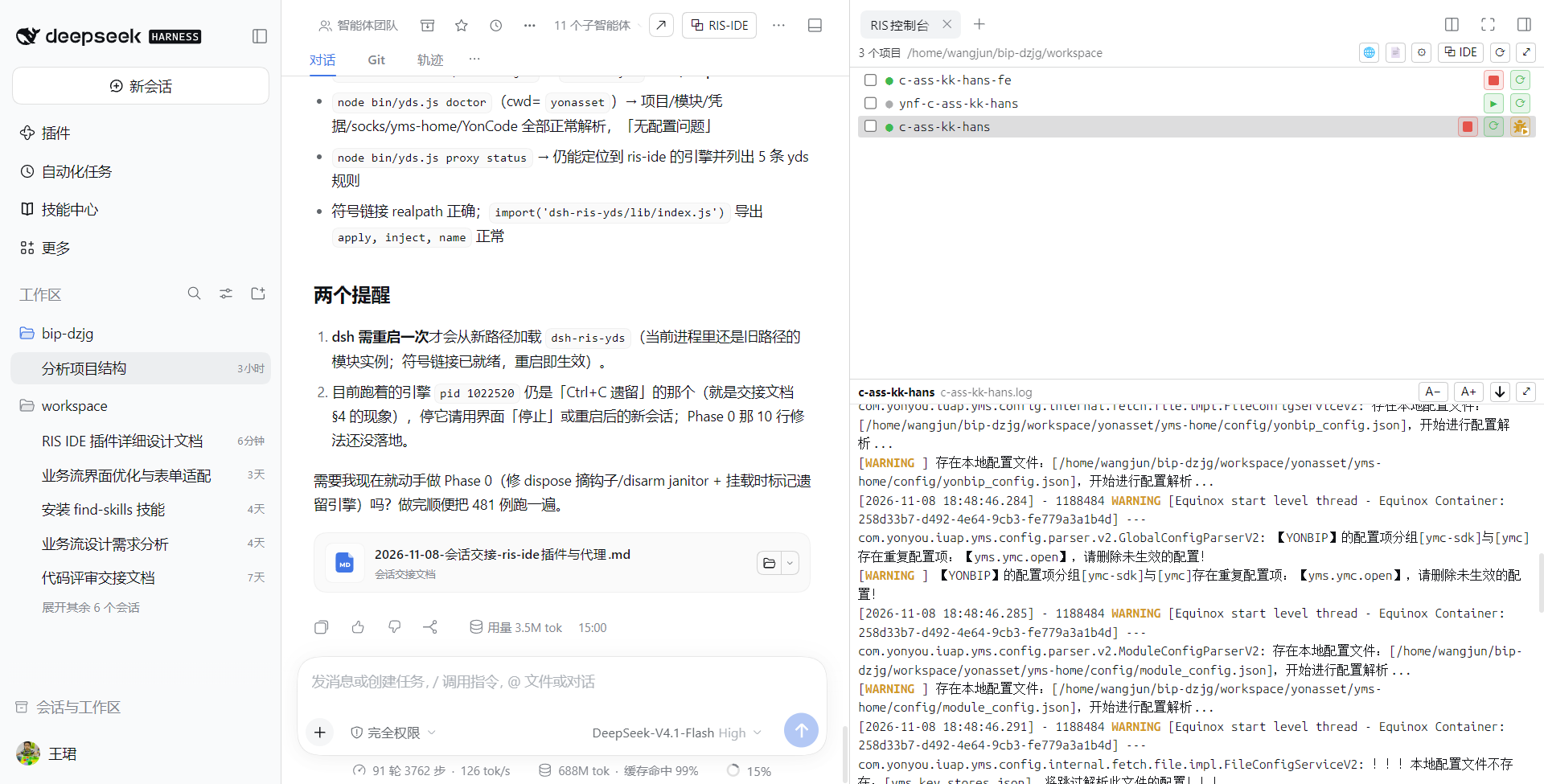
| 在 DSH 里管理本地服务:启停、实时日志、调试入口 |
|---|
|  |
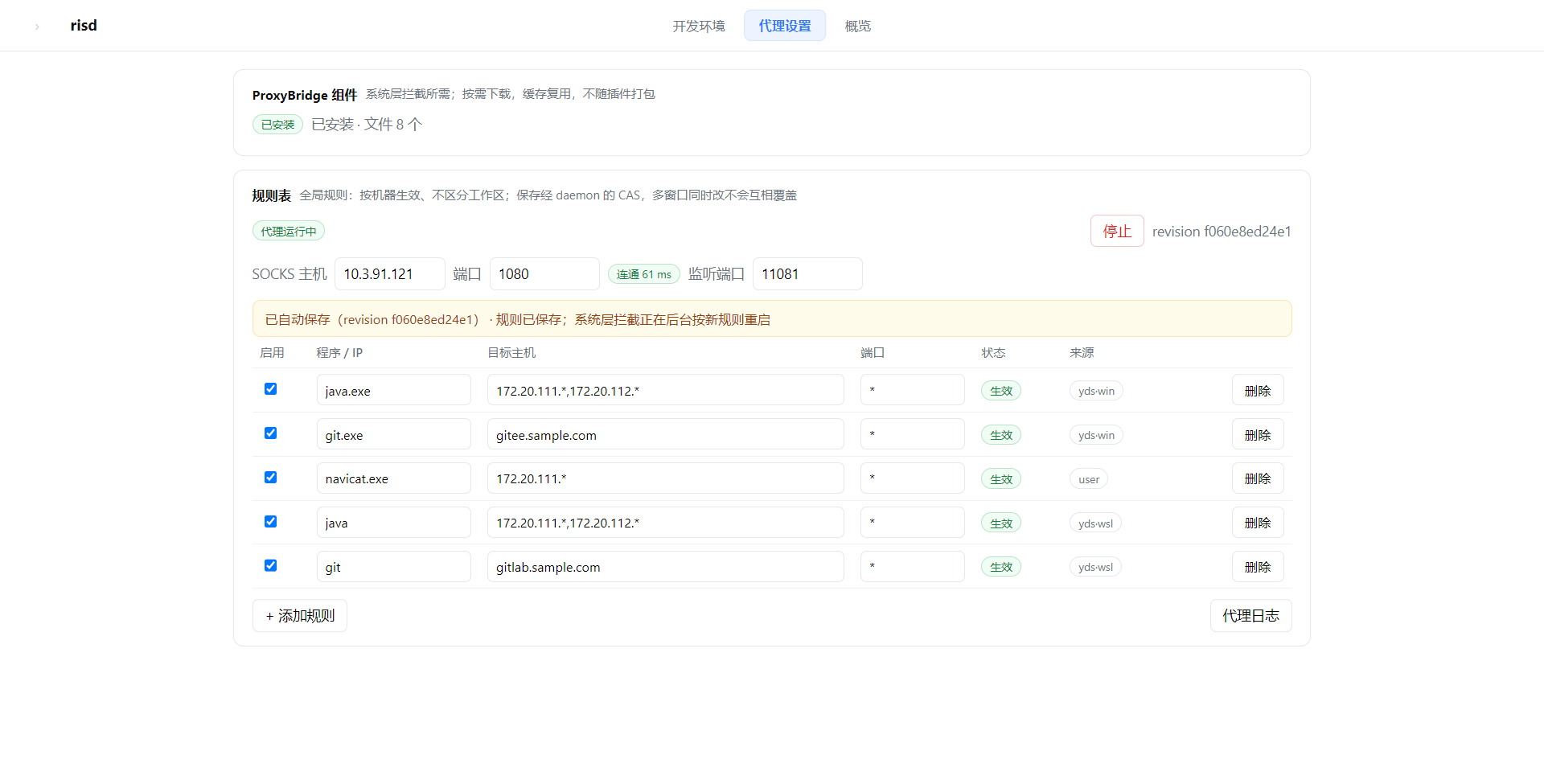
| 内网访问规则(可选):按程序 / 内网地址 / 端口放行,一次启用 |
|---|
|  |
能做什么
- 本地运行:构建、启动、停止、查看状态与实时日志;启动失败自动回收,不留下半启动的进程。
- 平台配置:从平台拉取配置并适配到本地运行时;支持离线缓存,网络不可达时也能启动。
- 内网访问:数据库 / 缓存 / 内网服务可经代理或直连访问;本机其它客户端也能共用同一条隧道。dsh-ris-ide 的代理 daemon(risd)在跑时自动共用它的引擎,
yds stop只撤自己的规则、不打断别人 (需要系统权限的可选能力)。 - 平台凭据:生成调用平台 API 的 YYCToken,新环境无需额外安装。
- 前端调试:让远端页面加载本地前端资源。内置一个极简 MV3 扩展(
yds fe extension一键生成目录,浏览器里加载一次):它给本模块的请求带上rdbga、把远端extend*.min.js|css换成127.0.0.1:<dev端口>/static,所有值由扩展向本机yds动态拉取,跟随项目和插件升级;不装扩展时用yds fe plan(CDP 注入)或yds fe url <page>(scriptUrl)。 - IDE 面板:在 dsh-ris-ide 面板里启停本地服务、查看实时日志、做 JDWP 断点调试。
- 外部 IDE:本地运行时可被外部 IDE 直接 F5 启动调试。
- 浏览器回调校准:确保工作台页面的请求回落到本机实例(失败时是静默的,自检可查)。
- 专用调试浏览器:
yds browser debug用独立 profile 起一个 Chrome/Edge,启动即加载ris-yds-extension(自动加载,无需手工安装,也不用在 IDE 概览里加插件条目)并开--remote-debugging-port——不用手工装扩展,也不碰日常浏览器;yds browser stop只停它自己启动的实例。 - 环境自检:
yds doctor一次列出配置、运行时、端口、隧道等所有缺失项。
安装
# 公开 npm(推荐)
dsh plugin --profile web add dsh-ris-yds

# 或从本地 checkout 安装(开发调试)
dsh plugin --profile web add <本目录>装完需重启 dsh web(宿主插件只在启动时组合一次,工具注册才生效)。新会话里 agent 就有
yds_* 工具;skills/dsh-ris-yds 会自动同步到项目 .dsh/skills。
前置:JDK 21 与 Maven 在 PATH(或在 .env 指定 java.path / maven.settings)。
快速开始
cd <你的 YonBIP 项目目录>

yds doctor          # 体检:配置解析、运行时、端口、隧道/缺失项
yds confcenter      # 拉取并适配平台配置(首次联网;之后可 --offline)
yds build           # 首次构建运行时(下载依赖,约 19 分钟;缓存后约 1 分钟)
yds start           # 后台启动(幂等;缺少配置/隧道会自动补;已在运行时返回 alreadyRunning)
yds start --restart # 重启:先停掉现有实例(含 pidfile 丢失、按端口识别到的实例)再启动
yds status          # 进程、端口、就绪状态
yds logs --lines 200
yds stop
命令一览
| 命令 | 能力 |
|---|---|
| yds doctor / yds config / yds token <url> | 体检 / 生效配置(凭据打码)/ 生成平台 API 凭据 |
| yds confcenter [--offline] | 拉取并适配平台配置到本地运行时 |
| yds build | 构建本地运行时(首次下载依赖) |
| yds start [--restart] / yds stop [--keep-socks] / yds status / yds logs | 本地运行时生命周期(启动幂等、按端口接管丢失 pidfile 的实例、--restart 先停后起) |
| yds ide apply\|check\|remove | 本地运行时的 IDE 面板集成(启停 / 日志 / 调试) |
| yds proxy [status\|sync\|start\|stop\|git-on\|git-off] | 内网访问与 git 代理 |
| yds browser [status\|fix] [--dry-run] | 浏览器请求回调校准 |
| yds browser debug [--url=<页面>] [--port=<9222>] / yds browser stop | 用独立 profile 启动/停止带扩展的调试浏览器(自动装 ris-yds-extension、开 CDP,不影响日常浏览器;优先用真实 Chrome/Edge,不用 Playwright 的 Chrome for Testing——后者窗口顶部有 "Download Chrome" 横幅;界面语言默认简体中文(LANGUAGE=zh_CN,YDS_BROWSER_LANG 覆盖);关闭时会快照登录 cookie,下次启动自动恢复) |
| yds fe [extension\|plan\|url <page>] | 前端调试接入(生成扩展目录 / CDP 请求改路 / URL 参数) |
配置(.env / 环境变量)
.env是工作区根的机器级配置(可选,与 dsh-ris-ide 共用)。确认是 yds 项目后(工作区里找到含yds.*键的.vscode/settings.json;其它目录一律不动),任何 yds 命令加载配置时都会检查它: 文件不存在或缺git.url/socks.host/socks.port/proxy.javaRules时,自动补上对应的 注释占位(#git.url=…,追加不覆盖,已有值/已有注释行都不动),所以新机器不用猜键名,直接填值即可。 占位还没填值时会输出[yds] 待补齐配置(未生效): …,提示(agent)向用户确认后把#key=改成key=<值>; 本机确实不需要这些配置时,在.env追加一行# yds: 配置已确认(无需补齐)即可停止提醒。
工作区根目录放一份 .env 即可,键名不带插件前缀;项目 .vscode/settings.json 的 yds.* 优先。
| 键 | 默认 | 说明 |
|---|---|---|
| socks.host / socks.port | 空 | 都空 = 直连;有值 = 代理模式 |
| socks.dbPort / socks.redisPort | 1521 / 6890 | 本机映射端口(JDBC/Redis 客户端用) |
| ide.launch | proxy | proxy / direct:外部 IDE 走代理还是直连 |
| git.proxy | auto | off 关闭 git 代理 |
| local.ymsHome | <项目>/yms-home | 本地运行时目录 |
| maven.settings / maven.repo | 空 | 构建用;留空用默认设置 |
| java.path | 空 | 指定 JDK(留空用 PATH) |
两种使用方式:代理 / 直连
| | 代理模式(有 socks.*) | 直连模式(无 socks.*) |
|---|---|---|
| 内网访问 | 经隧道;本机端口映射给 JDBC/Redis | 直接访问,不起任何隧道 |
| 本地运行时配置 | 改写成 127.0.0.1 映射地址 | 平台地址原样保留 |
| git 代理 | 自动按克隆地址主机写入 | 不写 |
隧道从哪来(自动选择,无需配置)
- dsh-ris-ide 的 risd daemon 在跑:规则、租约与系统层拦截交给它(写规则 + 登记租约),
daemon 的引擎不另起;但 YMS 配置被改写成
127.0.0.1:<dbForwardPort>/<redisForwardPort>, 而 daemon 引擎的 127.0.0.1 映射只做同端口映射,覆盖不到这两个端口,所以内置 SOCKS 转发器 仍会作为兜底 127.0.0.1 映射同时启动(代理模式下是两个进程:daemon 引擎 + 内置转发器; 直连模式下都不起); - 装了 dsh-ris-ide 但 daemon 没跑:借用它已有的代理引擎(127.0.0.1 映射由它按规则提供);
- 都没有:用本插件内置的 SOCKS 转发器(零依赖,不需要 dsh-ris-ide)。
规则表是全局一张表(面板/文件只有一份,保存即整表覆盖,不区分 workspace)。yds 每次启动注入自己
那一段时是「保留非 yds 行 + 用本次的 yds 行整体替换旧的 yds 行」,所以 yds stop 会把表里全部 yds 行
撤掉(同一台机器上的多个项目共用这张表,没有交叉配置);非 yds 行(你自己加的规则、其它工具注入的)不受影响。
非 Windows(含 WSL)除了 java.exe/git.exe 还会注入本地侧 java/git 两条规则(side 标明侧别),
WSL 里的 JVM/git 才会被拦截。yds stop 不会主动停掉机器级引擎(IDE 可能还在用)。
输出里的「已从共享规则表移除 N 条规则/M 个 host」是本次真正减掉的部分,减掉 0 时会明确说没改动规则表。
注意 yds stop 释放的是本项目的租约:如果 daemon 的生命周期配置是「无租约即拆除代理」,而 yds 恰好是
最后一个租约持有者,daemon 会在约 300ms 后自己关闭隧道(这不是 yds 去停它,进程日志里会打出来)。
同一台机器可以混合:dsh 走代理、外部 IDE 直连(.env 里设 ide.launch=direct):
# .env: 保留 socks.host / socks.port,加 ide.launch=direct
yds confcenter   # 准备运行配置
yds ide apply    # 应用当前模式
切换模式只需改 ide.launch 后重新应用。
与 dsh-ris-ide 搭配(可选)
装上 dsh-ris-ide 后,可在同一个 dsh 里获得:
- 启停本地服务、查看实时日志(只看本次启动);
- JDWP 断点调试(线程、调用栈、变量);
- 工作区文件树、编辑器、搜索与多文件粘贴。
两者互不依赖,可各自单独安装:没装 dsh-ris-ide 时本插件各项能力照常可用。
安全与边界(摘要)
workbenchUrl是项目级信任根:只对可信仓库执行yds build/yds start。- 本机转发端口无鉴权(单用户开发机可接受)。
yds token明文输出短期凭据,避免落盘。- 涉及浏览器状态的命令支持
--dry-run预览,不确定时先预览。
完整清单与实现理由见 DEVELOPMENT.md §15。
开发
架构、模块、内部机制(配置管线、隧道、模式隔离、IDE 集成、校准、发版)见 DEVELOPMENT.md。
测试与自检:
npm test               # node --test "test/*.test.mjs"
npm run check:listing  # 上架自检(❌ 必须为 0)
目录:
lib/实现、bin/CLI、native/原生凭据模块(6 平台)、assets/浏览器扩展包、test/测试、skills/dsh 技能。
License
MIT