
dsh-save-chat
v0.1.2
Published
Save DSH conversation turns into Markdown: a heart in the assistant action row, per-session collections in the sidebar, and a personal knowledge base the model can search on demand.

Maintainers
 aurora123444
Keywords
Readme
dsh-save-chat



把好的回答留下来。 点一下心形,就把整轮对话(你的问题 + 完整回答)存成项目里的真实 Markdown 文件;之后面板可以浏览它们,模型也能按需检索它们。
零依赖、无数据库,就是你自己的 Markdown 文件。
60 秒上手
装好之后,一条完整动线是这样:
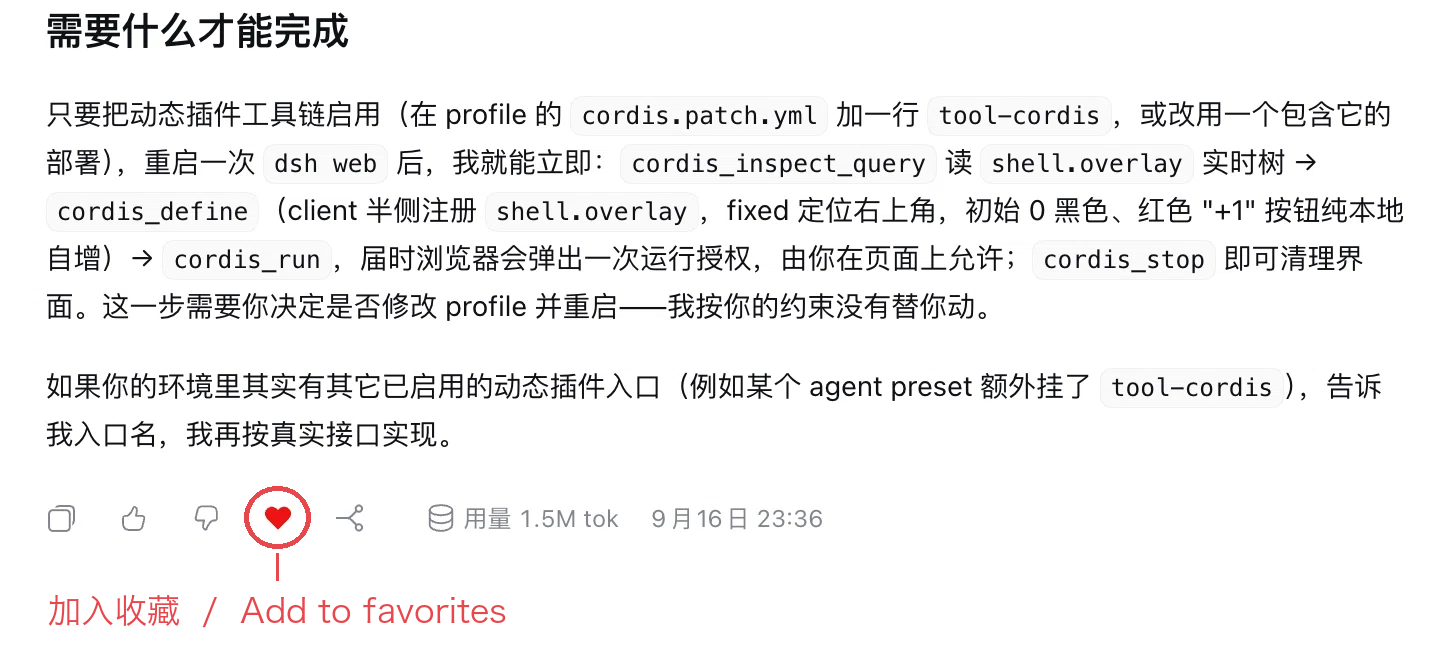
1. 点一下红心,收下这一轮。 任意一条回复下方的动作行里,红心就是收藏按钮——整轮问答(你的问题 + 完整回答)会写进 <会话工作目录>/.dsh-favorites/<会话标题>.md。
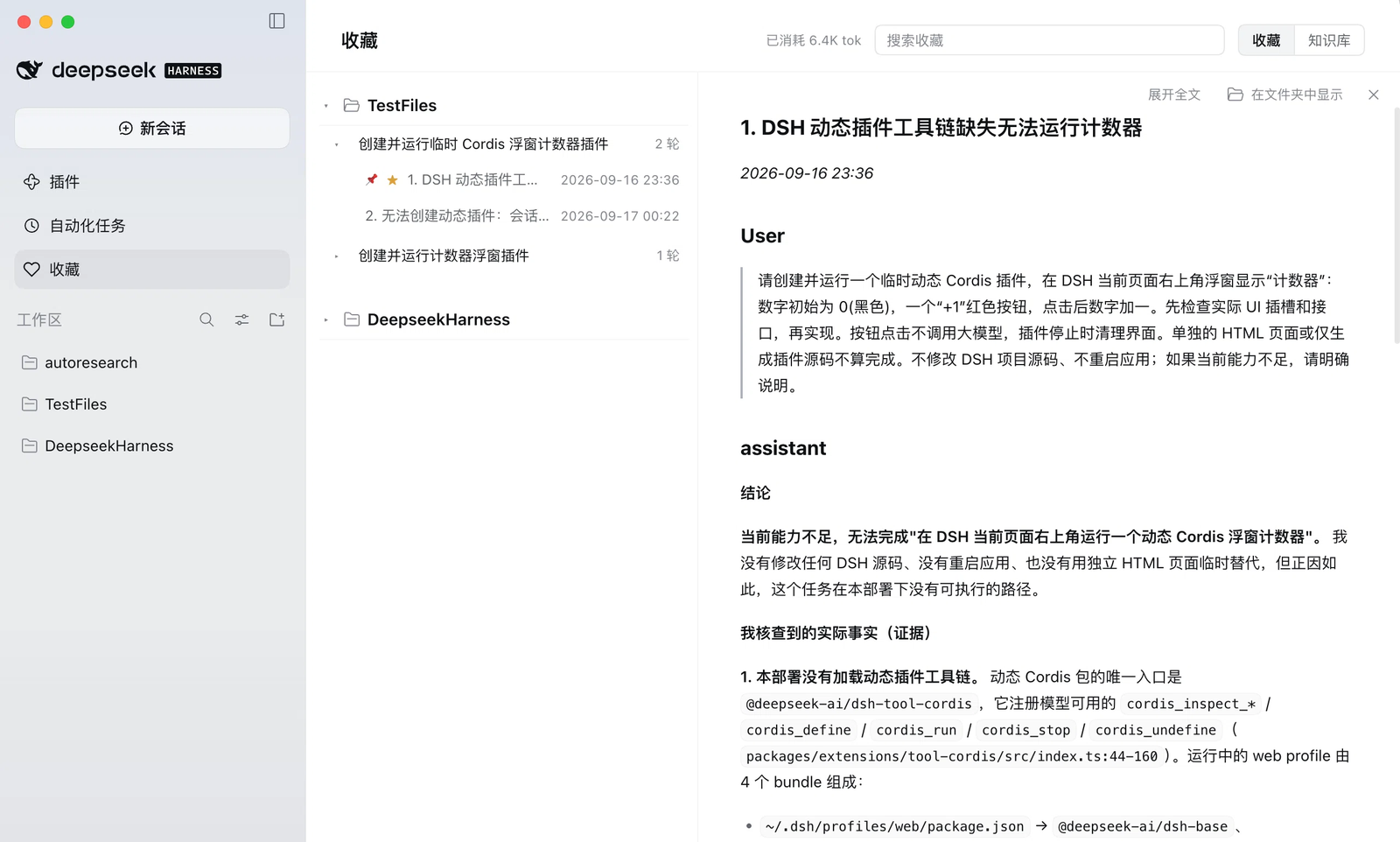
2. 在侧栏「收藏」里翻看。 左侧是按工作区 / 会话 / 条目分组的可搜索树(知识库视图按月份分组),右侧并排渲染选中的那一节;工具条可切换「只看该节 / 展开全文」、在文件夹中显示、关闭阅读区。
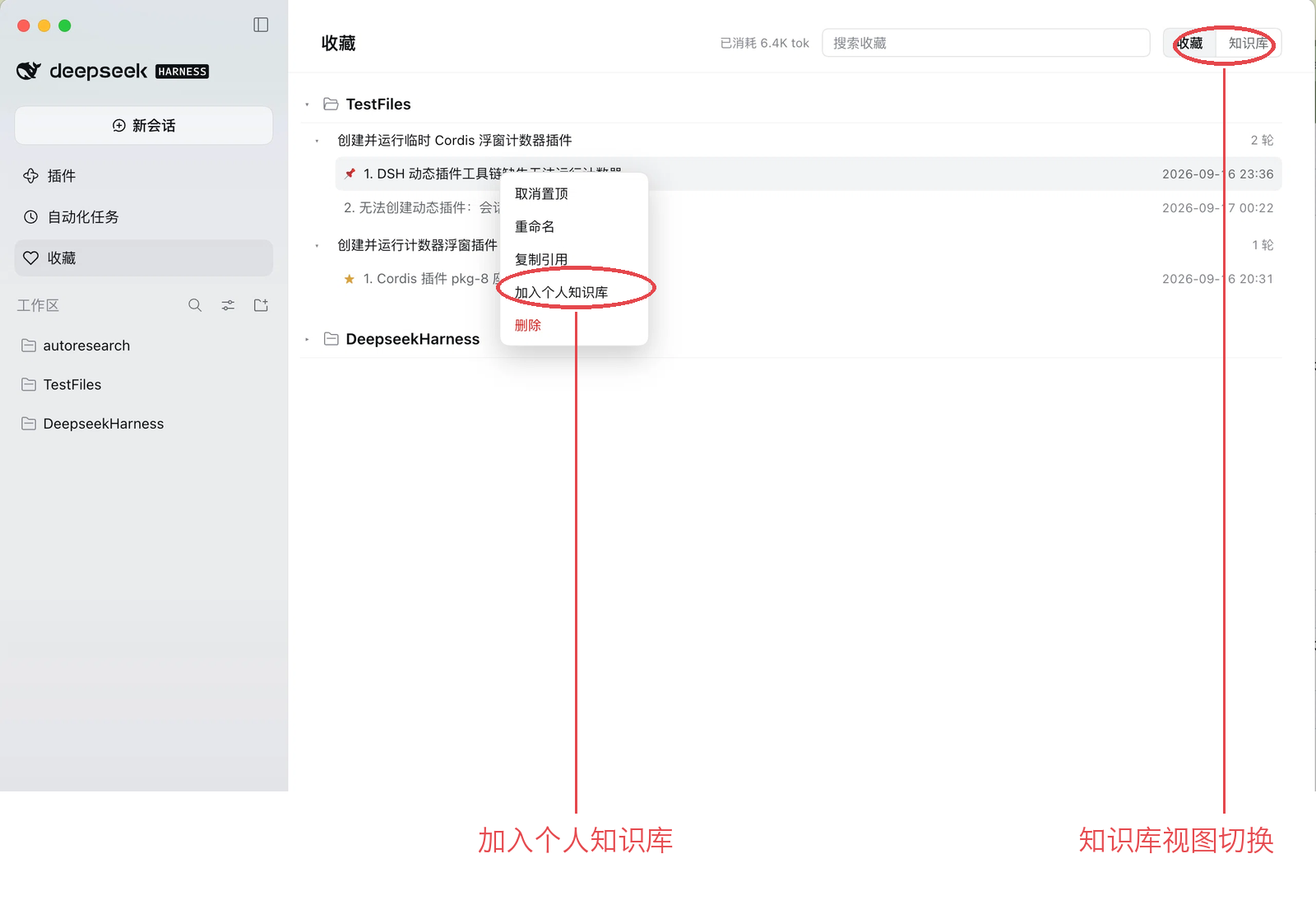
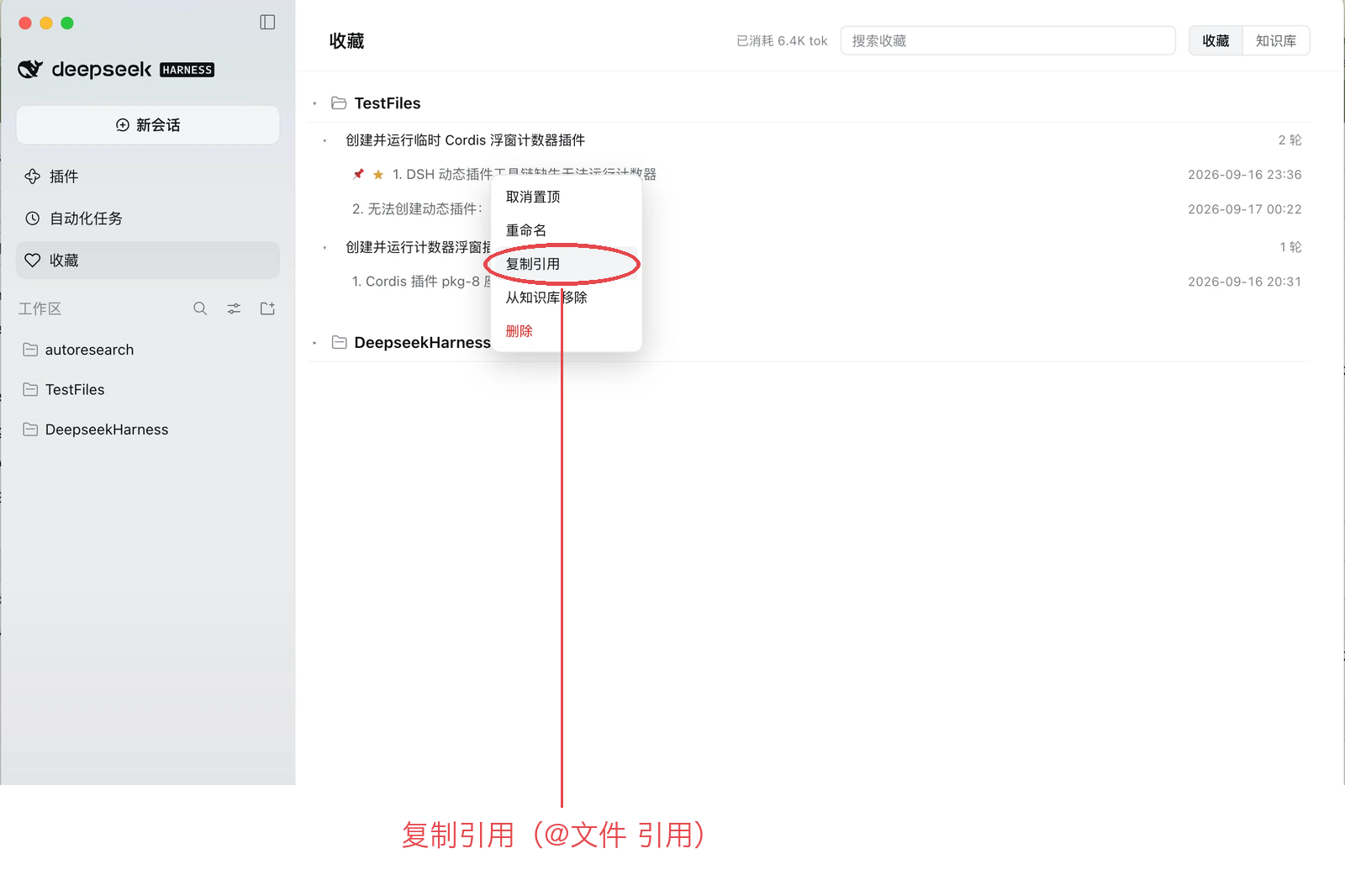
3. 把值得留的加入个人知识库。 右键任意条目:置顶 / 重命名 / 复制引用 / 加入个人知识库 / 删除;右上角的「知识库」切换到知识库视图,顶部提示写明了它的行为。
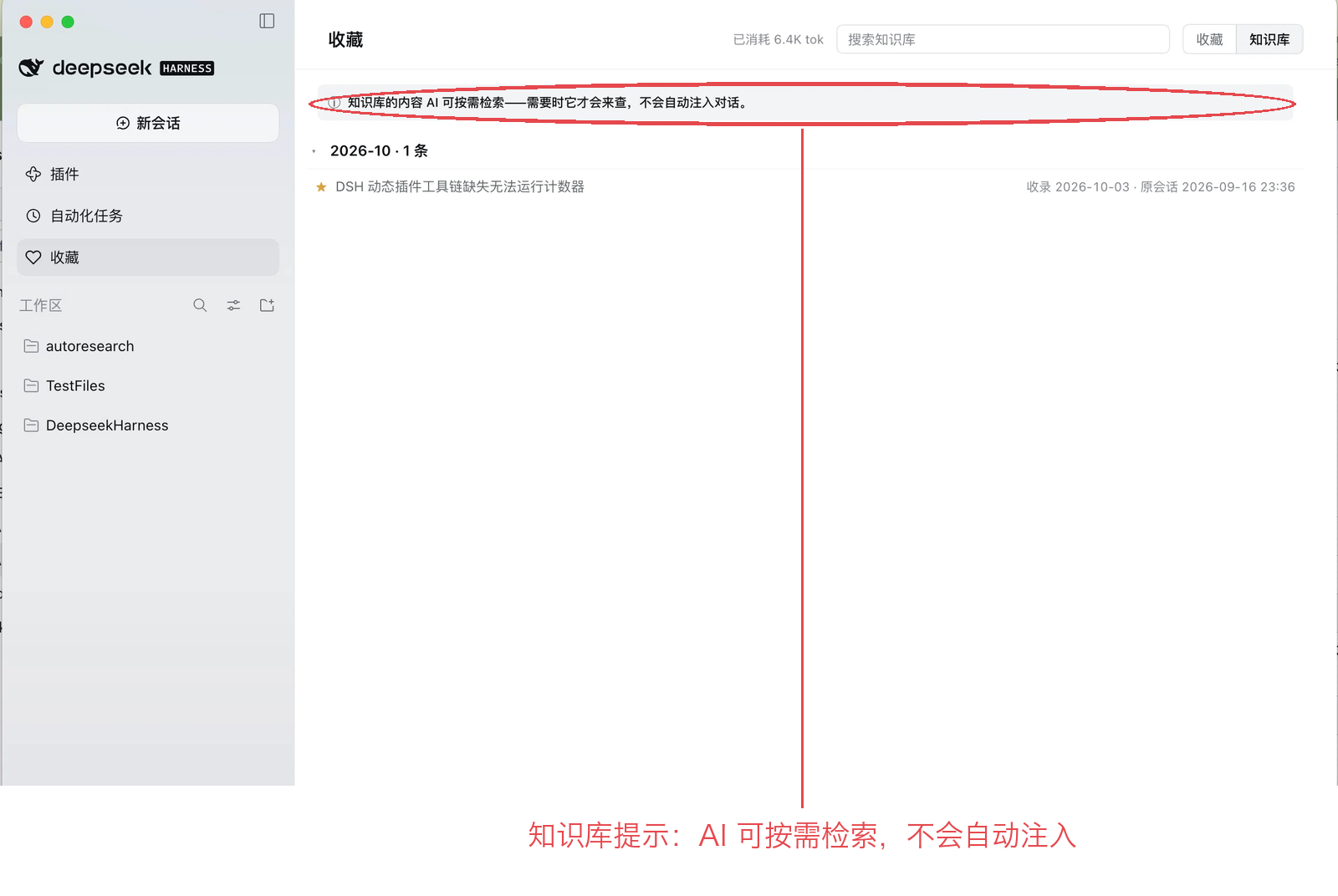
4. 在之后的对话里用起来。 「复制引用」把 @文件路径 放进剪贴板,粘到新对话里模型就会读到这份记录;也可以直接问"上次那个结论是什么",它会调用 search_knowledge 找到你保存的那一轮,并给出文件与日期。知识库的内容只在模型需要时才会被检索,不会自动注入对话。
安装
桌面 App 和 dsh web 两种形态都适用。插件会装进当前正在运行的那个 profile:桌面 App 是 desktop,dsh web 通常是 web。用界面不需要知道 profile 名,用命令则必须写对。
用界面(通用,dsh web 也一样)
打开 设置 → 插件 → 添加插件。包名、仓库地址、预构建 .tgz、本地路径都能填,日常最常用的是这两种:
| 粘贴内容 | 来源 |
|---|---|
| dsh-save-chat | npm(国内镜像同样可用) |
| 本地目录的绝对路径 | 开发调试用 |
然后重启 DSH(dsh web 就重启那个进程),再刷新页面。
用命令行
dsh plugin 会把参数交给 pnpm,并且必须带 --profile <名字>:写你实际运行的那个 profile(桌面 App 是 desktop,dsh web 是 web,自定义的就写自定义名)。在哪个目录执行都可以。
# dsh web
dsh plugin --profile web add dsh-save-chat
# 桌面 App
dsh plugin --profile desktop add dsh-save-chat
命令行接受同样的几类形式(包名、仓库地址、预构建 .tgz、本地路径),例如预构建包(不克隆、不构建):
dsh plugin --profile web add https://github.com/xypang33-sketch/dsh-save-chat/releases/latest/download/dsh-save-chat.tgz这里的 dsh 就是你平时启动 DSH 的那个命令(dsh web,或桌面 App 自带的那一份)。它在哪个目录执行都可以;如果你手上没有这个命令(例如只装了桌面 App),直接用上面的界面方式即可。
插件市场(可选,不是人人都有)
如果你装了社区插件 dshmarket(插件市场),本插件被收录后也会出现在那里,可一键安装。市场本身是一个插件、不属于 DSH 自带功能,所以这条路只在你先装了它之后才存在。
DSH 目前不支持插件自动更新——升级需要先卸载再安装新版本。
为什么用它
同类书签插件已经存在,这个的差别在四点:
| | dsh-save-chat |
|---|---|
| 存什么 | 整轮问答(你的问题 + 完整回答),不是单条消息、也不是一个链接。 |
| 两层结构 | 会话内收藏(跟着项目、原始记录)+ 个人知识库(跨项目、你把值得留的挑进去)。 |
| 模型能检索 | 通过 search_knowledge / read_knowledge 按需取用;不自动注入,没人问的库一分钱不花。 |
| 纯文件、零依赖 | 一个会话一个 Markdown 文件,图片复制在旁边;无数据库、无锁定、无 npm 依赖——能扛核心版本变化,也能进 git、Obsidian 或直接 grep。 |
你会得到什么
- 动作行里的心形——一次点击,先乐观更新、失败自动回滚;
- 收藏面板——工作区 → 会话 → 条目的树、每条带序号、时间小字、各层可折叠、按当前视图搜索、知识库按月分组、「在文件夹中显示」、阅读区可关闭;
- 条目操作——置顶、重命名、复制引用、加入/移出知识库、删除;
- 图片不会丢——图片会复制到 Markdown 旁边并在阅读区显示;加入知识库时再复制一份,并在图下写一句图片摘要,让图片之后能按内容被检索;
- 懂你存了什么的检索——段落级切块 + BM25 + 中文二元组,一个小节只出一条,两条矛盾时以时间较晚者为准;
- 成本透明——面板显示"为收藏这件事已消耗多少 token"。
模型那一侧
两个工具,都是按需——不问就完全看不到:
| 工具 | 作用 |
|---|---|
| search_knowledge | 搜个人知识库(scope: "all" 可连收藏层一起),返回小命中:标题、日期、文件#行号、片段和 id。 |
| read_knowledge | 片段不够时取回该节全文(上限 8 KB)。 |
默认只搜个人知识库——"加入知识库"就是你告诉模型"这条值得你看"的方式。原始收藏仍归你自己,除非你提升它或明确要求。
常见问题
文件在哪? <会话工作目录>/.dsh-favorites/<会话标题>.md;知识库在 ~/.dsh/knowledge/<年-月>.md(可配置)。都是普通 Markdown,用任何编辑器都能打开。
会把数据发到别处吗? 不会。全部在本机,它提供的接口只监听回环地址。
花钱吗? 收藏时一次小模型调用给这一轮起名(几百 token,面板里可见);提升图片时一次小视觉调用写摘要;检索是本地免费的。
会拖慢 DSH 吗? 解析结果按文件大小与 mtime 缓存,只重读变过的文件。
项目删了怎么办? 收藏跟着项目走;你提升进知识库的那些还在,图片也在。
模型能看到我全部收藏吗? 只有它用 scope: "all" 搜索时(你问过去的事就会)。否则它只看到你提升过的。
开发
npm test # 宿主单测 + 真实 DOM 测试(jsdom)文件格式、全部 HTTP 接口、设计取舍与限制都在 docs/reference.zh.md。
许可
MIT