
dsh-search-enhance
v0.1.10
Published
Bounded search, documentation, extraction, progressively disclosed site mapping/research planning, and read-only diagnostics for DeepSeek Harness


Readme
DeepSeek Harness Search Enhance
English | 简体中文
dsh-search-enhance 是 DeepSeek Harness 的搜索增强插件。它使用 Grok-compatible Search API 生成普通网页搜索的主要回答,并可选用 Context7、Exa、Tavily 和 Firecrawl 完成文档检索、补充来源、网页正文提取和站点页面发现。
插件将搜索、来源保留和页面读取作为不同步骤处理。web_search 和 docs_search 返回搜索回答或文档片段以及可见来源;完整来源记录可通过 source_ref 保存并继续分页读取;需要核对重要内容时,再由 web_extract 获取选中页面。因此,搜索 snippet 与实际读取的网页正文会保持明确区分。
你需要自行提供所选服务的端点和凭据,插件不内置任何 API Key。
web_search需要 Grok-compatible 端点;Context7、Exa、Tavily 和 Firecrawl 均为可选 Provider。
主要特点
web_search使用 Grok-compatible 端点生成主要回答,并行调用用户勾选的全部补充搜索 Provider(Exa、Tavily、Firecrawl),每家使用独立的来源数量上限。- 来源在展示前会经过 URL 标准化、去重,并根据来源类别、目标版本和发布时间信号重新排序。
source_ref将完整来源记录保存在插件私有持久存储中,Agent 可以继续分页读取首次结果未展示的来源。docs_search只在提供明确library_name或library_id时使用 Context7;没有库身份的请求使用 Exa 发现。web_extract每次必须通过provider指定一家用户已启用的服务:tavily_extract、firecrawl_scrape、smart_direct或direct。结果报告提取路径、证据等级和页面元数据,失败不自动换服务。- 来源分页、Context7 精细操作、站点映射、研究计划和诊断通过
search_tools与search_call按需披露。 - Native Tool Mode 与 Code Mode 使用相同的固定工具入口和规范输出。DSH Settings、Credentials、Agent Preset、guard 和生命周期清理继续生效。
- 补充搜索默认不选择任何 Provider。未选中的服务不会被请求;选中服务缺少凭据或执行失败会在结果中显示警告。
完整的路由、证据处理和渐进披露流程见搜索链路架构。
快速开始
1. 安装
仅支持 DSH 0.1.5-rc.2。DSH 依赖精确锁定到该版本,不兼容旧版或其他预发行版。
将 npm 上发布的 bundle 安装到 DSH web profile:
dsh plugin --profile web add dsh-search-enhance@latest2. 启动 DSH Web
dsh web3. 配置搜索
打开:
设置 → 插件 → 插件配置 → dsh-search-enhance在设置卡片中配置:
- 在 凭据 → Grok 搜索 中填写 xAI 端点或明确的 Grok-compatible 网关及密钥;
- 在 Grok 搜索后端 中选择匹配的
completions或responses协议及模型; - 用 补充搜索服务 和 可用网页提取服务 的下拉框多选需要的服务。其他服务的接口地址、超时和凭据引用也位于各自的凭据卡片中。
默认凭据引用名是 SEARCH_API_KEY。密钥值通过 DSH Credentials 保存,不会暴露为模型参数。
官方 Grok 端点会自动启用原生搜索,无需新增协议或开关:
- 版本路径可省略:
https://api.x.ai/https://us.api.x.ai自动补/v1;https://openrouter.ai自动补/api/v1,填到/api时补/v1。搜索与模型列表请求都会补全,不重复追加完整路径,也不改写自定义中转地址。 - xAI:
https://api.x.ai/v1(也支持https://us.api.x.ai/v1),模型如grok-4.6。自动使用 Responses 并发送web_search+x_search,即使设置选择了completions;不改写已保存的设置。 - OpenRouter:
https://openrouter.ai/api/v1,模型如x-ai/grok-4.6。保留所选协议,发送openrouter:web_search、engine: native,无需:online后缀。OpenRouter 的模型能力和工作区策略仍可能影响实际搜索引擎;严格禁止其回退时,在工作区仅允许native。 - 只匹配上述官方 HTTPS 域名及 Grok 模型;其他模型、中转端点保持原行为。官方适配中
minimal映射为low、max映射为xhigh,off仍表示省略思考参数。 - 结构化引用会进入来源列表。若 API 未报告完成的搜索、结构化引用或搜索用量,结果会明确提示原生搜索未确认;正文链接本身不作为执行证明。
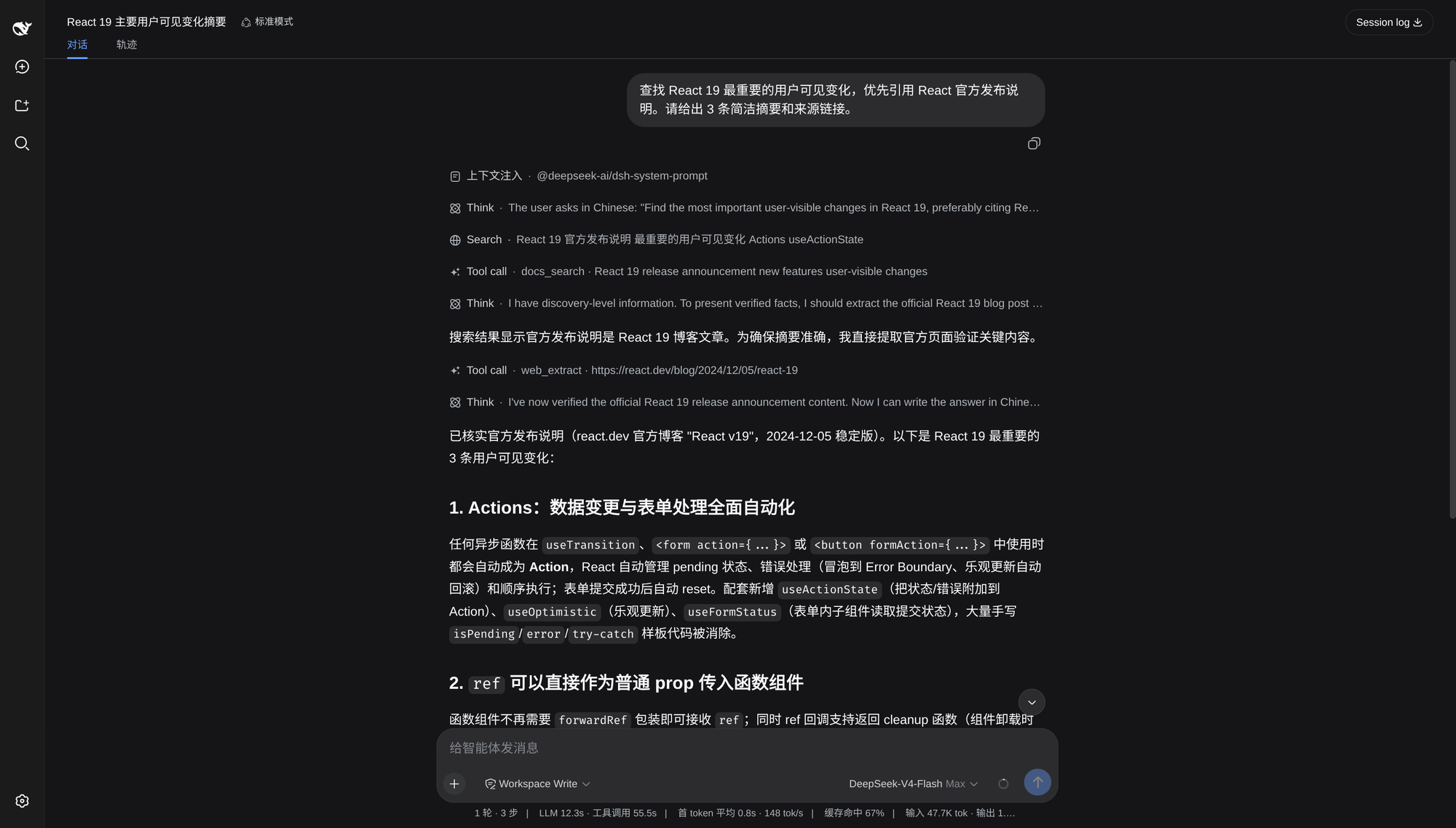
保存设置并重启 DSH,然后询问一个需要当前信息的问题。成功时会看到 Search 工具行、回答和来源链接。
使用示例
直接使用自然语言即可,插件会为 Agent 提供路由指引。
- “查找 React 19 最重要的用户可见变化,优先引用官方发布说明并附上来源链接。”
- “查找 FastAPI 当前 JWT 认证 API,并根据官方文档给出最小示例。”
- “读取并总结
https://example.com/article,区分页面原文与推断。”
需要完整来源分页、站点发现、研究计划或 Provider 诊断时,请明确提出。
Provider
只配置你实际需要的路径。
| Provider | 用途 | 默认凭据引用名 | 是否必需 |
| --- | --- | --- | --- |
| Grok-compatible Search API | web_search 的主要回答和来源 | SEARCH_API_KEY | 使用 web_search 时 |
| Context7 | 明确库身份的文档检索 | CONTEXT7_API_KEY | 否 |
| Exa | 广泛文档发现和补充发现 | EXA_API_KEY | 否 |
| Tavily | 补充搜索、网页提取和站点映射 | TAVILY_API_KEY | 否 |
| Firecrawl | 补充搜索和网页提取 | FIRECRAWL_API_KEY | 否 |
在插件设置中,可以多选 补充搜索 Provider。选中项与主搜索并行执行,每家使用 supplementalSearch.maxSourcesPerProvider 限制来源数量(默认 5,最大 100)。选择对所有搜索 profile 生效,不再隐式启用 Exa,也不再按 60/40 分摊共享预算。
另外,多选 网页提取 Provider 可以限制 Agent 可用的服务范围。每次 web_extract 必须明确选择一家已启用服务,例如 { "url": "https://example.com/", "provider": "direct", "format": "markdown" }。服务被禁用、缺少凭据、不支持格式或执行失败时,直接报告错误,不自动回退。提取服务默认全部启用,可取消勾选不希望使用的服务。
配置变更: 原 extraDiscoverySources 按 profile 设置的预算改为 supplementalSearch 选择项。需要明确启用 exa、tavily 和/或 firecrawl;已有 API 凭据本身不会开启补充搜索。现有提取服务的 enabled 开关继续作为可用名单。保存设置后重启 DSH。fallbackMode 现在仅影响保持原样的文档搜索路由。
对于 docs_search,Context7 需要明确的 library_name 或 library_id。两者都未提供时,provider: "auto" 使用 Exa,不会根据完整问题猜测包名。
工具披露
模型可见入口始终是五个工具:web_search、docs_search、web_extract、search_tools 和 search_call。高级 operation 通过 manifest 披露,不会注册成更多模型工具。
默认 progressive 模式下,新披露的能力从下一模型 step 开始可调用。all 模式让延迟 operation 立即处于 active 状态。Native Tool Mode 与 Code Mode 使用相同 schema、执行策略和规范输出。
web_search 或 docs_search 返回 source_ref 时,插件会自动激活来源分页,并追加对应的真实 operation manifest。
更新与卸载
更新时重新运行上面的安装命令。卸载插件:
dsh plugin --profile web remove dsh-search-enhance更新或卸载 bundle 后请重启 DSH。