
dsh-stock-analysis
v0.2.15
Published
DeepSeek Harness (dsh) plugin for stock analysis, screening, and strategy backtesting across A/HK/US/JP/KR/TW markets

Maintainers
 weaxs
Readme
Stock Analysis — DeepSeek Harness (dsh) Plugin
A 股 / 港股 / 美股 / 日股 / 韩股 / 台股的行情、技术分析、选股与回测。作为 dsh bundle 安装到 profile 后,对话中可调用 75 个工具,并自动注册 21 个工作流和策略方法论 Skill;dsh Web / Desktop 侧栏还会多出一个「股票仪表盘」。
安装
dsh plugin --profile <你的profile> add dsh-stock-analysis
dsh --profile <你的profile>
dsh plugin add 是 pnpm 的薄封装:安装后 dsh 会读取本包 package.json 里的 dsh.bundle.patch,把 cordis.patch.yml 作为一层叠加进 profile 组合。可用 dsh --profile <你的profile> --dump-config 验证 layer 已生效。
同一份插件也以 @weaxs/dsh-stock-analysis 发布;装 scoped 版时,下文配置里的包名也换成 @weaxs/dsh-stock-analysis。
从源码安装(本仓库根目录):
npm install && npm run build:dsh
dsh plugin --profile <你的profile> add ./dsh
Python 运行时
工具实际逻辑在 tools/*.py,依赖 akshare、pandas、numpy、requests。本包的 postinstall(scripts/setup-python.mjs)会在包目录下自动建 .venv 并装好依赖,前提:本机有 python3 >= 3.10。依赖安装失败时 postinstall 会返回非零状态,避免 pnpm 缓存未装完整的 .venv;解决安装问题后重新安装插件即可。
注意:dsh profile 使用 pnpm 且默认不执行第三方包的安装脚本。如 postinstall 被跳过,请在 profile 的 pnpm-workspace.yaml 中允许:
allowBuilds:
  "dsh-stock-analysis": true
如果 venv 最终没建起来,plugin 会回退到系统 python3(Windows 为 python),此时请自行 pip install -r tools/requirements.txt。
股票仪表盘(Web / Desktop)
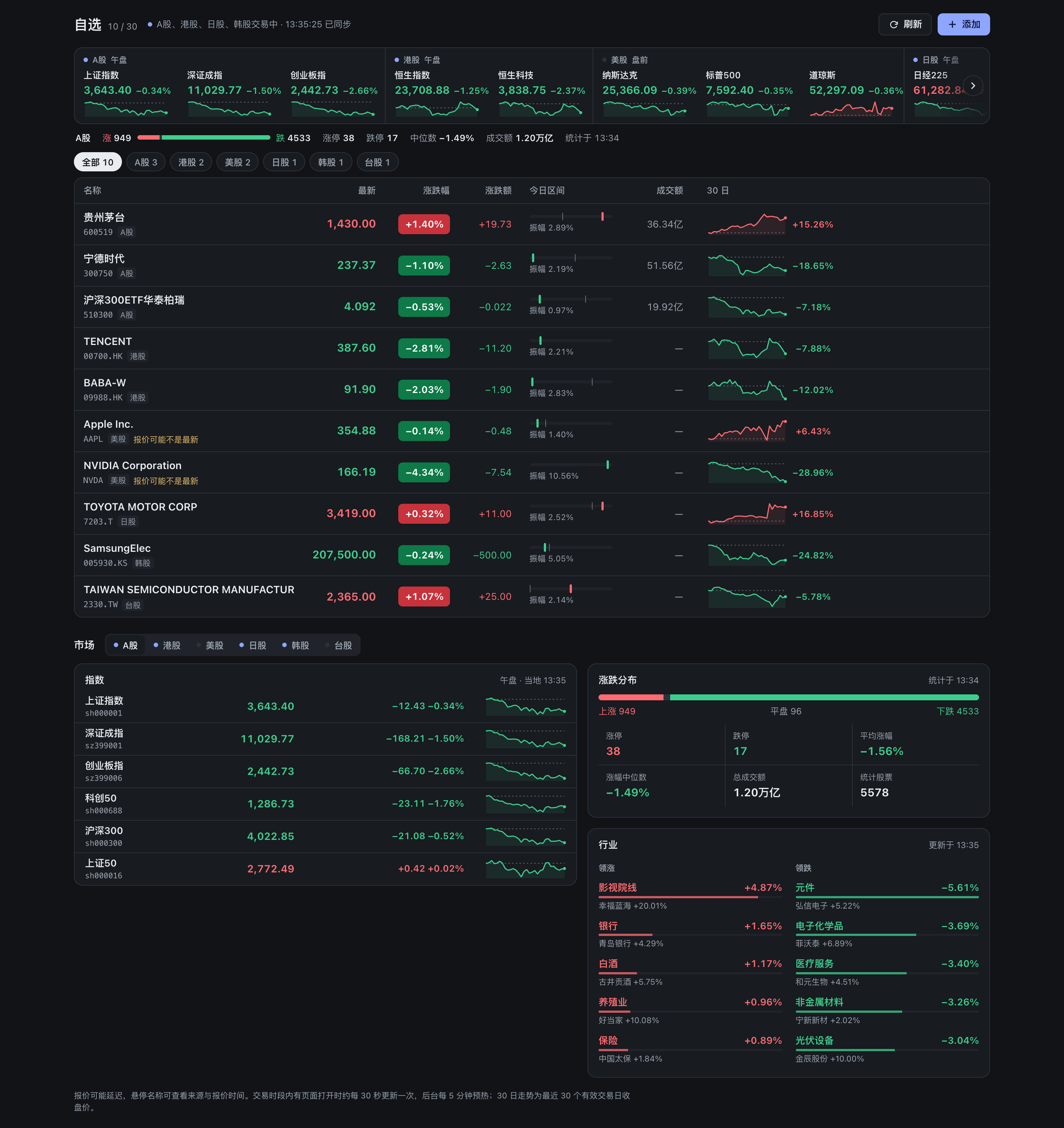
支持 dsh 前端的宿主会在侧栏显示「股票仪表盘」。首屏是自选股行情表:最新价、涨跌幅、涨跌额、今日区间(振幅与昨收位置)、成交额和 30 日走势(悬停可看每日收盘与较首日涨跌),可按列排序、按市场筛选;上方是六市场指数带和 A 股涨跌分布,下方可切换 A / HK / US / JP / KR / TW 查看各市场指数与交易阶段,A 股另有涨跌统计和行业领涨/领跌榜。其他市场没有用少数指数推算全市场宽度。
自选股按代码添加,支持逗号批量导入和删除,最多 30 只,覆盖六个市场。列表保存在 $STOCK_WATCHLIST_FILE,未配置时保存到 $DSH_HOME/stock-analysis/watchlist.json(DSH_HOME 默认为 ~/.dsh)。文件损坏时拒绝静默覆盖。
场外公募基金可用六位基金代码添加。交易所行情源均返回无报价时,自选会查询基金已披露的单位净值、净值日期和净值走势。添加股票或指数时可用交易所前缀指定市场。自选会合并裸码与其默认交易所前缀写法,更换写法时先删除原条目。TIAA 投顾组合显示组合名称和可获取的投顾机构信息,价格一栏标注「无统一净值」。
数据如何更新
数据由插件后台常驻预热:Web 路由注册后即开始按固定任务表调用现有 CLI(stock_data.py quotes/market_indices/klines/sector_rankings/market_stats 与 trading_calendar.py phase),最多 4 个 Python 进程按优先级排队(报价 > 指数 > 走势 > 行业/统计);同一轮到期的自选股与 A 股指数报价合并为一个 quotes 进程,走势按市场合并为每个市场一个 klines 进程,单只失败只影响该行,结果留在内存缓存。刷新节奏随各市场交易阶段变化:交易时段有页面打开时报价与指数约 30 秒、行业 1 分钟、全 A 统计 2 分钟;无人查看时放宽到 5–10 分钟;收盘后 30–60 分钟一次。失败保留上次成功值并标注,重试间隔按 1、2、4… 分钟退避。页面只轮询内存快照 /api/snapshot(有后台任务时 1.5 秒,否则 15 秒,页面不可见时停止),并在浏览器本地缓存 24 小时,打开即显示上次数据;「刷新」会让所有数据立即重新获取。不调用包含财务、新闻、风险等完整采集的 run_watchlist_analysis。前端接口只接受固定的快照、刷新和自选股操作,不开放任意 Python 脚本或参数。
前端由 dsh/client.ts、dsh/dashboard.ts 和 dsh/web/(app.ts + HTML/CSS)组成,均为 TypeScript,npm run build:dsh 将浏览器端编译为 IIFE 输出到 dist/;它不增加或改变四宿主共享的 75 个模型工具。源码或 manifest 改动后重新运行 npm run build:dsh 并重装/重启对应 profile。
页脚显示当前插件版本。从 npm 安装时,有页面打开的情况下后台每 6 小时最多查询一次 npm 的 latest 版本(默认 registry.npmjs.org,可用环境变量 npm_config_registry 改为镜像);有新版时页头出现「新版本 ↑ vX」标记,点击打开 dsh 插件页中本插件的详情(在其版本区块点「更新」),宿主没有插件页时打开 GitHub 发布页。查询失败不影响行情。源码或本地路径安装不检查更新。
按需工具发现
dsh 0.2.2 及以上(工具注册支持按步骤的 when 条件)默认增加一个宿主控制入口 stock_tool_search;更早的 0.2.1 不提供该接口,插件会自动关闭按需发现并全量暴露工具,功能不受影响。按需发现只控制工具加载,不改变 75 个分析工具的名称、参数和输出。原生函数调用模式下,首次请求只暴露这个发现入口;其他插件的工具照常保留。搜索支持中文描述、英文关键词或确切工具名,例如 财务、get_quote、run_backtest;命中工具在下一次模型请求提供完整 schema,再按原名调用。默认最多加载 5 项,limit 可设 1 到 20;无匹配返回空列表。
加载集合按 Agent 隔离,搜索和回退均保留宿主已有的工具权限限制。搜索入口被禁止或移除时,下一次请求保留原先已授权的完整股票工具目录。旧版缺少相关接口时保持全量暴露;PTC / both 模式沿用宿主生成的 SDK,不做发现过滤。加载集合在本次运行中保留,恢复会话或重载插件后需重新搜索。
如需关闭发现,在 profile 中本插件条目的配置中设置:
- name: "dsh-stock-analysis"
  config:
    toolDiscovery: false
这里的 stock_tool_search 是 dsh 适配器的目录控制工具,作用类似 Pi/Hermes/OpenClaw 的宿主发现入口,不增加共享 Python 分析能力,也不执行分析。
工具与 Skills
75 个工具覆盖行情与基金净值、技术分析与 K 线形态、资金流与板块、估值/股东/ETF/股息、公告与 SEC、多因子选股、策略回测、市场复盘、新闻舆情、持仓风险与调仓计算。完整列表见主仓库 README · 工具列表,Skills 见 Skills 一览。
其他宿主
同一套工具也以 Pi Agent extension、Hermes plugin、OpenClaw plugin 和 MCP stdio 服务器形式分发,见主仓库 README · 快速开始。