
dsh-task-reliability
v0.4.7
Published
DSH 任务可靠性保障插件:模型超时/请求失败自动重试、任务未完成自动继续、思考重复干预、休眠重启后任务恢复、锁屏/休眠唤醒自动恢复、ask 超时自动继续、自主决策模式、远程触发、/task 斜杠命令。DSH web plugin: auto-retry, auto-continue, verification agent, repeat detection, resume after restart, stall watchdog, ask timeout, autopilot, remote trig


Readme
dsh-task-reliability
DSH 插件:任务可靠性保障 —— 模型超时/请求失败自动重试、任务未完成自动继续、思考重复检测干预、休眠/重启后任务恢复、锁屏/休眠唤醒自动恢复、ask 超时自动继续、独立完成度校验 agent、自主决策模式(出行防中断)、远程触发接口。
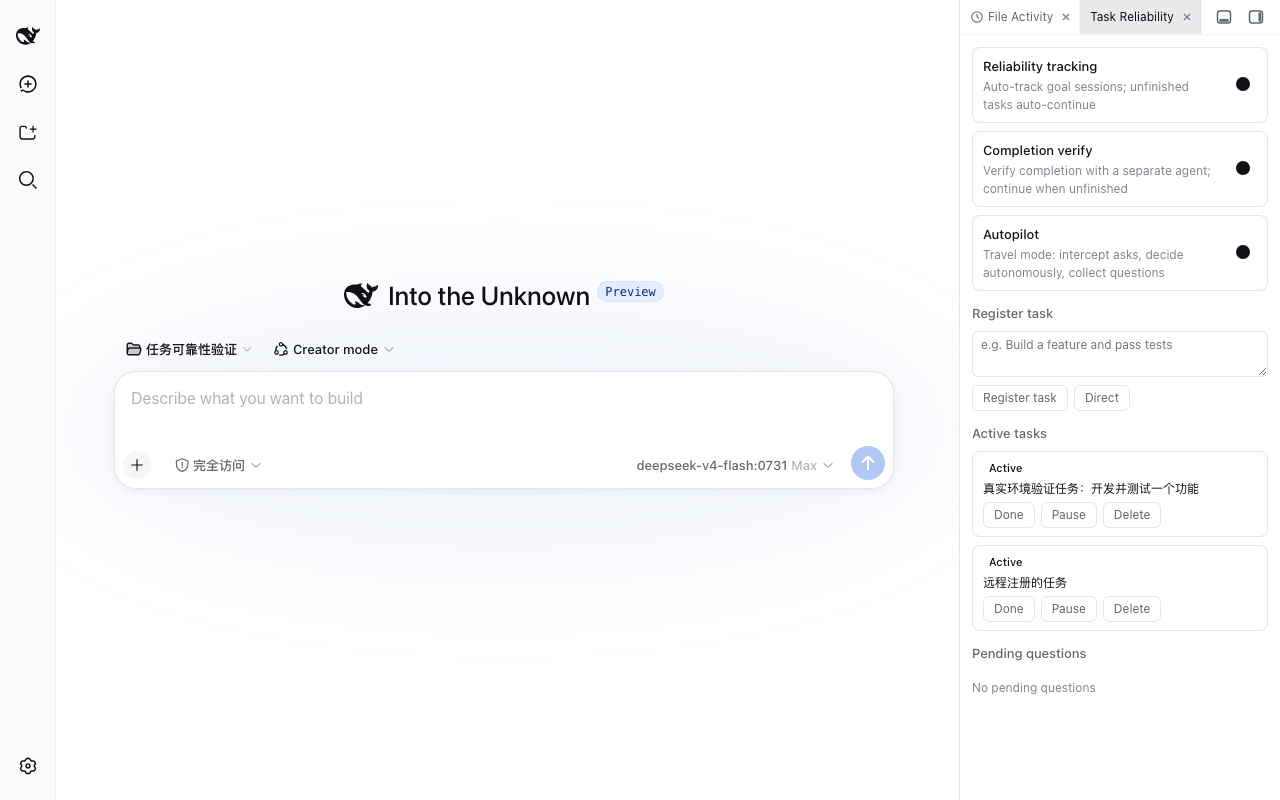
功能
| 能力 | 说明 |
| --------------------- | ---------------------------------------------------------------------------------------------------------------------------------------------------------------- |
| 任务注册表 | 手动注册/自动跟踪任务,持久化到 $DSH_HOME/task-reliability.json(原子写 + 防抖) |
| 超时/失败自动重试 | agent/request-error 接管 TIMEOUT / ETIMEDOUT / ECONNRESET / TRANSPORT 等瞬态失败,指数退避 + 次数上限 |
| 任务自动继续 | 回合即将结束时,存在活动任务则注入继续指令(含防死循环护栏:循环上限/冷却/全局速率限制) |
| 输出截断自动补完 | 普通对话(无任务)回合因输出上限/异常中断且输出不完整时,自动注入继续指令补完(受每会话次数上限 + 冷却约束;用户主动停止不自动继续) |
| 完成度校验 agent | 开启校验模式后,会话结束后用独立 agent 判断任务是否真正完成,未完成自动唤醒继续(带校验结论) |
| 思考重复干预 | 检测 reasoning 段落重复(n-gram 相似度),终止循环回合并注入分级打断指令 |
| 休眠/重启恢复 | 插件启动时扫描活动任务,agents.resume 恢复会话并注入「继续完成之前的任务」 |
| 锁屏/休眠唤醒恢复 | 任务停滞看门狗定期扫描活动任务,长时间无进展(锁屏/休眠/网络断开)自动唤醒继续,无需重启 DSH |
| ask 超时自动继续 | ask_user_question 长时间无响应(默认 30 分钟)自动降级:记录待确认问题 + 注入继续指令 + 模拟回答(推荐选项/模型自行决策),任务不挂起 |
| 自主决策模式 | 出行模式:拦截 ask_user_question 自动决策,问题收集到待确认列表(回来后可批量回答);审批策略切换为自动批准 |
| 远程触发接口 | POST /task-reliability/api/trigger(loopback 信任围栏 + 可选 token),支持注册任务 / 切换模式 / 回答待确认问题 / 查询状态 |
| /task 斜杠命令 | 任何时候输入 /task 查看任务状态(活动任务/待确认问题/模式)、/task continue 唤醒活动任务继续、/task answer <id> <text> 回答待确认问题、/task autopilot on | off 切换自主决策模式、/task register <描述> 注册任务——与 HTTP API 共享同一套 store/API 逻辑 |
安装
💡 npm 安装(普通用户推荐):
dsh plugin --profile web add dsh-task-reliability --trust-lockfile——无需克隆本仓库;以下 link 方式供本仓库开发者使用。依赖dsh-shared(server 端共享工具包)随 npm 自动安装,无需手动处理。
dsh plugin --profile web add link:<本目录绝对路径>使用
- 注册任务:侧边栏「任务可靠性」页签 → 输入任务描述 → 注册(默认当前会话);或在任意会话
agent执行中通过远程 hook 注册。 - 开启校验:页签内打开「完成度校验」开关 —— 会话结束后独立校验 agent 判断完成度,未完成自动继续。
- 出行模式:页签内打开「自主决策」开关(或
POST /task-reliability/api/trigger远程开启)—— 之后 agent 不会再 ask 打断你,被拦截的问题进入「待确认问题」列表,回来后可批量回答。 - 远程触发:
curl -X POST http://127.0.0.1:3080/task-reliability/api/trigger \
  -H "Content-Type: application/json" \
-d '{"action":"mode","autopilot":true}'- /task 斜杠命令(任何会话随时可用,参考官方
/goal):
/task                          # 查看任务状态(活动任务/待确认问题/模式)
/task continue                 # 唤醒活动任务继续执行
/task answer <id> <text>       # 回答待确认问题(id 见 /task 状态输出)
/task autopilot on|off         # 切换自主决策模式
/task register <描述>          # 注册任务到当前会话
配置
| 字段 | 默认 | 说明 |
| --------------------- | ------------------- | ----------------------------------------------------------------------------------------------- |
| apiToken | 空 | 远程接口令牌;配置后 trigger/mode/answer 要求 x-task-reliability-token 头 |
| retryMax | 3 | 单次模型请求失败重试上限 |
| maxLoop | 8 | 每任务自动继续次数上限(防死循环) |
| maxVerify | 3 | 每任务完成度校验次数上限 |
| retryableCodes | TIMEOUT/ETIMEDOUT/… | 触发自动重试的错误码集合 |
| retryBaseMs | 1000 | 重试指数退避基数(毫秒) |
| autopilot | false | 默认自主决策开关 |
| autopilotGraceMs | 20000 | 自主决策缓冲(毫秒,0 = 立即拦截):ask 先展示给用户,缓冲超时后才自动决策(问题记录待确认) |
| steerCooldownMs | 8000 | 两次自动继续之间的最小间隔(毫秒) |
| askTimeoutMs | 1800000 | ask 超时自动继续(毫秒,0 = 禁用):询问用户超时后记录待确认问题 + 注入继续指令 + 模拟回答 |
| watchdogIntervalMs | 300000 | 任务停滞看门狗检查间隔(毫秒,0 = 禁用) |
| stallTimeoutMs | 600000 | 停滞判定阈值(毫秒):任务超过该时长无进展则自动唤醒 |
| saveDebounceMs | 500 | 任务状态落盘防抖窗口(毫秒) |
| resumeGraceMs | 2000 | 启动后延迟恢复任务的时间(毫秒) |
| rateMaxActions | 12 | 自动继续的全局速率限制(每分钟动作数) |
| rescueOnTruncation | true | 输出截断自动补完开关:回合因输出上限/异常中断且输出不完整时自动注入继续指令(普通对话同样生效) |
| rescueMaxPerSession | 2 | 每会话自动补完次数上限(防「截断→继续→再截断」死循环) |
| rescueCooldownMs | 30000 | 两次自动补完之间的最小间隔(毫秒) |
设置页可视化(推荐)
所有配置项也可在 设置 → 插件 → 任务可靠性 页签中可视化查看和编辑(官方 slots 扩展点,无需手动编辑配置文件):
- 超时重试:最大重试次数 / 退避基数 / 可重试错误码(逗号分隔);
- 自动继续:每任务继续上限 / 校验次数上限 / 继续冷却 / ask 超时;
- 持久化与速率:落盘防抖 / 恢复宽限 / 每分钟动作上限;
- 停滞看门狗:检查间隔 / 停滞判定阈值;
- 截断救场:输出截断自动补完开关 / 每会话救场上限 / 救场冷却(毫秒);
- 安全:自主决策默认开关、自主决策缓冲(毫秒)、远程触发 Token。
点击「保存」即生效(写入 $DSH_HOME/profiles/<profile>/cordis.patch.yml,DSH 热重载 + 内存即时更新),重启不丢。
安全
所有 /task-reliability/api/* 路由先做 loopback 信任围栏(与 DSH /api 网关契约一致),非本机来源一律 403;配置 apiToken 后,远程动作(trigger / mode / answer)额外要求 token 头。
需求与测试
- 需求清单见 docs/任务可靠性/需求清单.md
- 测试:
npm test(vitest 单元 + 覆盖率门禁 + cucumber 验收),npx stryker run(变异测试 ≥70%)
License
MIT