
dsh-trading212
v0.7.0
Published
Read-only Trading 212 portfolio workspace for dsh

Maintainers
 kevoyuan
Readme
dsh × Trading 212

在 dsh 里直接查看自己的 Trading 212 投资组合,并用自然语言提问。只读、低门槛:配置一次 API 密钥后,就能看持仓、历史成交、风险概览和个股买卖点。
仅供个人信息整理与研究参考,不构成投资建议。本插件不会下单、修改或取消订单。
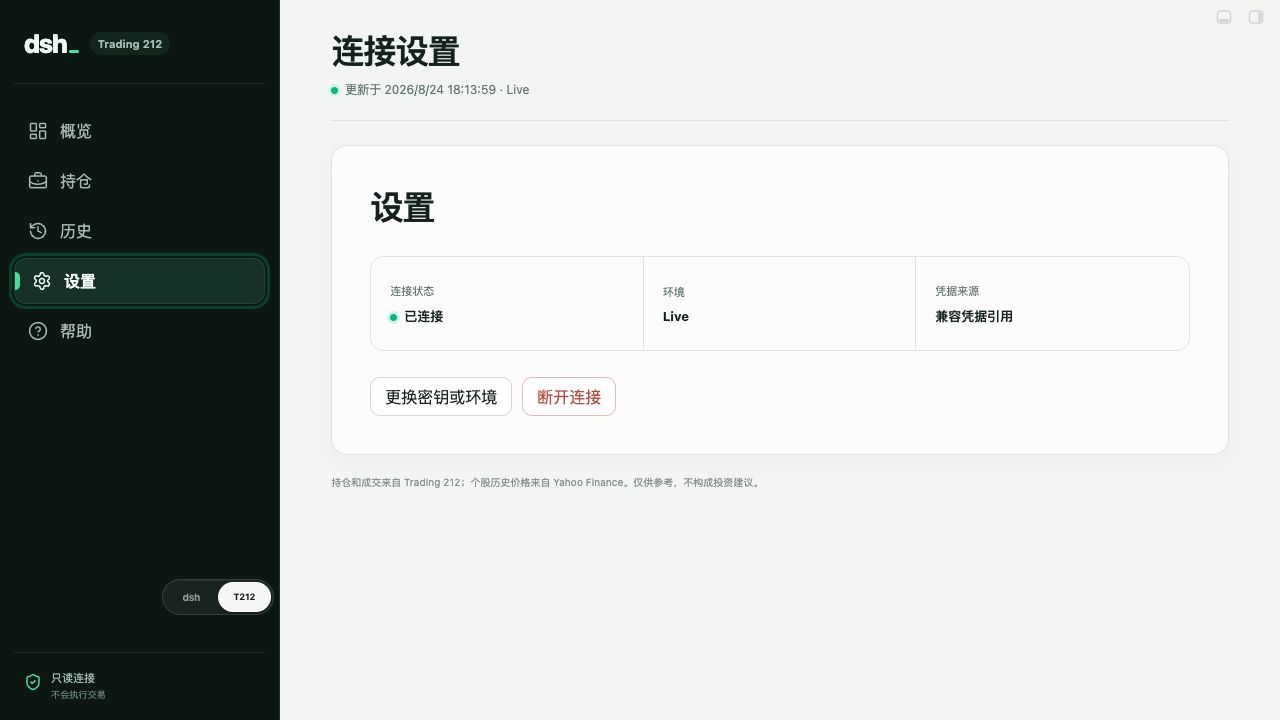
真实产品界面截图;画面不包含账户金额、持仓、姓名或 API 密钥。
能做什么
- 在 dsh 中完成 Demo / Live API 配置;刷新后仍会恢复连接状态
- 一眼查看账户总览、现金、收益、外汇影响、集中度和待处理订单
- 查看持仓、历史订单、资金流水与分红
- 点击个股查看价格曲线,并叠加 Trading 212 的真实买入/卖出成交点
- 中英双语界面,默认跟随 dsh 界面语言,也可在设置中手动切换
- 在 dsh 对话中询问自己的组合,例如最大持仓、风险、货币敞口和未成交订单
- 凭据由 dsh 的 credential provider 保存;不会写入 URL、浏览器存储、日志或 tool 输出
3 分钟开始
你需要准备
- 已安装并可打开 dsh。
- 一个 Trading 212 API Key 和 API Secret。建议先创建 Demo 环境密钥。
安装插件
直接执行:
dsh plugin --profile web add --save-exact dsh-trading212@latest然后完全退出并重新打开 dsh。侧边栏左下会出现 dsh / T212 切换器,点击 T212 即可打开 dashboard。
也可以从 GitHub Releases 下载 .tgz,然后安装本地文件:
dsh plugin --profile web add --save-exact ./dsh-trading212-<version>.tgz连接账户
- 打开
T212dashboard,选择Demo或Live。 - 粘贴 API Key 和 API Secret,点击“测试并保存”。
- 验证成功后即可查看 dashboard,或回到 dsh 开始对话。
创建密钥时仅授予以下读取权限:
- Account data / account summary
- Portfolio / positions
- Orders / history
不要授予下单、修改或取消订单权限。Trading 212 的 Secret 只显示一次,遗失后需要重新创建。
英文官方说明:Trading 212 API documentation · How can I generate an API key? · dsh plugin development guide
在 dsh 中提问
直接在任意 dsh 对话里说:
总结我最大的三个持仓和集中度风险。哪些仓位正在拖累未实现收益?我的组合有哪些货币敞口?有没有还没成交的订单?dsh 会按需调用只读的 trading212_portfolio 和 trading212_history tools,返回规范化的账户数据。插件不会注册交易指令。
数据与隐私
| 数据 | 用途 | 会发送什么 | | --- | --- | --- | | Trading 212 官方 API | 账户、持仓、订单、成交、资金流水、分红 | API Key / Secret 仅用于向 Trading 212 验证 | | Yahoo Finance 非官方接口 | 个股每日历史价格曲线 | 仅发送公开标的标识;不发送凭据、数量或账户金额 |
历史价格可能延迟、缺失或暂时不可用;即使 Yahoo Finance 不可用,Trading 212 的持仓与成交记录仍可查看。
本地构建(开发者)
pnpm install
pnpm typecheck
pnpm test
pnpm pack --pack-destination dist
dsh plugin --profile web add --save-exact ./dist/dsh-trading212-<version>.tgz
代码结构:
src/index.ts:dsh host、HTTP API 与只读 toolssrc/portfolio-service.ts:凭据持久化、缓存与请求协调src/trading212.ts:Trading 212 API 客户端与响应校验src/market-data.ts:Yahoo Finance 历史价格数据src/client/index.tsx:dsh 侧边栏 switcher 与 dashboard overlaysrc/app/:连接、组合、历史和个股详情 UI
贡献
欢迎提交 issue 或 pull request。请勿在 issue、截图、测试 fixture 或提交记录中包含 API Key、API Secret、真实账户金额或持仓数据。
许可证
本项目采用 MIT License 开源。