
dsh-translate-on-select
v0.1.1
Published
DSH 划词翻译:鼠标选中非中文内容后,在选区下方就地浮出简体中文译文

Maintainers
 syzke
syzkeReadme
dsh-translate-on-select
DSH 划词翻译插件:鼠标选中非中文内容后,在选区下方就地浮出一张卡片显示简体中文译文。
选中即翻 —— 不用快捷键、不用装浏览器扩展、不用离开当前页面。
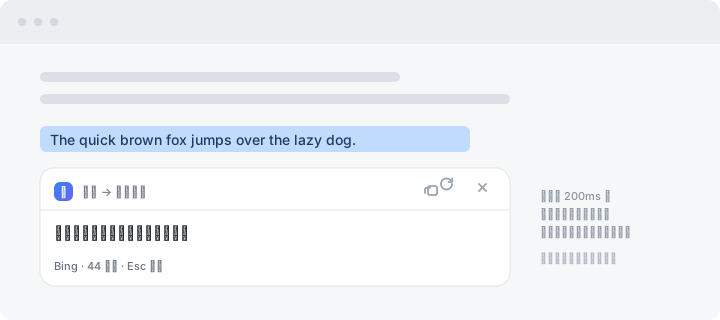
上图是卡片外观的示意(非真实截图)。实际效果:选中一段外文 → 松手约 200ms → 选区正下方出现译文卡片。
特性
- 划词即译:松开鼠标约 200ms 后自动翻译,落点在选区正下方(下方空间不够会自动翻到上方)。
- 自动判断要不要翻:纯中文选区直接跳过(省掉一次「翻完还是原文」的无用请求);日语、韩语因为有假名/谚文会被正确判定为「需要翻译」。
- 不打扰输入:在输入框、文本域、
contenteditable里的选区不会触发。 - 自动识别源语言:英文、日文、德文等都能识别,卡片上会显示「英语 → 简体中文」。
- 缓存:同一段文本第二次选中是瞬时返回(内存 LRU,宿主与前端各一层)。
- 美观且跟主题:毛玻璃卡片、圆角、柔和投影,自动跟随 DSH / 系统的明暗主题;带骨架屏加载态;尊重
prefers-reduced-motion。 - 可交互:一键复制译文、重新翻译、Esc / 点空白处关闭。
- 多后端回退:主用 cn.bing.com,失败自动切 MyMemory。
- 零依赖、零构建:纯 JavaScript,没有第三方依赖,也没有
prepare/build脚本。
安装
需要已安装 dsh CLI(DeepSeek Harness 桌面客户端自带,源码运行时用 pnpm dsh)。
方式一:从 npm 安装(推荐,最省事)
dsh plugin --profile desktop add dsh-translate-on-selectdesktop是桌面客户端的 profile;如果你跑的是dsh web,把--profile desktop换成--profile web。- 包已经发在 npm 上:dsh-translate-on-select。
- 本插件没有
prepare/build脚本,预构建安装,pnpm 不会要求你在pnpm-workspace.yaml里追加allowBuilds授权。 - 不需要本机装
git。
方式二:从 GitHub 安装(直接跑源码)
dsh plugin --profile desktop add github:syzke/dsh-translate-on-select- 需要本机装了
git(pnpm 通过 git 拉取源码)。 - 想锁定版本:
... add github:syzke/dsh-translate-on-select#v0.1.1。
方式三:本地源码安装(改代码立即生效)
dsh plugin --profile desktop add "link:/absolute/path/to/dsh-translate-on-select"
link:是软链安装:源码改动立即生效(前端改完硬刷新即可,宿主改完要重启客户端)。 代价是不能移动或重命名该源码目录,移动后要重新add一次。 想改成拷贝安装(此后源码改动不再同步)用file:<路径>。
⚠️ 装完必须重启一次客户端
webserver/index-inject 的注入行不会热生效,需要重启一次 DeepSeek Harness;只刷新页面(F5 / Ctrl+F5)是不够的。
原因:桌面端的注入表由 dsh-desktop-host 在宿主启动时一次性收集(collectIndexInjections()),Electron 主进程把它缓存成数组,之后每次 dsh-desktop:boot IPC 都返回同一份。所以哪怕是整页重载,拿到的还是启动那一刻的旧表 —— 新加的注入行必须靠重启应用才会被重新收集。
重启后自检:
- 右下角不应出现任何东西(本插件没有常驻图标,这是正常的)。
- 在任意助手回复里用鼠标选中一段英文 → 选区下方应浮出译文卡片。
- 若没反应:打开开发者工具看 Console 有没有
/dsh-translate/client.js的报错;Network 里应能看到该请求返回 200。
配置
配置文件在 $DSH_HOME/.dsh-translate.json(Windows 默认即 C:\Users\<你>\.dsh\.dsh-translate.json),首次改配置时才会创建:
{
  "to": "zh-Hans",
  "enabled": true
}
| 字段 | 说明 |
|---|---|
| to | 目标语言。zh-Hans=简体中文(默认);也支持 zh-Hant、en、ja 等。Bing 用 BCP-47 码,改这个就能当反向词典用。 |
| enabled | 设为 false 可整体关掉翻译(插件仍加载,但接口会直接返回「已关闭」)。 |
改完不用重启(每次请求都重新读文件)。
环境变量(可选)
| 变量 | 用途 |
|---|---|
| DSH_TRANSLATE_CONTACT | MyMemory 的联系邮箱。匿名额度约 5000 字符/天,填了可提到 5 万。 |
| DSH_TRANSLATE_TRUSTED_HOSTS | 逗号分隔。仅当宿主信任栅栏不可用且你把 DSH 放在了反代/局域网后面时才需要。 |
安全与隐私
- 翻译请求在宿主侧发出,只监听
127.0.0.1(DSH 默认绑定),不对外暴露。 - 所有路由都套了信任栅栏,三层策略:自身校验(拒绝
Sec-Fetch-Site: cross-site;有 Origin 时必须与 Host 同源)→ 委托宿主栅栏ctx.connection.requestRejection→ fail-closed(栅栏抛异常按拒绝处理)。没有宿主栅栏时只放行回环地址 /DSH_TRANSLATE_TRUSTED_HOSTS。 - 请知悉:翻译走的是公共免费接口,也就是你选中的文本会被发送到 cn.bing.com(必要时还有 MyMemory)。不要用它翻密钥、隐私数据或未公开的代码。
已知限制
- 译文是「重排版」的:长文本按 4000 字符分片,各片独立翻译后拼接,所以长段的换行可能与原文不完全一致(字符顺序与内容不丢)。
- 延迟:短句约 0.7–1.4s,2000 字符级别约 4s。没有流式输出,用骨架屏顶着。
- 公共接口的稳定性不由我们控制:Bing 的
ttranslatev3靠页面里的params_AbusePreventionHelpertoken(1 小时有效,自动续期),页面结构变了就可能失效;MyMemory 匿名额度很小。两者都挂时会显示带原因的失败卡片,可点 ⟳ 重试。 - 滚动或缩放窗口时卡片会收起(选区会跟着动,钉在原位必然错位)。
- 选中 20000 字符以上不翻译。
卸载
dsh plugin --profile desktop remove dsh-translate-on-select然后重启客户端。
实现说明
dsh-translate-on-select/
├── package.json          # dsh.bundle.patch → cordis.patch.yml
├── cordis.patch.yml      # 挂载声明
├── lib/
│   ├── index.js          # 宿主:注入行 + 本地路由 + 信任栅栏 + 配置
│   └── providers.mjs     # 翻译后端:Bing / MyMemory + 分片 + 缓存
├── assets/
│   └── translate.js      # 前端:选区监听 + 卡片(样式内嵌)
├── test/
│   └── providers-test.mjs # 后端自测(会真实联网)
└── docs/preview.svg      # 卡片外观示意
数据流
页面选区 ──► assets/translate.js ──POST /dsh-translate/translate──► lib/index.js
                                                                      │
                                                       lib/providers.mjs
                                                      ├─ Bing(cn.bing.com,主)
└─ MyMemory(备)翻译放在宿主侧而不是浏览器里直接调,有三个好处:绕开 CORS、能集中做缓存/分片/多后端回退、能把探测到的真实语言回传给界面显示。
为什么用 webserver/index-inject 而不是 dsh.client
DSH 确实有 dsh.client 客户端插件机制(window.__ModuleLoader__.load({...})),但它是槽位(slot)导向的:UI 只能注册进 DSH 已声明的具名槽位(如 conversation.composer.dock)。本插件要的是覆盖任意页面内容的全局浮层,没有对应槽位,所以走注入行这条路。
注入行必须是内联脚本(kind:'script')而不是 kind:'script-src':页面侧解释器对后者是「加载失败即 reject 掉 __DSH_BOOT_READY__,整个应用起不来」。内联行里由我们自己创建 <script src> 并吞掉 onerror,这样插件被停用、路由注销时只会静默失败,绝不会把宿主拖死。
开发
# 语法检查(离线)
node --check lib/index.js && node --check lib/providers.mjs && node --check assets/translate.js

# 后端自测(会真实请求 cn.bing.com / MyMemory)
node test/providers-test.mjs- 改
assets/translate.js(前端 / 样式)→ 卡片不出现或样式不对时,Ctrl+F5 硬刷新即可,不用重启。 - 改
lib/*.js(宿主 / 路由 / 后端)→ 需要重启客户端。
可能的后续增强
- 换成 DSH 自带模型:
ctx.llm.stream()+ctx.agentDefaultModel.currentSelection()是公开可用的(dsh-session-title-llm就是现成范例)。这样质量更好、无需第三方出网、不用公共接口,代价是消耗你自己的模型额度。当前providers.mjs的结构就是为这种替换留的(一个 provider 就是{label, maxChunk, translate})。 - 命中缓存时右侧显示「原文 → 译文」对照。
- 加一个快捷键(如 Alt+Shift+T)对当前选区强制翻译,绕过「已是中文则跳过」的判断。
English
A select-to-translate plugin for the DeepSeek Harness (DSH) desktop app. Select any non-Chinese text with the mouse, and a floating card with the Simplified Chinese translation appears right below the selection — no hotkey, no browser extension, no leaving the page.
dsh plugin --profile desktop add dsh-translate-on-selectThen restart the app once (the injection table is collected at host startup and is not hot-reloaded). Text you select is sent to the public cn.bing.com translator (falling back to MyMemory); do not use it on secrets or private data.
Install from source instead: dsh plugin --profile desktop add github:syzke/dsh-translate-on-select.
许可
MIT。翻译内容来自第三方公共接口,其准确性不作保证。