
npm package discovery and stats viewer.

Discover Tips

  • General search

    [free text search, go nuts!]

  • Package details

    pkg:[package-name]

  • User packages

    @[username]

Sponsor

Optimize Toolset

I’ve always been into building performant and accessible sites, but lately I’ve been taking it extremely seriously. So much so that I’ve been building a tool to help me optimize and monitor the sites that I build to make sure that I’m making an attempt to offer the best experience to those who visit them. If you’re into performant, accessible and SEO friendly sites, you might like it too! You can check it out at Optimize Toolset.

About

Hi, 👋, I’m Ryan Hefner  and I built this site for me, and you! The goal of this site was to provide an easy way for me to check the stats on my npm packages, both for prioritizing issues and updates, and to give me a little kick in the pants to keep up on stuff.

As I was building it, I realized that I was actually using the tool to build the tool, and figured I might as well put this out there and hopefully others will find it to be a fast and useful way to search and browse npm packages as I have.

If you’re interested in other things I’m working on, follow me on Twitter or check out the open source projects I’ve been publishing on GitHub.

I am also working on a Twitter bot for this site to tweet the most popular, newest, random packages from npm. Please follow that account now and it will start sending out packages soon–ish.

Open Software & Tools

This site wouldn’t be possible without the immense generosity and tireless efforts from the people who make contributions to the world and share their work via open source initiatives. Thank you 🙏

© 2026 – Pkg Stats / Ryan Hefner

dsh-tweaks-model-capabilities

v0.1.0

Published

在 DSH 设置→模型的官方模型行里补上思考强度(llm-pi-ai)与多模态(llm-pi-ai / llm-deepseek),并提供 1M/128K 容量快捷填入

Readme

dsh-tweaks-model-capabilities

在 DSH 的模型编辑界面里,补上官方没有的「思考强度 / 多模态 / 容量」设置。

它能做什么

在「设置 → 模型」里编辑模型时,官方界面只能改名字和上下文长度,没法告诉 DSH「这个模型支不支持思考」「支不支持看图」。这个插件把这些开关补进模型行:

  • 思考强度 —— 先用「协议预置」选协议,它决定可选档位:OpenAI = off / minimal / low / medium / high / xhigh / max,Anthropic = off / low / medium / high / xhigh / max(取自 DSH 自带 pi-ai 目录里两家模型的实测映射)。两个预置默认都勾 off / low / high / max;一个都不勾 = 这个模型不支持思考。(只有第三方网关 llm-pi-ai 有这一项)
  • 多模态 —— 选「文本」或「文本+图片」。(llm-pi-ai 和 llm-deepseek 都有)
  • 容量快捷填入 —— 「上下文窗口 / 最大输出」各有一个 1M / 128K 按钮;新建模型行展开容量时自动填好 1000000 / 131072。

怎么用

  1. 打开 设置 → 模型,选一个提供方 → 编辑 → 自定义设置。
  2. 找到要改的那个模型,点那一行的 「容量」 展开。
  3. 展开后顶部会显示这个模型当前的配置摘要,下面是思考强度、多模态和容量按钮:
    • 思考强度:先用「协议预置」选协议(OpenAI / Anthropic),档位行会换成该协议的枚举;勾上这个模型支持的档位,右边输入框是该档的"过线拼写",不同网关叫法不一样(比如 max 在你那边叫 ultra),可以改。
    • 切换预置会把档位重新按默认勾成 off / low / high / max;没配置过思考强度的模型展开时默认就是 OpenAI 预置 + off / low / high / max。
    • 一个档都不勾 = 这个模型不支持思考。
  4. 改完点官方那个 「保存」 才真正写进去(改过之后行内会提示"已改,点官方『保存』后写入");点官方「取消」则丢弃这次改动。

第三方网关(llm-pi-ai) —— 思考强度 + 多模态 + 容量快捷填入:
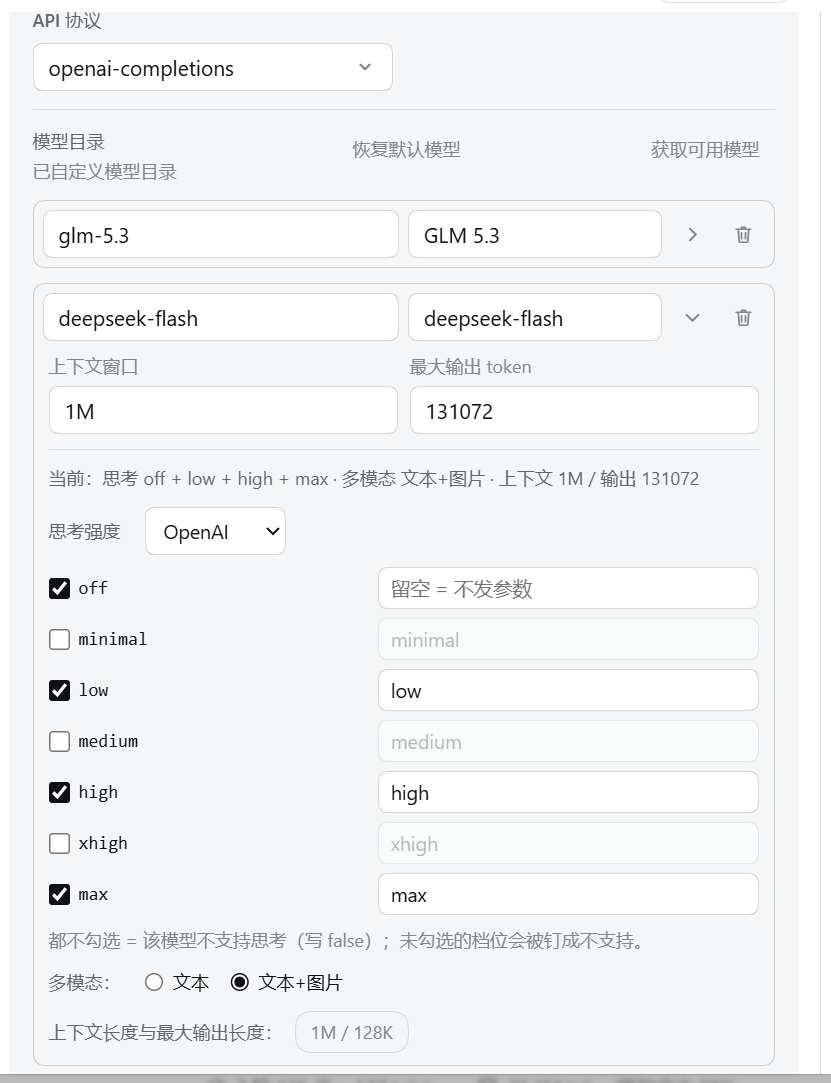
llm-pi-ai 模型行展开:思考强度选 OpenAI 预置(档位 off/minimal/low/medium/high/xhigh/max,默认勾 off/low/high/max),下面是多模态与「上下文长度与最大输出长度:1M / 128K」

官方 DeepSeek(llm-deepseek) —— 只有多模态(DeepSeek 的思考档位是提供方级设置,这里只读显示当前值):
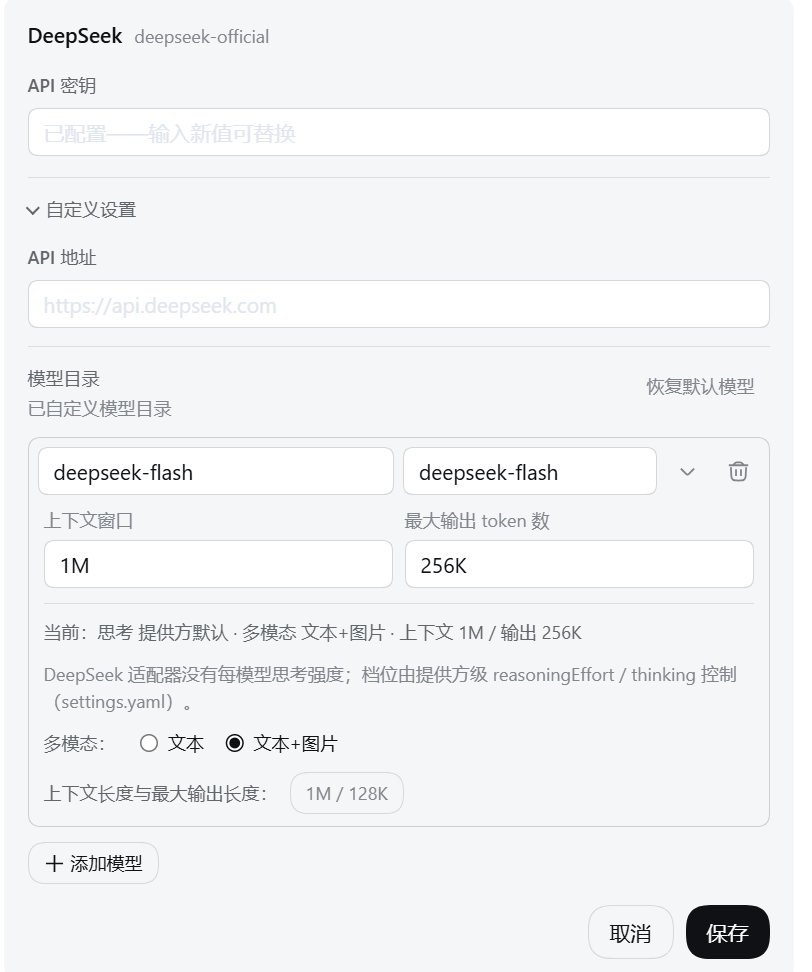
llm-deepseek 模型行展开:没有每模型思考强度,只提示档位由提供方级 reasoningEffort / thinking 控制;下面是「多模态:」与「上下文长度与最大输出长度:1M / 128K」

说明

  • 上下文窗口、最大输出仍然由官方输入框管,插件只是帮你少敲几个 0。
  • 「添加提供方」时的新卡片里不注入控件(还没保存过,这时写入会出问题);保存进编辑页之后就能配置了。
  • 预置只决定「有哪些档位可选」和「默认勾什么」,不改变协议本身:模型说 Responses 还是 Messages 由提供方的 compat 决定,插件不碰 compat。
  • 没配置过思考强度的模型,展开时会自动套用 OpenAI 预置并勾上 off / low / high / max,行内随即提示"已改,点官方『保存』后写入";不想写就把档位全部取消勾选。
  • 保存失败(比如设置冲突)会原样显示 DSH 报的错,改动会保留,可以再点一次「保存」重试。

安装

npx @deepseek-ai/dsh plugin --profile web add "D:\你的目录\dsh-tweaks\plugins\model-capabilities"

重启 DSH,并在浏览器中强制刷新(Ctrl + Shift + R)。

web 为 DSH 的 profile 名称,可在 C:\Users\你的用户名\.dsh\profiles\ 下确认。

开发者

本仓库的开发约定、DSH 契约与通用坑见 AGENTS.md。