
dsh-workspace-heal
v0.1.1
Published
Recreate deleted workspace folders that still own sessions, and import another session's context as a summary. Never rewrites session logs.

Maintainers
 nlflora
Readme
dsh-workspace-heal
DSH 插件:工作区目录自愈 + 旧会话上下文摘要导入。
A DSH plugin that recreates a deleted workspace folder still owning sessions, and turns a stranded session into a reusable summary. It never rewrites session logs.
解决什么问题
DSH 按「会话头里的 cwd」把会话归属到工作区。文件夹被改名、删除或移走后,路径对不上,会话就不再出现在任何工作区分组里——文件还在、日志还完整,但界面上找不到了。
本插件给两条出路:
| 情况 | 做法 |
| --- | --- |
| 文件夹被误删,你还想继续用这个工作区 | 自动重建空目录。会话头的 cwd 依旧匹配,会话立刻回到列表 |
| 文件夹搬到别处,你不想在旧路径留空壳 | 摘要导入。把旧会话折叠成一段摘要,粘进新会话当上下文 |
安装
从 npm 安装(推荐):
dsh plugin --profile <你的 profile> add dsh-workspace-heal改本地代码时,从目录安装(link: 方式,改动即时生效):
dsh plugin --profile <你的 profile> add /absolute/path/to/dsh-workspace-heal也可以在 DSH 的插件管理器里安装。装完无需重启即可激活(HMR)。
使用
插件的全部能力通过一个工具暴露:
workspace_heal
| action | 参数 | 作用 |
| --- | --- | --- |
| status | — | 工作区清单:路径、目录状态、绑定会话数;外加孤儿会话数量 |
| list | limit? | 列出失去归属的会话(sessionId / 原 cwd / 创建时间 / 事件数 / 大小) |
| preview | sessionId, maxChars? | 返回该会话的摘要,先给用户看 |
| import | sessionId, maxChars? | 返回带标记的摘要正文,贴进对话即成上下文 |
| heal | — | 立即执行一次检查与重建,不等定时器 |
典型流程:
你 → 帮我把旧会话的上下文迁到新工作区
模型 → workspace_heal({ action: 'list' })
模型 → workspace_heal({ action: 'preview', sessionId: 'session-…' })
你  → 就这个
模型 → workspace_heal({ action: 'import', sessionId: 'session-…' })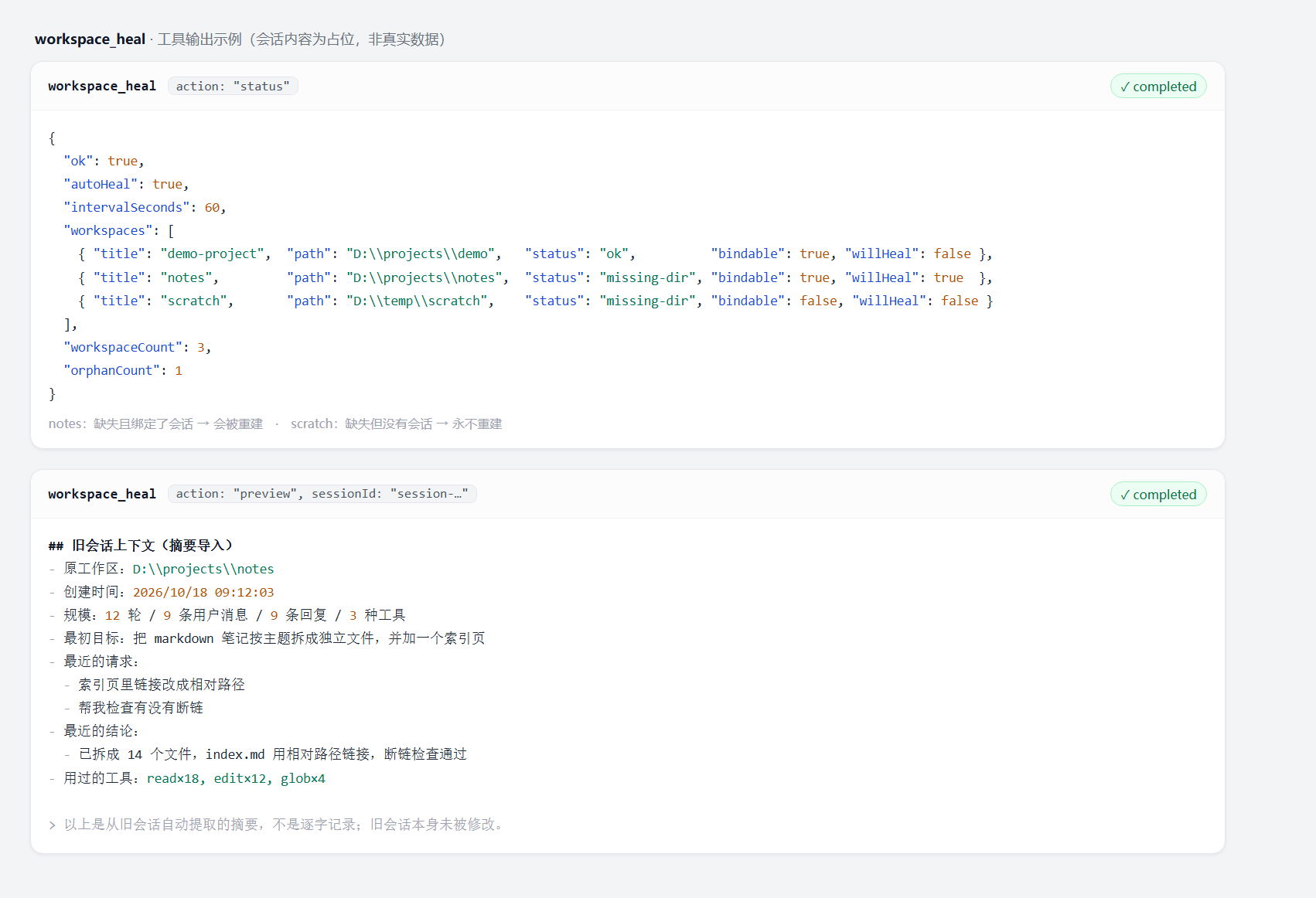
上图两段都是工具的原始返回:status 说明三个工作区的判定结果(notes 缺失且有会话 → 会重建;scratch 缺失但没有会话 → 永不重建),preview 就是交给用户确认的摘要正文。
配置
在 cordis.patch.yml 里按 id workspace-heal 覆盖:
- id: workspace-heal
  config:
    autoHeal: true          # 关掉就只保留工具(拿不准时先设 false)
    intervalSeconds: 60     # 检查间隔,最少 10 秒
    digestMaxChars: 1800    # 单个摘要的字符上限
⚠️
autoHeal默认是true:插件每 60 秒检查一次,命中条件时会真的往磁盘mkdir。三重条件很窄,但如果你希望"我没明确要求之前什么都别写",先把autoHeal设成false,需要时手动调workspace_heal({ action: 'heal' })。
判定规则(重要)
什么时候重建目录:三个条件同时成立才动手。
workspace.status() === 'missing-dir'- 该工作区
sessionIds.length > 0(仍绑定着会话) mkdir没抛错
→ 没有会话绑定的空文件夹被删掉,永远不重建。 你手动建的临时目录、清掉的空壳,插件不会复活它们。
什么算孤儿会话:header.cwd 有值,且不等于任何已注册工作区的规范化路径,且不是 origin: 'subagent' 的子代理会话。
注意:这跟界面上的「丢会话」不是一回事。界面丢会话多半是索引没收录,但
cwd仍然匹配现存工作区——那种走heal,不走迁移。
边界与保证
- 旧会话日志只读。 不做帧级改写、不搬迁会话目录、不碰
session.v4.jsonl.zstd。 - 唯一的写操作是
mkdir,且仅限上面那三个条件。 - 摘要是有损的:用于接着干活,不是逐字恢复。
- 摘要来自会话日志里的
user/message/assistant/message/tool/call;运行时注入块会被剔除(<system-reminder>、[MNEMON]快照、Current runtime context等),所以「最近的请求」里不会出现系统塞进去的上下文。 - 读会话走
sessionPersistence的只读句柄,取头尾各一段,不会把 13 MB 的日志整个读进内存。 - 卸载插件不会删掉它建出来的目录。 重建出来的目录属于你的文件系统,卸载后照旧存在;要清理请手动删。
测试
node --check index.js
node test.mjs
19 项断言,不需要 DSH 环境。其中「自动重建」一组用桩注册表 + 真实文件系统:会真的建目录、真的删掉,最后断言无残留。测试目录建在系统临时目录下,跨平台。
与已有插件的区别
同类项目(2026-10 起步,均 MIT):
dsh-plugin-workspace-archive:文件夹消失时归档会话,放回来时带回。它隐藏,本插件重建。dsh-session-mover:帧级改写 zstd 头,把会话真正搬到另一个工作区,逐字节校验 + 全目录备份。它无损,但要改日志。dsh-move-session/dsh-session-relocate/dsh-manage-sessions:移动或批量管理会话。
本插件的定位是不碰日志的那一侧:重建优先,迁移用摘要。两者互补——想要无损搬运请用 session-mover,想要零风险请用这个。
License
MIT