
dsintel
v0.3.0
Published
Design system token auditing tool

Maintainers
 guesshimself
Readme
dsintel
A CLI tool that audits design token files for quality and consistency issues. Supports the W3C Design Tokens Community Group (DTCG) format.
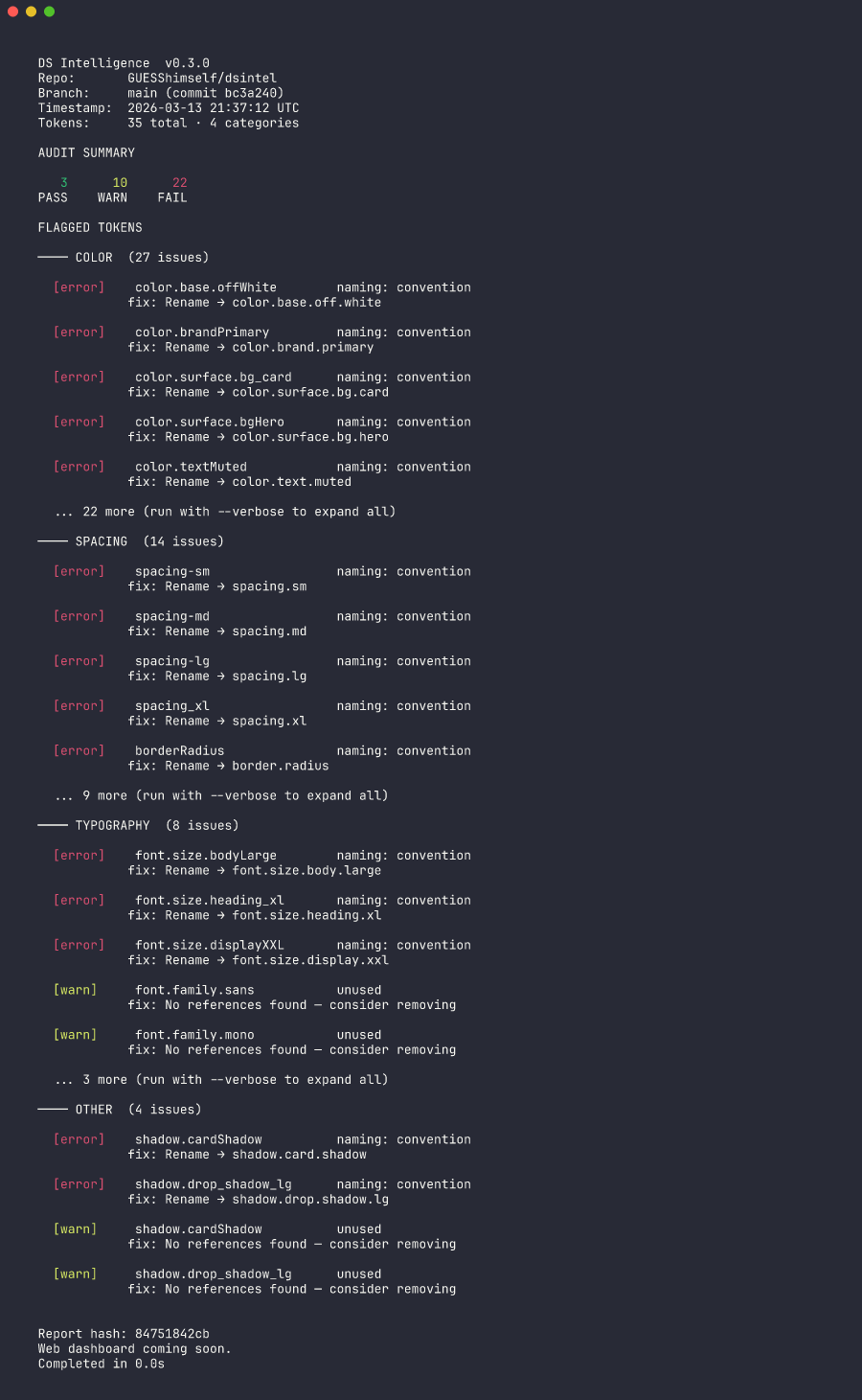
What it does
dsintel audit parses your token files and checks for:
- Naming violations — enforces DTCG dot-notation naming (catches camelCase, kebab-case, snake_case)
- Unused tokens — detects tokens that are never referenced as aliases
- Semantic drift — flags color tokens whose resolved values contradict their names (e.g. a "neutral" token with high saturation)
Each issue includes a severity level, category, and suggested fix.
Install
npm install
npm run build
Requires Node.js >= 20.
Usage
# Audit a token file
dsintel audit path/to/tokens.json

# Show all issues (default truncates to 5 per category)
dsintel audit path/to/tokens.json --verbose

# Machine-readable output
dsintel audit path/to/tokens.json --output json
Convert flat tokens to DTCG
If your tokens are in a flat key-value format (common when exporting from design tools), convert them to W3C DTCG first:
# Convert and write to a file
dsintel convert flat-tokens.json --out tokens-dtcg.json

# Convert and pipe to stdout
dsintel convert flat-tokens.json

# Override auto-detected prefix
dsintel convert flat-tokens.json --prefix "myapp-" --out tokens-dtcg.json
The converter auto-detects naming prefixes, infers $type from categories, and reassembles composite tokens (shadows, typography).
Try the examples
# Clean token file — passes audit
dsintel audit examples/healthy-tokens.json

# Token file with issues — naming violations, semantic drift, deprecated tokens
dsintel audit examples/messy-tokens.json
Example token file (W3C DTCG format)
{
  "color": {
    "$type": "color",
    "base": {
      "blue": { "$value": "#0066ff" }
    },
    "brand": {
      "primary": { "$value": "{color.base.blue}" }
    }
  },
  "spacing": {
    "$type": "dimension",
    "sm": { "$value": "8px" },
    "md": { "$value": "16px" }
  }
}
Configuration
Generate a config file to customize audit rules:
dsintel initThis creates a dsintel.config.json with all defaults:
{
  "rules": {
    "naming": {
      "enabled": true,
      "severity": "error",
      "convention": "lowercase"
    },
    "unused": {
      "enabled": true,
      "severity": "warn"
    },
    "semantic-drift": {
      "enabled": true,
      "severity": "error",
      "saturationThreshold": 20,
      "neutralKeywords": ["surface", "background", "bg", "neutral", "gray", "grey", "white", "black", "border", "outline", "shadow"],
      "brandKeywords": ["brand", "primary", "secondary", "accent", "interactive", "action", "link"]
    }
  },
  "reporter": {
    "maxIssuesPerCategory": 5
  }
}
All fields are optional — only include what you want to change. The config file is auto-discovered by walking up from the current directory.
Config options
| Option | Default | Description |
|--------|---------|-------------|
| rules.naming.enabled | true | Enable/disable naming rule |
| rules.naming.severity | "error" | "error" or "warn" |
| rules.naming.convention | "lowercase" | "lowercase", "kebab-case", or a custom regex |
| rules.unused.enabled | true | Enable/disable unused token detection |
| rules.unused.severity | "warn" | "error" or "warn" |
| rules.semantic-drift.enabled | true | Enable/disable semantic drift detection |
| rules.semantic-drift.severity | "error" | "error" or "warn" |
| rules.semantic-drift.saturationThreshold | 20 | HSL saturation % above which a "neutral" token is flagged |
| rules.semantic-drift.neutralKeywords | (see above) | Path segments that imply neutral colors |
| rules.semantic-drift.brandKeywords | (see above) | Path segments that imply brand colors |
| reporter.maxIssuesPerCategory | 5 | Max issues shown per category (use --verbose to override) |
CLI flags
# Use a specific config file
dsintel audit tokens.json --config path/to/config.json

# Ignore config files entirely
dsintel audit tokens.json --no-config
Development
npm run dev          # Watch mode (TypeScript)
npm test             # Run tests
npm run test:watch   # Watch mode (tests)
npm run lint         # Type-check without emitting
Project structure
src/
├── index.ts              # CLI entry point
├── config/               # Configuration loading and defaults
├── parser/               # Token file parsing (DTCG format)
├── rules/                # Audit rules (naming, unused, semantic-drift)
└── reporter/             # CLI report formatting
test/
├── parser.test.ts        # Parser tests
├── naming.test.ts        # Naming rule tests
├── config.test.ts        # Config loading and merging tests
└── fixtures/             # Sample token files
License
MIT