
dudoxx-ai
v1.3.2
Published
DUDOXX AI Provider for the AI SDK - Enterprise-grade LLM integration with reasoning capabilities

Maintainers
 optron
Readme
DUDOXX AI Provider



Enterprise-grade AI provider for the Vercel AI SDK with advanced reasoning capabilities, tool integration, and optimized performance for DUDOXX language models.
🚀 Overview
The DUDOXX AI Provider is a production-ready TypeScript package that seamlessly integrates DUDOXX's advanced language models with the Vercel AI SDK. Built for enterprise applications, it offers comprehensive support for text generation, streaming, embeddings, tool calling, and advanced reasoning capabilities.
✨ Key Features

- 🧠 Advanced Reasoning: Support for DUDOXX reasoning models with configurable effort levels
- ⚡ High Performance: Optimized for production workloads with streaming support
- 🔧 Tool Integration: Built-in support for function calling and tool execution
- 🤖 AI Agent Workflows: Multi-step reasoning with intelligent tool orchestration
- 🌊 Streaming Agents: Real-time tool execution with live streaming presentation
- 📊 Embeddings: Text embedding generation for semantic search and RAG applications
- 🎯 Type Safety: Full TypeScript support with comprehensive type definitions
- 🔄 Streaming: Real-time response streaming for interactive applications
- 🛡️ Enterprise Ready: Robust error handling and production-grade reliability
👨💻 Author
Walid Boudabbous
- 🏢 Acceleate.com - AI acceleration platform
- 🚀 DUDOXX.com - Enterprise AI solutions
- 💼 Enterprise AI consultant and solution architect
📦 Installation
npm install dudoxx-ai
# or
yarn add dudoxx-ai
# or
pnpm add dudoxx-ai
🏗️ Architecture
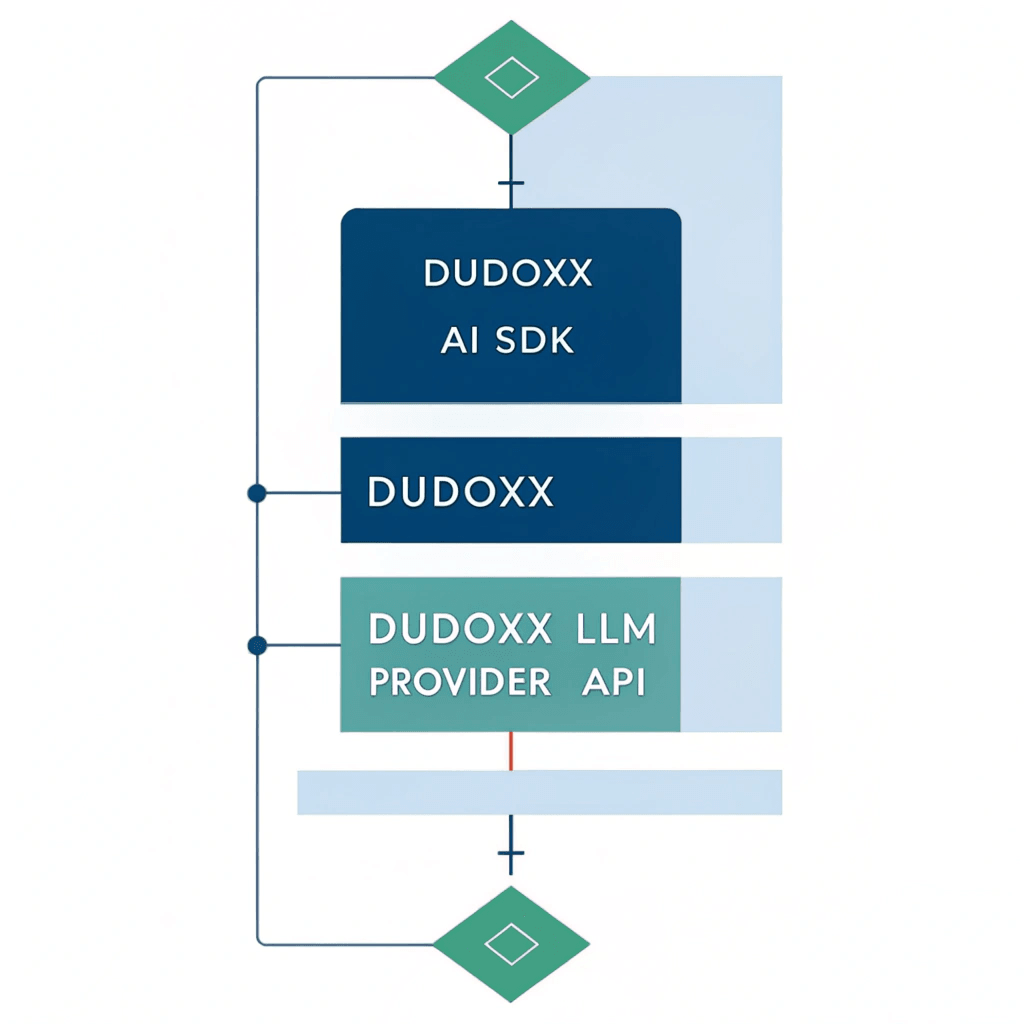
The DUDOXX AI Provider follows a clean architecture pattern:
- Application Layer: Your frontend/backend application
- AI SDK Layer: Vercel AI SDK for unified AI operations
- DUDOXX Provider: This package - handles DUDOXX-specific implementations
- DUDOXX API: The underlying DUDOXX language model endpoints
⚙️ Quick Start
Basic Setup
import { createDudoxx } from 'dudoxx-ai';
import { generateText } from 'ai';

// Initialize the provider
const dudoxx = createDudoxx({
  apiKey: process.env.DUDOXX_API_KEY,
  baseURL: 'https://llm-proxy.dudoxx.com/v1', // or your custom endpoint
});

// Use with AI SDK
const { text } = await generateText({
  model: dudoxx('dudoxx'),
  prompt: 'What is the future of AI?',
});

console.log(text);
Environment Configuration
Create a .env.local file in your project root:
# DUDOXX Configuration
DUDOXX_API_KEY=your_api_key_here
DUDOXX_BASE_URL=https://llm-proxy.dudoxx.com/v1
DUDOXX_MODEL_NAME=dudoxx

# For reasoning models
DUDOXX_REASONING_MODEL_NAME=dudoxx-reasoning
DUDOXX_REASONING_EFFORT=medium
🔧 vLLM Integration

The DUDOXX AI Provider is optimized for Mistral Small and Nemo LLM models served via vLLM. This setup provides enterprise-grade performance with advanced tool calling capabilities.
Recommended vLLM Command
nohup vllm serve mistralai/Mistral-Small-3.1-24B-Instruct-2503 \
  --tokenizer_mode mistral \
  --config_format mistral \
  --load_format mistral \
  --tool-call-parser mistral \
  --enable-auto-tool-choice \
  --limit_mm_per_prompt 'image=10' \
  --port 8000 \
  --served_model_name dudoxx \
  --host 0.0.0.0 \
  --gpu-memory-utilization 0.70 \
  --swap-space 16 \
  --disable-log-requests \
  --dtype auto \
  --max-num-seqs 32 \
  --block-size 32 \
  --max-model-len 32768 \
  --quantization fp8 &
vLLM Configuration Breakdown
| Parameter | Value | Purpose |
|-----------|--------|---------|
| --tool-call-parser mistral | Enable Mistral tool calling format |
| --enable-auto-tool-choice | Automatic tool selection |
| --gpu-memory-utilization 0.70 | Optimize GPU memory usage |
| --max-num-seqs 32 | Concurrent request handling |
| --quantization fp8 | Performance optimization |
| --served_model_name dudoxx | Model identifier for DUDOXX provider |
Then configure your provider to use the local vLLM endpoint:
const dudoxx = createDudoxx({
  apiKey: 'any-key', // vLLM doesn't require authentication
  baseURL: 'http://localhost:8000/v1', // Your vLLM endpoint
});
💡 Usage Examples
1. Text Generation
import { createDudoxx } from 'dudoxx-ai';
import { generateText } from 'ai';

const dudoxx = createDudoxx({
  apiKey: process.env.DUDOXX_API_KEY,
  baseURL: process.env.DUDOXX_BASE_URL,
});

const { text } = await generateText({
  model: dudoxx('dudoxx'),
  prompt: 'Explain quantum computing in simple terms',
  temperature: 0.7,
  maxTokens: 500,
});

console.log(text);
2. Streaming Responses
import { streamText } from 'ai';

const result = await streamText({
  model: dudoxx('dudoxx'),
  prompt: 'Write a story about AI',
});

for await (const delta of result.textStream) {
  process.stdout.write(delta);
}
3. Tool Calling
import { generateText, tool } from 'ai';
import { z } from 'zod';

const weatherTool = tool({
  description: 'Get weather information',
  parameters: z.object({
    city: z.string().describe('The city name'),
  }),
  execute: async ({ city }) => {
    // Your weather API logic here
    return `The weather in ${city} is sunny, 25°C`;
  },
});

const { text } = await generateText({
  model: dudoxx('dudoxx'),
  prompt: 'What\'s the weather like in Paris?',
  tools: { getWeather: weatherTool },
  maxSteps: 5, // Allow multiple tool calls
});

console.log(text);
4. Advanced Reasoning
const reasoningModel = dudoxx('dudoxx-reasoning', {
  reasoningEffort: 'high', // 'low', 'medium', 'high'
});

const { text } = await generateText({
  model: reasoningModel,
  prompt: 'Solve this complex math problem step by step: ...',
});
5. Embeddings
import { embed } from 'ai';

const embedding = dudoxx.textEmbeddingModel('embedder');

const { embedding: vector } = await embed({
  model: embedding,
  value: 'Text to embed for semantic search',
});

console.log(vector); // Float array representing the text
6. AI Agent Workflows
import { generateText, tool } from 'ai';
import { z } from 'zod';

// Define specialized tools
const researchTool = tool({
  description: 'Research information about a topic',
  parameters: z.object({
    topic: z.string(),
    focus: z.string().optional(),
  }),
  execute: async ({ topic, focus }) => {
    // Your research logic here
    return { findings: ['insight1', 'insight2'], confidence: 85 };
  },
});

const analysisTool = tool({
  description: 'Analyze data and provide insights',
  parameters: z.object({
    data: z.string(),
    analysisType: z.enum(['financial', 'market', 'technical']),
  }),
  execute: async ({ data, analysisType }) => {
    // Your analysis logic here
    return { insights: ['recommendation1', 'recommendation2'], score: 92 };
  },
});

// Execute agent workflow
const result = await generateText({
  model: dudoxx('dudoxx'),
  maxSteps: 8, // Allow multi-step reasoning
  tools: {
    research: researchTool,
    analyze: analysisTool,
  },
  messages: [
    {
      role: 'system',
      content: 'You are a business consultant. Use tools systematically to provide comprehensive analysis.',
    },
    {
      role: 'user',
      content: 'Evaluate the AI e-commerce market opportunity and provide strategic recommendations.',
    },
  ],
});

console.log(result.text);
7. Streaming Agent Workflow
import { generateText, streamText } from 'ai';

// Phase 1: Execute tools for comprehensive analysis
const toolResult = await generateText({
  model: dudoxx('dudoxx'),
  maxSteps: 6,
  tools: { research: researchTool, analyze: analysisTool },
  messages: [
    { role: 'system', content: 'Use tools to gather comprehensive data...' },
    { role: 'user', content: 'Analyze the healthcare AI market...' }
  ],
});

// Phase 2: Stream executive presentation
const streamResult = await streamText({
  model: dudoxx('dudoxx'),
  maxTokens: 1500,
  messages: [
    { role: 'system', content: 'Present results as executive briefing...' },
    { role: 'user', content: `Based on analysis: "${toolResult.text}"...` }
  ],
});

console.log('🎙️ Executive Briefing:');
for await (const delta of streamResult.textStream) {
  process.stdout.write(delta);
}
8. Batch Embeddings
import { embedMany } from 'ai';

const { embeddings } = await embedMany({
  model: dudoxx.textEmbeddingModel('embedder'),
  values: [
    'First document',
    'Second document',
    'Third document'
  ],
});

console.log(embeddings.length); // 3
🔧 Advanced Configuration
Provider Options
const dudoxx = createDudoxx({
  apiKey: 'your-api-key',
  baseURL: 'https://llm-proxy.dudoxx.com/v1',

  // Optional: Custom headers
  headers: {
    'Custom-Header': 'value',
  },

  // Optional: Request timeout (default: 60000ms)
  timeout: 30000,
});
Model Configuration
// Chat model with custom settings
const chatModel = dudoxx('dudoxx', {
  temperature: 0.8,
  maxTokens: 1000,
  topP: 0.9,
  frequencyPenalty: 0.1,
  presencePenalty: 0.1,
});

// Reasoning model
const reasoningModel = dudoxx('dudoxx-reasoning', {
  reasoningEffort: 'medium',
  temperature: 0.3,
});

// Embedding model
const embeddingModel = dudoxx.textEmbeddingModel('embedder', {
  dimensions: 1024,
  encodingFormat: 'float',
});
DUDOXX-Specific Parameters
const model = dudoxx('dudoxx', {
  // Standard parameters
  temperature: 0.7,
  maxTokens: 500,

  // DUDOXX-specific features
  dudoxxParams: {
    reasoning_effort: 'high',
    custom_instructions: 'Be creative and detailed',
    output_format: 'structured',
  },
});
🛠️ Framework Integration
Next.js App Router
// app/api/chat/route.ts
import { createDudoxx } from 'dudoxx-ai';
import { streamText } from 'ai';

const dudoxx = createDudoxx({
  apiKey: process.env.DUDOXX_API_KEY,
  baseURL: process.env.DUDOXX_BASE_URL,
});

export async function POST(req: Request) {
  const { messages } = await req.json();

  const result = await streamText({
    model: dudoxx('dudoxx'),
    messages,
  });

  return result.toDataStreamResponse();
}
React Hook Integration
// components/ChatComponent.tsx
import { useChat } from 'ai/react';

export default function ChatComponent() {
  const { messages, input, handleInputChange, handleSubmit } = useChat({
    api: '/api/chat',
  });

  return (
    <div>
      {messages.map(message => (
        <div key={message.id}>
          <strong>{message.role}:</strong> {message.content}
        </div>
      ))}

      <form onSubmit={handleSubmit}>
        <input
          value={input}
          onChange={handleInputChange}
          placeholder="Type your message..."
        />
        <button type="submit">Send</button>
      </form>
    </div>
  );
}
Express.js Integration
import express from 'express';
import { createDudoxx } from 'dudoxx-ai';
import { streamText } from 'ai';

const app = express();
const dudoxx = createDudoxx({
  apiKey: process.env.DUDOXX_API_KEY,
  baseURL: process.env.DUDOXX_BASE_URL,
});

app.post('/api/generate', async (req, res) => {
  const { prompt } = req.body;

  const result = await streamText({
    model: dudoxx('dudoxx'),
    prompt,
  });

  // Stream response
  for await (const delta of result.textStream) {
    res.write(delta);
  }
  res.end();
});
🎯 Use Cases
1. Conversational AI
Build intelligent chatbots and virtual assistants with advanced reasoning capabilities.
2. Content Generation
Create high-quality articles, documentation, and creative content.
3. Code Assistance
Develop AI-powered code completion and programming assistance tools.
4. Semantic Search
Implement vector search and recommendation systems using embeddings.
5. AI Agent Workflows
Build intelligent multi-step reasoning systems with tool orchestration.
6. Tool Integration
Build AI agents that can interact with external APIs and services.
7. Data Analysis
Perform complex data analysis and insights generation.
🔍 API Reference
Core Functions
createDudoxx(options)
Creates a DUDOXX provider instance.
interface DudoxxProviderOptions {
  apiKey: string;
  baseURL?: string;
  headers?: Record<string, string>;
  timeout?: number;
}
dudoxx(modelId, settings?)
Creates a chat language model.
interface DudoxxChatSettings {
  temperature?: number;
  maxTokens?: number;
  topP?: number;
  frequencyPenalty?: number;
  presencePenalty?: number;
  reasoningEffort?: 'low' | 'medium' | 'high';
  dudoxxParams?: Record<string, any>;
}
dudoxx.textEmbeddingModel(modelId, settings?)
Creates a text embedding model.
interface DudoxxEmbeddingSettings {
  dimensions?: number;
  encodingFormat?: 'float' | 'base64';
  maxEmbeddingsPerCall?: number;
  dudoxxParams?: Record<string, any>;
}
Model IDs
| Model ID | Type | Description |
|----------|------|-------------|
| dudoxx | Chat | General-purpose language model |
| dudoxx-reasoning | Chat | Advanced reasoning capabilities |
| embedder | Embedding | Text embedding generation |
⚡ Performance Optimization
Streaming Best Practices
// Efficient streaming with proper cleanup
const result = await streamText({
  model: dudoxx('dudoxx'),
  prompt: 'Long content generation...',
});

try {
  for await (const delta of result.textStream) {
    // Process delta incrementally
    await processChunk(delta);
  }
} catch (error) {
  console.error('Streaming error:', error);
} finally {
  // Cleanup resources
  await cleanup();
}
Batch Processing
// Efficient batch embedding generation
const texts = ['text1', 'text2', 'text3'];
const batchSize = 10;

for (let i = 0; i < texts.length; i += batchSize) {
  const batch = texts.slice(i, i + batchSize);
  const { embeddings } = await embedMany({
    model: dudoxx.textEmbeddingModel('embedder'),
    values: batch,
  });

  // Process batch results
  await processBatch(embeddings);
}
🚨 Error Handling
Comprehensive Error Management
import {
  DudoxxAPIError,
  DudoxxRateLimitError,
  DudoxxTimeoutError
} from 'dudoxx-ai';

try {
  const { text } = await generateText({
    model: dudoxx('dudoxx'),
    prompt: 'Your prompt here',
  });
} catch (error) {
  if (error instanceof DudoxxAPIError) {
    console.error('API Error:', error.message);
    console.error('Status:', error.status);
  } else if (error instanceof DudoxxRateLimitError) {
    console.error('Rate limit exceeded:', error.message);
    // Implement backoff strategy
  } else if (error instanceof DudoxxTimeoutError) {
    console.error('Request timeout:', error.message);
    // Retry logic
  } else {
    console.error('Unexpected error:', error);
  }
}
Retry Logic
async function generateWithRetry(prompt: string, maxRetries = 3) {
  for (let i = 0; i < maxRetries; i++) {
    try {
      return await generateText({
        model: dudoxx('dudoxx'),
        prompt,
      });
    } catch (error) {
      if (i === maxRetries - 1) throw error;

      // Exponential backoff
      await new Promise(resolve =>
        setTimeout(resolve, Math.pow(2, i) * 1000)
      );
    }
  }
}
🔒 Security Best Practices
API Key Management
// ✅ Good: Environment variables
const dudoxx = createDudoxx({
  apiKey: process.env.DUDOXX_API_KEY,
});

// ❌ Bad: Hardcoded keys
const dudoxx = createDudoxx({
  apiKey: 'dudoxx-123456789', // Never do this!
});
Input Validation
import { z } from 'zod';

const promptSchema = z.string().min(1).max(10000);

async function safeGenerate(userInput: string) {
  const validatedPrompt = promptSchema.parse(userInput);

  return await generateText({
    model: dudoxx('dudoxx'),
    prompt: validatedPrompt,
  });
}
📊 Monitoring and Analytics
Usage Tracking
async function generateWithTracking(prompt: string) {
  const startTime = Date.now();

  try {
    const result = await generateText({
      model: dudoxx('dudoxx'),
      prompt,
    });

    // Track successful completion
    analytics.track('generation_success', {
      duration: Date.now() - startTime,
      tokens: result.usage?.totalTokens,
      model: 'dudoxx',
    });

    return result;
  } catch (error) {
    // Track errors
    analytics.track('generation_error', {
      duration: Date.now() - startTime,
      error: error.message,
      model: 'dudoxx',
    });
    throw error;
  }
}
🧪 Testing
Unit Tests
import { createDudoxx } from 'dudoxx-ai';
import { generateText } from 'ai';

describe('DUDOXX Provider', () => {
  it('should generate text successfully', async () => {
    const dudoxx = createDudoxx({
      apiKey: 'test-key',
      baseURL: 'http://localhost:8000/v1',
    });

    const { text } = await generateText({
      model: dudoxx('dudoxx'),
      prompt: 'Test prompt',
    });

    expect(text).toBeDefined();
    expect(typeof text).toBe('string');
  });
});
Integration Tests
describe('DUDOXX Integration', () => {
  it('should work with real API', async () => {
    if (!process.env.DUDOXX_API_KEY) {
      return; // Skip if no API key
    }

    const dudoxx = createDudoxx({
      apiKey: process.env.DUDOXX_API_KEY,
      baseURL: process.env.DUDOXX_BASE_URL,
    });

    const { text } = await generateText({
      model: dudoxx('dudoxx'),
      prompt: 'Hello, world!',
    });

    expect(text).toContain('hello');
  });
});
🤝 Contributing
We welcome contributions! Please see our Contributing Guide for details.
Development Setup
# Clone the repository
git clone https://github.com/Dudoxx/dudoxx-ai.git

# Install dependencies
npm install

# Run tests
npm test

# Build the package
npm run build

# Lint code
npm run lint

# Run examples
npm run example:agent-workflow        # Basic agent with tools
npm run example:agent-streaming       # Streaming agent workflow
npm run example:streaming-tools       # Streaming with parallel tools
📝 Changelog
See CHANGELOG.md for a detailed history of changes.
🆘 Support
- 📚 Documentation: Full API Documentation
- 💬 Community: Discord Community
- 🐛 Issues: GitHub Issues
- 📧 Enterprise Support: [email protected]
📄 License
This project is licensed under the MIT License - see the LICENSE file for details.
🙏 Acknowledgments
- Vercel AI SDK Team for the excellent AI SDK framework
- DUDOXX Team for the powerful language models
- Open Source Community for continuous feedback and contributions
Built with ❤️ by Walid Boudabbous
⭐ Star this repo if it helps you build amazing AI applications!