
duitku-ts
v1.0.0
Published
Duitku TypeScript SDK for Node.js and Bun - Payment Gateway Integration

Maintainers
 bettadevindonesia
Readme
Duitku TypeScript SDK
Welcome to the Duitku TypeScript SDK — the Community TypeScript library for integrating Duitku payment gateway into your Node.js or Bun applications.
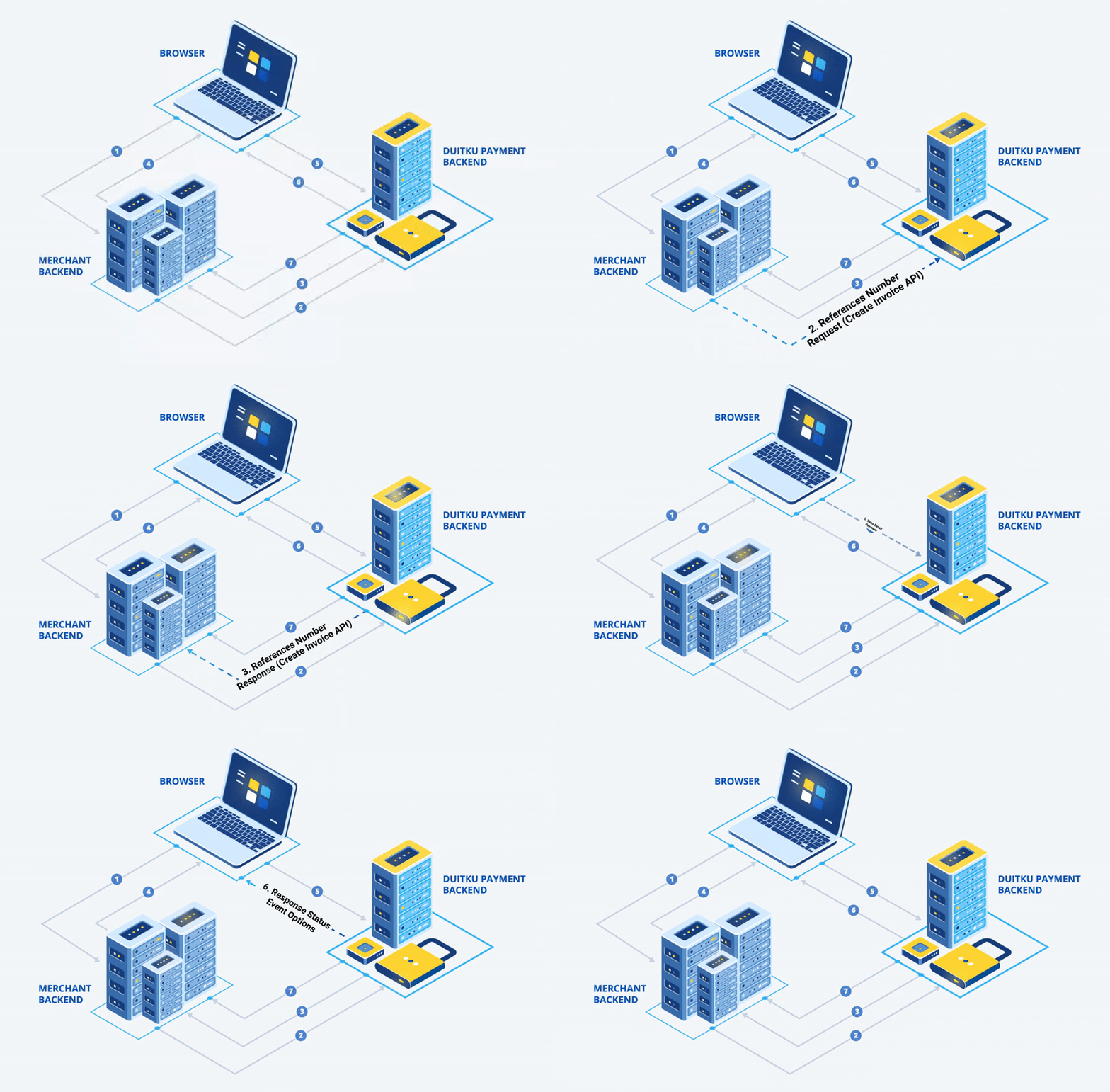
Features
- ✅ Full compatibility with Node.js >= 18 and Bun
- ✅ Zero runtime dependencies — uses only built-in APIs (
fetch,node:crypto,node:fs) - ✅ Dual package output — CommonJS and ESM
- ✅ Full TypeScript support with type definitions
- ✅ Support for both Duitku-Pop and Duitku-API
- ✅ Request parameter sanitization (optional)
- ✅ Logging to file (optional)
- ✅ Comprehensive test suite
Links
Requirements
- Node.js >= 18.0.0
- Bun >= 1.0.0 (optional)
Installation
Using npm
npm install duitku-tsUsing Bun
bun add duitku-tsUsing yarn
yarn add duitku-tsConfiguration Settings
import { Config } from 'duitku-ts';

const config = new Config('YOUR_MERCHANT_KEY', 'YOUR_MERCHANT_CODE');

// false for production mode (default: true = sandbox)
config.setSandboxMode(false);

// Enable/disable request parameter sanitization (default: true)
config.setSanitizedMode(false);

// Enable/disable logging to file (default: true)
config.setDuitkuLogs(false);
Config Constructor
| Parameter | Type | Default | Description |
| ----------------- | --------- | ------- | ------------------------------------------ |
| apiKey | string | — | Your merchant's API key |
| merchantCode | string | — | Your merchant's merchant code |
| isSandboxMode | boolean | true | true for sandbox, false for production |
| isSanitizedMode | boolean | true | Enable request parameter sanitization |
| duitkuLogs | boolean | true | Enable logging to file |
Duitku POP
Create Invoice (Duitku-Pop)
Parameter paymentMethod is optional. You can set it to direct customers to a specific payment method.
import { Config, Pop } from 'duitku-ts';

const config = new Config('YOUR_MERCHANT_KEY', 'YOUR_MERCHANT_CODE');
config.setSandboxMode(true);

const params = {
  paymentAmount: 10000,
  merchantOrderId: `order-${Date.now()}`, // unique
  productDetails: 'Test Payment',
  additionalParam: '', // optional
  merchantUserInfo: '', // optional
  customerVaName: 'John Doe',
  email: '[email protected]',
  phoneNumber: '081234567890',
  callbackUrl: 'http://YOUR_SERVER/callback',
  returnUrl: 'http://YOUR_SERVER/return',
  expiryPeriod: 60, // expired in minutes
  itemDetails: [
    {
      name: 'Test Payment',
      price: 10000,
      quantity: 1,
    },
  ],
  customerDetail: {
    firstName: 'John',
    lastName: 'Doe',
    email: '[email protected]',
    phoneNumber: '081234567890',
    billingAddress: {
      firstName: 'John',
      lastName: 'Doe',
      address: 'Jl. Kembangan Raya',
      city: 'Jakarta',
      postalCode: '11530',
      phone: '081234567890',
      countryCode: 'ID',
    },
    shippingAddress: {
      firstName: 'John',
      lastName: 'Doe',
      address: 'Jl. Kembangan Raya',
      city: 'Jakarta',
      postalCode: '11530',
      phone: '081234567890',
      countryCode: 'ID',
    },
  },
};

try {
  const response = await Pop.createInvoice(params, config);
  console.log(response.statusCode); // '00' = success
  console.log(response.paymentUrl); // payment URL
  console.log(response.reference); // reference for checkout.process()
} catch (error) {
  console.error(error.message);
}
Check Transaction Status (Duitku-Pop)
import { Config, Pop } from 'duitku-ts';

const config = new Config('YOUR_MERCHANT_KEY', 'YOUR_MERCHANT_CODE');

try {
  const merchantOrderId = 'YOUR_MERCHANT_ORDER_ID';
  const status = await Pop.transactionStatus(merchantOrderId, config);

  if (status.statusCode === '00') {
    // Action Success
  } else if (status.statusCode === '01') {
    // Action Pending
  } else {
    // Action Failed Or Expired
  }
} catch (error) {
  console.error(error.message);
}
Callback (Duitku-Pop)
Duitku sends callbacks via HTTP POST with application/x-www-form-urlencoded content type.
Note: Unlike the PHP SDK which reads
$_POST, the TypeScript SDK requires you to pass the request body as a parameter.
import { Config, Pop } from 'duitku-ts';

const config = new Config('YOUR_MERCHANT_KEY', 'YOUR_MERCHANT_CODE');

// Express.js example
app.post('/callback', express.urlencoded({ extended: true }), (req, res) => {
  try {
    const notification = Pop.callback(req.body, config);

    if (notification.resultCode === '00') {
      // Action Success
    } else if (notification.resultCode === '01') {
      // Action Failed
    }

    res.json(notification);
  } catch (error) {
    res.status(400).json({ error: error.message });
  }
});
Get Payment Method (Duitku-Pop)
import { Config, Pop } from 'duitku-ts';

const config = new Config('YOUR_MERCHANT_KEY', 'YOUR_MERCHANT_CODE');

try {
  const methods = await Pop.getPaymentMethod('10000', config);
  console.log(methods.paymentFee);
  // [{ name: 'Permata Bank Virtual Account', code: 'BT', fee: 4000 }, ...]
} catch (error) {
  console.error(error.message);
}
Frontend Integration (Duitku-Pop)
<!-- Add Duitku JS Bundle -->
<script src="https://app-sandbox.duitku.com/lib/js/duitku.js"></script>
<!-- For production: https://app-prod.duitku.com/lib/js/duitku.js -->

<script>
  $.ajax({
    type: 'POST',
    data: {
      paymentAmount: amount,
      productDetail: productDetail,
      email: email,
      phoneNumber: phoneNumber,
    },
    url: 'http://YOUR_SERVER/create-invoice',
    dataType: 'json',
    success: function (result) {
      checkout.process(result.reference, {
        successEvent: function (result) {
          console.log('Payment Success', result);
        },
        pendingEvent: function (result) {
          console.log('Payment Pending', result);
        },
        errorEvent: function (result) {
          console.log('Payment Error', result);
        },
        closeEvent: function (result) {
          console.log('Customer closed popup without finishing payment', result);
        },
      });
    },
  });
</script>
Duitku API
Create Invoice (Duitku-API)
Important:
paymentMethodis required for Duitku-API.
import { Config, Api } from 'duitku-ts';

const config = new Config('YOUR_MERCHANT_KEY', 'YOUR_MERCHANT_CODE');

const params = {
  paymentAmount: 10000,
  paymentMethod: 'BT', // REQUIRED - Permata Bank Virtual Account
  merchantOrderId: `order-${Date.now()}`,
  productDetails: 'Test Payment',
  email: '[email protected]',
  phoneNumber: '081234567890',
  customerVaName: 'John Doe',
  callbackUrl: 'http://YOUR_SERVER/callback',
  returnUrl: 'http://YOUR_SERVER/return',
  expiryPeriod: 60,
};

try {
  const response = await Api.createInvoice(params, config);
  console.log(response.paymentUrl);
} catch (error) {
  console.error(error.message);
}
Check Transaction Status (Duitku-API)
import { Config, Api } from 'duitku-ts';

try {
  const status = await Api.transactionStatus('YOUR_MERCHANT_ORDER_ID', config);

  if (status.statusCode === '00') {
    // Action Success
  } else if (status.statusCode === '01') {
    // Action Pending
  } else {
    // Action Failed Or Expired
  }
} catch (error) {
  console.error(error.message);
}
Callback (Duitku-API)
import { Config, Api } from 'duitku-ts';

// Express.js example
app.post('/callback/api', express.urlencoded({ extended: true }), (req, res) => {
  try {
    const notification = Api.callback(req.body, config);

    if (notification.resultCode === '00') {
      // Action Success
    } else if (notification.resultCode === '01') {
      // Action Failed
    }

    res.json(notification);
  } catch (error) {
    res.status(400).json({ error: error.message });
  }
});
Get Payment Method (Duitku-API)
import { Config, Api } from 'duitku-ts';

try {
  const methods = await Api.getPaymentMethod('10000', config);
  console.log(methods.paymentFee);
} catch (error) {
  console.error(error.message);
}
Error Handling
All SDK errors are wrapped in DuitkuError:
import { DuitkuError } from 'duitku-ts';

try {
  await Pop.createInvoice(params, config);
} catch (error) {
  if (error instanceof DuitkuError) {
    console.error('Message:', error.message);
    console.error('HTTP Status:', error.statusCode);
    console.error('Response:', error.responseBody);
  }
}
Migration from PHP SDK
If you're migrating from the PHP SDK (duitkupg/duitku-php), here are the key differences:
| PHP SDK | TypeScript SDK |
| ---------------------------------- | ----------------------------------------------- |
| Synchronous calls | All HTTP methods are async (use await) |
| Returns JSON string | Returns typed objects |
| callback($config) reads $_POST | callback(body, config) — pass body explicitly |
| \Duitku\Pop::createInvoice(...) | Pop.createInvoice(...) |
| \Duitku\Api::callback(...) | Api.callback(body, ...) |
| json_decode($response) | Not needed — already parsed |
Running Tests
# Unit tests
npm test

# Unit tests with Bun
npm run test:bun

# With coverage
npm run test:coverage
License
MIT — see LICENSE for details.
Support
For issues, questions, or feature requests, please visit: