
dyscalculia-embed
v0.1.0
Published
Free number practice games for any website: a <dyscalculia-game> web component and a React wrapper. Count the dots, which is bigger, which group has more, place the number and remember the digits, in English, German, Spanish, French, Dutch and Brazilian P

Maintainers
 fashiolabs
Readme
dyscalculia-embed
Free number practice games for your own website. Add a dot-counting, number-comparison, number-line or digit-memory game to a school, tutoring or parenting site in a few lines, in English, German, Spanish, French, Dutch or Brazilian Portuguese. The games need no sign-up, and the embedded game loads no analytics and sets no cookies.
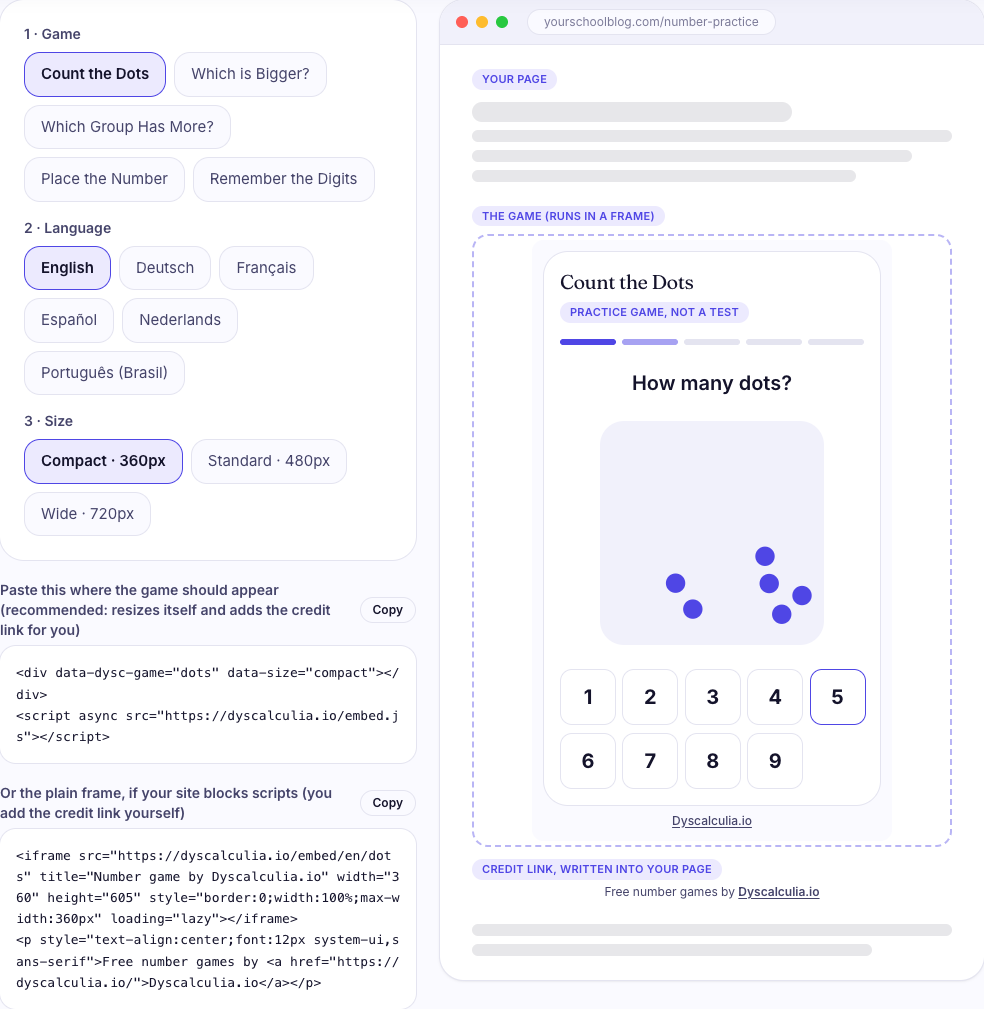
The grey bars are your own page. The dashed box is the real game. The line under it is the credit link, written into your page.
Pick a game and copy the code on the code builder: you see the result on a sample page before you paste anything.
These are practice games, not a test. They show no score, no result and no interpretation, and they do not assess anyone. They are separate from the Dyscalculia.io screening test, which you cannot embed.
Install
1. A script tag (no build step, works in any HTML page):
<div data-dysc-game="dots"></div>
<script async src="https://dyscalculia.io/embed.js"></script>
2. A web component (npm, any framework):
npm install dyscalculia-embed<script type="module">import "dyscalculia-embed";</script>
<dyscalculia-game game="dots" lang="en" size="standard"></dyscalculia-game>3. React (Next.js, Vite, ...; registers the component on the client only):
import { Game } from "dyscalculia-embed/react";

<Game game="numberline" size="wide" />
<Game game="compare" lang="de" />
Using Vue, Svelte or Angular? Import the package once on the client and use <dyscalculia-game> as a normal custom element.
Options
| Option (script / component) | Values | Default |
|---|---|---|
| data-dysc-game / game | dots, symbolic, compare, numberline, digitspan | required |
| data-lang / lang | en, de, es, fr, nl, pt-br | en |
| data-size / size | compact (360 px wide), standard (480 px), wide (720 px); the starting height is the tallest measured state (605, 578 or 538 px) and follows the game | standard |
Which game do I use?
| game | Name | What the player does |
|---|---|---|
| dots | Count the Dots | Dot patterns flash and the player taps how many there are, from 1 to 9. Five short rounds |
| symbolic | Which is Bigger? | Two numbers side by side; tap the bigger one. Five short rounds, single digits up to two-digit numbers |
| compare | Which Group Has More? | Two groups of dots; tap the side with more, without counting |
| numberline | Place the Number | A number appears; slide a marker to where it belongs on a line from 0 to 100. Three rounds |
| digitspan | Remember the Digits | A few digits appear one at a time, then disappear; type them back in order. Three rounds that get longer |
All five games exist in all six languages: 30 combinations. CATALOG.md lists every one with its example code and
frame address, and catalog.json (also at https://docs.dyscalculia.io/embed-catalog.json) has the same as data:
items → { game, lang, name, url, script, component, react, iframe }.
Examples that exist today:
| What you want | Code |
|---|---|
| Dot counting, English | data-dysc-game="dots" |
| Number comparison in German | data-dysc-game="symbolic" data-lang="de" |
| Number line in Brazilian Portuguese, wide | data-dysc-game="numberline" data-lang="pt-br" data-size="wide" |
| Digit memory in Dutch | data-dysc-game="digitspan" data-lang="nl" |
The credit link
The script and the web component write one small line under the game into your page, in the game's language: for example "Free
number games by Dyscalculia.io" (English), "Kostenlose Zahlenspiele von Dyscalculia.io" (German). The name links to the
Dyscalculia.io home page in that language. We ask that it stays visible; that is the whole price. A link inside the game's frame
belongs to the game's own document, not to your page, which is why the line is written into yours. With the plain <iframe> version
you add it yourself (the code builder shows both, and every entry of catalog.json has the iframe and credit lines).
Height
The game tells the page how tall it is and the iframe follows. If you use a plain iframe and want the same:
window.addEventListener("message", (e) => {
  if (e.origin !== "https://dyscalculia.io") return;
  const m = e.data;
  if (m && m.source === "dysc-embed" && m.type === "resize") iframe.style.height = Math.ceil(m.height) + "px";
});
Privacy
The embedded game page loads no analytics and sets no cookies, and has no sign-up or account. Nothing the player does is sent anywhere: there is no score to send. The page and its fonts load from dyscalculia.io like any embedded file, so ordinary server request logs exist. The credit link on your page is only a link.
Chart embeds
The statistics page gives copy-ready embed code under each of its 4 charts: a
standalone SVG (CC BY 4.0) with a caption that links back to the page. The same four snippets, with the image addresses, are at
the end of CATALOG.md. The data behind them is on npm as dyscalculia-data.
If something does not work
- The game does not show. Some platforms remove
<script>tags (for example free plans of some site builders). Use the plain<iframe>code from the code builder and add the credit line yourself. - Notion. Notion takes an address only: paste the game URL, such as
https://dyscalculia.io/embed/en/dots, after/embed. - Step-by-step for WordPress, Wix, Squarespace, Google Sites, Carrd and more (taken from each platform's own help pages): https://dyscalculia.io/embed#platforms.
- Still stuck? Open an issue on GitHub.
Links
Code builder · Docs · Developer tools · Statistics · GitHub
Code MIT. The statistics compilation is CC BY 4.0.