
eagent
v0.1.0
Published
Easy Agent — a terminal-native agentic coding CLI, rebuilt from scratch in TypeScript

Maintainers
 conardli
Readme
Easy Agent
一个使用 TypeScript 和 Node.js 构建的开源终端 Coding Agent。
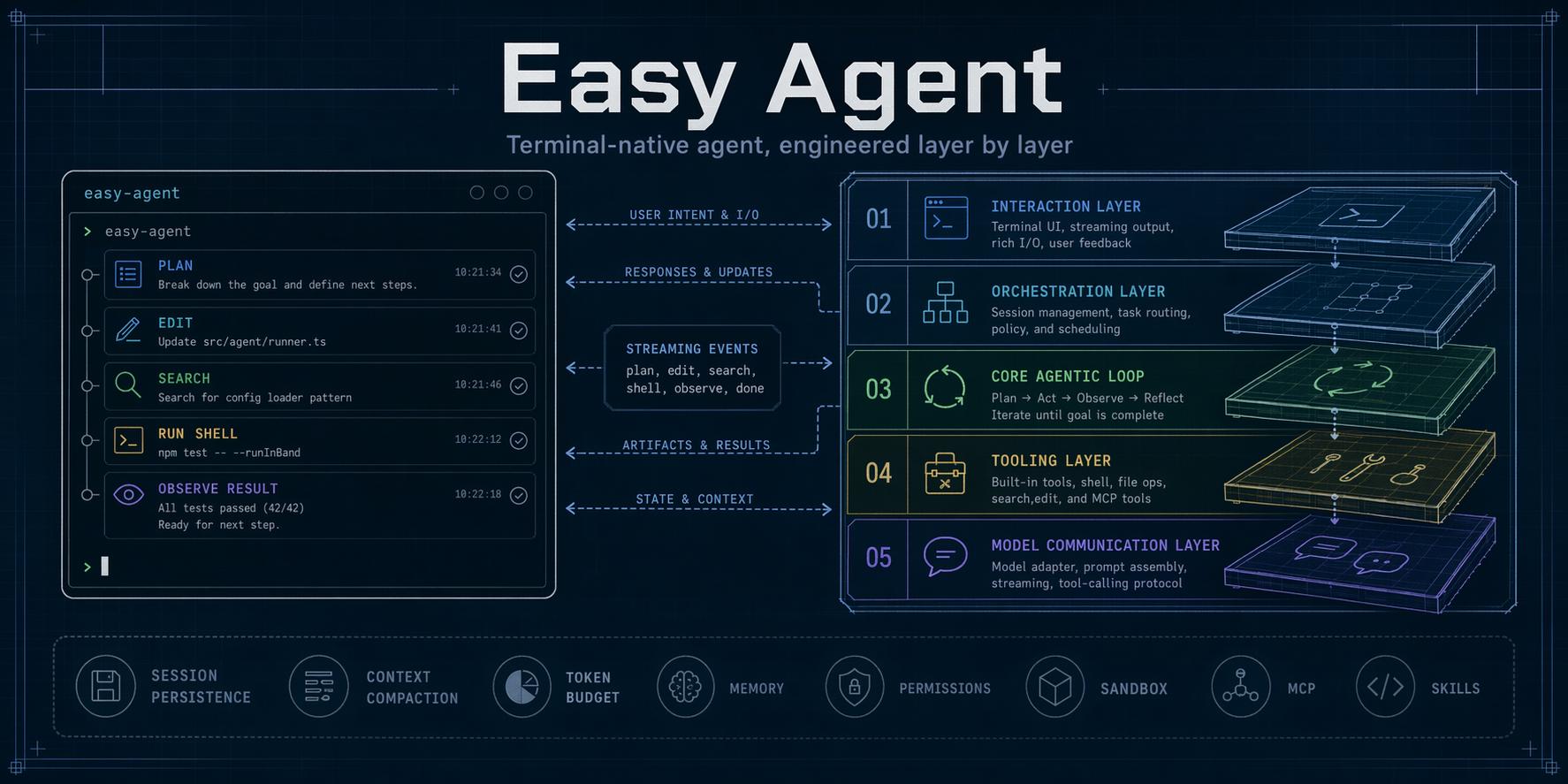
Easy Agent 在一套可阅读、可扩展的代码中提供类 Claude Code 工作流:流式模型对话、本地文件与 Shell 工具、权限模式、会话、MCP、Skills、Sub-Agent、Agent Teams、多模态输入和插件系统。
English documentation: README.md
当前进度
当前阶段: 阶段 36 发布候选已完成,等待首次 npm 发布。
实现主线、教程文章和 step/ 快照已经推进到阶段 36。单文件发布包、发布门禁、安装器、用户文档和 tag 发布工作流均已就绪;剩余动作是把 eagent 首次发布到 npm,并完成发布后的 registry 冷验证。
路线图与当前进度
Easy Agent 采用 37 阶段路线图,从模型通信开始,逐步构建到最终分发。
| 阶段 | 模块 | 核心快照 | 状态 |
|---|---|---|---:|
| 0 | 项目脚手架 | 项目基础 | ✅ 已完成 |
| 1 | LLM 通信层 | step/step1.js | ✅ 已完成 |
| 2 | React/Ink 终端 UI | step/step2.js | ✅ 已完成 |
| 3 | Tool 接口与第一个工具 | step/step3.js | ✅ 已完成 |
| 4 | 核心 Agentic Loop | step/step4.js | ✅ 已完成 |
| 5 | 完整核心工具集 | step/step5.js | ✅ 已完成 |
| 6 | System Prompt 与上下文工程 | step/step6.js | ✅ 已完成 |
| 7 | 权限控制系统 | step/step7.js | ✅ 已完成 |
| 8 | QueryEngine 多轮编排 | step/step8.js | ✅ 已完成 |
| 9 | 会话持久化与恢复 | step/step9.js | ✅ 已完成 |
| 10 | 项目记忆系统 | step/step10.js | ✅ 已完成 |
| 11 | 上下文压缩 | step/step11.js | ✅ 已完成 |
| 12 | Token 预算精细管理 | step/step12.js | ✅ 已完成 |
| 13 | Plan Mode | step/step13.js | ✅ 已完成 |
| 14 | TodoWrite 会话任务跟踪 | step/step14.js | ✅ 已完成 |
| 15 | 持久化任务图(V2) | step/step15.js | ✅ 已完成 |
| 16 | MCP 协议支持 | step/step16.js | ✅ 已完成 |
| 17 | Skills 系统 | step/step17.js | ✅ 已完成 |
| 18 | Sandbox | step/step18.js | ✅ 已完成 |
| 19 | Sub-Agent 与 Agent 定义系统 | step/step19.js | ✅ 已完成 |
| 20 | 后台执行与 Worktree 隔离 | step/step20.js | ✅ 已完成 |
| 21 | Agent Teams 与多 Agent 协作 | step/step21.js | ✅ 已完成 |
| 22 | Hooks 生命周期系统 | step/step22.js | ✅ 已完成 |
| 23 | Output Styles 与用户命令 | step/step23.js | ✅ 已完成 |
| 24 | 渲染体验升级 | step/step24.js | ✅ 已完成 |
| 25 | 配置系统完善 | step/step25.js | ✅ 已完成 |
| 26 | 文件历史与回滚 | step/step26.js | ✅ 已完成 |
| 27 | 错误处理与韧性 | step/step27.js | ✅ 已完成 |
| 28 | Headless 与管道模式 | step/step28.js | ✅ 已完成 |
| 29 | Auto Mode 分类器 | step/step29.js | ✅ 已完成 |
| 30 | 多 Provider 支持 | step/step30.js | ✅ 已完成 |
| 31 | Web、MultiEdit、MCP Resources 与 PowerShell | step/step31.js | ✅ 已完成 |
| 32 | 图片与截图多模态输入 | step/step32.js | ✅ 已完成 |
| 33 | 内置命令补全 | step/step33.js | ✅ 已完成 |
| 34 | Extended Thinking 控制与展示 | step/step34.js | ✅ 已完成 |
| 35 | Plugins 与 Marketplace | step/step35.js | ✅ 已完成 |
| 36 | 打包发布与文档 | step/step36.js | 🚧 发布候选 |
阶段 36 已通过本地 typecheck、单文件构建、tarball 边界检查、隔离全局安装、安装器测试、真实 PTY 启动和 npm publish --dry-run。完成首次 registry 发布及 npx eagent@latest 冷验证后,再将状态更新为已完成。
快速开始
运行要求:Node.js 22 或更高版本、npm,以及至少一个受支持模型服务的凭证。
无需安装即可试用:
export ANTHROPIC_AUTH_TOKEN="your-token"
npx --yes eagent@latest
也可以全局安装:
npm install -g --ignore-scripts eagent
eagent
同时提供长命令名:
easy-agent --helpmacOS 和 Linux 可以使用基于 npm 的安装脚本:
curl -fsSL https://raw.githubusercontent.com/ConardLi/easy-agent/main/install.sh | sh安装脚本只会检查 Node.js、使用 --ignore-scripts 安装同一个 npm 包、确认 eagent 已进入 PATH;它不会替你安装 Node.js,也不会执行包生命周期脚本。
模型配置
使用原始 Anthropic 模型名时,只配置环境变量即可:
export ANTHROPIC_AUTH_TOKEN="your-token"
export ANTHROPIC_MODEL="claude-sonnet-4-20250514" # 可选
eagent
Easy Agent 也支持具名的 Anthropic、OpenAI 兼容、Gemini 和本地模型 Profile。用户级配置放在 ~/.easy-agent/settings.json,项目级配置放在 .easy-agent/settings.json:
{
  "defaultModel": "gpt",
  "models": {
    "gpt": {
      "protocol": "openai-chat",
      "model": "gpt-5.1",
      "baseURL": "https://api.openai.com/v1",
      "apiKey": "${OPENAI_API_KEY}"
    },
    "gemini": {
      "protocol": "gemini",
      "model": "gemini-2.5-pro",
      "apiKey": "${GEMINI_API_KEY}"
    },
    "ollama": {
      "protocol": "openai-chat",
      "model": "qwen2.5-coder",
      "baseURL": "http://localhost:11434/v1"
    }
  }
}
通过 eagent --model gpt 启动,或在 REPL 中执行 /model gpt 选择 Profile。
| 环境变量 | 用途 |
|---|---|
| ANTHROPIC_AUTH_TOKEN | Anthropic API Token 或兼容网关 Token |
| ANTHROPIC_BASE_URL | 可选的 Anthropic 兼容端点 |
| ANTHROPIC_MODEL | 默认原始 Anthropic 模型名 |
| OPENAI_API_KEY | OpenAI 兼容 Profile 引用的 Key |
| GEMINI_API_KEY | Gemini Profile 引用的 Key |
| WEB_SEARCH_API_KEY | 可选的 WebSearch Provider Key |
运行 /config list、/model list 或 /doctor 可以检查最终生效的配置。
常用方式
eagent                         # 交互式 REPL
eagent --model gpt             # 选择模型 Profile
eagent --plan                  # 只读计划模式
eagent --auto                  # 分类器辅助的权限模式
eagent --resume                # 恢复最近一次会话
eagent --resume <session-id>   # 恢复指定会话
eagent -p "总结这个仓库"                         # Headless 文本输出
eagent -p "列出可用工具" --output-format json   # 机器可读输出
git diff | eagent -p "审查这个补丁"              # 合并 stdin 与 Prompt
运行 eagent --help 查看全部启动参数。常用 REPL 命令包括:
| 命令 | 用途 |
|---|---|
| /help | 查看命令和快捷键 |
| /model、/mode、/think、/effort | 控制模型与推理行为 |
| /config、/status、/doctor、/context | 检查配置和运行状态 |
| /resume、/history、/export、/copy | 管理会话与输出 |
| /rewind、/diff | 检查或恢复文件改动 |
| /permissions | 检查权限规则 |
| /skills、/agents、/hooks、/mcp | 检查扩展注册表 |
| /plugin、/marketplace | 安装和管理插件 |
| /memory | 检查或编辑项目记忆 |
核心能力
- 文件与代码工具:Read、Write、Edit、MultiEdit、Glob、Grep、Bash、PowerShell
- Web 与外部工具:WebFetch、WebSearch、MCP Tools、MCP Resources
- 安全执行:Allow/Ask/Deny、Plan Mode、Auto Mode、项目可信判断、Hooks 和受支持平台上的 Shell Sandbox
- 长任务:TodoWrite、持久化任务图、Sub-Agent、后台运行、Git Worktree 隔离、Agent Teams
- 上下文与连续性:会话持久化、Resume、Compaction、Token 预算、项目记忆、文件检查点和 Rewind
- 扩展能力:Skills、自定义 Agents、Slash Commands、Output Styles、Hooks、MCP Servers、Plugins 和静态 Marketplace
- 使用接口:Ink 交互界面、Headless text/JSON/NDJSON、图片与截图、多模型协议
升级与卸载
升级全局包,或重新运行安装脚本:
npm install -g --ignore-scripts eagent@latest卸载:
npm uninstall -g eagent卸载 npm 包时,~/.easy-agent/ 下的用户配置与会话会被有意保留。
故障排查
- 运行
eagent --version,并用node --version确认 Node.js 版本。 - 在 Easy Agent 中运行
/doctor,检查凭证、Settings、MCP、Plugins、Sandbox 支持和目录写入权限。 - 运行
/status和/config list,确认当前模型与配置来源。 - 如果全局安装成功但找不到
eagent,请把npm prefix -g对应的全局 bin 目录加入PATH,然后打开一个新 Shell。 - 可复现的问题请提交到 GitHub Issues。
提交 Issue 时不要包含 API Key、.env 内容或私密 Prompt。
架构
Easy Agent 将五层运行时职责保持分离:
终端 UI
    ↓
QueryEngine(多轮编排)
    ↓
Agentic Loop(推理 → 工具 → 观察)
    ↓
工具与权限执行
    ↓
Provider API 与流式适配
打包发布是包裹这五层的交付层。npm 包发布为可读的 ESM 单文件 bundle 和 sourcemap,不携带运行时依赖树。
实现主线和教程快照已完成到阶段 35;阶段 36 负责把 CLI 打包分发,并补齐面向用户的公共文档。
本地开发
git clone https://github.com/ConardLi/easy-agent.git
cd easy-agent
npm install
npm run dev
常用检查:
npm run typecheck
npm run build
npm run test:stage36
npm run verify:release
npm publish --dry-run
主代码位于 src/,阶段快照位于 step/。dist/ 是生成且被 Git 忽略的构建目录。
贡献
项目仍在快速演进,目前暂不接收外部 Pull Request。欢迎提交带有明确复现步骤的 Issue。