
edgarparse
v1.2.14
Published
Parse SEC EDGAR 10-Q and 10-K filings via inline XBRL extraction


Readme
edgarparse
Get structured SEC financial statements from EDGAR filings — income, balance sheet, and cash flow — without scraping HTML or guessing multipliers.
Install
npm install edgarparseExample
import { XBRLIncomeQuarterlyProcessor } from 'edgarparse';

const income = new XBRLIncomeQuarterlyProcessor();
income.initialize('789019', '2023-09-30');  // Microsoft, Q1 FY2024
const result = income.extract();

result.quarterly.facts.forEach(f => console.log(f.label, f.value));
// revenue           56517000000
// cost of revenue   16302000000
// gross profit      40215000000
// operating income  26895000000
// net income        22291000000
All three statements work the same way:
import {
    XBRLIncomeQuarterlyProcessor,
    XBRLBalanceQuarterlyProcessor,
    XBRLCashflowQuarterlyProcessor,
    XBRLIncomeAnnualProcessor,
    XBRLBalanceAnnualProcessor,
    XBRLCashflowAnnualProcessor,
} from 'edgarparse';

// Balance sheet (point-in-time snapshot)
const balance = new XBRLBalanceQuarterlyProcessor();
balance.initialize('789019', '2023-09-30');
const { endDate, facts } = balance.extract();

// Cash flow (always YTD; diff consecutive filings for standalone quarter)
const cashflow = new XBRLCashflowQuarterlyProcessor();
cashflow.initialize('789019', '2023-09-30');
const { ytd } = cashflow.extract();

// Pass raw filing string directly instead of reading from disk
const raw = fs.readFileSync('./my-filing.txt', 'utf8');
processor.initialize('789019', '2023-09-30', raw);
Output format
type XBRLFact = {
    concept: string;   // "us-gaap:Revenues" — stable cross-company identifier
    label: string;     // "revenue" — human-readable
    value: number;     // actual dollars, fully scaled (not in thousands/millions)
    unit: 'USD';
};

type PeriodFacts = {
    startDate: string; // "2023-07-01"
    endDate: string;   // "2023-09-30"
    months: number;    // 3 or 9
    facts: XBRLFact[];
};

// Income:   { quarterly: PeriodFacts; ytd?: PeriodFacts }
// Cashflow: { ytd: PeriodFacts }
// Balance:  { endDate: string; facts: XBRLFact[] }
Facts are returned in document order — revenue → gross profit → operating income → net income — matching the actual filing layout.
How it works
Modern 10-Q and 10-K filings embed XBRL facts directly in HTML via <ix:nonFraction> tags. Each tag carries:
name— the XBRL concept (us-gaap:Revenues)contextRef— links to a period (2023-07-01→2023-09-30)scale— power of 10 (6= millions), making the actual value unambiguoussign— explicit negation flag
The parser filters 500+ context definitions down to the consolidated (non-segment) contexts matching the reporting period, collects all USD facts, and maps us-gaap:* element names to human-readable labels.
REST API + AI Skill
Don't want to download raw filings? The EdgarParse API serves pre-parsed historical data for thousands of US public companies — up to 40 quarters or 10 years of history per ticker.
Free tier: 100 major tickers, no credit card required.
curl "https://api.edgarparse.com/v1/tickers/AAPL/income?period=quarterly&api_key=YOUR_KEY"{
"ticker": "AAPL",
"period": "quarterly",
"periods": ["2024-09-30", "2024-06-30", "2024-03-31"],
"line_items": [
{
"concept": "us-gaap:Revenues",
"label": "Revenue",
"values": [94930000000, 85777000000, 90753000000]
}
]
}Endpoints: /income, /balance, /cashflow — add ?period=annual for annual filings.
AI Agent Skill (Claude Code)
Install the skill so your AI agent can answer financial questions directly:
npx skills add https://github.com/ssmlee04/edgarparseThen ask naturally:
/edgarparse What was Apple's revenue for the last 4 quarters?
/edgarparse Show me Tesla's annual balance sheet for the past 3 years.
/edgarparse What was Microsoft's operating cash flow last quarter?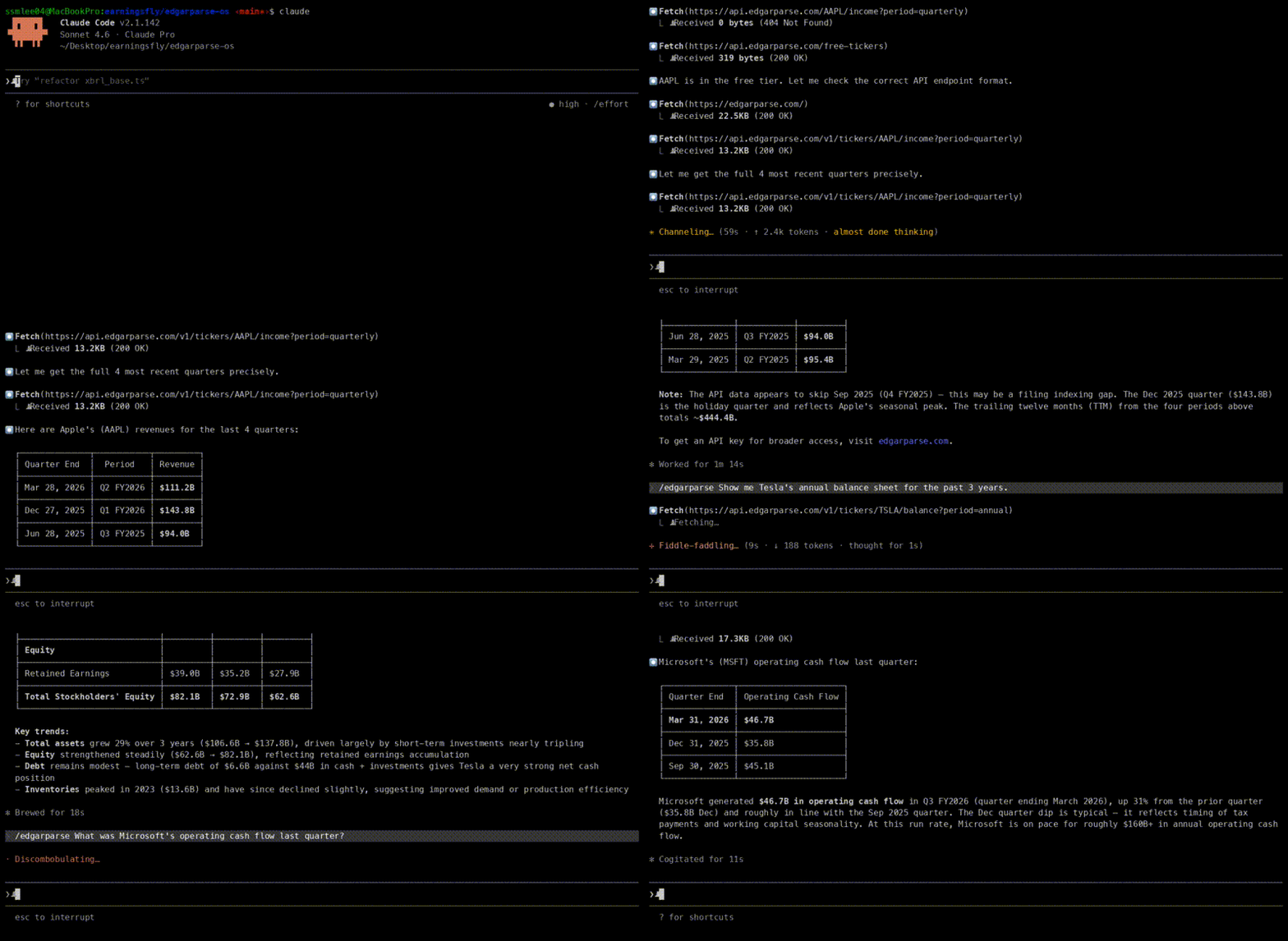
License
MIT