
editorjs-cross-block-format
v0.8.3
Published
Cross-block inline formatting (bold/italic/underline) for Editor.js — select text across several blocks and format it in one go
Downloads
45

Maintainers
 kost.t.human
Readme
editorjs-cross-block-format
Select from the middle of one Editor.js paragraph to the middle of another and apply bold, italic or underline to exactly that — not to the paragraphs it happens to touch. Images, embeds and other non-text blocks in between are skipped.
The partial part is the whole point. Editor.js gives every block its own contenteditable,
and the moment a selection leaves the block it started in, the core throws the text selection
away and replaces it with whole blocks marked ce-block--selected. Where the selection began
and ended is gone by then, so anything built on top of that state can only format blocks
end to end. This package keeps the real selection instead: it paints the Range itself, splits
it per block, and formats the first block from the selection start, the last one up to the
selection end, and only the middle ones entirely.
Three things stand in the way of that, and each is handled here — the browser will not extend a mouse selection past a block, Editor.js wipes the selection that does get built, and the browser mistakes a hand-built selection for a text drag and moves the text on drop.
Not an Editor.js plugin — nothing to put in tools, and no inline tool to subclass. It
attaches to an editor that is already running.
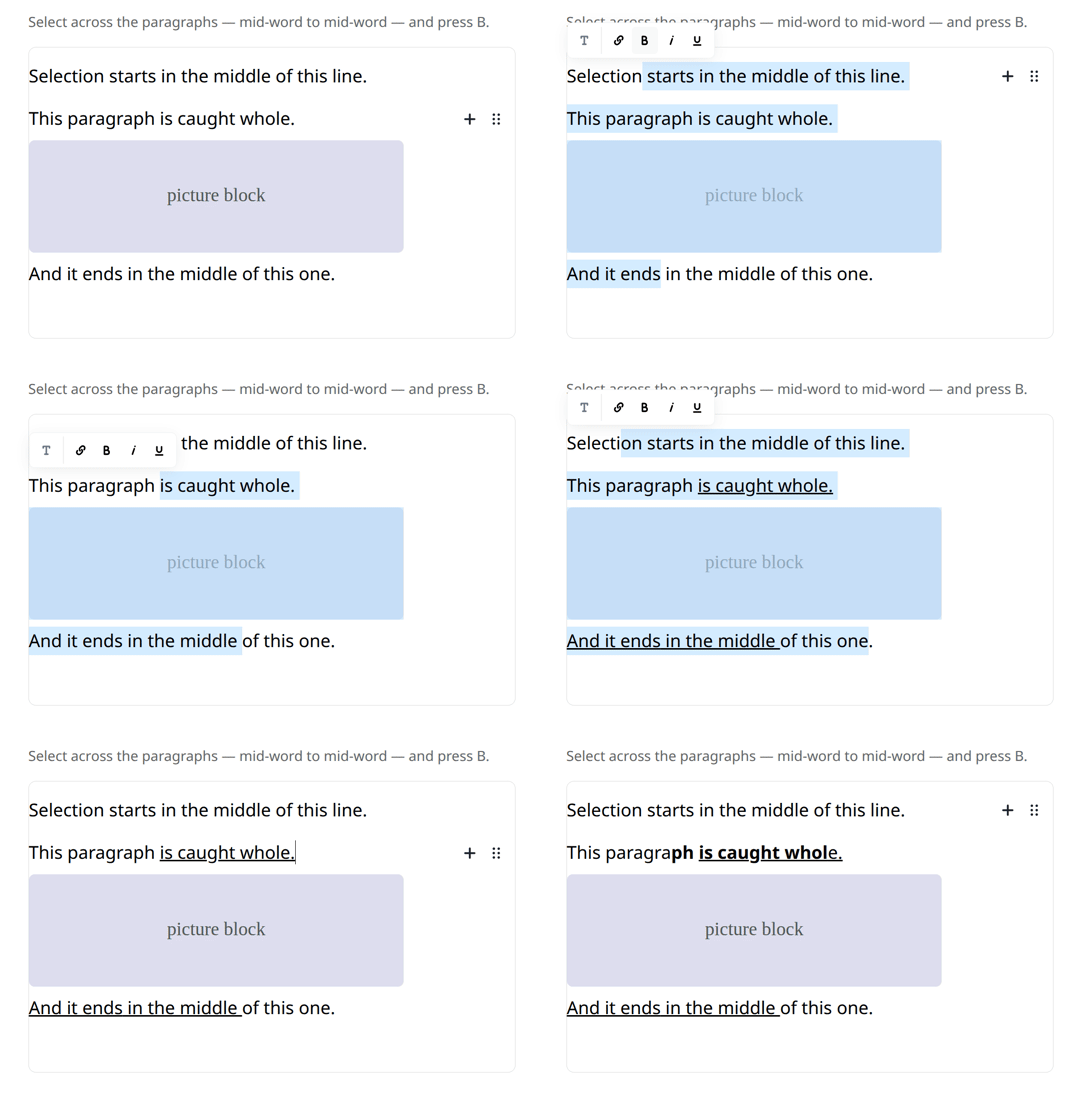
Live demo — drag a selection across the blocks, or press Run self-check to watch the assertions run.
Install
npm install editorjs-cross-block-formatUsage
import EditorJS from "@editorjs/editorjs";
import { attachCrossBlockFormat } from "editorjs-cross-block-format";

const holder = document.getElementById("editor");

const editor = new EditorJS({
  holder,
  onReady: () => attachCrossBlockFormat(holder),
});
Drag a selection across two or more blocks: the editor's own Inline Toolbar appears above
it — a working copy of it, since the core's buttons cannot act on more than one block.
Ctrl/Cmd + B / I / U work on the same selection, Escape dismisses the toolbar.
Single-block selections are left alone — the native Inline Toolbar keeps handling those.
Options
const detach = attachCrossBlockFormat(holder, {
  tools: ["bold", "italic"],       // default: bold, italic, underline
  titles: { bold: "Bold text" },   // button tooltips, for i18n
});

detach(); // removes listeners and the toolbar
The toolbar is a clone of the editor's own Inline Toolbar — the actual DOM Editor.js built for this instance, with whatever inline tools, icons and order this project configured — rewired to act on the whole selection. Nothing is imitated, so nothing drifts when the editor is upgraded or its tools change. Tools that cannot work across blocks (converting a block, links) stay visible but disabled, and the core's own toolbar is kept closed while this one is up: its buttons format a single block, and clicking one over a cross-block selection would format that block alone and drop the rest of the selection.
Editor.js builds its Inline Toolbar lazily, so on the very first selection of a session
there may be nothing to clone yet; a plain toolbar with the same markup and icons stands in
until a clone becomes available (that is the only place titles is used — a clone carries
the editor's own tooltips). Each button also gets
.ecbf-toolbar__button--{bold,italic,underline} for styling, and the root is .ecbf-toolbar.
How it works
- The selection is driven by hand. A browser does not extend a mouse selection past
the editing host it started in — drag out of a block and the selection stops at its end.
So the caret under the pointer is read on every
mousemove(caretRangeFromPoint) and the Range is set from the mousedown anchor to it. Set programmatically, a Range may span several hosts, even though a mouse cannot build one. - Editor.js is kept out of it. Its
CrossBlockSelectionlistens formouseoverondocumentin the bubble phase and callsSelection.removeAllRanges()the moment the pointer crosses a block boundary. A capture-phase listener swallows that event for the duration of the drag, so the core never learns a cross-block drag is happening. - The core's Inline Toolbar is cloned and kept closed while ours is up, watched by a
MutationObserver— Editor.js reopens it on its own schedule, after ours is already placed. Its buttons format a single block, so clicking one over a cross-block selection would format that block alone and drop the rest of the selection. - Native text drag-and-drop is suppressed. With a selection painted under a held
button, the browser decides the pointer is dragging selected text and, on drop, MOVES it —
paragraphs silently relocate.
dragstartis cancelled while our drag is in flight. Drags that start outside a text area (a block's drag handle, a toolbar) are left alone, so Editor.js keeps its own block dragging. - The Range is split per block on
mouseup, clipped to each block's editable area: the first block from the selection start to its end, the middle blocks entirely, the last block up to the selection end. Blocks with no editable area — images, embeds, custom tools — drop out of that list, which is what lets pictures sit between formatted paragraphs. Blocks are matched byRange.intersectsNode, not by the Range's own containers: a drag starting in the whitespace between blocks puts a boundary outside every block. - Each part is selected in turn and
document.execCommandis applied to it. Editor.js picks the DOM changes up through its ownModificationsObserver, soonChangefires andeditor.save()returns the new markup — nothing extra to wire up.
Two things bite when rebuilding state around all this. Selection.toString() returns ""
for a selection spanning editing hosts even though its Range is intact, and
Selection.isCollapsed is no more trustworthy there — read the Range. And Selection keeps
the very Range object it is handed, which execCommand then rewrites: pass it a copy, or
the parts still waiting their turn come out mangled.
Limitations
- Mouse selection only. Cross-block selection via
Shift + arrowsis Editor.js's own keyboard flow and is left untouched. - Mixed formatting inside one block is resolved by the first block's state: the whole selection goes one way. A block that is half bold already may come out fully bold.
- The toolbar hides on scroll rather than following the selection.
- Built against the Editor.js 2.19–2.31 DOM (
.codex-editor__redactor > .ce-block,[contenteditable="true"]). Check those selectors on a major upgrade. - Chrome/Firefox/Safari via
document.execCommand, which is deprecated but has no replacement for this job and is not going anywhere.
Demo
npm install @editorjs/editorjs   # peer dependency, only needed for the demo
python3 -m http.server 8777      # or any static server
Try it live, or open http://localhost:8777/demo/index.html. The Run self-check button runs the
test suite in the page: it drives a cross-block drag with mouse events only — the selection
is built by the module under test, never by the test — then applies bold and asserts the
resulting DOM. It includes a negative control (detached, the selection stops at the first
block), a check that the native text drag was cancelled, and a check that block dragging by
the handle still works.
License
MIT