
efst
v0.1.5
Published
an easy file download CLI tool

Maintainers
 atqq
atqqReadme
efst
an easy file download CLI tool
Quick Started
# method npx
use npx efst

# global install
npm i -g efst
# then you can use efst command
efst http://mtw.so/5uDwX3
efst https://img.cdn.sugarat.top/docs/images/test/avatar.png
# download with proxy
efst https://www.google.com/images/branding/googlelogo/2x/googlelogo_color_92x30dp.png --proxy http://127.0.0.1:7890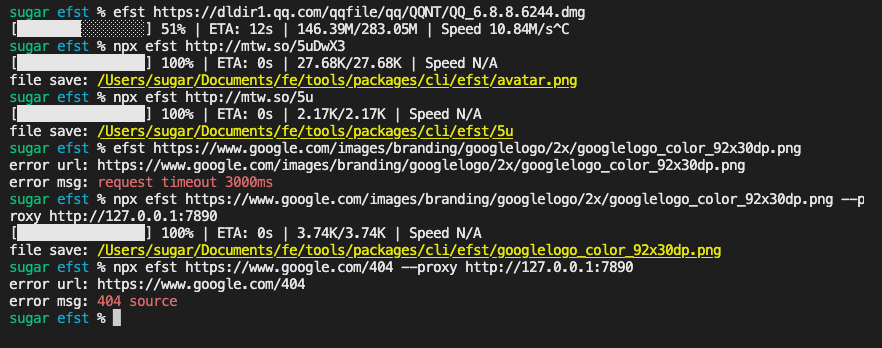
CLI Options
Options:
  -V, --version                  output the version number
  -f,--filename <filename>       set download filename
  -L,--location <times>          set location times (default: "10")
  -t,--timeout <timeout>         set the request timeout(ms) (default: "3000")
  -p,--proxy <proxy server>      set proxy server
  -o,--override                  override duplicate file (default: false)
  -h, --help                     display help for command
Usage Example
# set download filename
efst http://mtw.so/5uDwX3 -f hello.png

# override duplicate file
efst http://mtw.so/5uDwX3 -o

# download with proxy server
efst http://mtw.so/5uDwX3 -p http://127.0.0.1:7890

# set timeout
efst http://mtw.so/5uDwX3 -t 1000
Advanced Usage
CRUD Global Config
# set
efst config set proxy http://127.0.0.1:7890
efst config set location 30
efst config set timeout 1000

# get
efst config get proxy

# del
efst config del proxy

# get global config(.efstrc) content
cat ~/.efstrc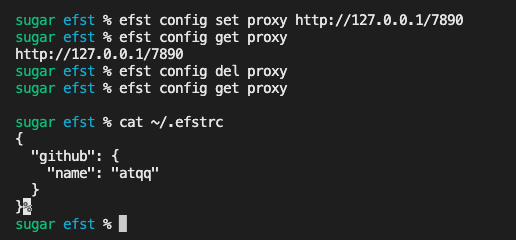
Local Lib
import { downloadByUrl, getSpeedCalculator } from 'efst'

// download demo
downloadByUrl(url,options)
    .error((err)=>{
        // error callback
    })
    .progress((current, receive, sum)=>{
        // progress callback
    })
    .end((filepath)=>{
        // download finished successfully
    })

// speed demo
const speed = getSpeedCalculator()

setTimeout(speed, 200, 4000)
setTimeout(speed, 300, 5000)
setTimeout(speed, 1000, 10240)
setTimeout(() => {
  console.log(speed(0)) // 23.49K/s
}, 1100)
more methods see efst/utils