npm package discovery and stats viewer.

Discover Tips

  • General search

    [free text search, go nuts!]

  • Package details

    pkg:[package-name]

  • User packages

    @[username]

Sponsor

Optimize Toolset

I’ve always been into building performant and accessible sites, but lately I’ve been taking it extremely seriously. So much so that I’ve been building a tool to help me optimize and monitor the sites that I build to make sure that I’m making an attempt to offer the best experience to those who visit them. If you’re into performant, accessible and SEO friendly sites, you might like it too! You can check it out at Optimize Toolset.

About

Hi, 👋, I’m Ryan Hefner  and I built this site for me, and you! The goal of this site was to provide an easy way for me to check the stats on my npm packages, both for prioritizing issues and updates, and to give me a little kick in the pants to keep up on stuff.

As I was building it, I realized that I was actually using the tool to build the tool, and figured I might as well put this out there and hopefully others will find it to be a fast and useful way to search and browse npm packages as I have.

If you’re interested in other things I’m working on, follow me on Twitter or check out the open source projects I’ve been publishing on GitHub.

I am also working on a Twitter bot for this site to tweet the most popular, newest, random packages from npm. Please follow that account now and it will start sending out packages soon–ish.

Open Software & Tools

This site wouldn’t be possible without the immense generosity and tireless efforts from the people who make contributions to the world and share their work via open source initiatives. Thank you 🙏

© 2026 – Pkg Stats / Ryan Hefner

el-color-picker-sheldon

v1.0.0

Published

@[toc](el-color-picker-sheldon使用说明(一款基于Vue和ElementUI的取色器))

Downloads

6

Readme

@toc

Introduction 简介

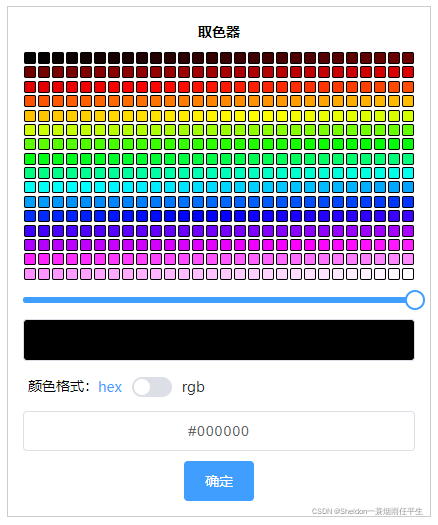
在这里插入图片描述

This is a color picker component based on vue and element-ui. It is powerful and supports drag and drop, color picking and other functions.

这是一个基于 vue 和 element-ui 的取色器组件,功能强大,支持拖拽、取色等功能。

Functions 功能点

  1. Show a gradient palette with all colors and adjustable transparency 展示一个有所有颜色并且可以调节透明度的渐变调色板

  2. Click on the palette to get the selected color, and display the corresponding hex value or rgba value in real time 点击调色板获取选中的颜色,并且实时显示对应 hex 值或者 rgba 值

  3. Modify the hex value or rgba value, and display the corresponding color in real time 修改 hex 值或者 rgba 值,实时显示对应的颜色

  4. You can set whether the color picker can be dragged 可以设置取色器是否可拖动

  5. Send the current color to the parent component 发送当前的颜色给父组件

Install 安装

npm install el-color-picker-sheldon

Usage 用法

  1. Introduce the required element-ui components in main.js or plugins/element.js 在 main.js 或者 plugins/element.js 中按需引入 element-ui 组件(也可以直接引入整个 element-ui):
import Vue from 'vue';
import {Slider,Switch,Row,Col,Button,Input,Message,MessageBox} from 'element-ui'
Vue.use(Slider)
Vue.use(Switch)
Vue.use(Row)
Vue.use(Col)
Vue.use(Button)
Vue.use(Input)
Vue.prototype.$message = Message
Vue.prototype.$confirm = MessageBox.confirm
import 'element-ui/lib/theme-chalk/index.css';
  1. Partial introduction of components 局部引入组件
<template>
	<div>
		<div>{{colorValue}}</div>
		<color-picker :draggable="false" @receiveColor="receiveColor"></color-picker>
	</div>
<template>
<script>
import ColorPicker from 'el-color-picker-sheldon'

export default {
	components:{
		ColorPicker
	},
	data () {
	 	return {
			colorValue:''
		}
	}
	methods:{
		// get color value 获取取色器的颜色
	    receiveColor(colorValue){
	      this.colorValue = colorValue
	    },
	}
}

如果遇到使用上的问题,或者有任何好的改进建议,欢迎在评论下留言。

CSDN 地址

el-color-picker-sheldon 使用说明(一款基于 Vue 和 ElementUI 的取色器)