
embedwire
v0.4.0
Published
Control a YouTube embed over the postMessage wire its own widget uses — no iframe_api script, works with youtube-nocookie. Method and event names follow the IFrame Player API (playVideo, seekTo, getDuration, stateChange); ships a transcript-follow example

Maintainers
 yonaka15
Readme
embedwire
Control a YouTube embed over the postMessage wire its own widget uses, without
loading https://www.youtube.com/iframe_api. Method and event names follow the
IFrame Player API you
already know — playVideo, seekTo, getDuration, stateChange, … — so the code
reads the same; what runs underneath is this small library, not Google's script.
- Works with
www.youtube-nocookie.com; adds no third-party script, sets no cookie of its own. - Zero dependencies, one function, plain ESM.
- Hardened against the failures that only show up in production: a slow embed, a frame that reloads under you, a player that says "playing" while its ticks stop.
- Ships an example of what to build on it: a transcript that follows the video
(
embedwire/follow), the reason this exists.
<iframe id="ytp" src="https://www.youtube-nocookie.com/embed/VIDEO_ID?enablejsapi=1"></iframe>

<script type="module">
  import { connect, PlayerState } from 'embedwire';

  const player = connect(document.getElementById('ytp'));
  player.on('ready', () => console.log(player.getDuration(), player.getVideoData().title));
  player.on('stateChange', ({ state }) => console.log(state === PlayerState.PLAYING));
  player.on('timeUpdate', ({ t }) => console.log(t));
  player.seekTo(60); player.playVideo();
</script>
?enablejsapi=1 on the embed URL is the only requirement.
Install
npm install embedwireor straight from GitHub: npm install github:yonaka15/embedwire.
Renamed from yt-follow in 0.3.0 (same code, new import path); the old name stays
on npm as 0.2.0 with a deprecation notice.
connect(iframe, opts?)
Returns a player. Nothing is loaded; the handshake is a listening message
sent every askInterval ms until the player answers.
| option | default | |
|---|---|---|
| id | iframe.id or 'ytp' | id echoed by the player (several players on a page are told apart by it) |
| askInterval | 500 | ms between listening retries |
| giveUpAfter | 120000 | ms before a silent player is given up (gaveUp) |
| stallAfter | 3000 | ms without a tick while playing before stall |
| stallPoll | 2000 | ms between stall checks |
| origin | /(^|\.)youtube(-nocookie)?\.com$/ | accepted message-origin hostnames |
Methods — the IFrame Player API's names
Commands are posted to the player:
player.playVideo(); pauseVideo(); stopVideo(); clearVideo();
player.seekTo(seconds, allowSeekAhead = true);
player.mute(); unMute(); setVolume(0–100);
player.setPlaybackRate(rate); setPlaybackQuality(q);
player.loadVideoById(id | { videoId, startSeconds, endSeconds }); cueVideoById(…);
player.loadVideoByUrl(…); cueVideoByUrl(…); loadPlaylist(…); cuePlaylist(…);
player.nextVideo(); previousVideo(); playVideoAt(i); setLoop(b); setShuffle(b);
player.command(name, args);   // anything the embed lists in getApiInterface()
Getters read a local copy of the player's info — the embed sends it in full once
(initialDelivery) and then as patches with every tick, which is exactly how the
official script answers them too. They are undefined until the player has spoken:
player.getCurrentTime(); getDuration(); getPlayerState();
player.getVolume(); isMuted(); getPlaybackRate(); getAvailablePlaybackRates();
player.getPlaybackQuality(); getAvailableQualityLevels();
player.getVideoData();        // { video_id, title, author, isPlayable, … }
player.getVideoUrl(); getVideoEmbedCode(); getVideoLoadedFraction();
player.getPlaylist(); getPlaylistIndex(); getPlaylistId();
player.getApiInterface();     // every function the embed accepts
player.getInfo();             // the merged object, for anything without a getter
PlayerState carries the IFrame Player API's numbers: UNSTARTED -1, ENDED 0, PLAYING 1,
PAUSED 2, BUFFERING 3, CUED 5.
Events
const off = player.on('stateChange', ({ state }) => …); // returns unsubscribe| event | payload | |
|---|---|---|
| ready | { asks, loads } | the player's first message; getters work from here |
| stateChange | { state } | on change of playerState (official onStateChange) |
| timeUpdate | { t, state } | every tick with a currentTime — several a second while playing |
| playbackRateChange | { playbackRate } | |
| playbackQualityChange | { playbackQuality } | |
| volumeChange | { volume, muted } | |
| error | { data } | the embed's onError code (2, 5, 100, 101, 150) |
| info | { changed, info, first } | every patch, with the keys that changed; first is the initial full delivery (which fires no *Change events — the starting state is not a change) |
| load | { n, asks } | the iframe's load event; n ≥ 2 = it reloaded and a new handshake started |
| stall / resume | { gap_s, had_tick } | "playing" but no tick for stallAfter ms, and the tick that ends it |
| gaveUp | { asks, loads } | never answered within giveUpAfter |
| * | (name, props) | everything — for telemetry |
player.ready, player.stalled, player.destroy().
Example: a transcript that follows the video
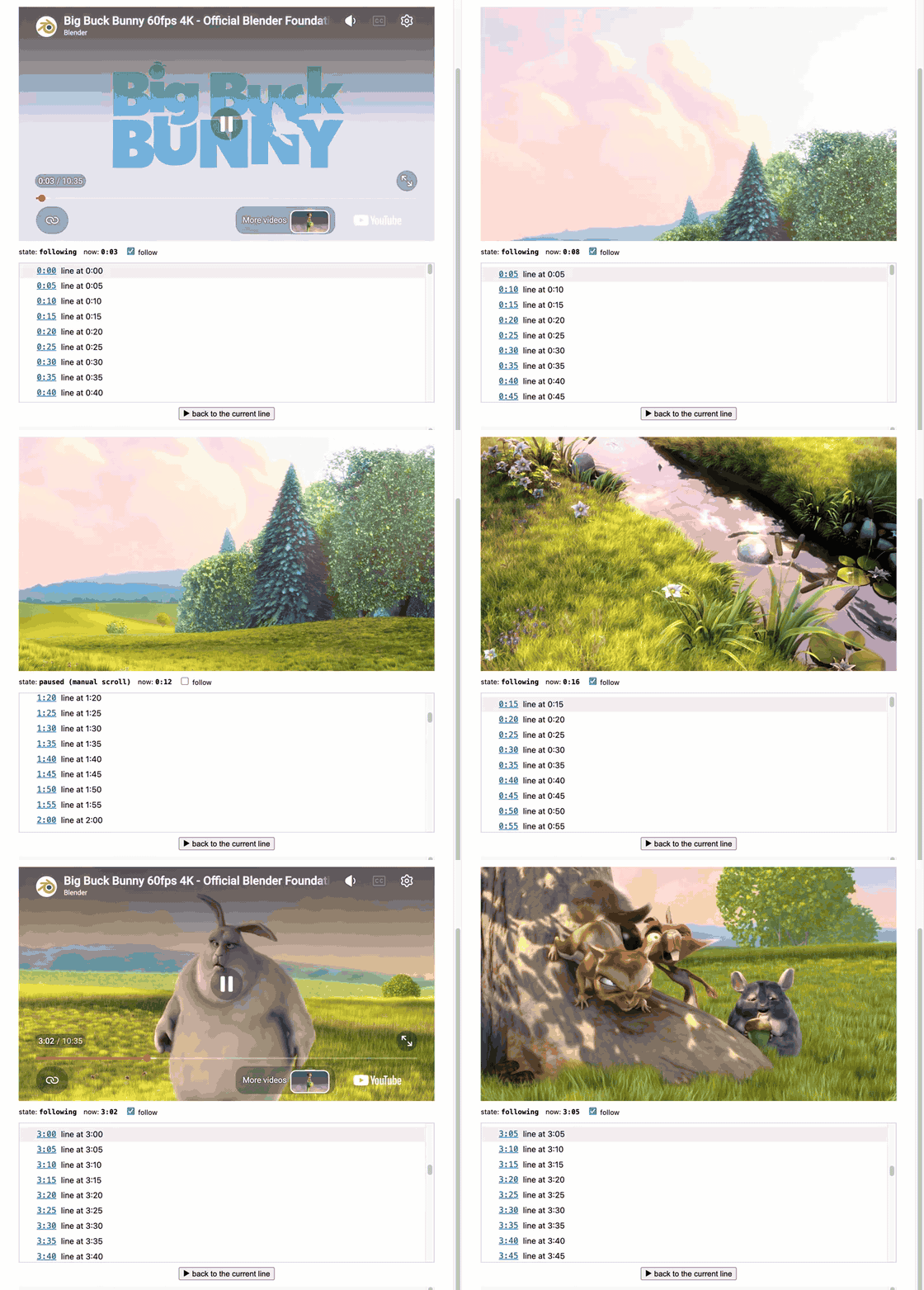
examples/transcript.html on Big Buck Bunny (Blender
Foundation, CC BY 3.0). Play → the transcript follows → a wheel over it stops the
following → "back to the current line" jumps back → a click on a timestamp seeks the
video. (mp4)
follow(rowsEl, player, opts?) is that panel, shipped as embedwire/follow so
it can be imported rather than copied. Rows are [data-t] elements (an empty
data-t is skipped) sorted by their start second:
<ol data-rows>
  <li data-t="0"><button data-seek disabled>0:00</button> First line…</li>
  <li data-t="4.2"><button data-seek disabled>0:04</button> Second line…</li>
</ol>
<script type="module">
  import { connect } from 'embedwire';
  import { follow } from 'embedwire/follow';
  const player = connect(document.getElementById('ytp'));
  const f = follow(document.querySelector('[data-rows]'), player);
</script>
The current row gets class="is-now", the list (not the page) scrolls to it when
it changes, a click on a timestamp seeks the video, and a wheel / touch / arrow key
over the list stops following until f.setFollow(true) — but only when the list
could actually have scrolled that way. A swipe over a list already at its end
scrolls the page, and was never aimed at the transcript.
| option | default | |
|---|---|---|
| rowSelector / timeAttr | '[data-t]' / 'data-t' | how rows are found and timed |
| seekSelector | '[data-seek]' | click target inside a row that seeks; disabled is cleared on ready |
| nowClass | 'is-now' | class on the current row |
| tolerance | 0.25 | seconds a row may lead the player and still count as current |
| topOffset / behavior | 6 / 'smooth' | how the panel scrolls to the row |
| keys | PageUp/Down, Arrow Up/Down, Home, End | keys that break follow |
| onTick(now, row) / onChange(row, now) | | every tick / when the current row changes |
| onFollow(on, reason, extra) | | reason: wheel touchmove keydown seek or yours; extra.room says whether the panel could have scrolled that way |
| onGesture(reason, extra) | | every wheel/touchmove over the panel, ignored ones included; extra.broke says whether it stopped following |
| onSeek(t, row) | | after a seek |
f.setFollow(on, reason), f.seekTo(t), f.following, f.now, f.current, f.rows, f.destroy().
Both examples run from the repo: npm run demo, then
/examples/player.html and
/examples/transcript.html.
Why these rules (each one shipped as a bug first)
- Keep asking until the player answers. The embed ignores a
listeningsent before its own script runs. A fixed number of tries gives up on exactly the slow embeds that need the most — measured on a live site with +8 s latency on the YouTube hosts: the transcript never connected, and one morelisteningsent by hand connected it at once. YouTube's own widget polls with no cap. - Every
loadis a new player. The handshake restarts and the previous player's info is forgotten, or its "playing" would judge the new one. - "Playing" with no ticks is a failure that looks like nothing. It is
reported (
stall) instead of freezing silently under a label that says "following". - In the transcript example: scroll only when the current row changes
(ticks arrive several times a second; scrolling on each fought its own smooth
animation), scroll the panel, not the page (
scrollIntoViewunpins the video), break follow on a gesture, never onscroll(our own scroll fires the same event). - A gesture the panel could not have acted on is not the reader's. v0.3.0
reported
roomand left it at that. Two days of a live site said 35 % of all breaks (31 % of mobile swipes) hadroom: false— a finger on its way down the page passing over the transcript — and only 20 % of readers who lost following ever turned it back on, so each one lasted the rest of the visit. v0.4.0 breaks following only onroom: true, and reports the ignored gestures throughonGestureso the change can be checked rather than assumed.
In the wild
- ワラケル — warakeru.jugoya.ai: an AI-run site that
measures laughs in Japanese comedy videos (笑い/分, first laugh, speaker share) and
publishes each act with a timed transcript. Every post page is
connect()+follow()on ayoutube-nocookieembed; the yellow gutter marks are the measured laughs, and clicking one seeks the video to it.
Using it somewhere? Open an issue and it goes here.
What it is not
Not the IFrame Player API, and not affiliated with or endorsed by YouTube — it
borrows the API's method and event names so code reads the same, nothing more.
Not a player creator — you write the <iframe> (with ?enablejsapi=1) and hand
it over; there is no new YT.Player('div', {videoId}). Not a transcript editor or
renderer — bring your own rows. The wire is what the embed sends and answers,
observed on a real player; it is undocumented, and if YouTube changes it this
breaks together with every page that uses the official script's transport. The
official script is the supported path; this is for when you specifically do not
want it (nocookie, CSP, one less third-party request) and accept that trade.
Development
npm test        # node --test, jsdom, a fake player that answers over postMessage
npm run demo    # serves the repo; open /examples/player.html or /examples/transcript.html
MIT © yonaka15