
ember-live-exec
v0.2.1
Published
Interactive execution of Ember code.


Readme
Ember-live-exec
Write (or edit) code in the browser and see the updates interactively. Document Ember code with live examples withouth duplication.
Similar to Ember Twiddle or JSFiddle except turned on its head. Instead of representing an entire app, ember-live-exec lets you drop live-exec editable examples anywhere in your existing Ember app. You can even put multiple live-exec regions on the same page.
Demo: http://teknofiend.github.io/live-exec-demo
Installation
ember install ember-live-exec
Usage
Basic Usage
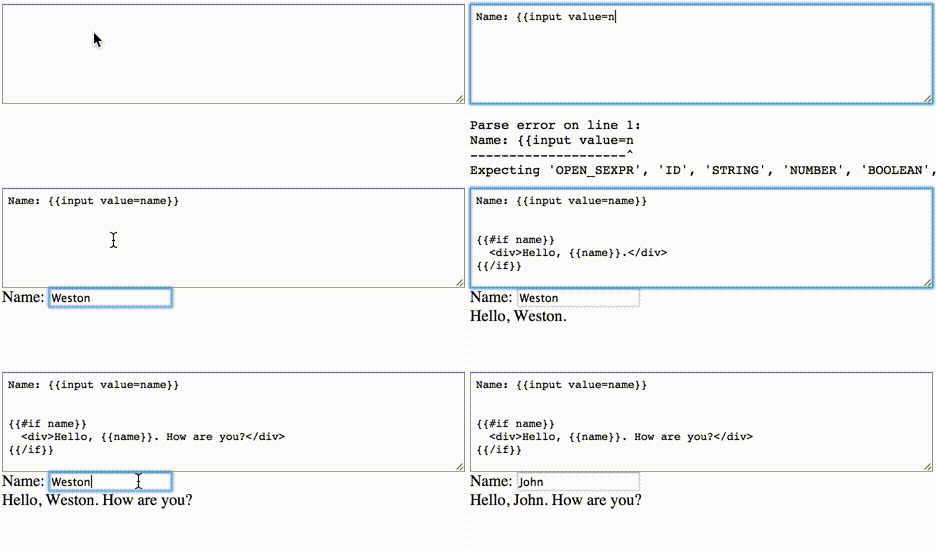
The source parameter specifies the default contents of the editable textarea. Changing the contents of the textarea at runtime causes the rendere output to change.
{{#live-exec}}
  {{live-exec-template source='
Name: {{input value=name}}

{{#if name}}
  <div>Hello, {{name}}.</div>
{{/if}}
'}}
  {{live-exec-output}}
{{/live-exec}}'}}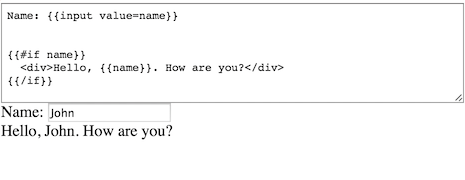
Component Definition
You can also specify actions and default values for properties on the associated component with the live-exec-component component. NOTE: This uses eval and is NOT safe where XSS is a concern... if you're not sure what that means please don't use it!
{{#live-exec}}
  {{live-exec-template source='
<div>Foo is: {{foo}}</div>
<button {{action "toggleFoo"}}>Toggle Foo</button>
'}}
  {{live-exec-component source='
foo: true,
actions: {
  toggleFoo: function() {
    console.log("Foo Toggled!");
    this.set( "foo", !this.get("foo") );
  }
}
'}}
  {{live-exec-output}}
{{/live-exec}}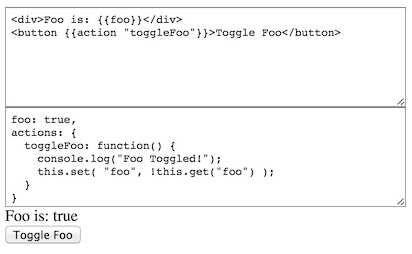
Customization
To customize the template display and functionality you can pass a block to live-exec-template and use the source property on the passed object.
{{#live-exec}}
  {{#live-exec-template source='
<div>
  Name: {{input value=name}}
</div>
<div>
  Phone: {{input value=phone}}
</div>

Call {{name}} at {{phone}}
' as |template| }}
    {{ivy-codemirror
        value         = template.source
        mode          = "handlebars"
        lineNumbers   = true
        fixedGutter   = true
        lineWrapping  = true
        tabSize       = 2
        readOnly      = false
    }}
  {{/live-exec-template}}
  {{live-exec-output}}
{{/live-exec}}'}}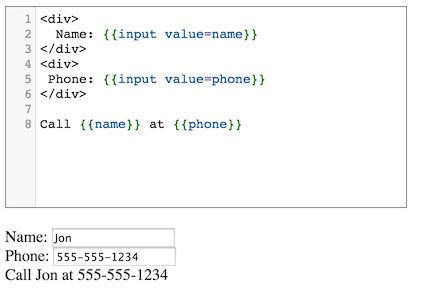
Development
Installation
git clonethis repositorynpm installbower install
Running
ember server- Visit your app at http://localhost:4200.
Running Tests
ember testember test --server
Building
ember build
For more information on using ember-cli, visit http://www.ember-cli.com/.